
1. Úvod
This manual provides detailed instructions for the installation, operation, and maintenance of your Showasaki 10.1-inch Double Din Android Car Stereo. Please read this manual thoroughly before using the product to ensure proper function and safety.
The Showasaki 10.1-inch Double Din Android Car Stereo is a universal replacement head unit featuring a rotatable touchscreen, Android 10.1 operating system, CarPlay, Android Auto, Bluetooth 5.0, GPS navigation, and multimedia playback capabilities. It is designed to enhance your in-car entertainment and connectivity experience.
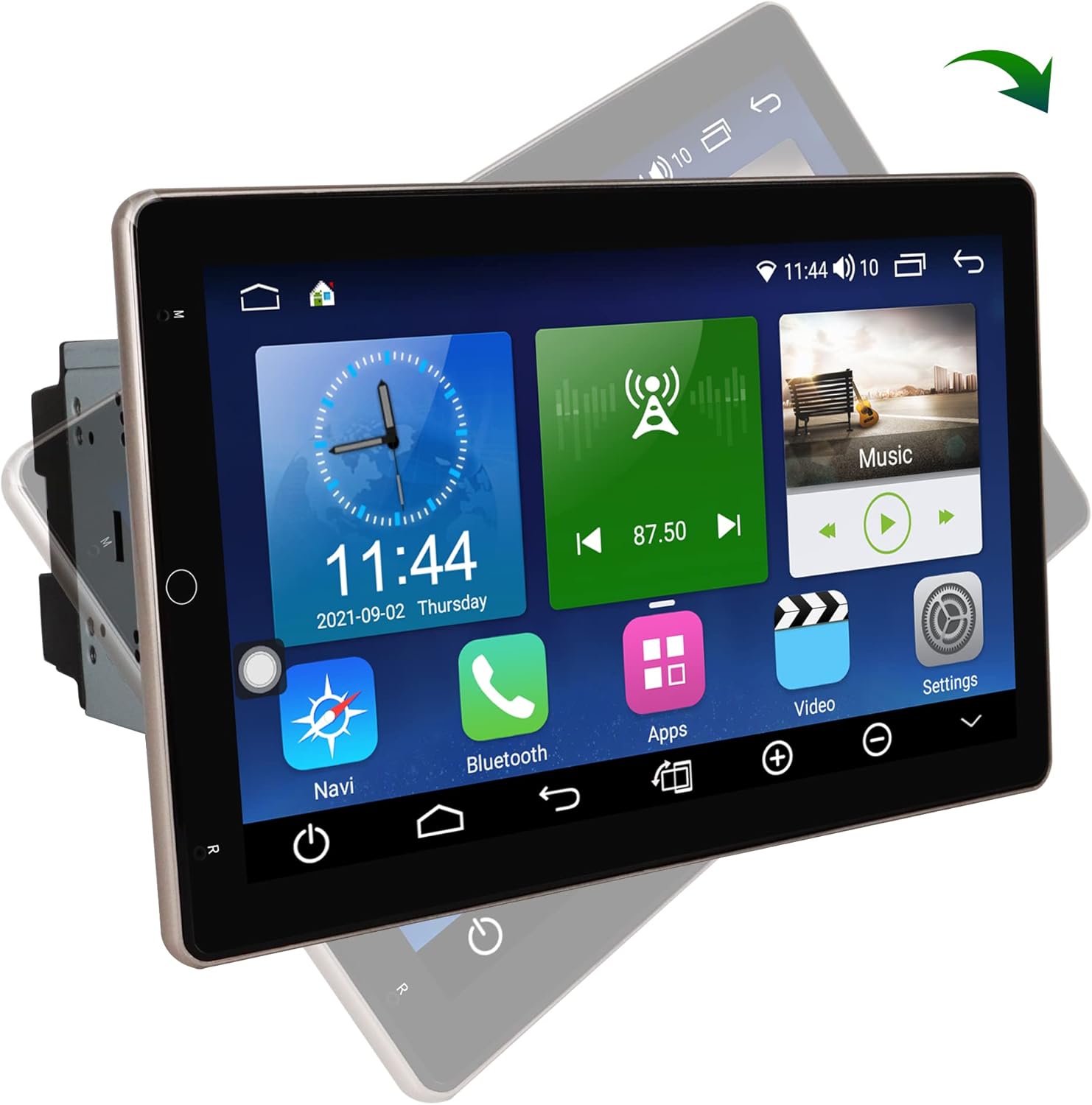
Image 1.1: The Showasaki 10.1-inch Double Din Android Car Stereo displaying its main interface.
2. Nastavení a instalace
2.1. Kontrola před instalací
Before beginning installation, verify the dimensions of your car's center console to ensure compatibility with the stereo unit. The standard 2 Din universal size is 178mm x 100mm. The 10.1-inch screen is designed to fit this standard.

Image 2.1: Diagram illustrating the dimensions of the stereo unit (178mm x 100mm) and an example of how it fits into a car's dashboard.
2.2. Obsah balení
Ujistěte se, že v balení jsou všechny součásti:
- Android System 10.1 Inch Double Din Universal Rotatable Car Radio Replacement Unit
- Vstupní kabel kamery
- Rear/RCA Output Cable
- Napájecí kabel
- AV výstupní kabel
- 6P USB Cable
- 4P USB Cable
- GPS anténa
- Externí mikrofon

Image 2.2: All cables and accessories included with the Showasaki car stereo, laid out for identification.
2.3. Elektroinstalace a připojení
Connect the provided cables to their respective ports on the head unit and your vehicle's wiring harness. Refer to your vehicle's specific wiring diagram for accurate connections. Key connections include:
- Napájecí kabel: Připojte k napájení vozidla, uzemnění a kabelům příslušenství.
- Dráty reproduktorů: Connect to vehicle's speaker outputs.
- GPS anténa: Namontujte na místě s průhledným view oblohy pro optimální příjem signálu.
- USB kabely: For connecting external devices or for wired CarPlay/Android Auto.
- Vstup fotoaparátu: Pro připojení zadní částiview fotoaparát (není součástí dodávky).
- Externí mikrofon: Pro lepší kvalitu hovoru.
Caution: Incorrect wiring can damage the unit or your vehicle's electrical system. If you are unsure, consult a professional installer.
3. Návod k obsluze
3.1. Zapnutí/vypnutí a základní rozhraní
Once installed, turn on your vehicle's ignition to power the unit. The system will boot up to the Android home screen. Navigate through applications using the capacitive touchscreen.
3.2. Otočná dotyková obrazovka
The 10.1-inch screen features a 90° rotation capability. Use the dedicated button on the unit to adjust the screen's orientation between vertical and horizontal viewing angles according to your preference.

Image 3.1: Illustration of the screen's 90-degree rotation capability, allowing for both horizontal and vertical display modes.
3.3. Operační systém Android 10.1
The unit runs on Android 10.1 with an A55 8-core processor, 4GB RAM, and 64GB ROM. This allows for smooth operation and the ability to download applications from the Google Play Store. The split-screen function enables multitasking.
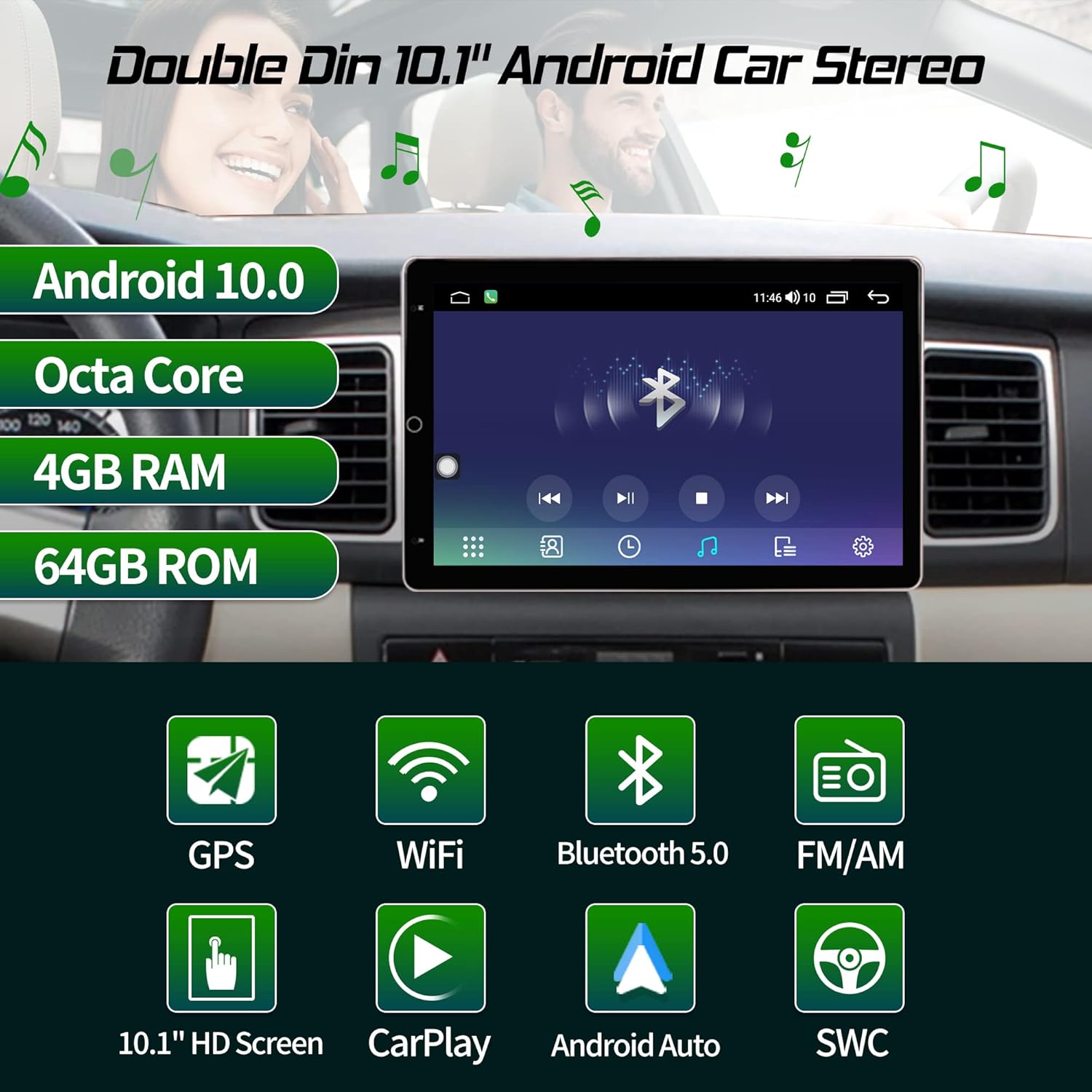
Image 3.2: Visual summary of the stereo's core features including Android 10.0, Octa Core processor, 4GB RAM, 64GB ROM, GPS, WiFi, Bluetooth 5.0, FM/AM, 10.1" HD Screen, CarPlay, Android Auto, and Steering Wheel Control.
3.4. CarPlay a Android Auto
This head unit supports both Apple CarPlay and Android Auto for seamless smartphone integration.
- Wireless and Wired CarPlay: Connect your iPhone wirelessly or via a USB cable to access navigation, music, messages, and more directly on the stereo screen.
- Kabelové Android Auto: Connect your Android phone via a USB cable to use Google Maps, Spotify, and other compatible apps.

Image 3.3: The stereo displaying CarPlay and Android Auto interfaces, showing wireless CarPlay and wired Android Auto connections.

Image 3.4: Icons representing CarPlay and Android Auto features.
3.5. Připojení Bluetooth 5.0
Pair your smartphone via Bluetooth 5.0 for hands-free calling, Bluetooth music streaming, and syncing your phonebook. This feature is designed to minimize distractions while driving.

Image 3.5: The stereo displaying a phone dialer interface, demonstrating Bluetooth 5.0 for hands-free calls and music, emphasizing safe driving.

Image 3.6: Icon representing Bluetooth 5.0 connectivity.
3.6. GPS navigace
The unit includes GPS navigation with worldwide map support. Utilize pre-installed navigation apps or download your preferred navigation software from the Google Play Store.

Image 3.7: Icon representing GPS Navigation functionality.
3.7. Ovládání na volantu (SWC)
The stereo supports factory steering wheel controls, allowing you to easily switch songs, change radio channels, and adjust volume without taking your hands off the wheel. This enhances safety and convenience.

Image 3.8: Icon representing Steering Wheel Control feature.
3.8. Multimedia Playback and Radio
Enjoy various multimedia formats and listen to AM/FM radio stations. The unit's Android system allows for diverse entertainment options.

Image 3.9: Icon representing AM/FM Radio functionality.
3.9. Wi-Fi and 4G Module
Connect to Wi-Fi networks or insert a 4G SIM card (if supported by the specific model) for internet access, enabling online navigation, app downloads, and streaming services.

Image 3.10: Icon representing WiFi and 4G Module connectivity.
3.10. Hlasové ovládání
Utilize voice commands for various functions, such as playing music, making calls, or navigating, to maintain focus on the road.

Image 3.11: Icon representing Voice Control functionality.
4. Údržba
4.1. Čištění obrazovky
Dotykovou obrazovku jemně otřete měkkým hadříkem, který nepouští vlákna. V případě odolných šmouh lehceampOmyjte hadřík vodou nebo roztokem na čištění obrazovky. Nepoužívejte agresivní chemikálie ani abrazivní materiály.
4.2. Aktualizace softwaru
Periodically check for software updates to ensure optimal performance and access to the latest features. Updates can typically be found in the system settings menu or on the manufacturer's webmísto.
4.3. Obecná péče
Nevystavujte jednotku extrémním teplotám, delšímu přímému slunečnímu záření nebo nadměrné vlhkosti. Zajistěte dostatečné větrání v okolí jednotky, abyste zabránili přehřátí.
5. Řešení problémů
5.1. Bez napájení
- Check all power connections and ensure they are securely fastened.
- Zkontrolujte, zda je pojistka autorádia ve vozidle neporušená.
- Ujistěte se, že je zapnuté zapalování vozidla.
5.2. Žádný zvuk
- Zkontrolujte připojení kabelů reproduktorů.
- Ujistěte se, že hlasitost není ztlumená nebo nastavená příliš nízko.
- Ověřte nastavení zvukového výstupu v systémové nabídce.
5.3. Problémy se signálem GPS
- Ujistěte se, že je anténa GPS správně připojena a namontována na místě s volným view z nebe.
- Přesuňte vozidlo na otevřené prostranství, dále od vysokých budov nebo hustého porostu.
5.4. Problémy s připojením Bluetooth
- Ujistěte se, že je Bluetooth povoleno jak na stereo systému, tak na vašem smartphonu.
- Smažte předchozí párování a zkuste zařízení znovu spárovat.
- Restart both the stereo and your smartphone.
5.5. Dotyková obrazovka nereaguje
- Restartujte jednotku.
- Ujistěte se, že je obrazovka čistá a bez nečistot.
6. Specifikace
| Funkce | Specifikace |
|---|---|
| Velikost displeje | 10.1 palce |
| Operační systém | Android 10.1 |
| Procesor | A55 8 Core Processor |
| BERAN | 4 GB |
| ROM | 64 GB |
| Typ obrazovky | Capacitive Rotatable Touch Screen |
| Verze Bluetooth | 5.0 |
| Technologie připojení | Bluetooth, USB, Wi-Fi |
| Integrace do auta | Wireless/Wired CarPlay, Wired Android Auto |
| Typ mapy | Celosvětově |
| Režim zvukového výstupu | Stereo |
| Hmotnost položky | 5.15 libry |
| Rozměry balení | 11.14 x 10.67 x 7.17 palce |
7. Informace o záruce
The Showasaki 10.1-inch Double Din Android Car Stereo comes with a 1-letá záruka od data nákupu. Tato záruka se vztahuje na výrobní vady a poruchy při běžném používání. Uschovejte si prosím doklad o koupi pro případ uplatnění záruky.
The warranty does not cover damage caused by improper installation, misuse, accidents, unauthorized repairs, or normal wear and tear.
8. Podpora
For technical assistance, troubleshooting not covered in this manual, or warranty inquiries, please contact Showasaki customer support through the retailer where the product was purchased or refer to the official Showasaki webstránky pro kontaktní informace.