
Zavedení
The Hyperkin X91 Ice Wired Controller is designed for use with Xbox Series X|S, Xbox One systems, and Windows 10/11 PCs. It features a classic 90s-style design combined with modern controller functionalities, offering a comfortable and responsive gaming experience.

Image: Hyperkin X91 Ice Wired Controller (Ruby Red) and its retail packaging.
Klíčové vlastnosti:
- Retro Design with Modern Ergonomics: Combines a classic aesthetic with comfortable handling for extended play sessions.
- Precision Analog Triggers: Poskytuje přesný a citlivý vstup pro hraní her.
- 3.5 mm Headset Jack: Allows connection of a compatible headset for audio and communication.
- Tlačítko Sdílet: Dedicated button for capturing and sharing gameplay moments on Xbox Series X|S.
- Prémiové sestavení: Konstruováno pro odolnost a spolehlivý výkon.
Pokyny pro nastavení
The Hyperkin X91 Ice Wired Controller is a plug-and-play device. Follow these steps to connect it to your system:
- For Xbox Series X|S or Xbox One:
- Ujistěte se, že je konzole Xbox zapnutá.
- Locate an available USB port on your console.
- Plug the USB connector of the Hyperkin X91 controller into the USB port.
- The controller will automatically be detected and configured by the console.
- For Windows 10/11 PC:
- Ujistěte se, že je váš počítač zapnutý.
- Vyhledejte na počítači volný USB port.
- Plug the USB connector of the Hyperkin X91 controller into the USB port.
- Your PC should automatically install the necessary drivers. This may take a few moments.
- Once drivers are installed, the controller is ready for use with compatible games.
No additional software or batteries are required for operation.
Obsluha ovladače
Familiarize yourself with the controller's layout and functions:
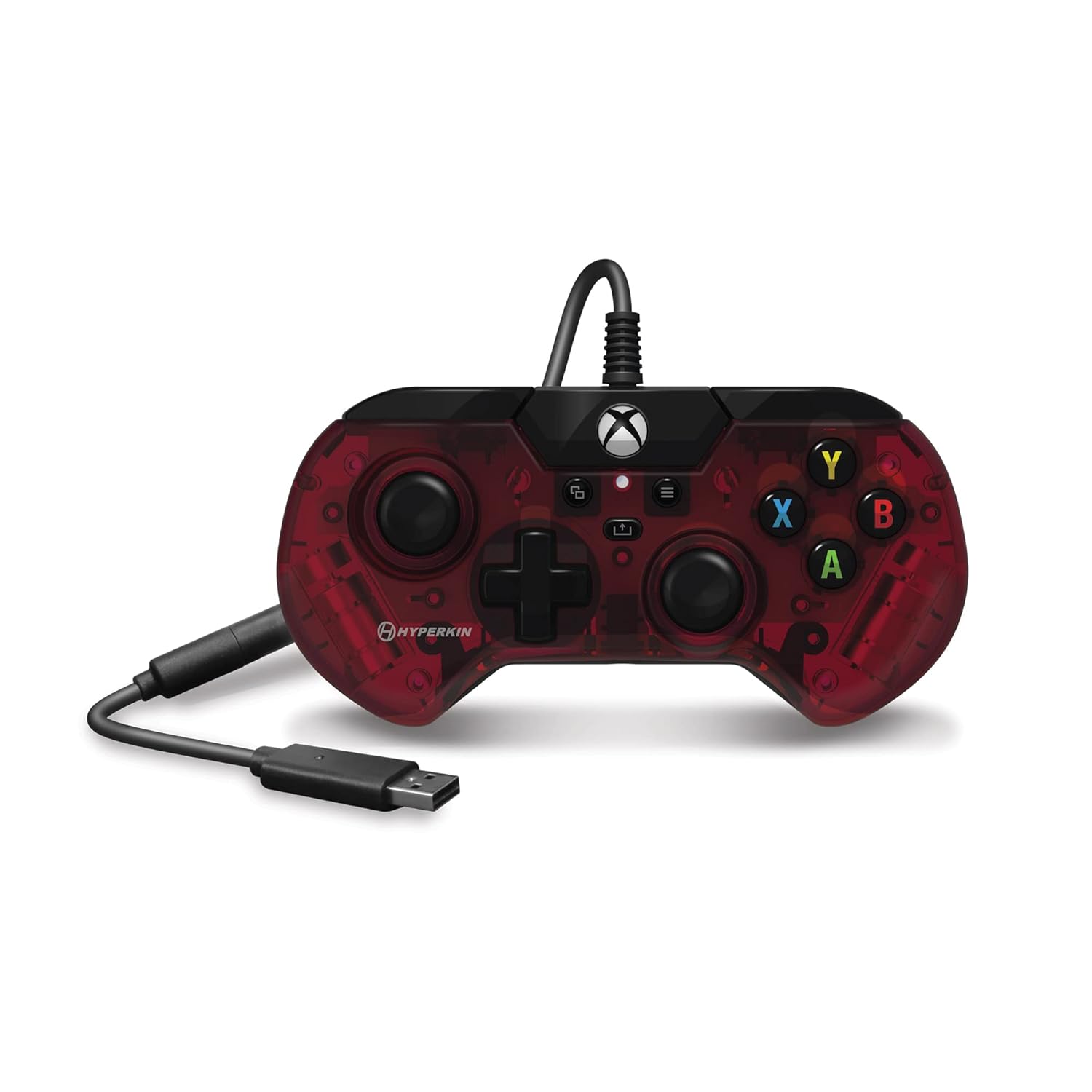
Obrázek: Nahoře view of the Hyperkin X91 Ice Wired Controller, highlighting button placement.
- Levé/pravé analogové páčky: Používá se pro ovládání pohybu a kamery ve hrách.
- D-Pad (směrový ovladač): For precise directional input, often used in menus or for specific game actions.
- Tlačítka A, B, X, Y: Standard action buttons, typically color-coded and labeled.
- Tlačítko nabídky: Accesses in-game menus or system settings.
- View Tlačítko: Provides additional in-game options or system functions.
- Tlačítko Xbox: Powers on the console (if off), opens the Xbox Guide, or returns to the home screen.
- Tlačítko Sdílet: (Xbox Series X|S only) Press to capture screenshots or record game clips.

Image: Detail of the Share button, located near the center of the controller.
- Levý/pravý nárazník (LB/RB): Located on the top edge, typically used for secondary actions.
- Levý/pravý spouštěč (LT/RT): Analog triggers on the underside of the top edge, providing pressure-sensitive input for actions like acceleration or shooting.

Obraz: View of the Left and Right Triggers (LT/RT) on the controller's top edge.
- 3.5 mm Headset Jack: Located on the bottom edge of the controller. Plug in a compatible headset for game audio and voice chat.

Image: Detail of the 3.5 mm headset jack on the bottom of the controller.
Údržba a péče
To ensure the longevity and optimal performance of your Hyperkin X91 controller, follow these maintenance guidelines:
- Čištění: K otření ovladače použijte měkký, suchý hadřík. V případě odolné nečistoty lehceampOtřete hadřík vodou nebo jemným čisticím roztokem. Vyhněte se agresivním chemikáliím nebo abrazivním materiálům.
- Skladování: Store the controller in a clean, dry place away from direct sunlight, extreme temperatures, and excessive dust.
- Péče o kabely: Avoid sharply bending or twisting the USB cable. Do not pull the controller by its cable. Always grasp the USB connector when plugging or unplugging.
- Vyhněte se kapkám: Protect the controller from drops or impacts, as this can damage internal components or affect button responsiveness.
Odstraňování problémů
If you encounter issues with your Hyperkin X91 controller, refer to the following common solutions:
- Ovladač nereaguje:
- Ujistěte se, že je kabel USB bezpečně zapojený do ovladače i konzole/počítače.
- Zkuste zapojit ovladač do jiného USB portu.
- Restartujte konzoli nebo počítač.
- Test the controller on another compatible device if possible to determine if the issue is with the controller or the system.
- Buttons or Analog Sticks Not Working Correctly:
- Check for any physical obstructions or debris around the buttons or analog sticks.
- Gently press and release the affected buttons multiple times.
- If an analog stick exhibits "drift" (input without touching), ensure the controller's firmware is up to date (if applicable, check Hyperkin's official support webstránky).
- No Audio from Headset Jack:
- Ensure your headset is fully plugged into the 3.5 mm jack on the controller.
- Check your console/PC audio settings to ensure output is directed to the headset.
- Vyzkoušejte sluchátka s mikrofonem s jiným zařízením, abyste se ujistili, že fungují správně.
- Upravte úroveň hlasitosti na náhlavní soupravě i na systému.
If problems persist, contact Hyperkin customer support for further assistance.
Specifikace
| Číslo modelu | X91 |
| Kompatibilita | Xbox Series X|S, Xbox One, počítače s Windows 10/11 |
| Konektivita | Kabelové USB |
| Audio port | 3.5 mm Jack pro sluchátka |
| Rozměry (přibližně) | 7.05 x 5.43 x 3.23 palce (rozměry balení) |
| Hmotnost (přibližně) | 12 unce |
| Výrobce | Hyperkin |
Záruka a podpora
For warranty information, product registration, or technical support, please visit the official Hyperkin website or contact their customer service department. Details regarding specific warranty periods and support procedures are typically provided with your product purchase or on the manufacturer's webmísto.
Hyperkin Official Webmísto: www.hyperkin.com