
Zavedení
This manual provides detailed instructions for the safe and efficient use of your Westcott Compact Electric Pencil Sharpener. Please read this manual thoroughly before operating the device and retain it for future reference.

Obrázek 1: Přední strana view of the Westcott Compact Electric Pencil Sharpener.
Bezpečnostní informace
Pro zajištění bezpečného provozu a prevenci poškození dodržujte prosím následující bezpečnostní opatření:
- Keep the sharpener away from water or other liquids.
- Do not insert fingers or foreign objects into the sharpening holes.
- Unplug the sharpener before cleaning or when not in use.
- Ensure the shavings reservoir is properly closed during operation.
- Tento spotřebič není určen pro použití osobami (včetně dětí) se sníženými fyzickými, smyslovými nebo duševními schopnostmi nebo nedostatečnými zkušenostmi a znalostmi, pokud na ně nedohlíží osoba odpovědná za jejich bezpečnost nebo jim nebyla poskytnuta instrukce ohledně používání spotřebiče.
Obsah balení
Ověřte, zda jsou v balení přítomny všechny položky:
- Westcott Compact Electric Multi-Hole Horizontal Pencil Sharpener
- Napájecí adaptér
Vlastnosti produktu
The Westcott Compact Electric Pencil Sharpener offers several features for efficient pencil sharpening:
- Multi-Hole Dial: Accommodates pencils of various diameters.
- Elektrické napájení: Ensures consistent sharpening without battery concerns.
- Velká nádrž na hobliny: Snižuje frekvenci vyprazdňování.
- Těžká konstrukce: Designed for durability and long-lasting performance.
- 8-Tooth Stainless Steel Helical Blade: Provides a sharp, precise point.
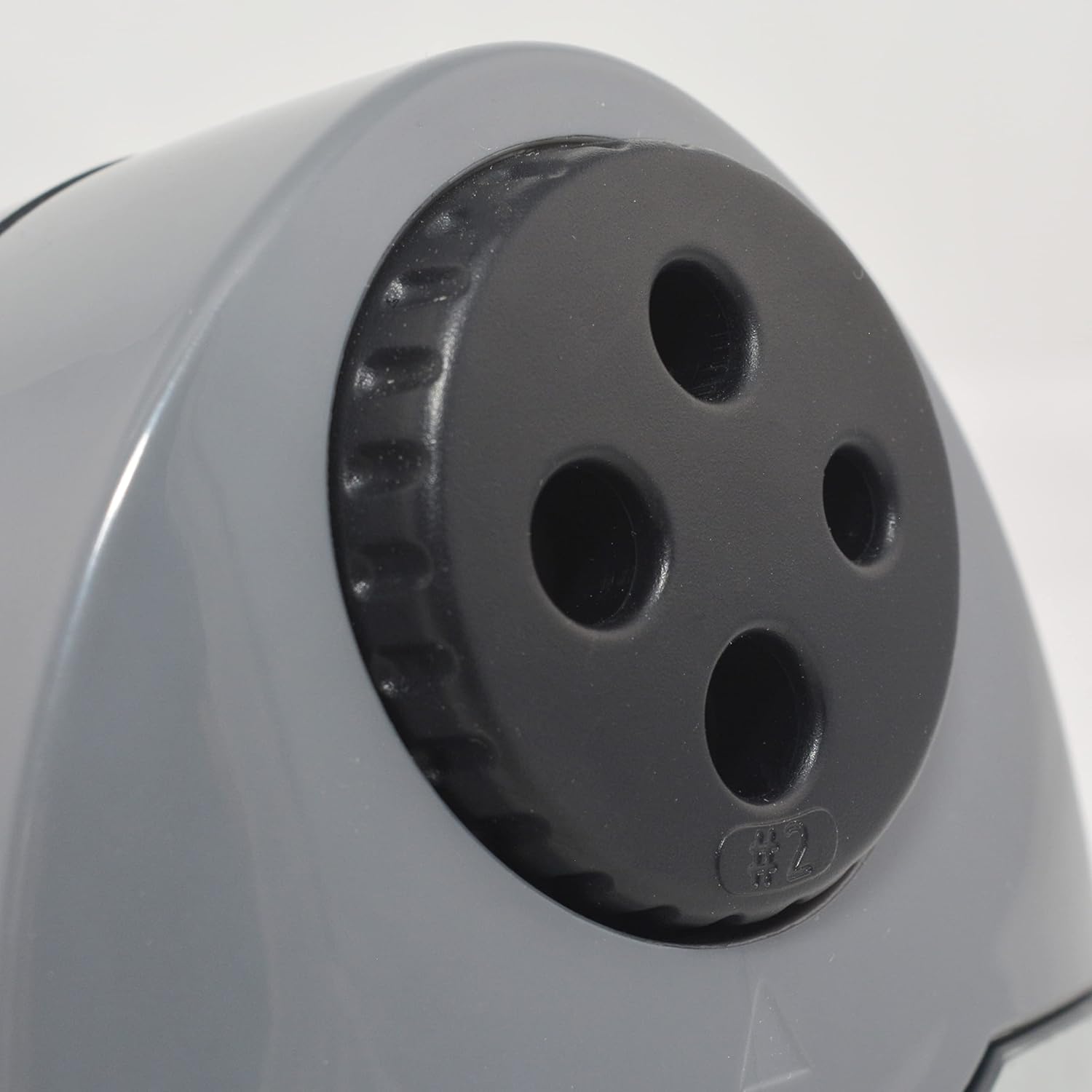
Figure 2: Multi-hole dial for different pencil sizes.
Video 1: Konecview of the Westcott Compact Electric Horizontal Pencil Sharpener, demonstrating its features and design.
Nastavení
- Unpack the Sharpener: Carefully remove all packaging materials from the sharpener.
- Umístěte na stabilní povrch: Position the sharpener on a flat, stable surface to prevent movement during use.
- Připojte napájení: Insert the power adapter into the designated port on the sharpener, then plug the adapter into a standard electrical outlet.

Figure 3: Connecting the power adapter to the sharpener.
Návod k obsluze
- Vyberte správnou díru: Rotate the multi-hole dial on the top of the sharpener to align the appropriate size opening with the pencil you intend to sharpen. The sharpener can accommodate various pencil diameters.
- Vložte tužku: Gently insert the pencil into the selected sharpening hole. The sharpener will automatically activate when the pencil is inserted correctly.
- Sharpen the Pencil: Apply light pressure to the pencil while the sharpener is running. The sharpener will stop automatically or reduce motor speed when the pencil reaches an optimal point, indicated by the #2 pencil sharpening indicator for standard pencils.
- Remove the Pencil: Once sharpened, carefully remove the pencil.

Figure 4: Inserting a pencil for sharpening.
Video 2: Demonstration of the Westcott Compact Pencil Sharpener in action, showing the sharpening process.
Údržba
- Emptying Shavings Reservoir: Regularly check and empty the shavings reservoir to maintain optimal performance and prevent blockages. To empty, gently pull the transparent reservoir away from the main unit. Dispose of shavings and reattach the reservoir securely.

Figure 5: Emptying the shavings reservoir.
- Čištění nožů: If sharpening performance decreases, the blades may need cleaning. Unplug the sharpener. Use a soft brush or cotton swab to carefully remove any graphite or wood residue from the blades. Exercise caution as blades are sharp.
Odstraňování problémů
If you encounter issues with your sharpener, refer to the following common problems and solutions:
- Sharpener not turning on:
- Ensure the power adapter is securely plugged into both the sharpener and the electrical outlet.
- Zkontrolujte, zda je elektrická zásuvka funkční, zapojením jiného zařízení.
- Verify the shavings reservoir is correctly installed and closed. The sharpener may have a safety switch that prevents operation if the reservoir is open.
- Pencil not sharpening properly (uneven or blunt point):
- Ensure you have selected the correct hole size for your pencil.
- Check the blades for any debris or damage. Clean as per the maintenance section.
- Avoid applying excessive pressure, which can cause uneven sharpening or lead breakage.
- Pencil breaking frequently:
- This can be a sign of dull blades or excessive pressure. Refer to cleaning instructions or consider blade replacement if available.
- Ensure the pencil is inserted straight and not at an angle.
Specifikace
| Atribut | Hodnota |
|---|---|
| Značka | Westcott |
| Číslo modelu | 00406 |
| Specifické použití pro produkt | Grafitová tužka |
| Barva | Černý |
| Zdroj napájení | Elektrický kabel |
| Materiál | Kov |
| Cílové publikum | Artist, Student |
| Hmotnost položky | 11.52 unce |
| Další funkce | Heavy Duty |
Informace o záruce
This Westcott product comes with a 7 rok záruka. For warranty claims or detailed information, please refer to the official Westcott webwebu nebo kontaktujte zákaznickou podporu.
Zákaznická podpora
If you require further assistance or have questions not covered in this manual, please contact Westcott customer support through their official webnebo kontaktní informace poskytnuté při nákupu.