
Zavedení
This manual provides detailed instructions for the Goodmans Bluetooth Aqua Speakers. Please read this manual thoroughly before using the product to ensure proper operation and to maximize its lifespan. Keep this manual for future reference.
Bezpečnostní informace
- Nevystavujte reproduktor extrémním teplotám, přímému slunečnímu záření ani vysoké vlhkosti.
- While the speaker features internal water jets, it is not designed to be submerged in water. Avoid exposing the exterior to excessive water or liquids.
- Use only the provided Micro USB charging cable.
- Nepokoušejte se reproduktor rozebírat, opravovat ani upravovat. Zrušíte tak platnost záruky a může to způsobit poškození nebo zranění.
- Uchovávejte mimo dosah dětí.
- Během provozu zajistěte řádné větrání.
Obsah balení
Ověřte, zda jsou v balení přítomny všechny položky:
- Goodmans Bluetooth Aqua Speakers (2 units)
- Micro USB nabíjecí kabel
- 3.5mm Line-in Audio Cable
- Návod k použití (tento dokument)
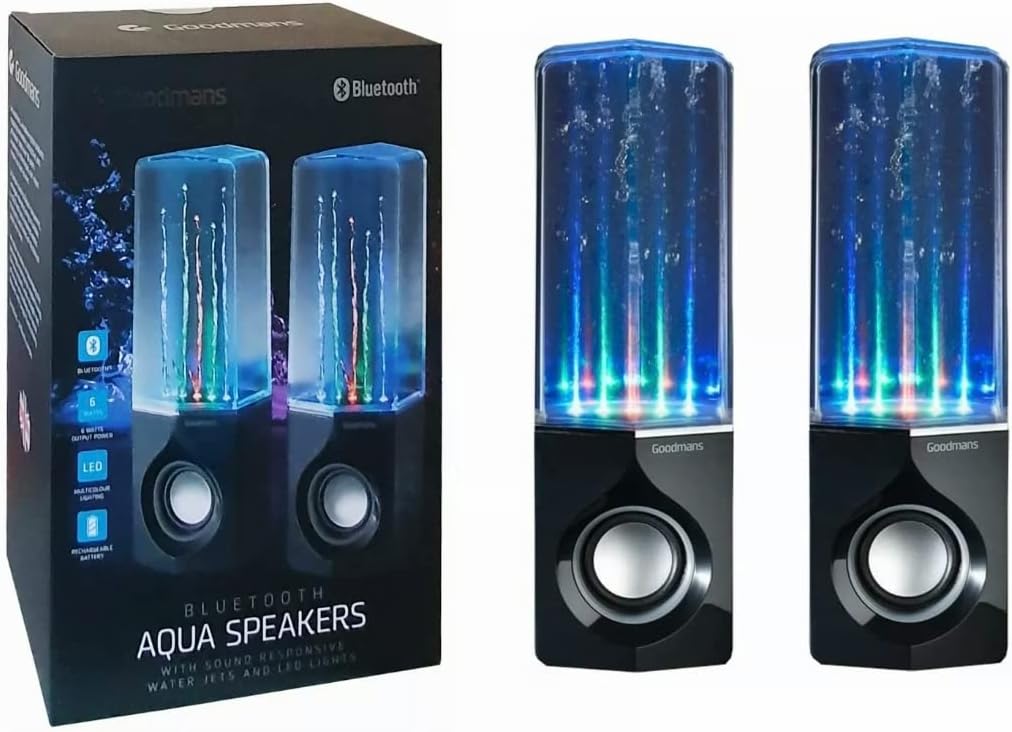
Image: Goodmans Bluetooth Aqua Speakers shown alongside their retail packaging, illustrating the product as it appears when unboxed.
Konec produktuview
The Goodmans Aqua Speakers feature a sleek design with integrated LED lights and sound-reactive water jets that pulse to your music. Each speaker unit includes a main speaker driver and control buttons.

Obrázek: Přední strana view of two Goodmans Bluetooth Aqua Speakers, showcasing the active water jets and vibrant LED lights during operation.
Součásti reproduktorů
- Water Chamber: Transparent upper section containing water and LED lights.
- Mřížka reproduktoru: Protects the audio driver.
- Ovládací panel: Located on the side or rear of the main speaker unit.
- Micro USB port: Pro nabíjení interní baterie.
- 3.5 mm audio vstup: Pro kabelové připojení k audio zařízením.

Obrázek: Boční view of one Goodmans Bluetooth Aqua Speaker, highlighting the location of control buttons and input/output ports.
Nastavení
1. Nabíjení baterie
- Připojte nabíjecí kabel Micro USB k portu Micro USB na reproduktoru.
- Druhý konec kabelu připojte k napájecímu adaptéru USB (není součástí balení) nebo k portu USB počítače.
- Rozsvítí se kontrolka nabíjení. Po úplném nabití může kontrolka změnit barvu nebo zhasnout.
- A full charge typically takes 2-3 hours and provides several hours of playback.
2. Zapnutí/vypnutí
- To power on, press and hold the Power button (usually marked with a power symbol) for a few seconds until you hear an audible prompt or see the LED lights activate.
- Chcete-li reproduktor vypnout, znovu stiskněte a podržte tlačítko napájení, dokud se nevypne.
Provozní
1. Párování Bluetooth
- Ensure the speaker is powered on and within close proximity (within 10 meters) of your Bluetooth-enabled device.
- The speaker will automatically enter Bluetooth pairing mode, indicated by a flashing LED light or an audible prompt.
- Na svém zařízení (chytrý telefon, tablet, počítač) přejděte do nastavení Bluetooth a povolte Bluetooth.
- Hledat available devices. The speaker should appear as "Goodmans Aqua Speakers" or a similar name.
- Select the speaker from the list to pair. Once paired, you will hear a confirmation sound, and the LED light may change to a solid color.
- You can now play audio from your device through the Aqua Speakers.
2. Pomocný (AUX) vstup
For devices without Bluetooth, or if you prefer a wired connection:
- Připojte jeden konec 3.5mm audio kabelu k portu AUX-in na reproduktoru.
- Připojte druhý konec kabelu ke konektoru sluchátek nebo zvukovému výstupu vašeho zařízení.
- The speaker should automatically switch to AUX mode, or you may need to press a mode button if available.
3. Přehrávání hudby a ovládání hlasitosti
- Přehrát/pozastavit: Press the Play/Pause button (often marked with a triangle or || symbol) to start or stop playback.
- Zvýšení/Snížení hlasitosti: Use the volume buttons (+/-) on the speaker or your connected device to adjust the volume.
- Přeskočit stopu: Some models may have dedicated buttons for skipping tracks forward or backward. Refer to the specific button layout on your speaker.
4. LED Lights and Water Jets
The LED lights and water jets are sound-reactive, meaning they will pulse and change color in sync with the audio being played. This feature is automatic and does not typically require manual control.
Údržba
- Čištění: Use a soft, dry cloth to wipe the exterior of the speaker. Do not use abrasive cleaners or solvents. For the transparent water chamber, a slightly damp Lze použít hadřík, ale dbejte na to, aby se do elektronických součástek nedostala voda.
- Skladování: Pokud reproduktor delší dobu nepoužíváte, skladujte jej na chladném a suchém místě mimo dosah přímého slunečního záření a extrémních teplot.
- Péče o baterie: Chcete-li prodloužit životnost baterie, vyvarujte se častého úplného vybíjení. Reproduktor pravidelně nabíjejte, i když jej nepoužíváte neustále.
Odstraňování problémů
| Problém | Možné řešení |
|---|---|
| Reproduktor se nezapne. | Ujistěte se, že je baterie nabitá. Připojte reproduktor ke zdroji napájení pomocí kabelu micro USB. |
| Nelze spárovat přes Bluetooth. | Make sure the speaker is in pairing mode. Disable and re-enable Bluetooth on your device. Ensure no other device is currently connected to the speaker. Move the speaker closer to your device. |
| Žádný zvuk nebo nízká hlasitost. | Check the volume levels on both the speaker and your connected device. Ensure the correct input mode (Bluetooth or AUX) is selected. If using AUX, check the cable connection. |
| Water jets or LED lights not working. | Ensure music is playing and the volume is sufficient for the sound-reactive features to activate. Check if the speaker is fully charged. |
| Zkreslený zvuk. | Reduce the volume on both the speaker and your device. Ensure the speaker is not too far from the Bluetooth source. |
Specifikace
| Funkce | Detail |
|---|---|
| Název modelu | Aqua reproduktory |
| Technologie připojení | Bluetooth |
| Typ reproduktoru | Stereo |
| Režim zvukového výstupu | Stereo |
| Maximální výstupní výkon reproduktoru | 6 wattů |
| Zdroj napájení | Napájení z baterie (dobíjecí) |
| Speciální funkce | Integrated Rechargeable Battery, Bluetooth Enabled, 3.5mm Line-in Cable Included, Micro USB Charging Cable Included, Sound-Reactive LED Lights and Water Jets |
| Kontrolní metoda | Stiskněte tlačítko |
| Hmotnost položky | 1.58 kg |
| Barva | Černý |
| Materiál | Waterproof Material (for internal water chamber) |
| Rozměry produktu | 35 x 22.7 x 13.7 cm |
Záruka a podpora
Goodmans products are designed to meet high-quality standards. For warranty information, please refer to the warranty card included with your purchase or contact your retailer. Keep your proof of purchase for any warranty claims.
For further assistance or technical support, please contact the retailer where you purchased the product or visit the official Goodmans webstránky pro kontaktní údaje.