
Zavedení
This manual provides detailed instructions for the safe installation, operation, and maintenance of your bimar Wi-Fi Ceiling Fan, Model 1 (Ø 132). Please read this manual thoroughly before using the product and retain it for future reference.
Zamýšlené použití: This high-performance ceiling fan is designed for ventilation in indoor domestic environments. Any other use is considered improper and potentially hazardous. The manufacturer cannot be held responsible for any damages resulting from improper use or repairs performed by unqualified personnel.
Důležité bezpečnostní pokyny
Abyste snížili riziko požáru, úrazu elektrickým proudem nebo zranění osob, dodržujte následující:
- Před instalací ventilátoru si přečtěte všechny pokyny.
- Instalaci musí provést kvalifikovaný elektrikář v souladu se všemi místními a národními elektrotechnickými předpisy.
- Ensure the installation site can support the fan's weight (approximately 6.2 kg).
- Před instalací nebo servisem vždy odpojte napájení hlavním jističem.
- Neprovozujte ventilátor s poškozeným napájecím kabelem nebo zástrčkou.
- Keep hands, hair, and clothing away from moving blades.
- Do not insert any objects into the fan blades while it is operating.
- Tento spotřebič není určen pro použití osobami (včetně dětí) se sníženými fyzickými, smyslovými nebo duševními schopnostmi nebo nedostatečnými zkušenostmi a znalostmi, pokud na ně nedohlíží osoba odpovědná za jejich bezpečnost nebo jim nebyla poskytnuta instrukce ohledně používání spotřebiče.
- Děti by měly být pod dozorem, aby bylo zajištěno, že si se spotřebičem nebudou hrát.
Co je v krabici
Your bimar Wi-Fi Ceiling Fan package includes the following components:
- bimar Wi-Fi Ceiling Fan unit (with 3 blades)
- Dálkové ovládání
- Mounting hardware (screws, brackets, etc.)
- Návod k použití (tento dokument)

Image: The bimar Wi-Fi Ceiling Fan, featuring three light-colored wooden blades and a brushed metal motor housing and downrod.
Nastavení a instalace
1. Instalace ventilátoru
Důrazně se doporučuje profesionální instalace kvalifikovaným elektrikářem. Ensure the ceiling structure can safely support the fan's weight and that all wiring complies with local electrical codes.
- Připravte si místo pro montáž: Turn off power at the circuit breaker. Securely attach the mounting bracket to a ceiling joist or a fan-rated outlet box.
- Sestavte spouštěcí tyč a motor: Připevněte spouštěcí tyč k pouzdru motoru ventilátoru.
- Zavěste ventilátor: Opatrně zvedněte sestavu ventilátoru a zavěste ji na montážní držák.
- Zapojte ventilátor: Connect the electrical wires (live, neutral, ground) from the ceiling to the fan's wiring, following the wiring diagram provided in the separate installation guide (if applicable).
- Připojte čepele: Securely fasten the three blades to the motor housing.
- Zajistěte vrchlík: Raise the canopy to cover the wiring and mounting bracket, securing it in place.

Obrázek: Boční view of the bimar ceiling fan, illustrating the angle of the light wood blades and the connection to the downrod.
2. Připojení k Wi-Fi a aplikacím
The bimar Wi-Fi Ceiling Fan is compatible with the Bimar Live Smart app for advanced control and scheduling.
- Stáhněte si aplikaci: Hledat "Bimar Live Smart" in your smartphone's app store (iOS or Android) and install it.
- Vytvořit účet: Otevřete aplikaci a postupujte podle pokynů na obrazovce k vytvoření nového uživatelského účtu nebo se přihlaste, pokud již nějaký máte.
- Přidat zařízení: Power on the ceiling fan. In the Bimar Live Smart app, tap "Add Device" or the "+" icon. Select "Ceiling Fan" or the appropriate device type.
- Připojení k Wi-Fi: Follow the app's instructions to put the fan into pairing mode (usually by pressing a button on the fan or remote for a few seconds). Connect the fan to your home 2.4GHz Wi-Fi network.
- Pojmenujte zařízení: Once connected, you can name your fan for easy identification within the app.

Image: A modern living room featuring the bimar ceiling fan installed, with a smartphone displaying the Bimar Live Smart app interface, indicating Wi-Fi and voice control capabilities.
Návod k obsluze
Your bimar Wi-Fi Ceiling Fan offers multiple control options for convenience.
1. Dálkové ovládání
The included remote control allows direct access to all fan functions.
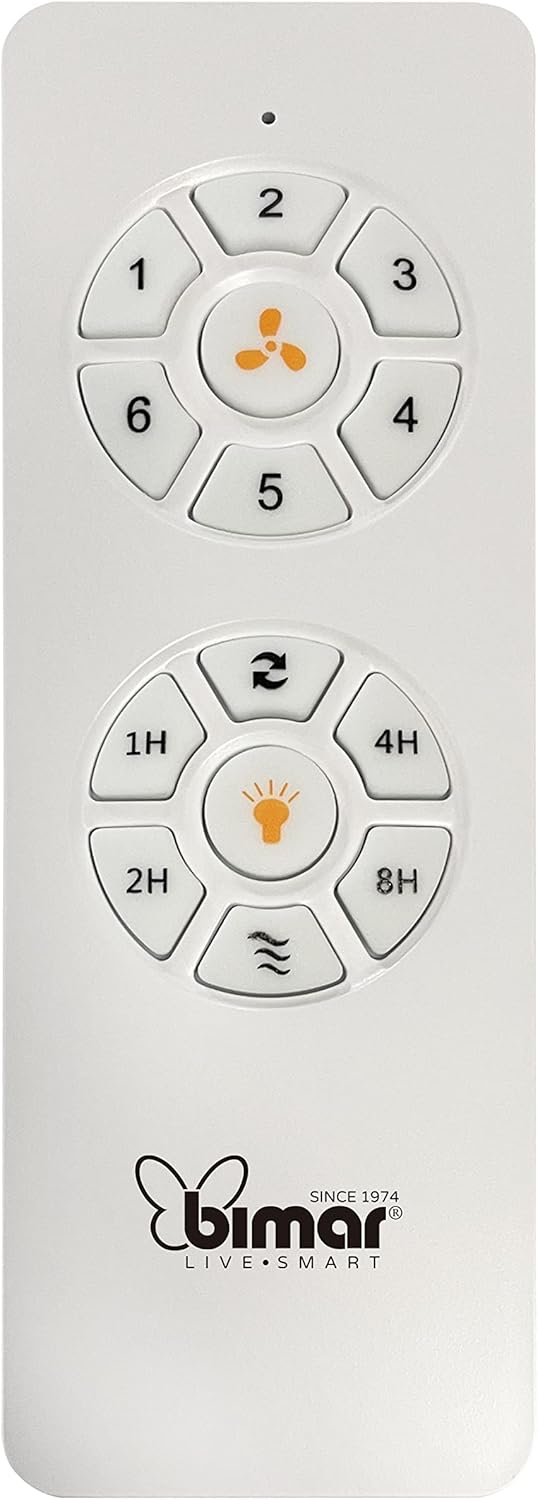
Image: The white remote control for the bimar ceiling fan, showing buttons for fan speed (1-6), fan on/off, timer (1H, 2H, 4H, 8H), mode selection, and reverse function.
- Zapnutí/vypnutí: Stisknutím tlačítka s ikonou ventilátoru jej zapnete nebo vypnete.
- Nastavení rychlosti: Use buttons 1-6 to select one of the six available fan speeds.
- Funkce časovače: Press 1H, 2H, 4H, or 8H to set the fan to automatically turn off after the selected duration.
- Výběr režimu: Use the mode button (often represented by waves or arrows) to cycle through Normal, Natural, Sleep, and Breeze modes.
- Režim léto/zima: The reverse button (often two arrows forming a circle) changes the blade rotation direction.
2. App Control (Bimar Live Smart)
Once connected to the Bimar Live Smart app, you can access enhanced features:
- Dálkové ovládání: Control all fan functions from anywhere with an internet connection.
- Plánování: Program daily and weekly on/off times for automated operation.
- Časovač: Adjust the timer from 1 to 8 hours.
- Mode and Speed Selection: Easily switch between the 6 speeds and 4 operating modes.
3. Hlasové ovládání
The bimar Wi-Fi Ceiling Fan is compatible with popular voice assistants like Amazon Alexa and Google Assistant. After connecting the fan to the Bimar Live Smart app, link your Bimar account to your voice assistant app (e.g., Alexa app or Google Home app).
Example Hlasové příkazy:
- "Alexa, turn on the ceiling fan."
- "Hey Google, set ceiling fan speed to 3."
- "Alexa, turn off the ceiling fan in 1 hour."
4. Operating Modes and Speeds
- 6 Ventilation Speeds: Adjust the airflow intensity to your preference.
- Normální režim: Konzistentní proudění vzduchu při zvolené rychlosti.
- Přirozený režim: Simuluje přirozený vánek změnou rychlosti ventilátoru.
- Režim spánku: Pracuje s nižší a tišší rychlostí pro nerušený odpočinek.
- Režim Breeze: Provides a gentle, intermittent airflow.
5. Summer/Winter Function
The reversible blade function allows for year-round use:
- Letní režim (otáčení proti směru hodinových ručiček): Vytváří proudění vzduchu směřující dolů a tím vytváří chladivý vánek.
- Zimní režim (otáčení ve směru hodinových ručiček): Creates an upward airflow, circulating warm air trapped near the ceiling, improving heating efficiency.

Image: A diagram illustrating the airflow patterns for summer (indirect ventilation, pushing air upwards) and winter (direct ventilation, pulling air downwards) modes of a ceiling fan.
Údržba
Pravidelná údržba zajistí optimální výkon a dlouhou životnost vašeho stropního ventilátoru.
- Čištění: Before cleaning, ensure the fan is turned off and power is disconnected at the circuit breaker. Use a soft, damp cloth to wipe down the blades and motor housing. Do not use abrasive cleaners or solvents.
- Kontrola čepele: Periodically check the blades for any signs of damage or warping. Ensure all blade screws are tight.
- Mazání motoru: The fan's DC motor is designed for maintenance-free operation and does not require lubrication.
- Utáhněte upevňovací prvky: Over time, some fasteners may become loose. Check and tighten all screws and connections annually.

Obrázek: Detailní záběr view of the bimar ceiling fan's brushed metal motor housing and the attachment points for the light wood blades, highlighting areas for cleaning and inspection.
Odstraňování problémů
| Problém | Možná příčina | Řešení |
|---|---|---|
| Ventilátor se nespustí | Žádné napájení; Vybitá baterie v dálkovém ovladači; Nesprávné zapojení. | Check circuit breaker and wall switch. Replace remote batteries. Verify wiring connections (consult electrician). |
| Ventilátor se třese | Uvolněné nože nebo montážní materiál; Nevyvážené nože. | Ensure all blade screws and mounting screws are tight. Use a balancing kit (not included) if necessary. |
| Dálkové ovládání nefunguje | Low battery; Obstruction between remote and receiver; Remote not paired. | Replace remote batteries. Ensure clear line of sight. Refer to pairing instructions in the full manual. |
| Problémy s připojením Wi-Fi | Nesprávné heslo k Wi-Fi; Router je příliš daleko; Vybrána síť 5 GHz. | Verify Wi-Fi password. Move router closer or use a Wi-Fi extender. Ensure you are connecting to a 2.4GHz network. Reset fan and re-attempt pairing. |
| Ventilátor je hlučný | Loose screws; Blades hitting an obstruction; Motor issue. | Check and tighten all screws. Ensure nothing is obstructing the blades. If noise persists, contact customer support. |
Specifikace
| Funkce | Detail |
|---|---|
| Značka | bimar |
| Číslo modelu | 1 |
| Rozměry produktu | 132 x 132 x 27.5 cm (průměr x průměr x výška) |
| Hmotnost | 6.2 kg |
| Počet čepelí | 3 |
| Materiál | Dřevo |
| Barva | Black (Note: Blades are light wood finish as shown in images) |
| Typ motoru | DC (Brushless, energy-saving) |
| Spotřeba energie | 35W |
| Kontrolní metody | Remote Control, Bimar Live Smart App, Voice Control (Amazon Alexa, Google Assistant) |
| Otáčky ventilátoru | 6 |
| Provozní režimy | Normal, Natural, Sleep, Breeze |
| Časovač | 1 až 8 hodin |
| Další funkce | Silent operation, Summer/Winter mode (reversible blades) |
| Zdroj napájení | Elektrický |
| Typ instalace | Stropní držák |

Image: The three light wood fan blades, detached and laid flat, showcasinjejich design a texturu.


Obrázek: Dva views of the bimar ceiling fan, illustrating different downrod lengths: one with a 25 cm downrod and another with a 13 cm downrod, affecting the overall height of the fan.
Záruka a podpora
For warranty information, technical support, or service inquiries, please refer to the warranty card included with your product or visit the official bimar webUschovejte si doklad o koupi pro případ reklamace.
Výrobce: Bimar S.r.l.
Kontakt: Prosím navštivte the bimar store on Amazon or the official bimar webstránky pro kontaktní údaje.