
Zavedení
Thank you for choosing the BOBLOV W3 WiFi Body Camera. This manual provides detailed instructions for the proper setup, operation, and maintenance of your device. Please read this manual thoroughly before using the camera to ensure optimal performance and to prevent damage.
Obsah balení
Ověřte, zda jsou v balení obsaženy všechny níže uvedené položky:
- 1x tělová kamera BOBLOV W3
- 1x 64GB Micro SD Card (pre-installed in camera)
- 1x nabíjecí kabel USB-C
- 1x šroubovák
- 1x Uživatelská příručka (tento dokument)
- 1x Back Magnets Clip
- 1x Brooch
Konec produktuview
Seznamte se s komponenty a ovládacími prvky fotoaparátu:

Obraz: BOBLOV W3 Body Camera with labels indicating the Power/Video Button, Audio/WiFi Button, Microphone, Reset button, Brooch attachment point, Back Magnetic Clip, and USB-C Charging Interface. The image also shows the dimensions of the camera.
- Power/Video Button: Used to power on/off the device and start/stop video recording.
- Audio/WiFi Button: Used to start/stop audio recording and activate/deactivate WiFi function.
- Mikrofon: Mikrofon pro záznam zvuku.
- Resetovat: Malé tlačítko pro resetování zařízení (vyžaduje PIN kód).
- Brooch: Attachment point for the included brooch clip.
- Back Magnetic Clip: Removable clip for magnetic attachment.
- Nabíjecí rozhraní: Port USB-C pro nabíjení a přenos dat.
Nastavení
1. Nabíjení fotoaparátu
Before initial use, fully charge the camera. The built-in 1450mAh battery takes approximately 3 hours to fully charge.
- Connect the provided USB-C charging cable to the camera's charging interface.
- Druhý konec kabelu připojte k napájecímu adaptéru USB (není součástí balení) nebo k portu USB počítače.
- Kontrolka nabíjení se během nabíjení rozsvítí a po úplném nabití zhasne.
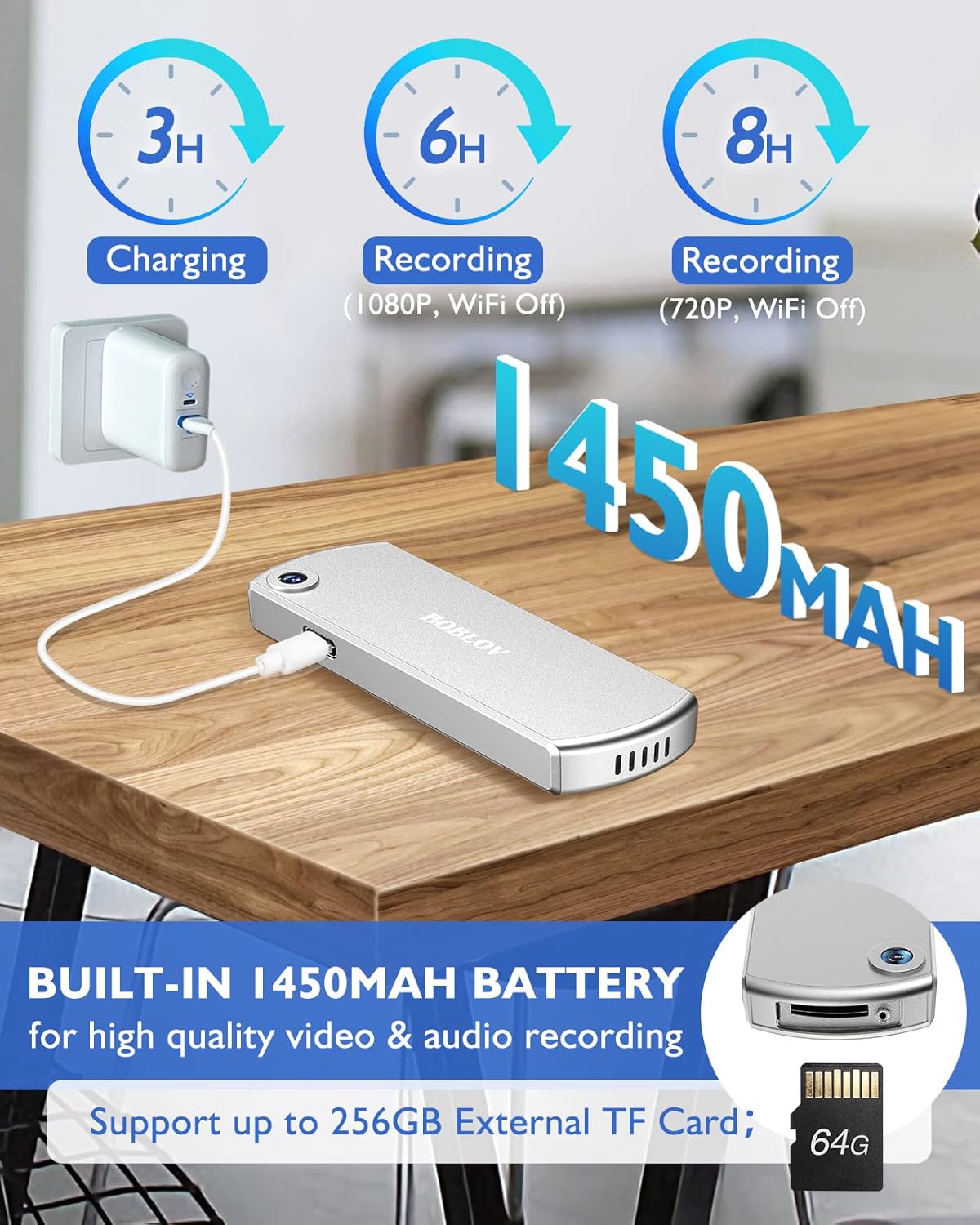
Obraz: The BOBLOV W3 Body Camera being charged via a USB-C cable, highlighting the 1450mAh battery and charging times: 3 hours for full charge, 6 hours recording (1080P, WiFi Off), and 8 hours recording (720P, WiFi Off).
2. Inserting/Expanding Memory Card
The W3 Body Camera uses an external Micro SD card. A 64GB card is included and pre-installed.
- Locate the memory card slot on the camera.
- Use the included screwdriver to carefully unscrew the cover of the card slot.
- Insert or replace the Micro SD card (up to 256GB) into the slot with the contacts facing down.
- Securely fasten the card slot cover with the screwdriver.
3. Připevnění fotoaparátu
The camera offers two attachment options: a back magnetic clip and a brooch.
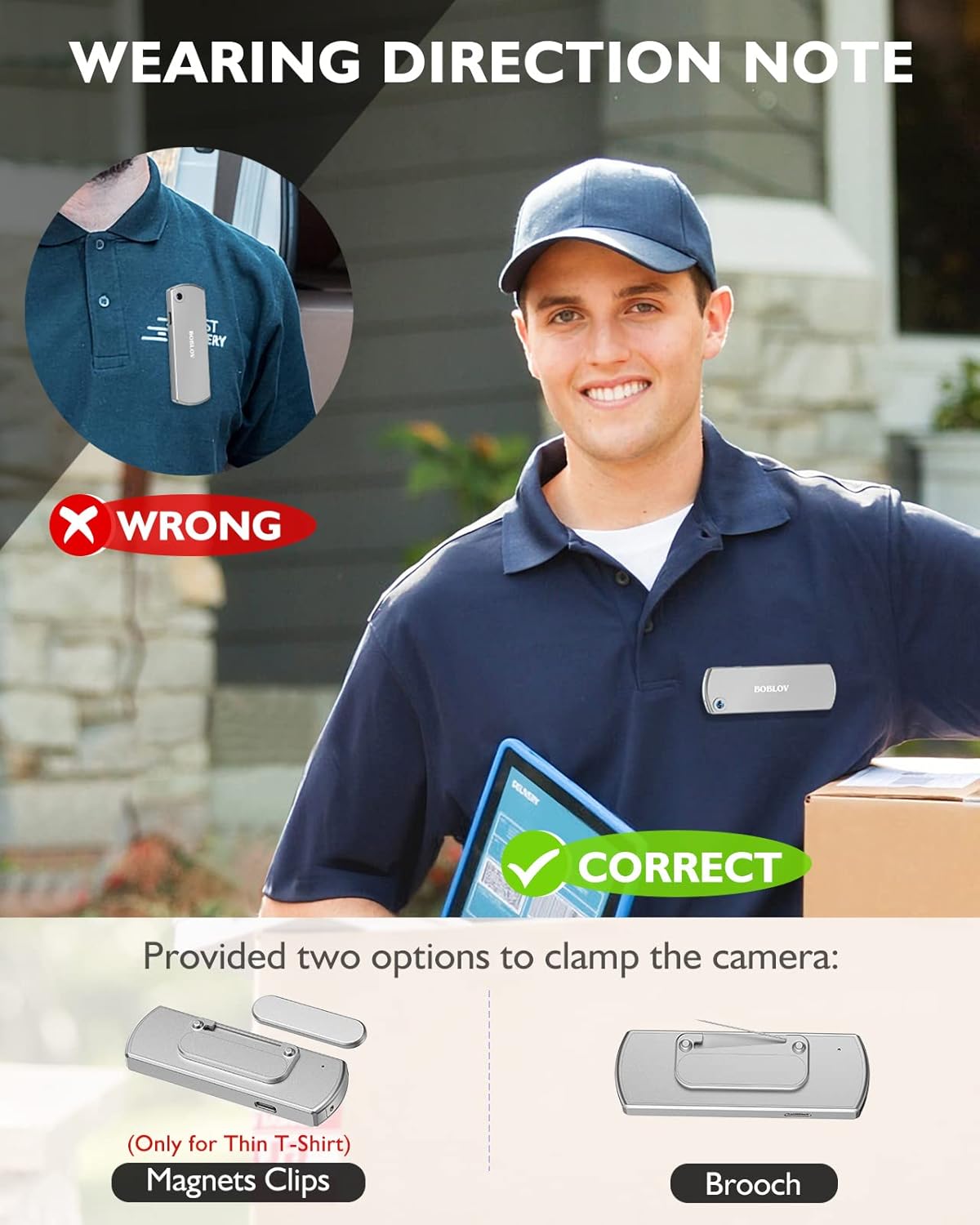
Obraz: Illustration demonstrating correct and incorrect ways to wear the BOBLOV W3 Body Camera. It shows that magnetic clips are suitable for thin T-shirts, while a brooch provides a more secure attachment for other clothing types.
- Magnetický klip: Attach the magnetic clip to the back of the camera. This is suitable for thin fabrics like T-shirts. Ensure the camera is securely held.
- Brooch: For more secure attachment or thicker clothing, use the provided brooch. Attach it to the camera's designated brooch point and then pin it to your clothing.
Návod k obsluze
1. Zapnutí/vypnutí
- Zapnutí: Stiskněte a podržte Power/Video Button for a few seconds until the indicator light illuminates.
- Vypnout: Stiskněte a podržte Power/Video Button again for a few seconds until the indicator light turns off.
2. Nahrávání videa
- While the camera is powered on, press the Power/Video Button once to start video recording. The indicator light will flash to indicate recording is in progress.
- Stiskněte tlačítko Power/Video Button again to stop video recording. The indicator light will return to a steady state.
- The camera supports 1080P and 720P video recording. With WiFi off, it can record for approximately 6 hours at 1080P or 8 hours at 720P on a full charge.
- Videos are saved in 5-minute fragments by default. The camera supports loop recording, overwriting older files, když je paměťová karta plná.
3. Nahrávání zvuku
- While the camera is powered on, press the Audio/WiFi Button once to start audio recording.
- Stiskněte tlačítko Audio/WiFi Button znovu pro zastavení nahrávání zvuku.
4. WiFi Function and App Connectivity
The BOBLOV W3 features WiFi connectivity, allowing you to manage files and change settings via a smartphone app.
- Aktivace Wi-Fi: Stiskněte a podržte Audio/WiFi Button for a few seconds to turn on the WiFi function. The WiFi indicator light will flash.
- Stáhnout aplikaci:
- For Android devices, download the DHiHZ aplikace
- For iOS devices, download the Mini-XRcam aplikace
- Připojení k fotoaparátu: On your smartphone, go to WiFi settings and connect to the camera's WiFi network (usually named "BOBLOV_W3_XXXX"). The default password is typically "12345678".
- Použijte aplikaci: Open the downloaded app to view živé footage, přehrávání nahrávek, stahování filea upravte nastavení fotoaparátu.
- Deaktivace Wi-Fi: Stiskněte a podržte Audio/WiFi Button znovu pro vypnutí WiFi.

Obraz: The BOBLOV W3 Body Camera wirelessly connected to a smartphone, illustrating the WiFi function for managing files, changing settings, and accessing features like video, audio, preview, playback, and download through the dedicated Android (DHiHZ) and iOS (Mini-XRcam) applications.
5. Připojení k PC
You can connect the camera to a computer to manage recorded files a změňte nastavení.
- Ensure the camera is powered ON before connecting to the PC.
- Připojte fotoaparát k počítači pomocí dodaného kabelu USB-C.
- Fotoaparát se v počítači zobrazí jako vyměnitelná disková jednotka.
- You can then access, copy, delete, or upload recorded files. Some settings may also be configurable via a configuration file on the camera's storage.

Obraz: The BOBLOV W3 Body Camera connected to a laptop via a USB-C cable, demonstrating how to manage recorded files and change settings. Icons for Playback, Delete, Upload, and Settings are shown, with a note to ensure the camera is powered ON for connection.
Údržba
- Čištění: Use a soft, dry cloth to clean the camera body. Do not use liquid cleaners or solvents.
- Skladování: Fotoaparát skladujte na chladném a suchém místě mimo dosah přímého slunečního záření a extrémních teplot.
- Péče o baterie: Chcete-li prodloužit životnost baterie, vyvarujte se častého úplného vybíjení. Fotoaparát pravidelně nabíjejte, i když jej delší dobu nepoužíváte.
- Paměťová karta: Periodically back up important recordings from the Micro SD card to a computer. Format the Micro SD card regularly (e.g., once a month) to maintain optimal performance and prevent data corruption.
- Voděodolnost: The camera has an IP65 waterproof rating, meaning it is protected against dust and low-pressure water jets. It is not designed for submersion.
Odstraňování problémů
| Problém | Možná příčina / řešení |
|---|---|
| Fotoaparát se nezapne. | Battery may be depleted. Charge the camera for at least 3 hours. If the issue persists, try resetting the camera using a pin in the reset hole. |
| Camera gets hot when WiFi is on. | This is normal behavior for the camera when the WiFi function is active due to increased power consumption. |
| Cannot connect to WiFi via smartphone app. | Ensure WiFi is enabled on the camera. Check if you have downloaded the correct app (DHiHZ for Android, Mini-XRcam for iOS). Verify the WiFi password (default is "12345678"). Try restarting both the camera and your phone. |
| Camera stops recording unexpectedly. | The memory card may be full. The camera supports loop recording, but if the card is corrupted or too slow, it might cause issues. Try formatting the card or using a different high-speed Micro SD card. Battery may be low. |
| Nelze získat přístup files na PC. | Ensure the camera is powered ON before connecting to the PC. Try a different USB-C cable or USB port. |
Specifikace
| Funkce | Detail |
|---|---|
| Značka | BOBLOV |
| Název modelu | W3 |
| Číslo modelu | B-W3 |
| Technologie připojení | Wi-Fi |
| Speciální funkce | Lehký |
| Kompatibilní zařízení | Android/iOS Phone |
| Zdroj napájení | Napájení z baterie |
| Rozlišení záznamu videa | 1080p |
| Barva | Stříbro |
| Typ montáže | Povrchová montáž |
| Form Factor | Kompaktní |
| Materiál pouzdra | Kov |
| Typ upozornění | Pouze pohyb |
| Světelný zdroj | Infračervený |
| Hodnocení voděodolnosti | IP65 |
| Kontrolní metoda | App |
| Wattage | 3.7 watthodin |
| Noční vidění | Noční barva |
| Rozměry položky | 9 x 3 x 1.5 centimetrů |
| Kapacita baterie | 1450 mAh (vestavěná) |
| Recording Time (1080P, WiFi Off) | Přibl. 6 hodin |
| Recording Time (720P, WiFi Off) | Přibl. 8 hodin |
| Doba nabíjení | Přibl. 3 hodin |
| Externí paměť | Micro SD Card, up to 256GB (64GB included) |
| Čistá hmotnost | 60 g / 2 oz |
Záruka a podpora
BOBLOV provides a two-year warranty for high-value products, including the W3 Body Camera. For any technical assistance, troubleshooting, or warranty claims, please contact BOBLOV customer service.
Please refer to the official BOBLOV webNejnovější kontaktní informace a podrobnosti o záruce naleznete na webových stránkách nebo v dokumentaci k nákupu.