
Zavedení
This manual provides detailed instructions for the operation and maintenance of your Casio A100WE-7B Digital Watch. Please read this manual carefully to ensure proper use and to fully utilize all features of your timepiece.
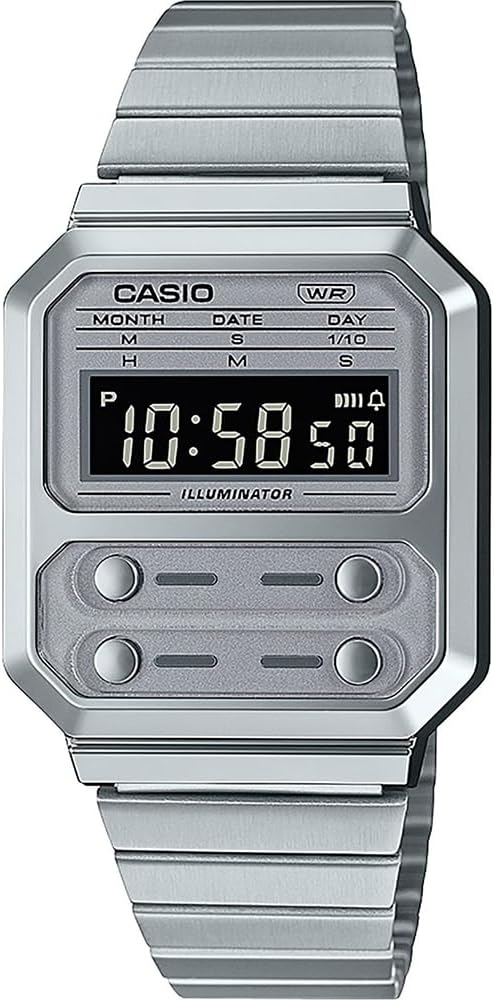
Obrázek 1: Přední view of the Casio A100WE-7B Digital Watch. The watch features a silver-tone case and band, a clear digital display, and four distinct buttons for various functions located below the main display area.
Nastavení
Adjusting the Band Length
The watch band features a side clasp for easy adjustment. To adjust the length:
- Open the clasp by lifting the small lever.
- Slide the clasp along the band to the desired position.
- Press the lever down firmly to secure the clasp. Ensure it clicks into place to prevent accidental opening.
Počáteční nastavení času a data
Refer to the "Operating Instructions" section for detailed instructions on setting the time and date using the watch's buttons.
Návod k obsluze
Your Casio A100WE-7B watch features four buttons for operation. While the exact button functions may vary by mode, generally:
- Tlačítko A (vlevo nahoře): Mode selection, adjustment.
- Tlačítko B (vpravo nahoře): Start/Stop, increment.
- Tlačítko C (dole vlevo): Light, decrement.
- Tlačítko D (vpravo dole): Reset, confirmation.
Režim měření času
This is the default mode, displaying the current time (hours, minutes, seconds), day of the week, month, and date.
- To enter time setting mode, press and hold Tlačítko A until the seconds begin to flash.
- Stiskněte Tlačítko A repeatedly to cycle through the setting options: seconds, hour, minute, year, month, day.
- Použití Tlačítko B to increase the flashing value or Tlačítko C snížit to.
- Stiskněte Tlačítko A znovu pro ukončení režimu nastavení.
Funkce alarmu
The watch features a daily alarm.
- V režimu měření času stiskněte Tlačítko A to cycle through modes until "AL" (Alarm) appears.
- Stiskněte a podržte Tlačítko A dokud nezačne blikat hodina budíku.
- Použití Tlačítko B upravit hodinu a Tlačítko A přepnout na minuty.
- Použití Tlačítko B upravit minuty.
- Stiskněte Tlačítko A pro ukončení nastavení budíku.
- Chcete-li zapnout/vypnout budík, stiskněte Tlačítko B while in Alarm Mode. An alarm indicator will appear/disappear.
Funkce stopek
The 1/100 second digital stopwatch measures elapsed time, split time, and two finishes.
- V režimu měření času stiskněte Tlačítko A to cycle through modes until "ST" (Stopwatch) appears.
- Stiskněte Tlačítko B pro spuštění stopek.
- Stiskněte Tlačítko B znovu zastavit.
- Stiskněte Tlačítko D pro vynulování stopek.
- For split times, press Tlačítko D while the stopwatch is running to display the split. Press Tlačítko D again to return to elapsed time measurement.
Backlight Operation (EL Backlight)
Stiskněte Tlačítko C (bottom left) to illuminate the display for easy reading in low light conditions. The backlight will remain on for a few seconds.
Hourly Časový signál
Aktivace nebo deaktivace hourly time signal (which beeps every hour on the hour), navigate to the Alarm Mode. While in Alarm Mode, press Tlačítko D přepnout hourly time signal ON/OFF. An indicator will show if it's active.
Automatický kalendář
The watch includes an auto calendar feature, which automatically adjusts for different month lengths and leap years once the date is correctly set.
Údržba
Voděodolnost
Your watch is water resistant for daily use. This means it can withstand splashes or brief immersion in water, such as during hand washing or rain. It is ne vhodné pro plavání, potápění nebo sprchování horkou vodou, protože pára může pronikat těsněními.
- Nepoužívejte tlačítka, pokud jsou hodinky mokré.
- Nevystavujte hodinky extrémním teplotám ani náhlým změnám teplot.
Životnost baterie
The approximate battery life is 7 years with a CR2016 battery. When the display becomes dim or functions become erratic, it is time to replace the battery. Battery replacement should be performed by a qualified technician to ensure water resistance is maintained.
Čištění
Pouzdro hodinek a řemínek otřete měkkým, suchým hadříkem. V případě odolných nečistot použijte lehceamp cloth can be used, followed by a dry cloth. Avoid using chemical cleaners, as they may damage the watch's finish.
Odstraňování problémů
- Displej je prázdný nebo tmavý: Baterie může být slabá nebo vybitá. Vyměňte baterii.
- Čas je nesprávný: Re-set the time according to the "Timekeeping Mode" instructions. Ensure the correct AM/PM setting is selected if using 12-hour format.
- Tlačítka nereagují: Ensure the watch is not wet. If the issue persists, a reset may be required (consult a service center) or the battery may be extremely low.
- Voda uvnitř hodinek: Hodinky ihned odneste do kvalifikovaného servisního střediska. Nepokoušejte se je sami sušit, mohlo by dojít k dalšímu poškození.
Specifikace
| Číslo modelu | A100WE-7BDF |
| Rozměry pouzdra | 37.5 x 33.5 x 9.5 mm |
| Celková hmotnost | 58 g |
| Voděodolnost | Daily Use (Splashes, Rain) |
| Podsvícení | EL podsvícení |
| Poplach | Denní alarm |
| Stopky | 1/100 second digital stopwatch |
| Časový signál | Hourly Časový signál |
| Kalendář | Automatický kalendář |
| Přesnost | +/-30 sekund za měsíc |
| Typ baterie | CR2016 (1 Lithium Metal battery included) |
| Přibližná výdrž baterie | 7 roky |
| Modul | 1275 |
| Typ spony | Dvojitě zamykatelná překládací spona |
Záruka a podpora
Your Casio watch is covered by a manufacturer's warranty against defects in materials and workmanship. For specific warranty terms and conditions, please refer to the warranty card included with your purchase or visit the official Casio webmísto.
For technical support, service, or replacement parts, please contact your local authorized Casio service center. Contact information can typically be found on the official Casio webwebu nebo v dokumentaci dodané s hodinkami.
Poznámka: Neoprávněné opravy nebo úpravy mohou vést ke zrušení záruky.