
Zavedení
This manual provides essential information for setting up, operating, maintaining, and troubleshooting your HP EliteDesk 800 G3 Gaming Tower. This system is a renewed tower form factor computer, designed for performance and upgradability, featuring an Intel Quad Core i5-6500 processor and NVIDIA GeForce GT 1030 graphics.
Obsah balení
Než budete pokračovat v instalaci, ujistěte se, že balení obsahuje všechny níže uvedené položky:
- 1 x HP EliteDesk 800 G3 Tower Desktop
- 1 x bezdrátová klávesnice
- 1 x bezdrátová myš
- 1 x Napájecí kabel
Note: Additional accessories such as a monitor, speakers, or a DP to HDMI adapter may need to be acquired separately.
Pokyny pro nastavení
1. Vybalení a umístění
Carefully remove the HP EliteDesk 800 G3 Tower from its packaging. Place the tower on a stable, flat surface with adequate ventilation. Ensure that the air vents are not obstructed to prevent overheating.

Obrázek: Zkosená přední strana view of the HP EliteDesk 800 G3 Tower desktop computer, showcasinjeho elegantní černobílý a stříbrný design.
2. Připojení periferií
Connect your monitor, keyboard, mouse, and other peripherals to the appropriate ports on the desktop tower.
- Monitor: Connect your monitor to one of the available DisplayPort or HDMI ports on the graphics card. An adapter may be required for HDMI connectivity.
- Bezdrátová klávesnice a myš: Insert the wireless USB receiver (typically found with the keyboard/mouse combo) into an available USB port on the front or rear of the tower. Ensure the keyboard and mouse have batteries installed.
- Síť: For wired internet, connect an Ethernet cable to the Ethernet port on the rear of the tower. For wireless internet, the system has built-in Wi-Fi.
- Zvuk: Connect speakers or headphones to the audio output port on the front or rear.
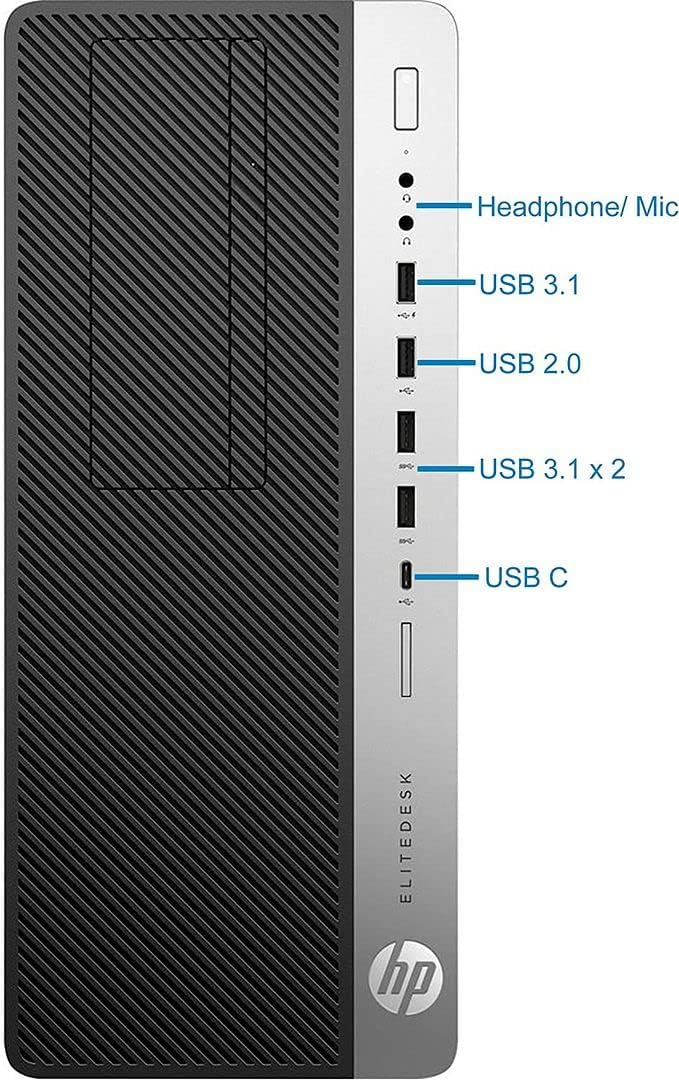
Obrázek: Detailní přední strana view of the HP EliteDesk 800 G3 Tower, highlighting the various front-facing ports including headphone/microphone jack, USB 3.1, USB 2.0, two additional USB 3.1 ports, and a USB-C port.
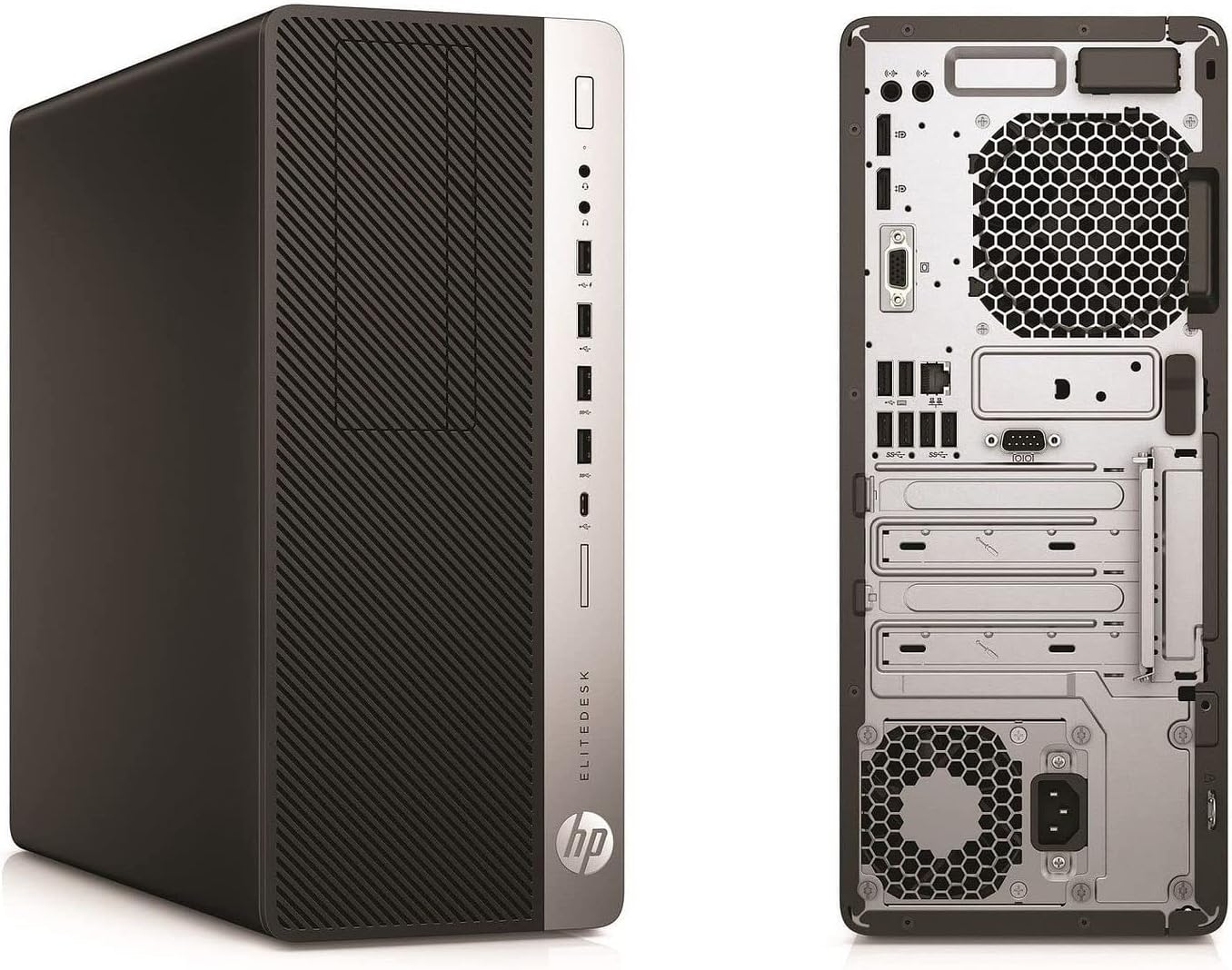
Image: Dual view of the HP EliteDesk 800 G3 Tower, displaying both the front panel with its ports and the rear panel with its extensive connectivity options, including DisplayPorts, USB ports, Ethernet, and power input.
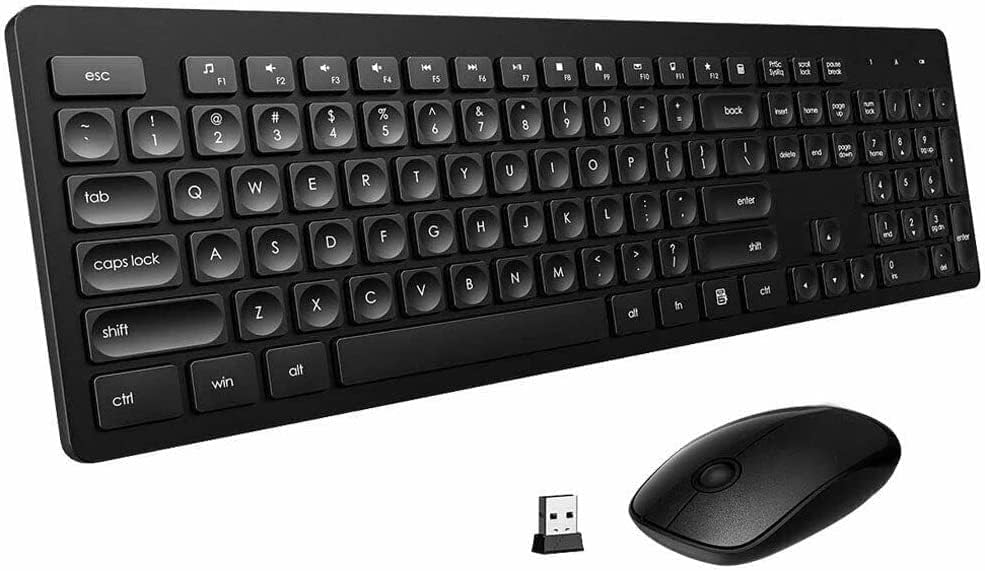
Image: The included black wireless keyboard and mouse, along with their compact USB receiver, ready for connection to the desktop.
3. Připojení napájení
Connect the power cord to the power supply unit (PSU) on the rear of the tower, then plug the other end into a grounded electrical outlet.
4. Počáteční zapnutí
Press the power button located on the front of the tower. The system will boot into Windows 11. Follow the on-screen instructions for any initial setup or personalization steps.
Návod k obsluze
Zapnutí/vypnutí
- Zapnutí: Press the power button on the front of the tower.
- Vypnout: V systému Windows 11 klikněte na tlačítko Start a poté vyberte Napájení > Vypnout.
- Restartovat: Klikněte na tlačítko Start a poté vyberte Napájení > Restartovat.
Připojení k síti
- Wi-Fi: The system has built-in Wi-Fi. To connect, click the network icon in the taskbar, select your desired Wi-Fi network, and enter the password.
- Ethernet: If an Ethernet cable is connected, the system should automatically establish a wired network connection.
Používání operačního systému
Your HP EliteDesk 800 G3 comes with Windows 11 Pro pre-installed. Familiarize yourself with the Windows 11 interface for managing files, installing applications, and customizing settings. For detailed guidance on Windows 11, refer to Microsoft's official documentation.
Údržba
Pravidelná údržba pomáhá zajistit dlouhou životnost a optimální výkon vašeho počítače.
- Udržujte průduchy volné: Ensure that the air intake and exhaust vents on the tower are free from dust and obstructions. Periodically clean them with compressed air.
- Aktualizace softwaru: Regularly check for and install Windows updates and driver updates for your graphics card and other components to maintain security and performance.
- Odstranění prachu: Every few months, carefully open the computer case (if comfortable doing so and aware of static discharge precautions) to gently remove accumulated dust from internal components using compressed air.
- Záloha dat: Pravidelně zálohujte důležitá data na externí disk nebo cloudové úložiště, abyste předešli jejich ztrátě.
Odstraňování problémů
Tato část se zabývá běžnými problémy, se kterými se můžete setkat.
Žádná síla
- Check if the power cord is securely connected to both the computer and the electrical outlet.
- Otestujte ji na jiném zařízení a ujistěte se, že je elektrická zásuvka funkční.
- Ověřte, zda je vypínač napájení (pokud je na zdroji napájení) v poloze „Zapnuto“.
Žádné zobrazení na monitoru
- Ensure the monitor is powered on and its video cable is securely connected to the graphics card port on the computer.
- Try connecting the monitor to a different video port on the computer, if available.
- Confirm the monitor's input source is correctly selected (e.g., DisplayPort, HDMI).
Klávesnice nebo myš nereaguje
- Check if the wireless USB receiver is properly inserted into a USB port.
- Ensure the keyboard and mouse have fresh batteries.
- Zkuste USB přijímač zapojit do jiného USB portu.
Pomalý výkon systému
- Zavřete nepotřebné aplikace běžící na pozadí.
- Zkontrolujte a nainstalujte všechny čekající aktualizace systému Windows nebo ovladačů.
- Ensure adequate free space on your primary drive (SSD).
- Spusťte antivirovou a malwarovou kontrolu.
Specifikace
Below are the key technical specifications for the HP EliteDesk 800 G3 Tower:
| Komponent | Specifikace |
|---|---|
| Značka | HP |
| Název modelu | EliteDesk 800 G3 |
| Model CPU | Intel Core i5-6500 (Quad Core, 3.20GHz up to 3.60GHz) |
| Paměť RAM | 16GB DDR4 SDRAM |
| Skladování | 128GB NVMe SSD + 2TB HDD |
| Grafická karta | NVIDIA GeForce GT 1030 2GB (Dedicated) |
| Operační systém | Windows 11 Pro |
| Porty USB 3.0 | 7 |
| Porty USB 2.0 | 4 |
| Zobrazit porty | 2 |
| Konektivita | Ethernet, HDMI, USB, Wi-Fi, Bluetooth |
| Rozměry (položka) | 6.06 x 14.37 x 14.57 palce |
| Vestavěná média | Klávesnice, myš |
Záruka a podpora
As a renewed product, this HP EliteDesk 800 G3 Gaming Tower is typically covered by a specific return and replacement policy. Please refer to your purchase documentation for exact terms.
- Zásady vrácení: This product includes a 90-day refund/replacement policy from the date of purchase.
- Technická podpora: For any technical issues or support inquiries, please contact the seller, Tech Magnet, directly through your purchase platform.