
1. Úvod
Thank you for choosing the Pantum BP5100DN Monochrome Laser Printer. This manual provides essential information for the safe and efficient use of your printer. Please read it thoroughly before operating the device and keep it for future reference.
The Pantum BP5100DN is designed for high-speed, high-quality monochrome printing, featuring automatic two-sided printing and versatile connectivity options including USB and Ethernet.
2. Bezpečnostní informace
- Always place the printer on a stable, level surface.
- Zajistěte dostatečné větrání kolem tiskárny, aby nedošlo k jejímu přehřátí.
- Nevystavujte tiskárnu vodě ani nadměrné vlhkosti.
- Use only the specified power supply and connect to a grounded outlet.
- Během provozu držte ruce a volný oděv v dostatečné vzdálenosti od pohyblivých částí.
- Nedotýkejte se fixační jednotky, může být velmi horká.
- Nepokoušejte se opravovat tiskárnu sami. Obraťte se na kvalifikovaný servisní personál.
3. Co je v krabici
Ověřte, zda jsou v balení obsaženy všechny níže uvedené položky:
- Pantum BP5100DN Monochrome Laser Printer
- Napájecí kabel
- kabel rozhraní USB
- Průvodce rychlým nastavením
- Starter cartridge (3000 pages)
- Starter drum (30000 pages)

Figure 3.1: Package Contents. This image displays the Pantum BP5100DN printer along with its accessories: power cord, USB interface cable, quick setup guide, starter toner cartridge, and starter drum unit.
4. Konec produktuview
4.1. Součásti tiskárny
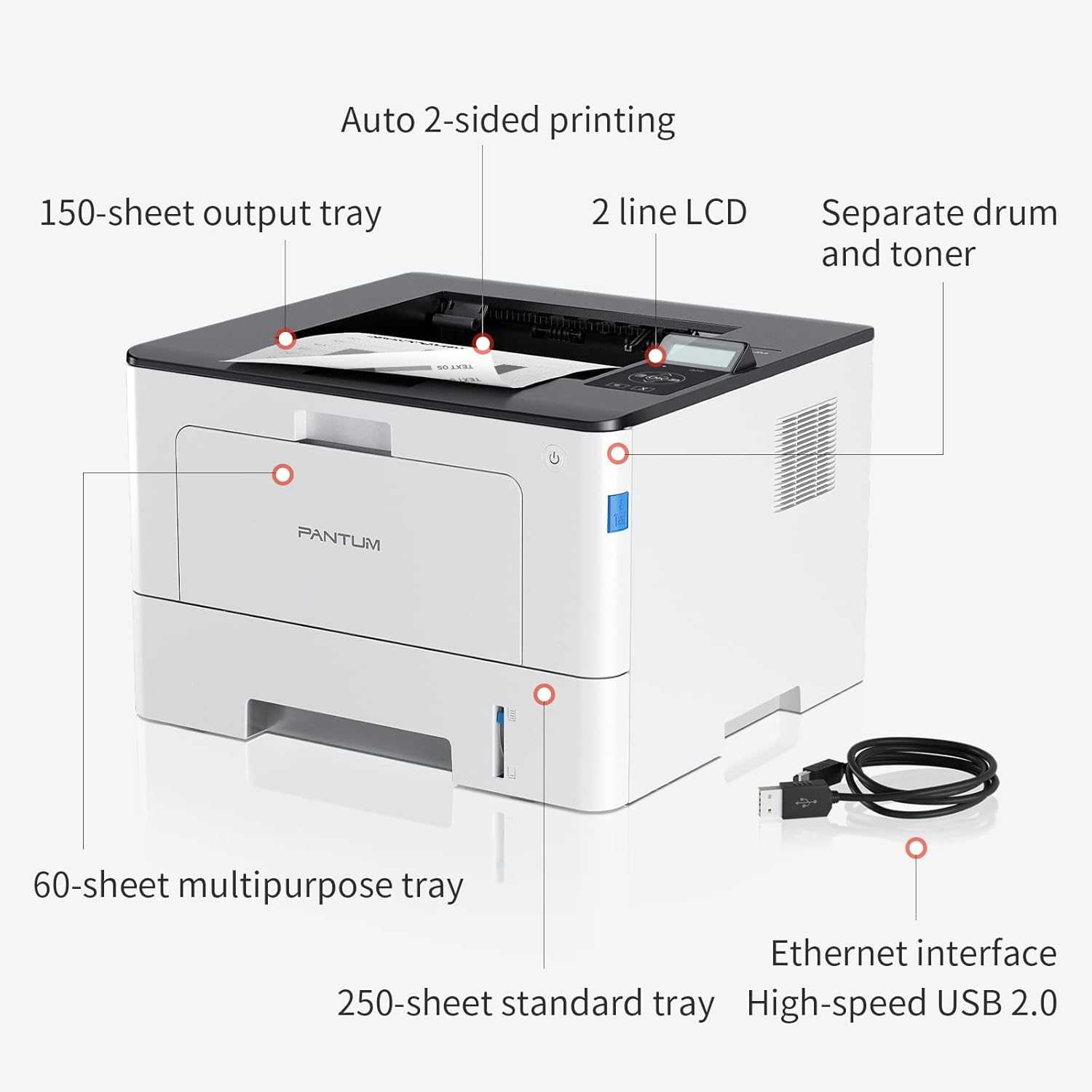
Figure 4.1: Printer Components. Key features include a 150-sheet output tray, a 2-line LCD display, separate drum and toner units, a 60-sheet multipurpose tray, a 250-sheet standard tray, an Ethernet interface, and a High-speed USB 2.0 port.
4.2. Rozměry

Figure 4.2: Printer Dimensions. The printer measures approximately 14.33 inches (W) x 10.12 inches (H) x 13.54 inches (D).
4.3. Ovládací panel

Figure 4.3: Control Panel. The control panel includes a 2-line LCD display for status messages and menu navigation, along with buttons for OK, arrow controls, and cancel functions.
5. Nastavení
5.1. Vybalení a umístění
- Opatrně vyjměte tiskárnu z obalu.
- Odstraňte z tiskárny všechny ochranné pásky a balicí materiály.
- Place the printer on a firm, level surface with adequate space for ventilation.
5.2. Toner and Drum Installation
- Otevřete přední kryt tiskárny.
- Vybalte jednotku fotoválce a tonerovou kazetu.
- Vložte tonerovou kazetu do fotoválce, dokud nezacvakne na místo.
- Insert the combined drum and toner unit into the printer.
- Zavřete přední kryt.
5.3. Vkládání papíru
- Pull out the standard paper tray or open the multipurpose tray.
- Upravte vodítka papíru podle formátu papíru.
- Load paper into the tray, ensuring it is flat and not exceeding the maximum capacity (250 sheets for standard tray, 60 sheets for multipurpose tray).
- Zavřete zásobník papíru.
5.4. Napájení a konektivita
- Připojte napájecí kabel k tiskárně a poté do uzemněné elektrické zásuvky.
- For USB connection: Connect the provided USB 2.0 cable from the printer to your computer.
- For Ethernet connection: Connect an Ethernet cable from the printer to your network router or switch.
- Stisknutím tlačítka napájení zapněte tiskárnu.
6. Návod k obsluze
6.1. Instalace ovladače
For optimal performance, install the printer drivers from the official Pantum website or the provided installation media. The printer supports easy one-step installation for quick setup.
6.2. Tisk dokumentu
- Otevřete dokument, který chcete vytisknout, v počítači nebo mobilním zařízení.
- Vyberte možnost tisku z aplikace.
- Choose the Pantum BP5100DN from the list of available printers.
- Adjust print settings as needed (e.g., number of copies, paper size, duplex printing).
- Klikněte na tlačítko „Tisk“.
The printer offers fast printing speeds of up to 40 pages per minute (A4) / 42 pages per minute (Letter) in black and white. It also supports automatic two-sided printing to save paper.
6.3. Mobilní tisk
The Pantum BP5100DN supports direct printing of office documents from mobile devices. Ensure your mobile device and printer are connected to the same network or via USB OTG (if supported by your device and printer).
7. Údržba
7.1. Replacing Toner Cartridge and Drum Unit
When the toner is low or the drum unit reaches its end of life, the printer's display will show a message. Refer to the instructions provided with the replacement consumables for proper installation. The starter toner cartridge yields approximately 3000 pages, and the starter drum unit yields approximately 30000 pages.
7.2. Čištění tiskárny
- Před čištěním tiskárnu vypněte a odpojte napájecí kabel.
- Otřete vnější povrch tiskárny měkkým hadříkem, který nepouští vlákna.
- Use a dry cloth to clean the paper path and rollers if paper jams occur frequently.
- Nepoužívejte abrazivní čisticí prostředky nebo rozpouštědla.
8. Řešení problémů
Pokud se s tiskárnou setkáte s problémy, podívejte se na následující běžná řešení:
- Tiskárna nereaguje: Zkontrolujte připojení napájení, připojení kabelu USB/ethernet a ujistěte se, že je tiskárna zapnutá. Restartujte tiskárnu i počítač.
- Zaseknutý papír: Open all covers and carefully remove any jammed paper. Ensure paper is loaded correctly and not creased or damaged.
- Špatná kvalita tisku: Check toner levels. If print quality is faded, especially with cut and paste text, ensure you are using the correct print settings and consider replacing the toner cartridge or drum unit if they are near end-of-life.
- Problémy s připojením: For Ethernet, verify network cable connection and IP address settings. For USB, try a different USB port or cable.
- Chybové zprávy: Consult the printer's display for specific error codes and refer to the quick setup guide or online support for detailed solutions.
For persistent issues, please contact customer service for support.
9. Specifikace
| Funkce | Specifikace |
|---|---|
| Název modelu | BP5100DN |
| Technologie tisku | Laser |
| Tiskový výstup | Monochromatický |
| Maximální rychlost tisku (černobíle) | 40 ppm (A4) / 42 ppm (Letter) |
| Maximální rozlišení tisku | 1200 x 1200 dpi |
| Oboustranný tisk | Ano (automaticky) |
| Technologie připojení | Ethernet, USB 2.0 |
| Maximální vstupní kapacita listu | 250 sheets (Standard Tray), 60 sheets (Multipurpose Tray) |
| Tisková média | Papír (obyčejný) |
| Velikost listu | A4, Letter, etc. |
| Kompatibilní zařízení | Chytré telefony, počítače |
| Wattage | 650 wattů |
| Hmotnost položky | 9.07 kg (přibližně 9 kg 70 g) |
| Výrobce | Pantum |
10. Záruka a podpora
The Pantum BP5100DN Monochrome Laser Printer comes with a 1-year warranty from the date of purchase. For warranty claims, technical support, or any inquiries, please refer to the contact information provided in your quick setup guide or visit the official Pantum webmísto.
For a better experience, please kindly refer to the user manual or contact customer service for support.