
1. Úvod
Děkuji za nákupasing the Depusheng U6 Audio Mixer. This 6-channel DJ sound controller is designed for versatile audio mixing, recording, and live streaming applications. It features a built-in USB audio interface, Bluetooth connectivity, and U-Disk playback/recording capabilities. This manual provides essential information for safe operation, setup, and optimal performance of your device. Please read it thoroughly before use and retain it for future reference.
2. Bezpečnostní informace
- Zdroj napájení: Používejte pouze určený napájecí adaptér nebo kompatibilní zdroj napájení USB. Ujistěte se, že hlasitosttage odpovídá požadavkům na zařízení.
- Voda a vlhkost: Nevystavujte mixér vodě, dešti ani nadměrné vlhkosti. Nepokládejte na něj předměty naplněné tekutinami.
- Větrání: Zajistěte dostatečné větrání. Neblokujte větrací otvory.
- Teplo: Udržujte jednotku mimo dosah zdrojů tepla, jako jsou radiátory, topná tělesa, kamna nebo jiná zařízení produkující teplo.
- Čištění: Čistěte pouze suchým hadříkem. Nepoužívejte tekuté čističe nebo aerosolové čističe.
- Servis: Nepokoušejte se tento výrobek opravit sami. Veškerý servis svěřte kvalifikovanému servisnímu personálu.
- Fantomová síla: When using condenser microphones, ensure +48V phantom power is activated only when necessary and that the microphone is compatible.
3. Obsah balení
Zkontrolujte prosím, zda jsou v balení obsaženy všechny následující položky:
- Depusheng U6 Audio Mixer
- Napájecí kabel USB
- Uživatelská příručka
4. Konec produktuview
The Depusheng U6 is a compact 6-channel mixer designed for various audio applications. It features multiple input and output options, integrated effects, and digital connectivity.
4.1 Ovládací prvky a připojení na předním panelu
The front panel provides access to all mixing controls and primary input/output ports.

Popis obrázku: Detailní view of the Depusheng U6 Audio Mixer's front panel, showing all knobs, faders, buttons, and the digital display for USB/Bluetooth functions. Key controls include GAIN, HIGH, LOW, EFX, PEAK, VOL for each channel, along with DELAY, REPEAT, and MAIN volume controls. The USB port and Bluetooth indicator are also visible.
- Mikrofonní/linkové vstupy (kanály 1-4): Combo jacks supporting both XLR and 1/4" (6.35mm) inputs for microphones or line-level instruments.
- +48V PHANTOM: Button to activate +48V phantom power for condenser microphones on channels 1-4.
- ZÍSKAT: Upravuje vstupní citlivost pro každý kanál.
- VYSOKÁ/NÍZKÁ: 2-band equalizer for adjusting treble and bass frequencies for each channel.
- EFX: Sends signal to the built-in effects processor (DELAY/REPEAT).
- LED PEAK: Rozsvítí se, když je vstupní signál příliš vysoký, což signalizuje možné ořezávání.
- VOL: Channel volume control.
- S/S (Stereo Input 5/6): 1/4" stereo inputs for connecting line-level devices.
- REC/MAIN OUT (RCA): Stereo RCA outputs for recording or connecting to external devices.
- MAIN OUT (1/4"): Stereo 1/4" outputs for connecting to power amplifikátory nebo aktivní reproduktory.
- USB port: For U-Disk playback/recording and connection to a computer as an audio interface.
- MODE/BT (Bluetooth): Button to switch between USB, Bluetooth, and other modes.
- PLAY/PAUSE, PREVIOUS, NEXT: Controls for U-Disk and Bluetooth playback.
- ZPOŽDĚNÍ/OPAKOVÁNÍ: Controls for adjusting the built-in delay effect.
- CLIP LED: Indicates output signal clipping.
- LED POWER: Indikuje, že je jednotka zapnutá.
- HLAVNÍ: Hlavní ovládání hlasitosti pro hlavní výstup.
- TELEFON: Ovládání hlasitosti sluchátek.
- Sluchátkový jack: 1/4" stereo output for monitoring.
4.2 Input Interface Types

Popis obrázku: Detailní záběr view of the input jacks on the Depusheng U6 Audio Mixer, illustrating both the 6.5mm (1/4 inch) and XLR connection types for microphones and line-level devices. This image highlights the versatility of the combo input jacks.
- 6.5mm (1/4") Interface: For connecting instruments or line-level audio sources.
- XLR rozhraní: For connecting microphones, providing a balanced connection.
5. Nastavení
5.1 Zapnutí mixážního pultu
The Depusheng U6 mixer can be powered via its USB port.

Popis obrázku: This image demonstrates two methods of powering the Depusheng U6 Audio Mixer via USB: connecting it to a computer's USB port or to a portable power bank. This highlights the flexibility of its power options.
- Connect the provided USB cable to the mixer's USB power input.
- Connect the other end of the USB cable to a computer's USB port or a USB power adapter (not included) connected to a wall outlet, or a power bank.
- The POWER LED on the mixer will illuminate when power is supplied.
5.2 Základní připojení
Typická nastavení připojení viz níže uvedený diagram.

Popis obrázku: A comprehensive diagram illustrating various connection possibilities for the Depusheng U6 Audio Mixer. It shows connections for a computer, condenser microphone, dynamic microphone, wireless microphone receiver, power amplifier, passive speakers, and headphones, demonstrating a complete audio setup.
- Mikrofony: Connect dynamic or condenser microphones to the MIC/LINE inputs (Channels 1-4) using XLR cables. Activate +48V phantom power for condenser microphones.
- Přístroje/linková zařízení: Connect instruments or other line-level devices to the MIC/LINE inputs (Channels 1-4) using 1/4" cables, or to the S/S (Stereo Input 5/6) using 1/4" stereo cables.
- Output to Speakers/Ampživější: Connect the MAIN OUT (1/4") to your power amplifier nebo aktivní reproduktory.
- Sluchátka: Pro monitoring připojte sluchátka do konektoru PHONE.
- Počítač: Connect the mixer's USB port to your computer for use as an audio interface.
6. Návod k obsluze
6.1 Bezdrátové streamování přes Bluetooth
The U6 mixer supports wireless Bluetooth audio streaming from compatible devices.
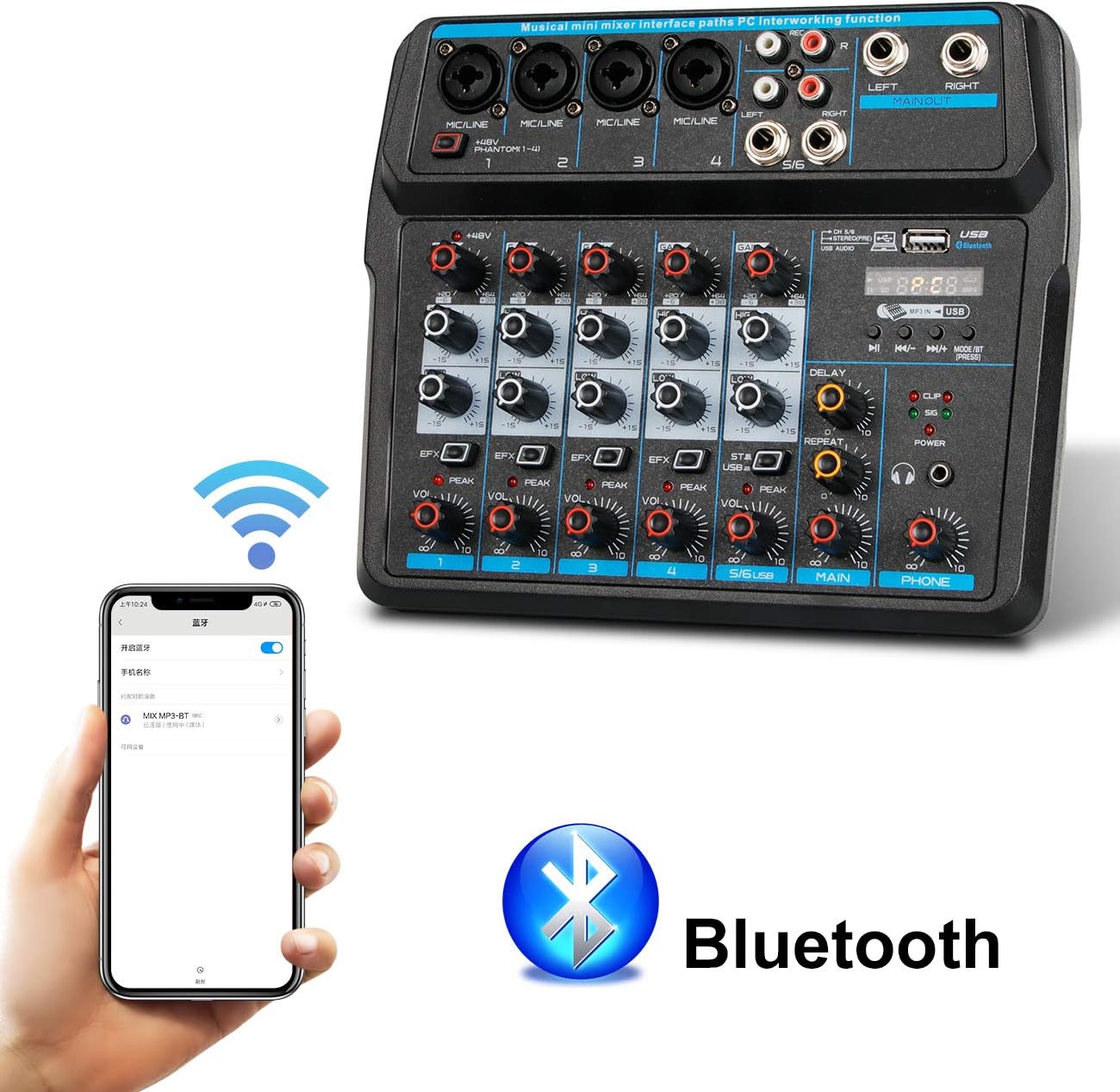
Popis obrázku: This image shows a smartphone displaying its Bluetooth settings, with the Depusheng U6 Audio Mixer (labeled 'U6 MP3-BT') available for connection. A large Bluetooth logo is also present, indicating the wireless connectivity feature.
- Stiskněte tlačítko MODE/BT button on the mixer until the Bluetooth indicator lights up and the display shows 'BT'.
- Na svém mobilním zařízení (chytrém telefonu, tabletu atd.) povolte Bluetooth a vyhledejte dostupná zařízení.
- Select 'U6 MP3-BT' from the list to pair.
- Once paired, you can stream audio wirelessly from your device to the mixer. Bluetooth operates effectively within approximately 1.5 feet.
6.2 USB Audio Interface (PC Recording/Playback)
The U6 mixer can function as an external sound card for your computer.

Popis obrázku: This diagram illustrates how to connect the Depusheng U6 Audio Mixer to a laptop via USB for both playback and recording. It shows audio signals flowing from the computer to the mixer (background music) and from the mixer to the computer (for recording), with a close-up of the USB connection port on the mixer.
- Connect the mixer to your PC using a USB cable.
- The mixer will be recognized as a USB audio device by your computer.
- In your computer's sound settings or DAW (Digital Audio Workstation) software (e.g., Pro Tools, Logic Pro X, GarageBand, Audacity), select the U6 mixer as the input and output audio device.
- Nyní můžete nahrávat zvuk ze vstupů mixážního pultu do počítače nebo přehrávat zvuk z počítače přes mixážní pult.
6.3 U-Disk Playback and Recording
The mixer supports direct playback of audio files from a USB flash drive (U-Disk) and recording to it.

Popis obrázku: This image highlights the U-Disk functionality of the Depusheng U6 Audio Mixer. It shows a USB flash drive inserted into the mixer's USB port, with text indicating its capabilities: 1. Play MP3/WAV/WMA/FLAC files, and 2. Record audio. The mixer's digital display shows '88:88', likely indicating playback time or a menu option.
- Přehrávání: Insert a U-Disk containing audio files (MP3/WAV/WMA/FLAC) into the USB port. The mixer will automatically switch to U-Disk mode or you may need to press MODE/BT. Use the PLAY/PAUSE, PREVIOUS, and NEXT buttons to control playback.
- Záznam: To record to a U-Disk, ensure it is inserted and the mixer is in U-Disk mode. Follow the specific recording instructions in the full manual (if available) or typically press and hold the PLAY/PAUSE button to initiate recording.
6.4 Using Effects (DELAY and REPEAT)
The U6 mixer includes built-in DELAY and REPEAT effects to enhance your audio.
- Použijte EFX knob on each channel to send a portion of that channel's signal to the effects processor.
- Upravte ZPOŽDĚNÍ knob to control the delay time of the effect.
- Upravte OPAKOVAT knoflík pro ovládání počtu opakování efektu delay.
- The overall level of the effects return can be controlled via a dedicated EFX return knob (if present) or integrated into the main mix.
7. Údržba
- Čištění: Use a soft, dry cloth to clean the surface of the mixer. Do not use abrasive cleaners, waxes, or solvents.
- Skladování: Pokud se mixér delší dobu nepoužívá, skladujte jej na chladném a suchém místě, mimo dosah přímého slunečního záření a extrémních teplot.
- Péče o kabely: Always grasp the connector, not the cable, when unplugging. Avoid bending or kinking cables excessively.
8. Řešení problémů
If you encounter issues with your Depusheng U6 Audio Mixer, refer to the following common problems and solutions:
| Problém | Možná příčina | Řešení |
|---|---|---|
| Žádný zvukový výstup |
|
|
| Mikrofon nefunguje |
|
|
| Bluetooth se nepřipojuje |
|
|
| Problémy s nahráváním/přehráváním na USB |
|
|
9. Specifikace
| Funkce | Specifikace |
|---|---|
| Značka | Depusheng |
| Číslo modelu | U6 |
| Počet kanálů | 6 |
| Technologie připojení | Bluetooth, USB |
| Zvukový vstup | XLR, 1/4" (6.35mm) |
| Zdroj napájení | USB kabel |
| Hmotnost položky | 1.02 kg |
| Rozměry balení | 29.3 x 24.3 x 9.2 cm |
| Hardwarové rozhraní | Bluetooth |
10. Záruka a podpora
Depusheng products are designed for reliability and performance. This product comes with a standard manufacturer's warranty. For specific warranty terms and conditions, please refer to the documentation provided at the time of purchase or contact your retailer.
If you require technical support or have questions not covered in this manual, please contact Depusheng customer service through the retailer where you purchased the product. Please have your model number (U6) and purchase information ready.