
1. Úvod
The Brady M210 Portable Label Printer Kit (M210-KIT) is designed to optimize on-site efficiency by enabling the creation of fast and reliable identification labels anywhere. This comprehensive kit includes the M210 printer, a label cartridge, essential accessories, and a durable hard case for convenient storage and transport. It is engineered for demanding work environments, offering robust performance for various labeling needs.

Konec produktuview Video
Toto video poskytuje obecný přehledview of Brady portable printers, highlighting their utility and design.
Konecview specifically for the M210 printer, demonstrating its features and capabilities.
2. Co je v krabici
The Brady M210 Portable Label Printer Kit comes with all the necessary components to get you started with your labeling tasks. Please ensure all items listed below are present in your kit:
- (1) AC Adapter/Battery Charger (M210-AC)
- (1) M210 Label Printer (M210)
- (1) M21 Series Nylon Cloth Patch Panel and Wire and Cable Labels (M21-750-499)
- (1) Li-ion Rechargeable Battery (M210-BATTERY)
- (1) Rychlý průvodce
- (1) Replacement Power Cord - North America
- (1) Hard Case (M210-HC)

3. Vlastnosti
The Brady M210 Label Printer is equipped with a range of features designed for efficiency and durability in various industrial and professional settings:
- Multi-line Label Creation: The printer creates multi-line labels for clear identification of wires, panels, circuit boards, and other industrial items.
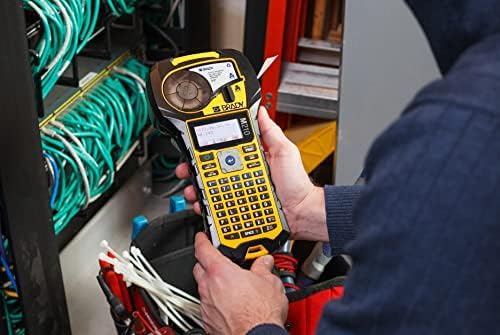
- User-Friendly Keypad and Display: Features a full A to Z and 0 to 9 keypad, along with a backlit LCD graphics display for easier labeling, even in low-lit areas.
- Variable Text Sizes: Capable of printing in 6 different text sizes, ranging from 6 point to 40 point, in a single color.
- Extensive Cartridge Compatibility: Utilizes over 90 different cartridges, including continuous tape and pre-sized labels, across 12 different material types.
- Robustní odolnost: Drop-tested and reinforced with molded rubber impact bumpers, ensuring durability in demanding work environments.

Top Applications and Materials
The M210 is versatile, suitable for a wide range of applications and compatible with various high-performance label materials:
- Wire and Cable: Sleeves, self-laminating, wire wraps, flag labels, cable markers.
- DataCom: Self-laminating, flag labels, patch-panel, face plate labeling.
- Elektrické: Sleeves, self-laminating, wire wraps, cable markers, flag and raised panel.
- Lean / 5S: Rack, gauge, part bin labeling.
- General Identification: Directional marking, equipment labeling.


4. Nastavení
Napájení zařízení
The Brady M210 can be powered in multiple ways to suit your needs:
- 6 AA baterie: For quick and easy power on the go.
- Rechargeable Li-ION Battery Pack: Provides extended use and can be recharged.
- Napájecí adaptér: For continuous power when near an outlet.

Instalace a nabíjení baterie
To install the Li-ion rechargeable battery, open the battery compartment on the back of the printer and insert the battery pack. For charging, the battery needs to be removed from the printer and charged using the provided AC adapter/battery charger (M210-AC). Connect the charger to a power outlet and the battery. The quick start guide provides clear instructions for this process.
Loading a Label Cartridge
Replacing the label cartridge is a straightforward process. The printer features a simple latch on the front and an eject button on the back for easy cartridge removal and insertion. Before installing a new label cartridge, ensure the label stock is properly fitted between the small plastic guides at the end of the cartridge to prevent jamming.

5. Obsluha tiskárny
The M210 is designed for intuitive operation, allowing users to quickly create and print labels.
Typing and Display
Use the QWERTY keypad to enter text for your labels. The backlit LCD graphics display provides clear visibility of your input, even in dimly lit environments. The printer supports various font sizes and styles, which can be adjusted via the keypad controls.
Tisk štítků
Once your text is entered and formatted, press the 'Print' button to generate your label. The printer is capable of producing multi-line labels with clear and easy-to-read text. It supports various label types, including continuous tape and pre-sized labels, allowing for flexibility in your labeling tasks.
6. Údržba
To ensure the longevity and optimal performance of your Brady M210 Label Printer, regular maintenance is recommended:
- Čištění: Periodically clean the print head and the label path to prevent residue buildup that could affect print quality. Use a soft, lint-free cloth.
- Skladování: When not in use, store the printer in its durable hard case to protect it from dust, debris, and physical damage.
- Péče o baterie: Follow the battery charging guidelines. If storing for an extended period, ensure the battery is partially charged and stored in a cool, dry place.
- Trvanlivost: The M210 is designed to be robust, featuring drop-tested construction and rubber impact bumpers. While durable, avoid unnecessary drops or harsh impacts to prolong its lifespan.
7. Řešení problémů
"No/Invalid Cartridge" Error
If your printer displays a "No/Invalid Cartridge" error, first ensure that the label cartridge is properly seated and locked into place. If the issue persists, verify that you are using an authentic Brady label cartridge. Some users have reported issues with non-authentic cartridges. Look for the "Authentic" logo on your Brady cartridges to ensure compatibility and proper function.

Label Jamming
If labels are jamming, check that the label stock is correctly positioned between the small plastic guides at the end of the cartridge before installation. Improper alignment can lead to feeding issues.
8. Specifikace
| Specifikace | Detail |
|---|---|
| Rozměry produktu | 2.5"H x 4.5"Š x 9.5"V |
| Maximální velikost média | 0.75 palců |
| Tisková média | Štítky |
| Typ skeneru | Přenosný |
| Maximální rychlost kopírování (černobíle) | 0.39 ppm |
| Typ zobrazení | LCD |
| Maximální rozlišení barevného tisku | 203 dpi |
| Velikost listu | 0.25 x 0.75 |
| Maximální rozlišení černobílého tisku | 203 dpi |
| Oboustranný tisk | Žádný |
| Duplex | Simplexní |
| Hardwarové rozhraní | USB 2.0 |
| Barva inkoustu | černý |
| Rezoluce | 203 x 203 dpi |
| Kontrolní metoda | App |
| Celkový počet portů USB | 1 |
| Modelová řada | M210 |
| Specifické použití pro produkt | Profesionální |
| UPC | 888434559505 |
| Kapacita paměti | 16 MB |
| Hmotnost položky | 4.5 libry |
| ASIN | B09WZDDGCZ |
| Číslo modelu položky | M210-KIT |
| Baterie | Jsou vyžadovány 1 lithium-iontové baterie. (v ceně) |
| Datum první dostupnosti | 8. května 2022 |
| Výrobce | Brady |
| Technologie připojení | USB |
| Technologie tisku | Tepelný |
| Speciální funkce | Resistant to 6-foot drops |
| Barva | Žlutá/černá |
| Název modelu | M210 |
| Tiskový výstup | Monochromatický |
| Maximální rychlost tisku (barevně) | 0.39 ppm |
| Maximální rychlost tisku černobíle | 0.393 |
9. Záruka a podpora
The Brady M210 Portable Label Printer Kit comes with a Plná záruka from Brady. For specific warranty terms and conditions, please refer to the documentation included with your product or visit the official Brady webmísto.
Plány ochrany
Pro rozšíření krytí nad rámec standardní záruky je možné zakoupit další ochranné plány:
- Dvouletý ochranný plán: Prodlužuje krytí o 36 měsíců.
- Dvouletý ochranný plán: Prodlužuje krytí o 48 měsíců.
- Kompletní ochrana: A monthly plan that covers all eligible past and future purchases.
For technical support, product inquiries, or to purchase additional supplies, please contact Brady customer service. Contact information can typically be found on the product packaging or the manufacturer's webmísto.


