
1. Úvod
This manual provides detailed instructions for the setup, operation, and maintenance of your SEDSEY K22 Tactical Smart Watch. Please read this manual thoroughly before using the device to ensure proper function and to maximize your user experience. The K22 Smart Watch is designed for active individuals, featuring a rugged design, comprehensive health monitoring, and convenient Bluetooth calling capabilities.
2. Obsah balení
Upon unpacking your SEDSEY K22 Tactical Smart Watch, please verify that all items listed below are present and in good condition:
- SEDSEY K22 Tactical Smart Watch (k22-Army green)
- Nabíjecí kabel
- Uživatelská příručka (tento dokument)
3. Konec produktuview
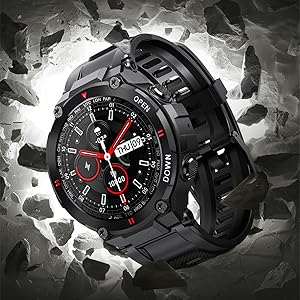
The SEDSEY K22 Tactical Smart Watch features a 1.28-inch IPS full-touch round display housed in a rugged casing, designed for durability and clear visibility. It includes multiple physical buttons for navigation and quick access to functions.

Obrázek 3.1: Přední view of the SEDSEY K22 Tactical Smart Watch, showcasing its round display and rugged army green design.
4. Průvodce nastavením
4.1. Počáteční nabíjení
Before first use, fully charge your smart watch. Connect the magnetic charging cable to the charging contacts on the back of the watch and plug the USB end into a standard USB power adapter (not included). A full charge typically takes approximately 2 hours.

Obrázek 4.1: The watch display indicating a charging status, showing the time and a battery icon.
4.2. Instalace a párování aplikace
- Stáhněte si aplikaci: Scan the QR code provided in the watch's quick start guide or search for the companion app (e.g., 'Dafit' or similar, as indicated in product information) on your smartphone's app store (Apple App Store for iOS or Google Play Store for Android).
- Povolit Bluetooth: Ujistěte se, že je na vašem smartphonu povoleno Bluetooth.
- Spárujte zařízení: Open the app, create an account if prompted, and follow the on-screen instructions to add your device. Select 'K22' from the list of available devices. Confirm the pairing request on both your phone and the watch.

Obrázek 4.2: Illustration of the Bluetooth dial call feature, showing a smartphone's call interface alongside the watch's dial pad and incoming call screen.
4.3. Základní nastavení
After successful pairing, you can customize various settings through the app or directly on the watch:
- Ciferník: Choose from a variety of pre-installed watch faces or customize your own via the app.
- Jazyk: The watch language will automatically synchronize with your smartphone's language. Supported languages include English, Chinese, Japanese, German, French, Spanish, Arabic, Russian, Ukrainian, and Portuguese.
- Čas a datum: These settings are typically synchronized automatically with your paired smartphone.
5. Návod k obsluze
5.1. Navigace
The K22 Smart Watch features a full-touch screen and physical buttons for intuitive navigation:
- Dotyková obrazovka: Přejetím prstem doleva/doprava, nahoru/dolů procházejte nabídkami a funkcemi. Klepnutím vyberete.
- Boční tlačítka: Use the physical buttons on the side for power on/off, returning to the home screen, or quick access to specific functions as configured.
5.2. Volání přes Bluetooth
Once paired, the watch allows you to manage calls directly from your wrist.
- Uskutečňování hovorů: Pro zahájení hovoru otevřete číselník nebo seznam kontaktů na hodinkách.
- Přijímání hovorů: Při příchozím hovoru hodinky zobrazí ID volajícího. Hovor můžete přijmout nebo odmítnout přímo z hodinek.
Obrázek 5.1: A user interacting with the smart watch to manage a Bluetooth call, demonstrating the convenience of hands-free communication.
5.3. Upozornění na zprávy
Receive real-time notifications from your smartphone directly on your watch.
- Nastavení: Enable app notifications in the companion app on your smartphone for desired applications (e.g., Mail, Text, Facebook, Twitter, Instagberan).
- Viewing: Swipe down on the watch face or access the notifications menu to view recent messages.

Obrázek 5.2: The watch screen showing an incoming call reminder and various social media application icons, indicating notification support.
5.4. Monitorování zdraví
The K22 Smart Watch provides continuous monitoring of key health metrics.
- Srdeční frekvence: The watch features a 24-hour dynamic heart rate monitor. Access the heart rate interface on the watch to view data v reálném čase.

Obrázek 5.3: A user wearing the smart watch, which displays a real-time heart rate graph, illustrating the continuous heart rate detection feature.
- Blood Pressure & SpO2: The watch can provide estimates for blood pressure and blood oxygen saturation (SpO2). These measurements are for reference only and should not be used for medical diagnosis.

Obrázek 5.4: The watch face showing various health metrics including heart rate (BPM), blood pressure (MMHG), and blood oxygen saturation (SpO2) percentage.
- Monitor spánku: The watch automatically records your sleep patterns, including deep and light sleep, to help you understand and adjust your sleep habits.

Obrázek 5.5: A person sleeping while wearing the smart watch, which displays a detailed sleep monitoring graph showing sleep duration and quality breakdown.
- krokoměr: Tracks your all-day steps, distance, and calories burned.
5.5. Sportovní režimy
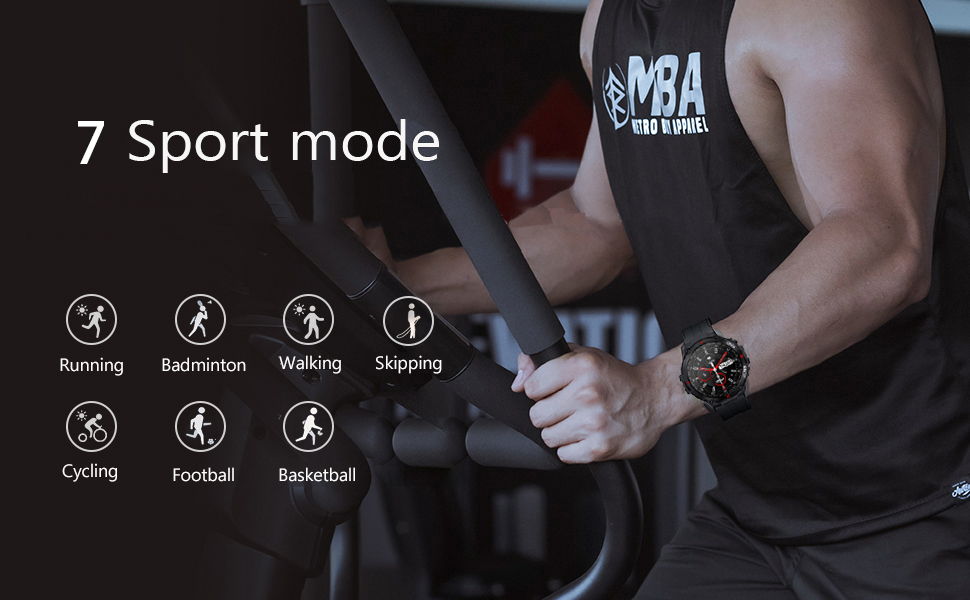
The K22 Smart Watch supports 17 sport modes to accurately track your exercise data.
- Dostupné režimy: Walking, Running, Cycling, Badminton, Basketball, Football, Skipping Rope, and more.
- Aktivace: Navigate to the 'Sport' menu on the watch, select your desired activity, and start your workout. The watch will record real-time heart rate, movement data, and other relevant health data.

Obrázek 5.6: The watch screen showing icons representing multiple sport modes, including walking, running, cycling, skipping, badminton, basketball, and football.
5.6. Další užitečné funkce
- Ovládání hudby: Ovládejte přehrávání hudby na smartphonu (přehrávání, pozastavení, přeskakování skladeb) přímo z hodinek.
- Počasí: View current weather conditions and forecasts after syncing with your phone's weather app.
- Vzdálená kamera: Používejte hodinky jako dálkové ovládání fotoaparátu vašeho smartphonu.
- Sedavé připomenutí: Dostávejte upozornění na pohyb po obdobích nečinnosti.
- Alarm Clock, Stopwatch, Timer, Games: Access these utility functions from the watch's menu.
Obrázek 5.7: A composite image illustrating various smart watch features: remote camera control, sedentary reminder, real-time weather information, and a step counter.
6. Údržba
6.1. Čištění
Regularly clean your watch to ensure optimal performance and hygiene:
- Otřete obrazovku a řemínek měkkým hadříkemamp tkanina.
- Vyhněte se používání agresivních chemikálií nebo abrazivních materiálů.
- Před nabíjením se ujistěte, že jsou nabíjecí kontakty čisté a suché.
6.2. Voděodolnost
The K22 Smart Watch is IP67 waterproof, meaning it is resistant to splashes, rain, and brief immersion in water. It can be worn during daily activities like hand washing or showering. However, it is not recommended for swimming, diving, or exposure to hot water/steam.
6.3. Péče o baterie
- Hodinky pravidelně nabíjejte, aby baterie vydržela dobře.
- Vyhněte se extrémním teplotám, které mohou snížit výkon baterie.
- Pokud hodinky nebudete delší dobu používat, nabijte je před uskladněním přibližně na 50 %.
7. Řešení problémů
If you encounter issues with your SEDSEY K22 Smart Watch, refer to the following common solutions:
| Problém | Možné řešení |
|---|---|
| Hodinky se nezapínají | Ujistěte se, že jsou hodinky plně nabité. Stiskněte a několik sekund podržte tlačítko napájení. |
| Nelze spárovat se smartphonem | Check if Bluetooth is enabled on your phone. Ensure the watch is within range. Restart both the watch and phone. Try unpairing and re-pairing through the app. |
| Nepřesné zdravotní údaje | Ensure the watch is worn snugly on your wrist, not too tight or too loose. Clean the sensor on the back of the watch. Note that environmental factors and individual physiology can affect readings. |
| Oznámení nebyla přijata | Verify that app notifications are enabled in your phone's settings and within the companion app. Ensure the watch is connected via Bluetooth. |
| Krátká výdrž baterie | Reduce screen brightness, disable continuous heart rate monitoring if not needed, limit frequent notifications. Ensure background app usage is optimized on your phone. |
8. Specifikace
Key technical specifications for the SEDSEY K22 Tactical Smart Watch:
| Funkce | Detail |
|---|---|
| Číslo modelu | K22 |
| Zobrazit | 1.28-inch IPS Full Touch Round Screen, 240x240 resolution |
| Kapacita baterie | Lithium Polymer s kapacitou 400 mAh |
| Životnost baterie | 7-15 days (working time), 30 days (standby time) |
| Doba nabíjení | Přibl. 2 hodin |
| Voděodolnost | IP67 (Daily life waterproof, not for swimming/diving) |
| Konektivita | Bluetooth 5.0 |
| Kompatibilita | Android 4.4 nebo novější, iOS 8.0 nebo vyšší |
| Monitorování zdraví | Heart Rate, Sleep Monitor, Pedometer, Calorie Tracker |
| Sportovní režimy | 17 modes (Walking, Running, Cycling, Badminton, Basketball, Football, Skipping Rope, etc.) |
| Rozměry produktu | 1.18 x 1.97 x 9.45 palce |
| Hmotnost položky | 3.53 unce |
9. Záruka a podpora
SEDSEY is committed to providing high-quality products and customer satisfaction. Your K22 Tactical Smart Watch comes with a commitment to support, including:
- Money Back and Free Replacement: Unconditionally ensured for product issues.
- Life-long Accessories: Straps, bands, and charging cables are offered for your relaxed usage.
For further assistance or warranty claims, please refer to the contact information provided with your purchase or visit the official SEDSEY support channels.
10. Video zdroje
No official product videos from the seller were available in the provided product data. Please refer to the manufacturer's official webna webu nebo na kanálech podpory, kde najdete veškeré dostupné videonávody nebo ukázky.