
FLEXISPOT EC5S-FR+PR1808-Black
FLEXISPOT Enhanced Standing Desk
Uživatelská příručka
Model: EC5S-FR+PR1808-Black
Konec produktuview
The FLEXISPOT Enhanced Standing Desk is an electric, motorized, height-adjustable desk designed to promote a healthy work-life balance. It features a robust dual-motor system and a three-section leg design, offering a wide height adjustment range from 62 cm to 127 cm. This desk is suitable for users ranging from 110 cm to 203 cm in height.
Mezi klíčové vlastnosti patří:
- Wide Height Adjustment: From 62 cm to 127 cm, accommodating various user heights.
- Powerful Dual Motor System: Ensures smooth and quick height transitions with a lifting speed of 3.5 cm/s.
- Vysoká nosnost: Supports up to 160 kg, ideal for multiple monitors and heavy equipment.
- Inteligentní ovládací panel: Features three programmable memory height presets and a timed reminder function for regular movement.
- Protikolizní systém: Automatically stops and retracts when an obstacle is detected, preventing damage and injury.
- Durable and Certified Materials: FSC-certified desktop meeting E0 environmental standards, ensuring safety and sustainability.

Figure 1: FLEXISPOT Enhanced Standing Desk, highlighting its robust design and 160kg load capacity.
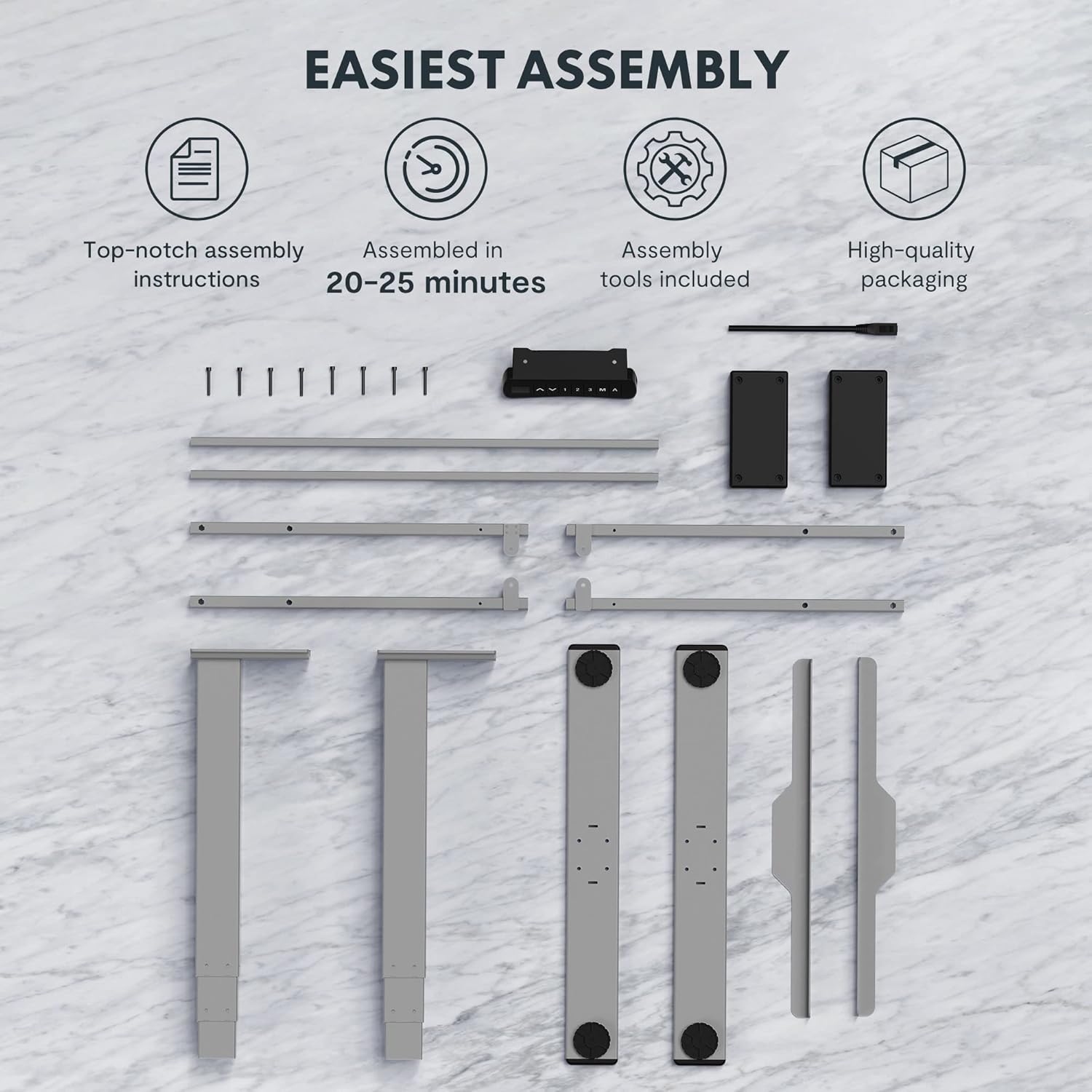
Figure 2: Available desktop options and material certifications, including FSC-certified wood.
Bezpečnostní upozornění
Please read and understand all safety warnings before operating the desk to prevent injury or damage to the product.
- Ochrana proti kolizi: The desk is equipped with an anti-collision system. If an obstacle is detected during movement, the tabletop will stop and retract slightly. Do not intentionally obstruct the desk's movement.
- Upozornění na přetížení: Do not exceed the maximum load capacity of 160 kg. Overloading can damage the motor and frame.
- Děti a domácí mazlíčci: Keep children and pets away from the desk during operation. Moving parts can cause injury.
- Napájení: Ensure the power cord is properly connected and not damaged. Do not operate the desk with a damaged cord or plug.
- Úroveň povrchu: Always operate the desk on a stable and level surface to prevent tipping.
- Odbavení: Ensure there is adequate clearance around the desk when adjusting height to avoid pinching or crushing objects or body parts.
Nastavení a montáž
The FLEXISPOT Enhanced Standing Desk is designed for easy assembly. All necessary tools and detailed instructions are included in the packaging. Typical assembly time is approximately 20-25 minutes.
- Rozbalte komponenty: Carefully remove all parts from the packaging. Verify that all components listed in the assembly instructions are present.
- Sestavte rám: Follow the step-by-step instructions to assemble the desk frame, including the three-section lifting columns and crossbars.
- Připojit plochu: Securely attach the desktop to the assembled frame using the provided screws.
- Connect Control Panel and Power: Connect the control panel and power supply according to the wiring diagram in the instructions.
- Správa kabelů: Use the included cable management accessories to organize and secure all cables.

Figure 3: Desk components laid out for assembly, illustrating the ease of setup with included tools and clear instructions.

Figure 4: Illustration of the desk's stable and durable design, featuring three lifting columns and a wide height adjustment range.
Návod k obsluze
The smart control panel allows for easy and precise height adjustments and includes convenient memory functions.

Figure 5: The smart control panel, featuring a digital display, height adjustment buttons, and memory presets.
- Nastavení výšky: Použijte Nahoru (▲) a Dolů (▼) arrow buttons on the control panel to raise or lower the desk to your desired height. The current height will be displayed on the digital screen.
- Nastavení předvoleb paměti:
- Adjust the desk to your preferred height (e.g., sitting height).
- Stiskněte tlačítko „M“ tlačítko. Na displeji se zobrazí „S-“.
- Stiskněte jedno z očíslovaných tlačítek paměti ("1", "2"nebo "3") do 3 sekund. Výška je nyní uložena do dané předvolby.
- Vyvolání předvoleb paměti: Press the desired numbered memory button ("1", "2"nebo "3"). Stůl se automaticky přesune do uložené výšky.
- Timed Reminder Function: The control panel includes a reminder function to prompt you to change positions. Refer to the detailed assembly manual for instructions on how to activate and set the reminder interval.
- Funkce proti kolizi: The desk will automatically stop and reverse slightly if it encounters an obstruction during height adjustment. This feature is designed for safety and cannot be disabled.
Údržba
Regular maintenance ensures the longevity and optimal performance of your FLEXISPOT standing desk.
- Čištění: Otřete povrch stolu a rám měkkým hadříkemamp hadříkem. Nepoužívejte agresivní chemikálie nebo abrazivní čisticí prostředky, které by mohly poškodit povrchovou úpravu.
- Správa kabelů: Periodically check that all cables are securely routed and not pinched or tangled.
- Spojovací materiál: Občas zkontrolujte všechny šrouby a vruty, zda jsou pevně utažené. V případě potřeby je dotáhněte.
- Motor a rám: Keep the motor and lifting columns free from dust and debris. Do not lubricate the lifting columns unless specifically instructed by FLEXISPOT support.
Odstraňování problémů
Pokud narazíte na jakékoli problémy se stolem, postupujte podle následujících běžných kroků pro řešení problémů:
| Problém | Možná příčina | Řešení |
|---|---|---|
| Stůl se nehýbe. | Power cord disconnected, motor error, or overload. | Check power connection. Unplug and replug the desk. Reduce weight on the desk. Refer to the full manual for error codes. |
| Stůl se pohybuje nerovnoměrně. | Uneven load, loose connections, or calibration issue. | Distribute weight evenly. Check all frame connections. Perform a reset/calibration as per the detailed manual. |
| Anti-collision activates frequently. | Obstruction in path, or sensitivity setting. | Ensure clear path for desk movement. Check the detailed manual for anti-collision sensitivity adjustment (if available). |
For more complex issues or error codes not listed, please consult the comprehensive user manual provided with your product or contact FLEXISPOT customer support.
Specifikace
Detailed technical specifications for the FLEXISPOT Enhanced Standing Desk (Model: EC5S-FR+PR1808-Black).
| Funkce | Detail |
|---|---|
| Značka | FLEXISPOT |
| Číslo modelu | EC5S-FR+PR1808-Black |
| Barva | Šedá + černá |
| Materiál | Metal (Frame), Engineered Wood (Top) |
| Design stolu | Stojící stůl |
| Tvar | Obdélníkový |
| Rozsah nastavení výšky | 62 cm - 127 cm |
| Zvedací sloupy | 3 Oddíly |
| Typ motoru | Duální motor |
| Maximální nosnost | 160 kg |
| Rychlost zvedání | 3.5 cm/s |
| Speciální funkce | Electric, Adjustable, Memory Presets, Reminder Function, Anti-Collision |
| Certifikace | IGR, CE, TÜV, FSC (for desktop) |
| Kompatibilita šířky rámu | 110-170 cm |
| Tabletop Compatibility (Width x Depth) | 120-200 cm x 60-80 cm |

Figure 6: Adjustable frame range and compatible tabletop dimensions.

Figure 7: Illustration of the upgraded load capacity, now supporting up to 160 kg.
Záruka a podpora
FLEXISPOT is committed to providing high-quality products. This desk has undergone extensive testing, including over 20,000 stress tests, and holds European certifications such as IGR, CE, and TÜV, ensuring its safety and durability.
For warranty information, technical support, or any inquiries, please contact FLEXISPOT customer service through their official website or the retailer where you purchased the product. Please have your model number (EC5S-FR+PR1808-Black) and purchase details ready when contacting support.
Ask a question about this manual
Ask about setup, troubleshooting, compatibility, parts, safety, or missing instructions. Manuals+ will review the question and use this page’s manual context to help answer it.