
1. Úvod
This manual provides detailed instructions for the safe and efficient use of your BALDR 1000W Portable Power Station and 120W Solar Panel Set. Please read this manual thoroughly before operating the product and retain it for future reference.
The BALDR 1000W Portable Power Station is a high-capacity, versatile power source designed for various applications, including outdoor activities, emergency backup, and general power needs. It features multiple output ports and can be recharged via AC adapter, car charger, or the included 120W solar panel.

Image: BALDR 1000W Portable Power Station and 120W Solar Panel Set in an outdoor setting.
2. Vlastnosti produktu
- Advanced Safety Management: The power station features a UL94 V-0 grade flame-retardant ABS material for the casing and incorporates a dual-fan cooling system to prevent overheating. An advanced Battery Management System (BMS) monitors battery voltage and temperature, protecting against overcharge, overvoltage, nadproud a zkraty.
- Versatile 5-Way Output: Equipped with 2 Pure Sine Wave AC outlets, 1 cigarette lighter socket, 3 USB (QC3.0) ports, and 1 Type-C (PD3.0) port, allowing simultaneous charging of up to 7 devices. Each output type has a separate control switch.
- Průchozí nabíjení: The unit supports pass-through charging, enabling you to power devices while the power station itself is being recharged.
- Přehledný LCD displej: A modern LCD screen displays rich content, including remaining battery life, estimated usage time, and required charging time, eliminating the need for manual calculations.
- Více způsobů nabíjení: Can be recharged via AC adapter (approx. 6.5 hours), 12V/24V car charger (approx. 15 hours), or solar panel (approx. 8-10 hours).
- MPPT Control: The solar charging input utilizes MPPT (Maximum Power Point Tracking) control to maximize power extraction from the solar panel under varying weather conditions, shortening charging time.
- Stable Pure Sine Wave Output: Provides 100V AC pure sine wave power, similar to household outlets, minimizing interference and potential damage to sensitive electronics. DC output maintains a stable 12V.
- Lehký a přenosný: Weighing approximately 8.6kg, this 1000W power station is significantly lighter than many comparable models, making it easy to transport for outdoor use or emergencies.
- Režim ECO: Features an ECO mode for energy saving, automatically turning off the power when not in use for over an hour.
- Switchable Frequency: Supports both 50Hz and 60Hz frequencies, making it compatible with various appliances in different regions.
- Certifikovaná bezpečnost: Complies with international safety standards including PSE, UN38.3, CE, UL, FCC, and RoHS.

Image: BALDR Portable Power Station in an outdoor setting, highlighting its versatility.

Image: BALDR Portable Power Station powering a lamp during a simulated power outage.
3. Obsah balení
Ověřte prosím, zda jsou ve vašem balení obsaženy všechny níže uvedené položky:
- BALDR 1000W Portable Power Station x 1
- BALDR 120W Solar Panel x 1
- Síťový adaptér x 1
- Car Power Plug (Cigar Plug) x 1
- Portable Power Station Instruction Manual x 1
- Solar Panel Instruction Manual x 1
- DC7909 to DC5521, DC5525, XT60, Anderson Connector Cable (1.5M) x 1

Image: All components of the BALDR 1000W Portable Power Station and 120W Solar Panel Set.
4. Pokyny k nastavení
4.1 Setting up the Solar Panel
- Rozložte solární panel: Lay the solar panel flat in an area with direct sunlight.
- Extend the Kickstands: Locate the integrated kickstands on the back of the solar panel and extend them to support the panel.
- Upravte úhel: Adjust the angle of the solar panel to face the sun directly for optimal charging efficiency.
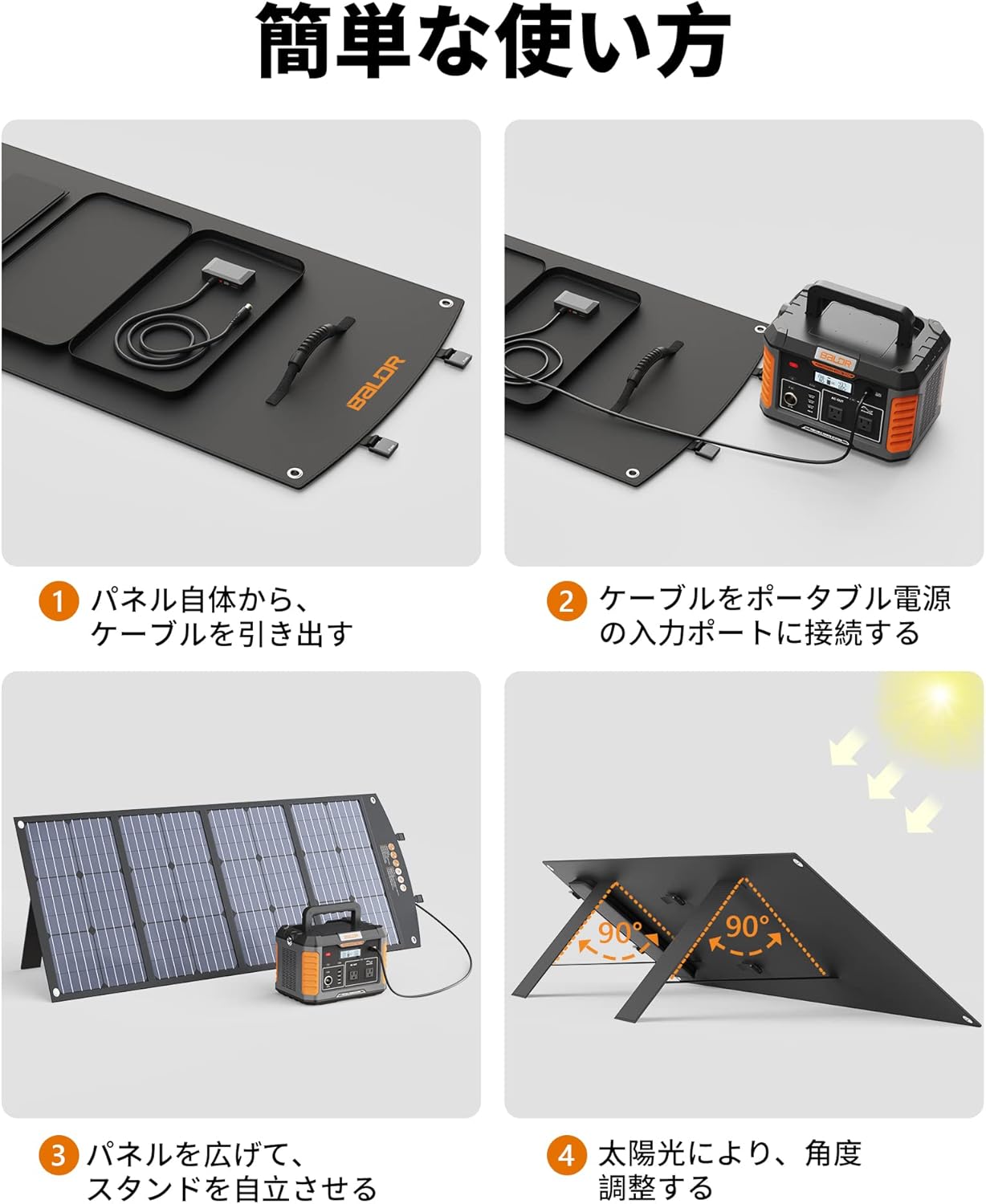
Image: Step-by-step guide on unfolding and positioning the BALDR 120W Solar Panel.
4.2 Connecting the Solar Panel to the Power Station
- Locate the DC Input Port: On the BALDR Portable Power Station, identify the DC input port (DC7909).
- Connect the Solar Panel Cable: Connect the DC7909 output cable from the solar panel to the DC input port on the power station.
- Ověřte nabíjení: The LCD display on the power station will indicate that it is receiving a charge from the solar panel.

Image: The solar panel connected to the portable power station for charging.
4.3 Direct Device Charging via Solar Panel
The solar panel itself includes USB-A (QC3.0 24W x1) and USB-C (PD45W x1) ports for direct charging of small devices like smartphones and tablets.
- Locate USB Ports: Find the USB-A and USB-C ports on the solar panel's integrated junction box.
- Připojit zařízení: Plug your device's charging cable into the appropriate USB port on the solar panel.
- Ověřte nabíjení: Your device should begin charging immediately if sufficient sunlight is available.

Image: A tablet and smartphone being charged directly from the solar panel's USB ports.
5. Návod k obsluze
5.1 Zapnutí/vypnutí
- Zapnutí: Press and hold the main power button for a few seconds until the LCD screen illuminates.
- Vypnutí: Press and hold the main power button again until the LCD screen turns off.
5.2 Použití výstupních portů
After powering on the unit, activate the desired output section (AC, DC, or USB) using its dedicated switch. The corresponding indicator light will turn on.
- AC výstup: Plug your AC appliances into the 100V AC outlets. Ensure the appliance's power consumption does not exceed 1000W (2000W peak).
- DC výstup: Use the cigarette lighter socket for 12V DC devices.
- USB výstup: Connect your USB-powered devices to the USB-A (QC3.0) or USB-C (PD3.0) ports.
5.3 Vysvětlení LCD displeje
The LCD display provides critical information about the power station's status:
- Úroveň baterie: Shows the current charge percentage.
- Vstupní výkon: Displays the current power input (W) during charging.
- Výstupní výkon: Shows the current power output (W) to connected devices.
- Zbývající čas: Estimates the remaining operating time or charging time based on current power draw/input.
- Výstražné indikátory: Displays icons for low battery, high temperature, or other system alerts.

Obrázek: Podrobný view of the BALDR Portable Power Station's LCD display and its indicators.
5.4 ECO režim
Activate ECO mode to conserve energy. When ECO mode is enabled, the power station will automatically turn off if no output is detected for more than one hour. To activate/deactivate, press the ECO button.

Image: Visual explanation of the ECO mode functionality.
5.5 Přepínání frekvence (50 Hz/60 Hz)
The power station supports both 50Hz and 60Hz frequencies. To switch between frequencies, locate the frequency switch button and press it to toggle between the two settings. Ensure the correct frequency is selected for your region and appliances.

Image: Illustration of the 50Hz/60Hz frequency switching capability.
6. Způsoby nabíjení
The BALDR Portable Power Station offers multiple ways to recharge:
- Nabíjení síťového adaptéru: Plug the provided AC adapter into a standard wall outlet and connect it to the DC input port on the power station. Full charge takes approximately 6.5 hours.
- Nabíjení autonabíječkou: Use the 12V/24V car charger to recharge the power station from your vehicle's cigarette lighter socket. Full charge takes approximately 15 hours.
- Nabíjení solárního panelu: Connect the 120W solar panel to the DC input port. Under optimal sunlight conditions, a full charge can be achieved in approximately 8-10 hours. The integrated MPPT controller optimizes charging efficiency.

Image: The BALDR Portable Power Station being charged by a solar panel.
6.1 Parallel Charging with Multiple Solar Panels
For faster solar charging, you can connect multiple BALDR solar panels in parallel to the power station using the appropriate connector cables. This can significantly reduce charging time.
7. Bezpečnostní informace
- Provozní teplota: The BALDR PIONEER 1000 Portable Power Station operates within a temperature range of -10°C to 40°C (14°F to 104°F). Operation outside this range may cause the product to malfunction.
- AC Adapter Heat: During charging, the AC adapter may become warm, reaching up to 65°C. This is normal and within its heat resistance design of 75°C. All AC adapters are PSE certified.
- Větrání: Always charge the power station in a well-ventilated area to ensure proper heat dissipation.
- Požární bezpečnost: The power station's cover is made of UL94 V-0 grade flame-retardant ABS material. In the event of an outdoor fire, the material will self-extinguish if moved away from the heat source, preventing internal battery combustion or explosion.
- Ochrana systému BMS: The advanced BMS protects against overcharge, overvoltage, overcurrent, and short circuits, ensuring safe operation indoors and outdoors.
- Vyvarujte se vystavení vodě: While the solar panel has an IP65 waterproof and dustproof ETFE film, the power station is not waterproof. Avoid exposing the power station to rain or moisture.
- Uchovávejte mimo dosah dětí: Výrobek skladujte mimo dosah dětí.
- Správná likvidace: Do not dispose of the product in fire or water. Follow local regulations for battery disposal.
8. Údržba
- Čištění: Use a dry, soft cloth to clean the exterior of the power station and solar panel. Do not use abrasive cleaners or solvents.
- Skladování: When not in use for extended periods, store the power station in a cool, dry place, away from direct sunlight and extreme temperatures. It is recommended to charge the unit to 50-80% every 3-6 months to maintain battery health.
- Inspekce: Regularly inspect the cables and ports for any signs of damage. Do not use if any part is damaged.
9. Řešení problémů
9.1 AC Adapter Gets Hot During Charging
It is normal for the AC adapter to generate heat during charging due to the significant current flow. Especially in warmer environments, the adapter's internal temperature may rise. The adapter is designed to withstand temperatures up to 75°C and is PSE certified. Always ensure the charging area is well-ventilated.
9.2 Main Unit Cannot Be Charged
- Kontrola teploty: The battery charging temperature range is 0-45°C. If the battery temperature exceeds 45°C after discharge, charging may be temporarily disabled. Allow the power station to cool down before attempting to charge again.
- Kontrola připojení: Ensure all cables and plugs are securely inserted into their respective ports. Verify that the AC adapter is properly connected to a working power outlet.
- Solar Panel Check: If charging via solar panel, ensure the panel is in direct sunlight and properly angled. Check all solar panel connections.
9.3 Jiné záležitosti
If you encounter any other issues not covered here, please refer to the detailed instruction manuals included with your product or contact customer support.
10. Specifikace
| Funkce | Specifikace |
|---|---|
| Značka | Baldr |
| Číslo modelu | P1000-120W |
| Hmotnost produktu | 8.6 kg |
| Power Station Capacity | 933 Wh / 252162 mAh |
| AC výstup | 1000W (2000W Peak) Pure Sine Wave, 100V, 50Hz/60Hz Switchable |
| DC výstup | Port do auta 12V |
| Výstup USB-A | 3 x QC3.0 ports |
| Výstup USB-C | 1 x PD3.0 port |
| Napájení ze solárních panelů | 120W |
| Účinnost solárních panelů | 23% (High Conversion Efficiency) |
| Vlastnosti solárního panelu | IP65 Waterproof/Dustproof ETFE Film, USB-A QC3.0 (24W), USB-C PD45W |
| Nabíjecí vstup | DC7909 Port (AC Adapter, Car Charger, Solar Panel) |
| Bezpečnostní certifikace | PSE, UN38.3, CE, UL, FCC, RoHS |
| Kompatibilní zařízení | Smartphones, Tablets, various home appliances up to 1000W |
11. Záruka a podpora
BALDR provides unlimited customer support from the date of purchase. A dedicated Japanese customer support center is available to assist you. In case of any issues or initial defects, please do not hesitate to contact us.
The product includes a Japanese instruction manual and a product warranty card. Please review these documents before use.