
Konec produktuview
The typecase Touch Keyboard Case is designed to enhance the functionality and protection of your iPad Air. It features a full-size keyboard with a multi-gesture trackpad, offering a laptop-like experience. The case boasts a 360° rotatable hinge, allowing for multiple viewing angles and usage modes. An adjustable 11-color RGB LED backlight provides comfortable typing in various lighting conditions. Integrated smart features like auto sleep/wake help conserve battery life, and a dedicated holder keeps your Apple Pencil secure.
Klíčové vlastnosti:
- Kompatibilita: Specifically designed for iPad Air 11-inch (M3 2025 / M2 2024), iPad Air 5th Gen (2022, 10.9"), and iPad Air 4th Gen (2020, 10.9").
- Integrovaný trackpad: Supports multi-gesture controls for precise navigation.
- Podsvícená klávesnice: 11 adjustable RGB backlight colors with laser-etched keys and a full row of iPadOS shortcuts.
- Versatile Use Modes: 360° rotatable hinge for 7 different viewing modes (Laptop, Stand, Tent, Tablet, Corner, Share, Protect).
- Chytrá ochrana: Premium hardshell design protects all sides of your iPad, with auto sleep/wake function.
- Držák na tužky: Conveniently stores your Apple Pencil.
Obsah balení
Prosím, ověřte, zda jsou v balení přítomny všechny položky:
- 1 x typecase Touch Keyboard Case for iPad Air 5th/4th Gen (10.9 inch)
- Nabíjecí kabel 1 x USB-C
- 1 x Uživatelská příručka
Průvodce nastavením
1. Charging the Keyboard Case
Before initial use, fully charge the keyboard case. Connect the provided USB-C charging cable to the charging port on the keyboard and to a USB power adapter (not included).
Charging indicator: The LED indicator will show charging status. Refer to the keyboard's specific LED behavior for full charge indication.
2. Vložení iPadu do pouzdra
Carefully align your iPad with the protective shell of the keyboard case. Gently press the iPad into place, ensuring all corners are securely seated. The case is designed to protect all sides of your iPad.
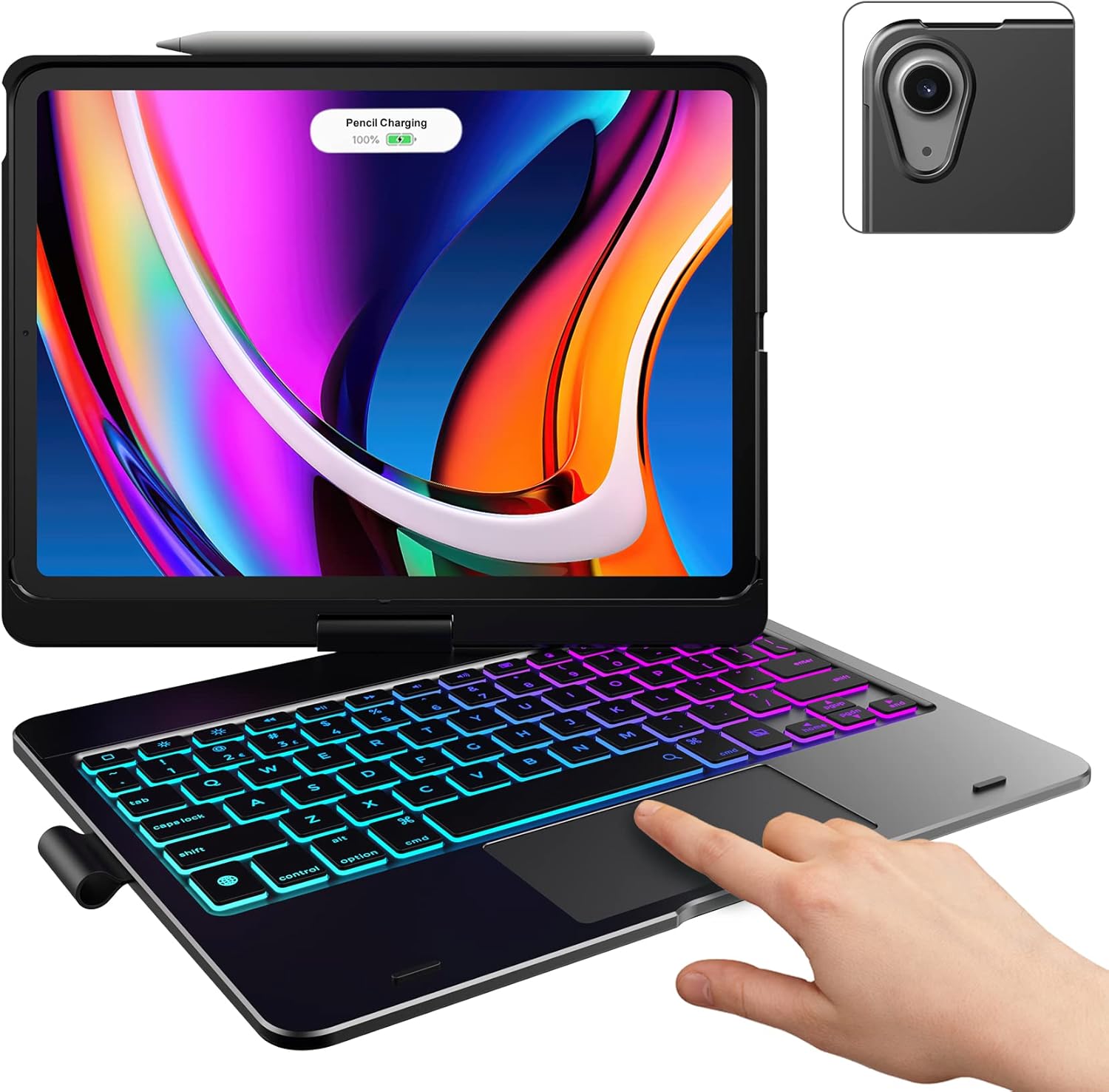
Image: The typecase keyboard case with an iPad securely inserted, ready for use. Note the integrated trackpad and backlit keys.

Image: Visual representation of the 7 versatile modes supported by the 360° rotatable hinge, including Laptop, Stand, and Tablet modes.
3. Pairing with Your iPad (Bluetooth)
- Zapněte klávesnici posunutím vypínače do polohy ON.
- Stiskněte tlačítko Připojit button (or a similar Bluetooth pairing button, usually indicated by a Bluetooth icon) on the keyboard. The Bluetooth indicator light will start blinking.
- Na iPadu přejděte na Nastavení > Bluetooth.
- Ujistěte se, že je Bluetooth zapnutý On.
- Locate "typecase Keyboard" or a similar name in the "Other Devices" list and tap on it to pair.
- Once paired, the Bluetooth indicator light on the keyboard will stop blinking and remain solid, or turn off.
Note: The keyboard will automatically enter sleep mode after a period of inactivity to conserve battery. Press any key to wake it up.
Návod k obsluze
Funkce klávesnice
The keyboard features a standard layout with 78 comfortably spaced keys and a dedicated row of iPadOS shortcut keys.

Obrázek: Podrobný view of the backlit keyboard, highlighting the iPadOS shortcut keys and the vibrant 11-color RGB backlight.
Klávesové zkratky iPadOS:
| Ikona klíče | Funkce |
|---|---|
| Domov | Vrátí se na domovskou obrazovku. |
| Snížení jasu | Snižuje jas obrazovky. |
| Jas nahoru | Zvyšuje jas obrazovky. |
| Keyboard Hide/Show | Přepíná klávesnici na obrazovce. |
| Hledat | Activates iPad search. |
| Předchozí stopa | Přeskočí na předchozí mediální stopu. |
| Přehrát/Pozastavit | Přehraje nebo pozastaví média. |
| Další stopa | Přeskočí na další mediální stopu. |
| Ztlumit | Ztlumí nebo zapne zvuk. |
| Snížit hlasitost | Snižuje hlasitost zvuku. |
| Zvýšení hlasitosti | Zvyšuje hlasitost zvuku. |
| Uzamknout obrazovku | Zamkne obrazovku iPadu. |
Použití trackpadu
The integrated multi-gesture trackpad allows for precise control and navigation of your iPad. Ensure the trackpad is enabled in your iPad's settings if you experience issues.
Common Trackpad Gestures:
- Klepnutí jedním prstem: Klikněte/Vyberte.
- Posouvání dvěma prsty: Přejděte nahoru nebo dolů.
- Stažením prstů přiblížíte: Přiblížení nebo oddálení obsahu.
- Přejetí třemi prsty nahoru: Přejděte na domovskou obrazovku.
- Přejetí třemi prsty doleva/doprava: Přepínání mezi otevřenými aplikacemi.
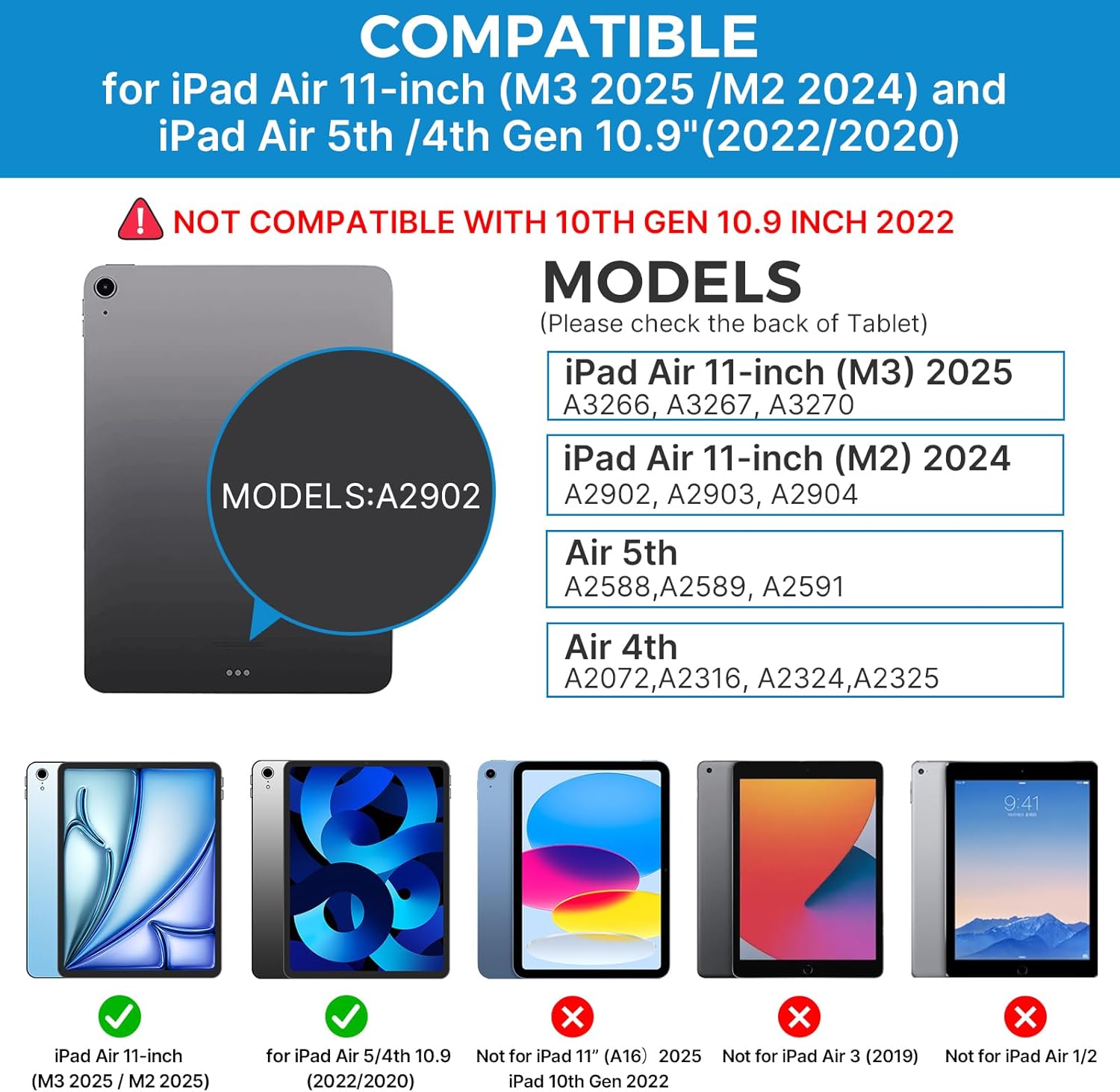
Image: A hand demonstrating the use of the multi-touch trackpad for precise cursor control on the iPad screen.
Nastavení podsvícení
The keyboard features 11 adjustable RGB backlight colors and 3 levels of brightness. Use the dedicated backlight keys on the keyboard to cycle through colors and adjust brightness levels.
Video: This video demonstrates the 360-degree rotation feature of the typecase Touch Keyboard Case, showcasing its versatility in different viewrežimy.
Video: This video provides a step-by-step guide on how to properly install and remove your iPad from the typecase Touch Keyboard Case, ensuring a secure fit and preventing damage.
Údržba a péče
- Čištění: Použijte měkký, damp cloth to clean the exterior of the case and keyboard. Avoid harsh chemicals or abrasive materials.
- Skladování: When not in use for extended periods, store the keyboard case in a cool, dry place. Ensure the iPad is removed if storing for very long durations.
- Životnost baterie: To maximize battery life, turn off the keyboard when not in use. The auto sleep/wake function helps conserve power.
- Vyhněte se tekutinám: Do not expose the keyboard case to excessive moisture or liquids.
- Zacházejte opatrně: While durable, avoid dropping the case or applying excessive force to the hinge or keyboard.
Odstraňování problémů
If you encounter any issues with your typecase Touch Keyboard Case, please refer to the following common solutions:
Keyboard Not Connecting/Typing:
- Ujistěte se, že je klávesnice zapnutá a plně nabitá.
- Zkontrolujte nastavení Bluetooth na iPadu a ověřte, zda je klávesnice spárovaná a připojená. Pokud ne, zkuste ji znovu spárovat.
- Restartujte iPad i klávesnici.
- Ujistěte se, že žádná jiná zařízení Bluetooth neruší připojení.
Trackpad nereaguje:
- Ověřte, zda je klávesnice připojena přes Bluetooth.
- Zkontrolujte nastavení iPadu: Nastavení > Přístupnost > Dotek > AssistiveTouch. Ensure "Mouse Keys" is off if it's causing interference.
- Očistěte povrch trackpadu od nečistot.
Nefunguje podsvícení:
- Ujistěte se, že je klávesnice dostatečně nabitá.
- Press the backlight adjustment keys to cycle through brightness levels and colors.
iPad Not Entering Sleep/Wake Mode:
- Ensure the iPad is correctly seated in the case.
- Zkontrolujte nastavení iPadu: Nastavení > Displej a jas > Zamknout/Odemknout. Ensure this feature is enabled.
If problems persist, please contact typecase customer support for further assistance.
Specifikace
| Funkce | Detail |
|---|---|
| Model | B09WVRD5JD |
| Kompatibilita | iPad Air 11-inch (M3 2025 / M2 2024), iPad Air 5th Gen (2022, 10.9"), iPad Air 4th Gen (2020, 10.9") |
| Konektivita | Bluetooth |
| Rozložení klávesnice | 78-key standard with iPadOS shortcuts |
| Podsvícení | 11barevný RGB, 3 úrovně jasu |
| Trackpad | Multi-functional, multi-gesture |
| Hinge Rotation | 360° (20,000-cycle stress tested) |
| Zdroj napájení | Napájení baterií (1 lithium-polymerová baterie je součástí balení) |
| Hmotnost položky | 1.52 libry |
| Rozměry produktu (DxŠxV) | 11.02 x 8.66 x 0.79 palce |
| Materiál | Premium hardshell design |
Záruka a podpora
typecase offers a comprehensive warranty and support for your product:
- 1letý náhradní servis: Enjoy worry-free after-sales support with a 1-year replacement service for manufacturing defects.
- 30denní vrácení peněz: If you are not satisfied with your purchase, you may be eligible for a refund within 30 days of purchase.
- Zákaznická podpora: For any questions, technical assistance, or warranty claims, please contact typecase customer service. Refer to the contact information provided in the product packaging or on the official typecase webmísto.

Obrázek: Overview of typecase's customer support and warranty policy, including 1-year replacement and 30-day refund.