
RCYAGO pH-W3988
Uživatelská příručka k chytrému WiFi monitoru kvality vody RCYAGO 6 v 1
Model: pH-W3988 Značka: RCYAGO
1. Úvod
This manual provides detailed instructions for the installation, operation, and maintenance of your RCYAGO WiFi Smart 6-in-1 Water Quality Monitor. This device is designed for continuous monitoring of pH, EC, TDS, Salt, S.G, and Temperature in various water environments. It features WiFi connectivity for remote monitoring via the Tuya Smart App.
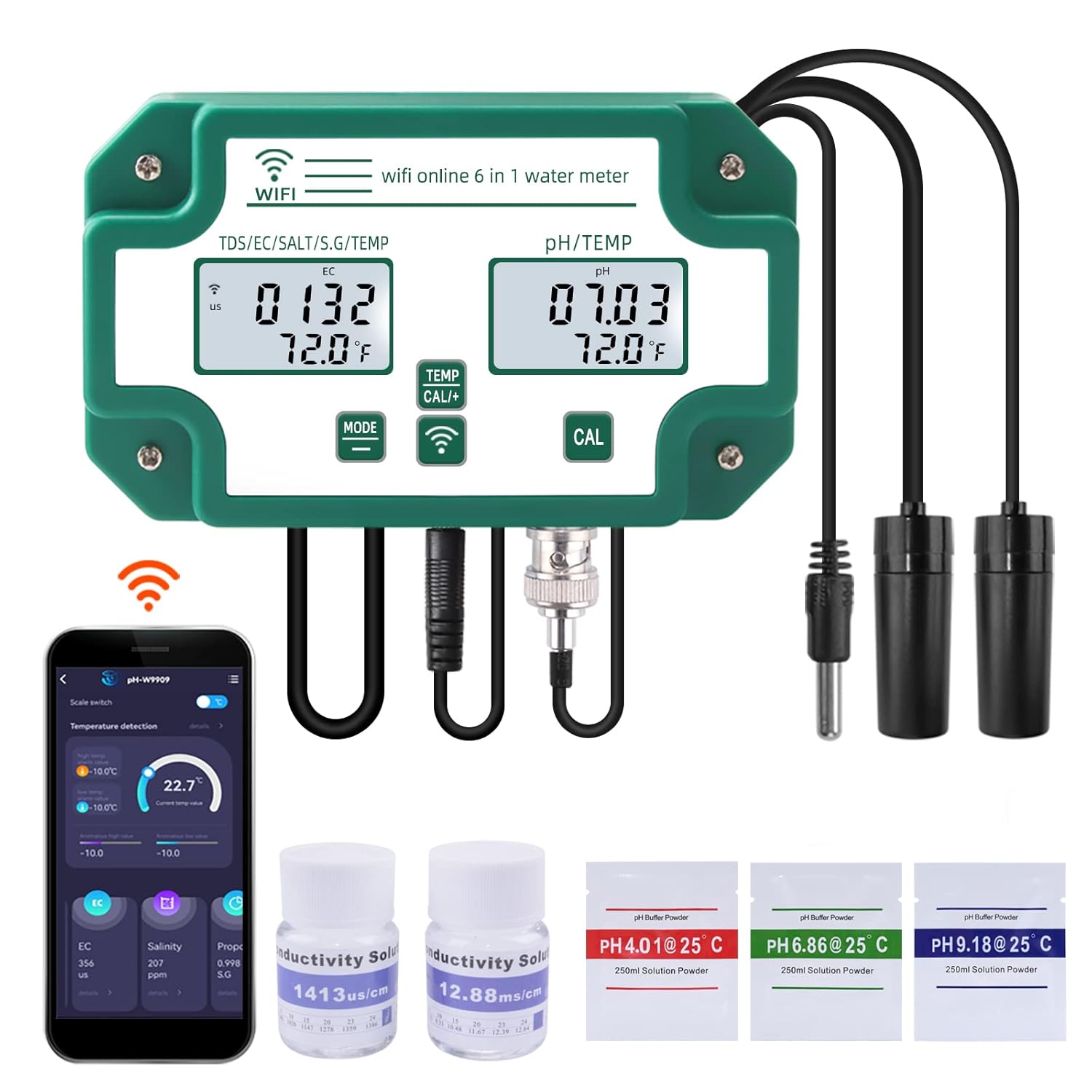
Figure 1: RCYAGO WiFi Smart 6-in-1 Water Quality Monitor with included accessories.
2. Obsah balení
Ověřte, zda jsou v balení přítomny všechny níže uvedené položky:
- RCYAGO WiFi Smart 6-in-1 Water Quality Monitor (Main Unit)
- pH sonda
- TDS/EC/Salt/S.G Probe
- Teplotní sonda
- Napájecí adaptér
- Napájecí kabel USB
- Wall-Mount Bracket and Suction Cups
- pH Buffer Powders (pH 4.01, pH 6.86, pH 9.18)
- Conductivity Calibration Solutions (1413 us/cm, 12.88 mS/cm)
- Uživatelská příručka

Obrázek 2: Obsah balení produktu.
3. Konec produktuview
Familiarize yourself with the main components and controls of the water quality monitor.

Figure 3: Main unit with labeled parts and dimensions.
- Příkon: USB port for connecting the power cable.
- TDS/EC/Salt/S.G/TEMP Display: Digital display for conductivity, salinity, specific gravity, and temperature readings.
- PH/TEMP Display: Digital display for pH and temperature readings.
- Tlačítko režimu: Used to cycle through display modes or settings.
- Temperature Unit Conversion/Calibration Key: Used to switch temperature units or initiate calibration.
- WiFi Signal Key: Indikuje stav WiFi připojení.
- PH Calibration Key: Dedicated button for pH calibration.
- TDS/EC/Salt/S.G Probe Input: Port for the multi-parameter probe.
- Temperature Probe Input: Port for the dedicated temperature probe.
- PH Probe Input: BNC connector for the pH probe.

Obrázek 4: Detailní view of the individual probes.
4. Specifikace
| Parametr | Rozsah | Podrobnosti |
|---|---|---|
| pH | pH 0.00 - 14.00 | |
| EC | 0 - 19900 µS/cm, 0 - 199.0 mS/cm | Elektrická vodivost |
| TDS | 0–200 000 ppm, 0–199.0 ppt | Celkové rozpuštěné pevné látky |
| Sůl | 0 - 199.9 ppt, 0 - 20% | Slanost |
| SG | 0.990–1.400 | Specifická gravitace |
| Teplota | 0 °C - 50.0 °C (32 °F - 122 °F) | |
| Konektivita | Wi-Fi (chytrá aplikace Tuya) | |
| Číslo modelu | pH-W3988 | |
| Rozměry | 10.67 x 7.2 x 2.68 palce | Main unit package dimensions |
| Hmotnost | 1.62 libry |
5. Nastavení
5.1 Initial Assembly and Power-Up
- Vybalte všechny součásti a zkontrolujte, zda nejsou poškozené.
- Connect the pH probe to the BNC connector (10) on the main unit.
- Connect the TDS/EC/Salt/S.G probe to its designated input (8).
- Connect the temperature probe to its designated input (9).
- Connect the USB power cable to the power input (1) on the main unit and then to the power adapter. Plug the adapter into a suitable power outlet. The device display should illuminate.
- Mount the main unit using the provided wall-mount bracket or place it in a stable location. Use suction cups to secure the probes in the water source, ensuring they are fully submerged but not touching the bottom or sides of the container.
5.2 Tuya Smart App Installation and WiFi Connection
- Stáhněte si Tuya Smart aplikaci z obchodu s aplikacemi ve vašem mobilním zařízení (iOS nebo Android).
- Zaregistrujte se nebo se přihlaste ke svému účtu Tuya Smart.
- Ujistěte se, že je vaše mobilní zařízení připojeno k síti WiFi s frekvencí 2.4 GHz.
- In the app, tap "Add Device" or the "+" icon. Select the appropriate device category (e.g., "Sensors" or "Water Quality Monitor").
- Follow the on-screen instructions to put the device into pairing mode. This usually involves pressing and holding a button on the monitor until the WiFi indicator (6) flashes.
- Enter your WiFi network password in the app to complete the connection. Once connected, the WiFi indicator on the monitor will become solid.

Figure 5: WiFi connection and Tuya Smart App interface.
6. Kalibrace
Regular calibration is essential for accurate readings. Use the provided buffer powders and conductivity solutions.
6.1 pH Kalibrace
- Prepare 250ml of distilled water for each pH buffer powder (pH 4.01, pH 6.86, pH 9.18). Dissolve one packet of powder into each 250ml of distilled water.
- Rinse the pH probe with distilled water and gently blot dry.
- Submerge the pH probe into the pH 6.86 buffer solution.
- Stiskněte a podržte PH CAL key (7) until the display shows a stable reading matching 6.86. Release the button.
- Opláchněte pH sondu destilovanou vodou.
- Submerge the pH probe into the pH 4.01 buffer solution.
- Stiskněte a podržte PH CAL key (7) until the display shows a stable reading matching 4.01. Release the button.
- For high pH ranges, repeat the process with the pH 9.18 buffer solution.
- Rinse the pH probe thoroughly with distilled water after calibration.
6.2 EC/TDS/Salt Calibration
- Prepare the conductivity calibration solutions (1413 µS/cm and 12.88 mS/cm).
- Rinse the TDS/EC/Salt/S.G probe with distilled water and gently blot dry.
- Submerge the probe into the 1413 µS/cm solution.
- Stiskněte a podržte TEMP CAL+ key (5) until the display shows a stable reading matching 1413 µS/cm. Release the button.
- Opláchněte sondu destilovanou vodou.
- Submerge the probe into the 12.88 mS/cm solution.
- Stiskněte a podržte TEMP CAL+ key (5) until the display shows a stable reading matching 12.88 mS/cm. Release the button.
- Rinse the probe thoroughly with distilled water after calibration.
7. Návod k obsluze
7.1 Základní obsluha zařízení
- Zapnutí/vypnutí: The device powers on automatically when connected to power. Disconnect power to turn off.
- Mode Key (4): Press briefly to cycle through different display modes for TDS/EC/Salt/S.G.
- Temperature Unit Conversion (5): Press briefly to switch between Celsius (°C) and Fahrenheit (°F) for temperature display.
- Ensure probes are fully submerged in the water to be tested for accurate continuous readings.
7.2 Tuya Smart App Features
The Tuya Smart App provides enhanced monitoring and control capabilities:
- Data v reálném čase: View current readings for all 6 parameters directly on your mobile device.
- Historická data: Access daily, weekly, and monthly historical data to track trends and changes in water quality.
- Nastavení budíku: Set custom high and low alarm thresholds for each parameter. Receive notifications on your phone if readings exceed or fall below these thresholds.
- Export dat: Some app versions may offer data export functionality for further analysis.

Figure 6: Tuya Smart App interface displaying temperature and other water quality parameters.

Figure 7: Tuya Smart App displaying historical data trends.

Figure 8: Tuya Smart App interface for setting alarm thresholds.
8. Údržba
8.1 Čištění sondy
To ensure accurate and consistent readings, regularly clean the probes:
- Před čištěním odpojte zařízení od napájení.
- Rinse all probes thoroughly with distilled or deionized water after each use or periodically during continuous monitoring.
- For stubborn deposits, gently wipe the probes with a soft cloth or cotton swab. Avoid abrasive materials that could scratch the probe surfaces.
- For pH probes, if readings become sluggish or erratic, soak the probe tip in a pH electrode storage solution or a mild cleaning solution specifically designed for pH electrodes for 15-30 minutes, then rinse.
8.2 Skladování
- When not in use for extended periods, ensure probes are clean and properly stored.
- The pH probe tip should always be kept moist. Store it in a pH electrode storage solution or a small amount of pH 4.01 buffer solution. Never store dry.
- Store the main unit and probes in a cool, dry place away from direct sunlight and extreme temperatures.
9. Řešení problémů
Běžné problémy a jejich možná řešení naleznete v tabulce níže.
| Problém | Možná příčina a řešení |
|---|---|
| Zařízení se nezapne |
|
| Nepřesné nebo nestabilní hodnoty |
|
| Selhalo připojení WiFi |
|
| App not displaying real-time data |
|
| Temperature readings are inconsistent |
|
10. Bezpečnostní informace
- Do not immerse the main unit in water. It is not waterproof.
- Keep the device and probes out of reach of children.
- Používejte pouze dodaný napájecí adaptér a kabel.
- Nevystavujte zařízení extrémním teplotám, přímému slunečnímu záření nebo korozivnímu prostředí.
- Handle probes with care. The glass bulb of the pH probe is fragile.
- Nepokoušejte se zařízení rozebírat ani opravovat sami. V případě problémů kontaktujte podporu.
11. Záruka a podpora
For warranty information, technical support, or service inquiries, please contact the seller or manufacturer directly through your purchase platform. Please have your model number (pH-W3988) and purchase date available when contacting support.
Související dokumenty - pH-W3988
 |
Návod k obsluze inteligentního analyzátoru rozpuštěného kyslíku typu Pen DO-9100 Tento dokument obsahuje pokyny k použití inteligentního analyzátoru rozpuštěného kyslíku perového typu DO-9100 a zahrnuje jeho funkce, technické parametry, provoz, údržbu a řešení problémů. |
 |
Uživatelská příručka RCYAGO SGW07 Dual Water Timer Komplexní uživatelská příručka pro dvojitý zavlažovací časovač RCYAGO SGW07. Zjistěte více o produktu.view, specifikace, instalace, automatické zavlažovací programy, ruční zavlažování, zpoždění deště, řešení problémů a stav baterie vašeho zavlažovacího systému pro zahradu. |
 |
E-1 Portable TDS & EC Meter and pH Meter User Manual Comprehensive user manual for the E-1 Portable TDS & EC Meter and pH Meter, detailing product specifications, operation, calibration, maintenance, and troubleshooting for accurate water quality testing. |
 |
Víceparametrový tester kvality vody pH-W218 - Uživatelská příručka a průvodce aplikací Komplexní průvodce pro víceparametrový tester kvality vody pH-W218, který zahrnuje specifikace, provoz, kalibraci (pH, EC, ORP) a připojení k mobilní aplikaci Tuya Smart pro vzdálené monitorování a alarmy. |
 |
PH-W9909 Multi-parameter Water Quality Tester User Manual & Specifications Comprehensive user manual and specifications for the PH-W9909 multi-parameter water quality tester, covering pH, EC, TDS, SALT, S.G, and temperature. Includes setup, calibration, and Tuya APP integration instructions. |
 |
PH4IN1 Tester Vode Korisničko Uputstvo – Merenje pH, EC, TDS, Temperature Korisničko uputstvo za Elementa PH4IN1 tester vode, uređaj za merenje pH, provodljivosti (EC), ukupne rastvorene supstance (TDS) i temperature. Uključuje detaljna uputstva za upotrebu, kalibraciju, napajanje, tehničke specifikacije i bezbednosne napomene. |
Ask a question about this manual
Ask about setup, troubleshooting, compatibility, parts, safety, or missing instructions. Manuals+ will review the question and use this page’s manual context to help answer it.