
Zavedení
Děkuji za nákupasing the UBeesize 170cm Tripod. This versatile tripod is designed to provide stable support for various devices, including cameras, smartphones, tablets, and video cameras. Its lightweight aluminum construction, 3-way pan head, and adjustable height make it suitable for a wide range of photography and videography needs, from family trips to live streaming. Please read this manual carefully to ensure proper setup and operation.
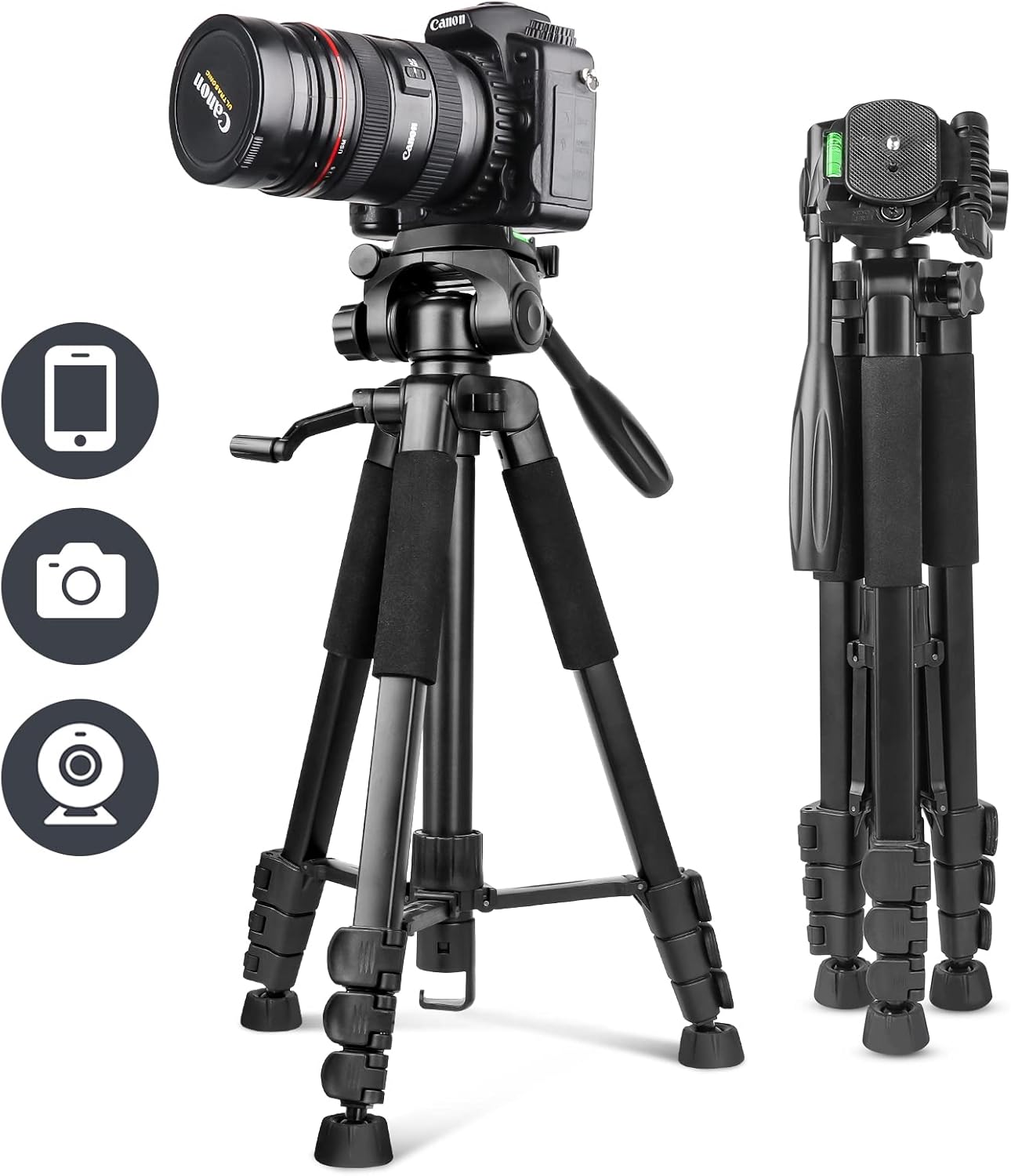
Image: The UBeesize 170cm Tripod shown fully extended with a camera attached, illustrating its primary use.
Obsah balení
Ověřte prosím, zda jsou ve vašem balení obsaženy všechny níže uvedené položky:
- UBeesize Camera Tripod x 1
- Smartphone Clip x 1
- Bezdrátové dálkové ovládání x 1
- Přepravní taška x 1
- Návod k použití x 1

Image: Visual representation of the tripod and its accompanying accessories, including the smartphone clip, wireless remote, and carrying bag.
Product Diagram and Parts Identification
Familiarize yourself with the different components of your UBeesize tripod:

Obrázek: Explodoval view diagram highlighting key parts such as the pan handle head, quick release plate, spirit level, center column, leg locks, anti-slip feet, and the hook for added stability.
- Pan Handle Head: Allows for smooth horizontal and vertical adjustments.
- Rychloupínací deska: For quick attachment and detachment of your device.
- Vodováha: Helps ensure your setup is perfectly horizontal.
- Středový sloupec: Extends for additional height adjustment.
- Zámky na nohou: Secure the tripod legs at desired lengths.
- Protiskluzové nožičky: Provide stability on various surfaces.
- Háček na příslušenství: Located at the bottom of the center column, can be used to hang a weight (e.g., backpack) for increased stability.
Pokyny pro nastavení
1. Rozložení stativu
- Umístěte stativ na rovný a stabilní povrch.
- Uvolněte zámky nohou na každé noze.
- Extend the legs to the desired length and angle.
- Securely fasten all leg locks to prevent accidental collapse.
2. Nastavení výšky
The tripod offers 4-stage height adjustment, from a minimum of 51cm to a maximum of 170cm.
- To adjust the leg height, open the leg locks, extend the leg sections, and then close the locks firmly.
- To adjust the center column height, loosen the center column lock knob, raise or lower the column, and then tighten the knob securely.

Image: A visual guide demonstrating the tripod's adjustable height settings, ranging from its folded state to its maximum extension of 170cm.
3. Attaching Devices (Camera, Smartphone)
- Pro fotoaparáty: Unscrew the quick release plate from the tripod head. Attach the quick release plate to the bottom of your camera by screwing it into the camera's tripod mount. Then, slide the quick release plate with the camera back onto the tripod head until it clicks into place. Ensure it is securely locked.
- Pro chytré telefony: Attach the smartphone clip to the quick release plate. Insert your smartphone into the clip, ensuring it is held firmly. Then, attach the quick release plate with the smartphone clip to the tripod head.
- Důležité: Always ensure the device is securely mounted and all screws are tightened to prevent accidental drops and maintain the maximum load capacity of 5.5kg.
4. Používání bezdrátového dálkového ovladače
The included wireless remote control is compatible with both iOS and Android smartphones, offering a maximum effective range of 10 meters.
- Zapněte dálkový ovladač pomocí vypínače ON/OFF.
- Povolte na svém smartphonu Bluetooth a vyhledejte dostupná zařízení.
- Select the remote control (usually named 'AB Shutter3' or similar) from the list to pair.
- Once paired, open your smartphone's camera app. Use the corresponding button on the remote (iOS or Android) to trigger the shutter.
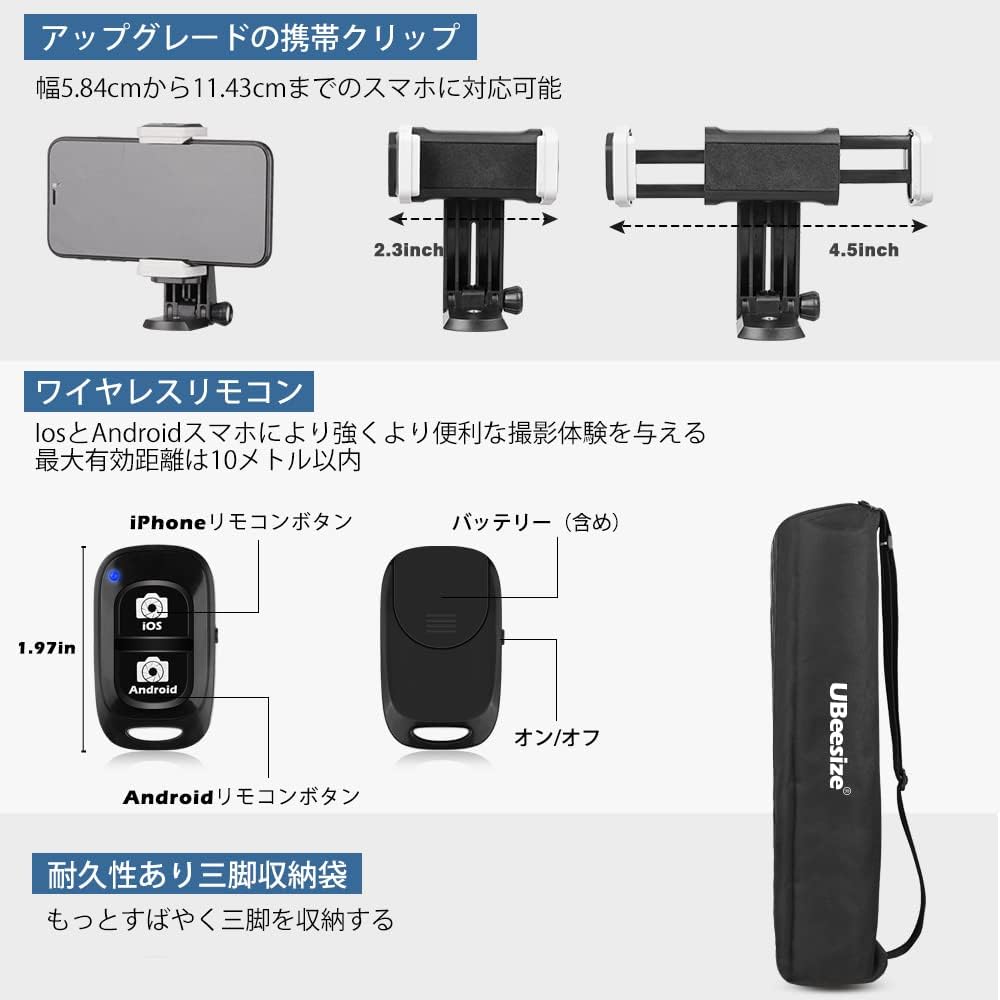
Obrázek: Detail view of the adjustable smartphone clip, the wireless Bluetooth remote control with iOS and Android buttons, and the compact carrying bag.
Návod k obsluze
1. Adjusting Shooting Angles with the 3-Way Pan Head
The 3-way pan head allows for flexible positioning of your device:
- Horizontal Panning: Loosen the horizontal lock knob on the pan head to rotate the device 360 degrees horizontally for panoramic shots. Tighten to secure.
- Vertical Tilting: Loosen the vertical tilt handle to adjust the device's angle up or down. Tighten the handle to secure the position.
- Orientace na výšku/na šířku: The quick release plate mount can be tilted 90 degrees to switch between landscape and portrait orientations. Loosen the side knob, adjust, and tighten.

Obrázek: Přamples of various shooting modes achievable with the 3-way pan head, including landscape, portrait, upward-angle, and downward-angle shots, along with an indicator for 360-degree rotation.
2. Enhancing Stability
For maximum stability, especially with heavier devices or in windy conditions:
- Ensure all leg locks and head adjustment knobs are firmly tightened.
- Hang a weight (e.g., your camera bag or backpack) from the accessory hook located at the bottom of the center column.
- Use the spirit level on the tripod head to ensure your setup is perfectly balanced.

Image: The tripod set up outdoors with a camera, showing a backpack attached to the center column hook to provide additional stability.
Údržba
To ensure the longevity and optimal performance of your tripod:
- Clean the tripod regularly with a soft, dry cloth. Avoid abrasive cleaners or solvents.
- If used in dusty or sandy environments, carefully clean the leg sections and locks to prevent grit from affecting their operation.
- Pokud stativ nepoužíváte, skladujte jej v přepravní brašně na suchém a chladném místě.
- Pravidelně kontrolujte utažení všech šroubů a spojů.
Odstraňování problémů
1. Tripod is unstable:
- Ujistěte se, že všechny zámky nohou jsou zcela utažené.
- Verify that the quick release plate and your device are securely attached to the tripod head.
- Extend the legs evenly and ensure they are spread wide enough.
- Consider hanging a weight from the accessory hook for added stability.
2. Device is slipping or tilting:
- Tighten the pan handle and tilt adjustment knobs firmly.
- Ensure your device's weight does not exceed the maximum load capacity of 5.5kg.
3. Wireless remote control not pairing:
- Ensure the remote control is turned on and within 10 meters of your smartphone.
- Zkontrolujte, zda je na vašem smartphonu povoleno Bluetooth.
- If previously paired, try unpairing and re-pairing the remote control in your smartphone's Bluetooth settings.
- V případě potřeby vyměňte baterii v dálkovém ovladači.
Specifikace
| Číslo modelu | UB-TR670BK01 |
| Materiál | Hliník |
| Barva | Černý |
| Maximální výška | 170 cm |
| Minimální výška | 51 cm |
| Složená délka | 51 cm |
| Hmotnost položky | 1.39 kg (body weight), 1.64 kg (package weight) |
| Maximální nosnost | 5.5 kg |
| Typ stativové hlavy | 3-Way Pan Handle Head |
| Kompatibilní zařízení | Cameras, Smartphones, Tablets, Video Cameras |
| Hodnocení voděodolnosti | IP54 |
| Speciální funkce | Portable, 360° Rotation, Accessory Hook |
Záruka a podpora
Your UBeesize 170cm Tripod comes with a Záruka 12 měsíců from the date of purchase. If you encounter any issues or have questions regarding your product during this period, please do not hesitate to contact our customer support team. We are committed to providing reliable service and assistance.
For support, please refer to the contact information provided on the UBeesize official webweb nebo vaše nákupní platforma.