
Zavedení
The ISDT P30 is a high-performance dual-channel smart charger and discharger designed for various battery types, including LiFe, LiIon, LiPo, LiHV, Pb, and NiMH. Featuring synchronous dual-channel operation, a 3.5-inch IPS LCD screen, and Bluetooth connectivity for mobile control, the P30 offers efficient and precise battery management. This manual provides essential information for safe and effective use of your ISDT P30 charger.
Důležité bezpečnostní informace
Please read and understand all safety warnings and instructions before using the ISDT P30 charger. Failure to do so may result in fire, injury, or property damage.
- Nabíječku vždy používejte v dobře větraném prostoru, mimo dosah hořlavých materiálů.
- Nikdy nenechávejte nabíječku během používání bez dozoru.
- Ensure correct battery type and cell count settings are selected to prevent overcharging or damage.
- Do not charge damaged, swollen, or leaking batteries. Dispose of them properly.
- Chraňte nabíječku před vlhkostí, prachem a přímým slunečním zářením.
- Používejte pouze originální nebo schválené příslušenství a kabely.
- Uchovávejte mimo dosah dětí.
Obsah balení
Ověřte, zda jsou v balení přítomny všechny položky:
- 1x ISDT P30 Charger
- 1x Uživatelská příručka (tento dokument)
- (Additional cables or accessories may be included depending on the specific package variant.)
Konec produktuview a klíčové vlastnosti

Obrázek 1: Přední strana view of the ISDT P30 Smart Charger, showing the screen, control buttons, and main ports.

Obrázek 2: Shora dolů view of the ISDT P30 Smart Charger, highlighting the dual balance ports and XT60 connectors.
- High Power Synchronous Dual Channel: Max. 1000W per single port, up to 1500W for synchronous parallel charging.
- Chytré nabíjení: High-speed processor for precise parameter interference to each port.
- 3.5-inch Super IPS LCD Screen: 320 x 480 resolution display showing current, capacity, internal resistances, and more.
- New Air Convection Design: Improved internal structure for effective heat dissipation and cooling.
- Haptic Touch: Tactile feedback for faster and more intuitive operation.
- Bluetooth Connect Function: Wireless OTA upgrade and mobile operations via APP support.
- BattGo Support: Seamless integration with BattGo enabled batteries for smart charging.
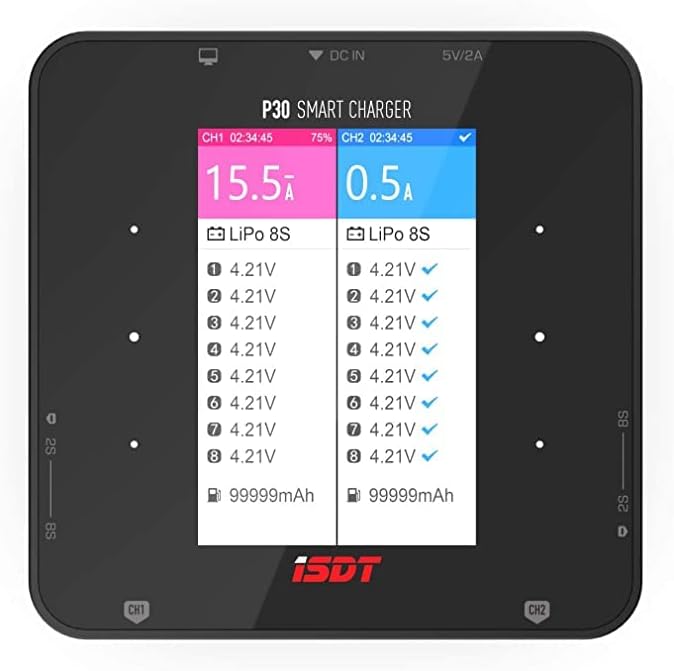
Figure 3: Close-up of the 3.5-inch IPS LCD screen displaying charging parameters for two channels.

Figure 4: ISDT P30 charger connected to a BattGo smart battery, demonstrating intelligent monitoring.
Průvodce nastavením
1. Připojení napájení
The ISDT P30 requires a DC input voltage between 10-34V. Connect your compatible power supply to the DC input port on the charger. Ensure the power supply can provide sufficient current for your charging needs.
2. Připojení baterií
The P30 features dual charging channels. For each battery:
- Connect the main power lead of your battery (e.g., XT60) to the corresponding main output port (CH1 or CH2) on the charger.
- Connect the balance lead of your battery to the appropriate balance port (CH1 or CH2) on the charger. Ensure the balance lead is correctly oriented.

Figure 5: Two batteries connected to the ISDT P30 for simultaneous charging, demonstrating the dual-channel capability.
Návod k obsluze
1. Navigace a rozhraní
The ISDT P30 features a user-friendly interface with a 3.5-inch IPS LCD screen and tactile buttons for navigation. Use the directional buttons to scroll through menus and adjust parameters, and the Enter button to confirm selections.
2. Selecting Battery Type and Mode
After connecting your battery, the charger will typically auto-detect the battery type and cell count. However, it is crucial to verify and manually select the correct settings if needed:
- Navigate to the "Task" menu for the desired channel.
- Select "Chemistry" to choose your battery type (LiPo, LiFe, LiIon, LiHV, Pb, NiMH).
- Select "Cells" to set the correct cell count (e.g., 1S-8S for LiPo).
- Choose your desired task:
- Účtovat: Standard charging mode.
- Zbývající poplatek: Charges and balances individual cell voltages for optimal battery health. (Recommended for LiPo/LiHV).
- Splnit: Discharges the battery to a specified voltage.
- Skladování: Charges or discharges the battery to a safe storage voltage.
- Rychlé nabíjení: Charges the battery quickly without balancing.
- Adjust the "Current" (charging/discharging amperage) as per your battery's specifications.
- Confirm settings and select "Start" to begin the operation.
3. Bluetooth Connectivity and Mobile App
The ISDT P30 supports Bluetooth for wireless control and monitoring via a mobile application. Download the official ISDT Link app from your device's app store. Once installed, pair your charger with the app to access real-time data, adjust settings, and initiate tasks remotely.
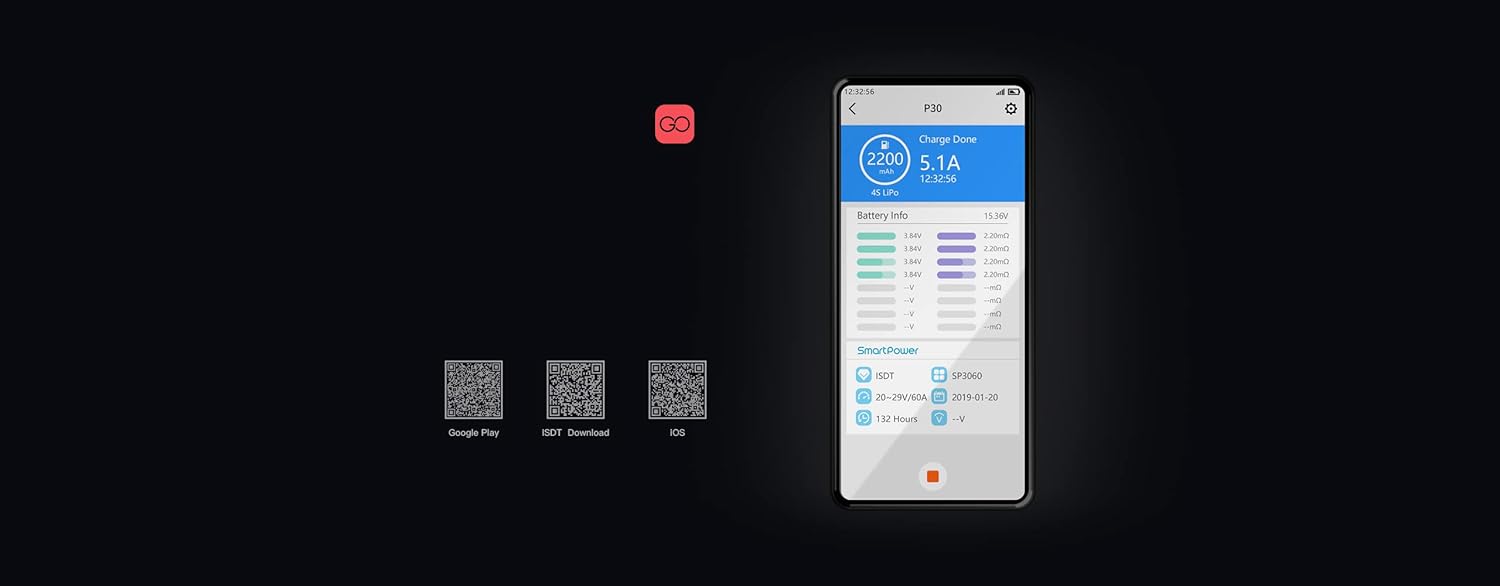
Obrázek 6: Přample of the mobile application interface for controlling and monitoring the ISDT P30 charger.
Údržba
- Čištění: Regularly clean the charger's exterior with a soft, dry cloth. Avoid using solvents or abrasive cleaners.
- Péče o obrazovku: The 3.5-inch IPS screen is sensitive. Consider applying a screen protector to prevent scratches. Clean the screen gently with a microfiber cloth.
- Chladicí systém: The charger features an air convection design for cooling. Ensure the vents are not obstructed during operation to maintain optimal performance and prevent overheating.
- Aktualizace firmwaru: Periodically check for firmware updates via the mobile app or ISDT's official website. For critical updates, it is recommended to use a PC with a USB cable for a stable connection, rather than relying solely on mobile phone updates, to prevent potential issues.
- Skladování baterie: Always store LiPo/LiHV batteries at their recommended storage voltage (typically 3.8V-3.85V per cell) using the "Storage" mode on the charger. This prolongs battery life and reduces safety risks.

Figure 7: Diagram illustrating the internal air convection cooling design of the ISDT P30 charger.
Odstraňování problémů
- Nabíječka se nezapíná:
- Ujistěte se, že stejnosměrný vstupní objtage je v rozsahu 10–34 V.
- Check all power connections for secure contact.
- Verify your power supply is functioning correctly.
- Battery Not Charging/Error Message:
- Ověřte, zda nastavení typu baterie a počtu článků odpovídá připojené baterii.
- Check main power and balance lead connections for proper seating and polarity.
- Inspect the battery for any physical damage (e.g., swelling, punctures). Do not charge damaged batteries.
- Problémy s připojením mobilní aplikace:
- Ensure Bluetooth is enabled on both your mobile device and the charger.
- Update the ISDT Link app to the latest version.
- Restart both the charger and your mobile device.
- Bloated Batteries: This often indicates improper charging/discharging practices or an aging battery. Always use the balance charge and storage modes to maintain battery health. Do not use bloated batteries.
- Selhání aktualizace firmwaru: If a firmware update fails via mobile, attempt the update using a PC connected via USB for a more stable process.
Specifikace
| Funkce | Specifikace |
|---|---|
| Max Charging Power (Single Channel) | 1000W |
| Max Charging Power (Whole Model) | 1500W |
| Nabíjecí proud | 0.2-30.0A |
| Maximální vybíjecí výkon | 30W x 2 |
| Maximální vybíjecí proud | 0.2A-3.0A x 2 |
| Vstupní objemtage | DC 10-34V |
| Výstupní objemtage | DC 1-34V |
| Podporované typy baterií | LiFe, LiIon, LiPo (1-8S), LiHV (1-7S), Pb (1-12S), NiMH (1-16S) |
| Velikost obrazovky | 3.5-inch IPS LCD (320 x 480 resolution) |
| Rozměry | 110 x 110 x 65mm (4.33 x 4.33 x 2.56 palce) |
| Hmotnost | 730 g (1.61 liber) |
Záruka a podpora
ISDT products are manufactured to high-quality standards. For warranty information, technical support, or service inquiries, please visit the official ISDT webnebo se obraťte na místního distributora. Uschovejte si účtenku jako doklad o koupi pro případ reklamace.
Nejnovější informace a zdroje podpory naleznete na adrese: www.isdt.co