
Zavedení
This manual provides detailed instructions for replacing the battery in your iPhone 12 or iPhone 12 Pro using the iFixit Battery Repair Kit. This kit is designed to help restore your device's battery performance, addressing issues such as poor charge retention, unexpected shutdowns, or a "service battery" warning.
The iFixit repair kit includes a replacement battery and all necessary tools and adhesive for a successful repair. Please read all instructions carefully before beginning the repair process.
Bezpečnostní informace
WARNING: Lithium-ion batteries can be dangerous if mishandled. Potential for fire or burning. Do not disassemble, puncture, crush, heat, or burn the battery. Always follow safety precautions.
- Ensure your device is powered off and disconnected from any power source before starting the repair.
- Work in a well-lit, clean, and static-free environment.
- Používejte vhodnou ochranu očí.
- Handle the battery carefully. Avoid bending or puncturing it.
- If the battery appears swollen, damaged, or leaks, exercise extreme caution. Do not attempt to install it.
- Properly dispose of the old battery according to local regulations. Do not throw it in household trash.
Obsah balení
Your iFixit Battery Repair Kit for iPhone 12 and 12 Pro includes the following items:
- Replacement Lithium-ion Battery (10.78 Wh, 3.83 V)
- Complete Tool Set for iPhone Repair
- Pre-cut Adhesive Strips for Battery and Display
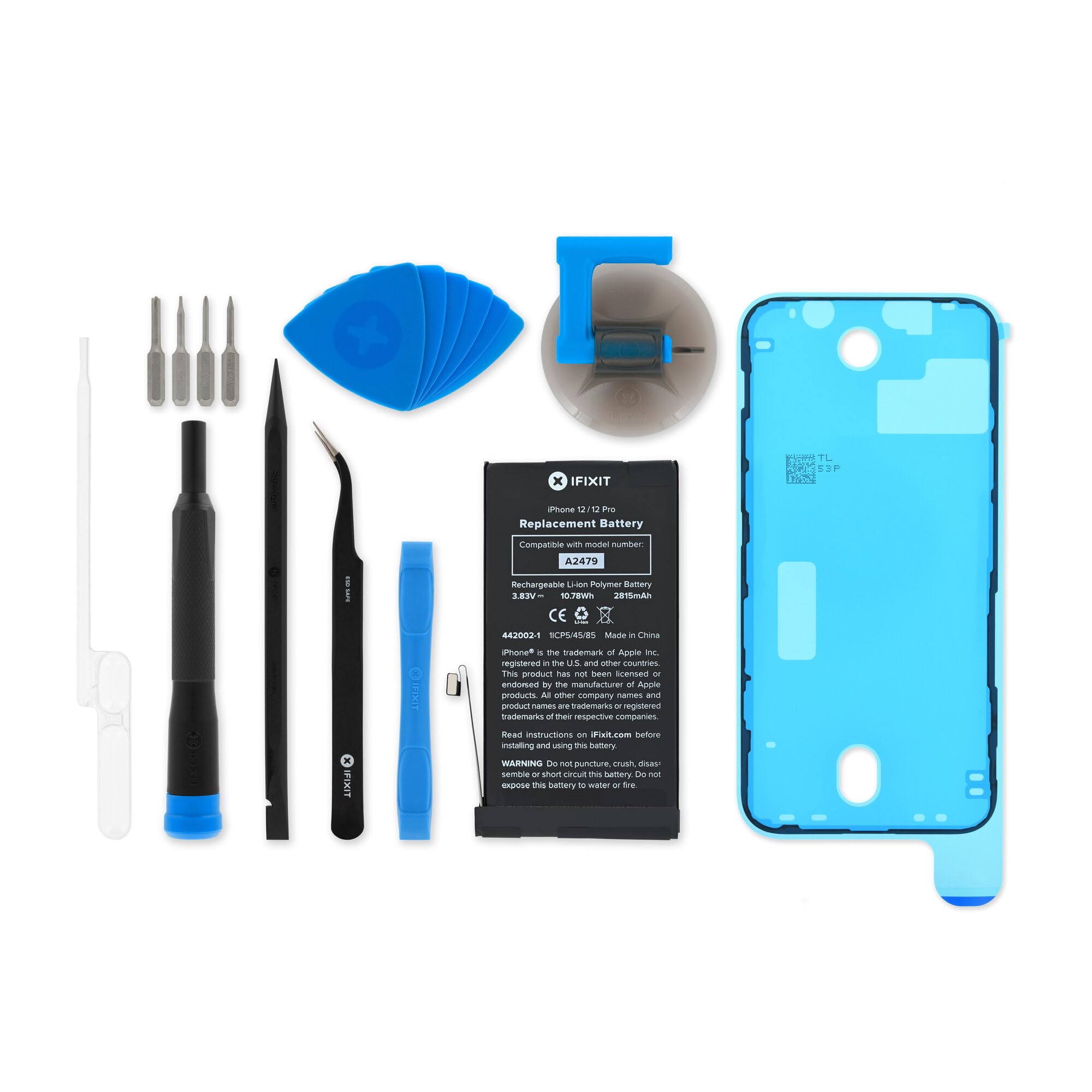
Obrázek: Přední strana view of the iFixit replacement battery for iPhone 12 and 12 Pro.

Image: Contents of the iFixit Battery Repair Kit, including the battery, tools, and adhesive.
Nastavení a instalace
This section outlines the general steps for replacing your iPhone 12 or 12 Pro battery. For detailed, step-by-step visual guides, please refer to the official iFixit repair guides available online. This process requires patience and precision.
Required Tools (Included in Kit):
- Pentalobe šroubovák
- Křížový šroubovák
- Trojhranný šroubovák
- Spudger
- Úvodní tipy
- Přísavka
- Pinzeta
- Adhesive remover (if applicable)
- New adhesive strips

Obrázek: Přample of an iFixit toolkit containing various precision tools for electronics repair.
Obecné kroky instalace:
- Vypínací zařízení: Completely power down your iPhone and disconnect it from any charging cables.
- Odstraňte šrouby Pentalobe: Use the pentalobe screwdriver to remove the two screws located on either side of the charging port.
- Heat the Edges (Optional but Recommended): Gently heat the edges of the iPhone's display to soften the adhesive. An iOpener or hairdryer on a low setting can be used.
- Otevřete displej: Attach the suction cup to the bottom edge of the display, near the home button (if applicable) or charging port. Gently pull up on the suction cup while inserting an opening pick into the seam between the display and the frame. Carefully work the pick around the edges to separate the adhesive.
- Odpojení kabelů displeje: Once the display is open, carefully prop it up. Use a spudger to disconnect the various display and sensor cables from the logic board. Be gentle to avoid damaging the connectors.
- Remove Battery Adhesive: Locate the battery. There will be adhesive strips underneath it. Carefully pull these strips out from under the battery. If they break, you may need to gently pry the battery out with a spudger, being extremely careful not to puncture it.
- Odpojení staré baterie: Use a spudger to disconnect the old battery's flex cable from the logic board.
- Vyjměte starou baterii: Carefully remove the old battery from the device.
- Nainstalujte novou baterii: Apply the new adhesive strips to the back of the new iFixit battery. Connect the new battery's flex cable to the logic board.
- Test funkčnosti: Before sealing the device, briefly power on the iPhone to ensure the new battery is recognized and the display functions correctly. Power off the device again.
- Znovu sestavte zařízení: Reconnect all display and sensor cables. Carefully align the display and press it firmly back into place, ensuring the new adhesive seals properly. Reinstall the pentalobe screws.
Note: This is a general guide. Specific screw locations and cable configurations may vary slightly between iPhone 12 and 12 Pro models. Always consult the most current iFixit repair guide for your specific model.
Provoz (po instalaci)
After successful battery replacement, follow these steps for optimal performance:
- Počáteční poplatek: Fully charge your iPhone to 100% without interruption.
- Battery Calibration (Recommended): For the first few charge cycles, allow the battery to drain completely until the phone shuts off, then charge it fully to 100%. This helps calibrate the battery's charge indicator.
- Monitorování výkonu: Observe the battery life and charging behavior over the next few days to ensure everything is functioning as expected.
Údržba
To maximize the lifespan and performance of your new iFixit battery:
- Vyhněte se extrémním teplotám: Do not expose your iPhone to very hot or very cold environments, as this can degrade battery health.
- Optimální návyky nabíjení: While full discharge/charge cycles are good for calibration, for daily use, try to keep the battery charge between 20% and 80%. Avoid leaving it at 0% or 100% for extended periods.
- Use Quality Chargers: Always use MFi-certified or original Apple charging accessories.
- Aktualizace softwaru: Keep your iOS software updated, as updates often include battery optimization improvements.
Odstraňování problémů
If you encounter issues after replacing your battery, consider the following:
- "Service Battery" Warning: This warning may appear even with a new battery if the iPhone's software cannot verify the battery as an "authentic Apple part." This is a software notification and does not typically affect battery performance.
- Telefon se nezapíná: Double-check all internal cable connections, especially the battery and display cables. Ensure they are securely seated.
- Rychlé vybíjení baterie: Perform a hard reset (force restart) of your iPhone. If the issue persists, ensure all internal connections are secure. Check for any background apps consuming excessive power.
- Přehřívání během nabíjení: Discontinue charging immediately. This could indicate a faulty battery or a short circuit. Re-open the device and inspect the battery and connections for any damage or improper installation.
- Problémy se zobrazením: If the screen is not responding or showing artifacts, ensure the display cables are correctly and securely connected.
For further assistance, refer to the iFixit support resources or community forums.
Specifikace
| Funkce | Detail |
|---|---|
| Typ baterie | Dobíjecí lithium-iontová |
| Watt hodiny (Wh) | 10.78 Wh |
| svtage (V) | 3.83 V |
| Kompatibilita | iPhone 12, iPhone 12 Pro |
| Číslo modelu | 1ICP5/45/85 |
| Rozměry balení | 3 x 2 x 0.5 palce |
| Hmotnost položky | 1.09 libry |
| Výrobce | iFixit |
Záruka a podpora
iFixit stands behind the quality of its products. This repair kit and its components are backed by iFixit's commitment to quality.
iFixit tools are Backed for Life. If any tool included in your kit breaks, iFixit will replace it for as long as you own it. For specific warranty details on the battery component, please refer to the official iFixit webwebu nebo kontaktujte zákaznickou podporu.

Image: iFixit "Backed for Life" emblem, signifying lifetime warranty on tools.
For comprehensive repair guides, troubleshooting tips, and customer support, visit the official iFixit webmísto: www.ifixit.com
Zřeknutí se odpovědnosti
Attempting repairs on electronic devices carries inherent risks, including potential damage to the device or personal injury. Proceed with caution and at your own risk. iFixit provides tools and guides to empower users to perform repairs, but cannot guarantee specific outcomes or assume liability for damages incurred during the repair process. Professional repair is recommended if you are uncomfortable performing the repair yourself.