
1. Úvod
This manual provides essential instructions for the installation, operation, and maintenance of your Qubo Car DashCam Pro 2K QHD. Please read this manual thoroughly before using the device to ensure proper functionality and safety.

Image 1.1: Qubo Car DashCam Pro 2K QHD. This image shows the compact design of the dashcam, highlighting its lens and mounting bracket.
2. Co je v krabici
Ověřte, zda jsou v balení přítomny všechny položky:
- Qubo Car DashCam Pro 2K QHD (1 unit)
- Adapter with cable (5V 2AMP) (1 unit)
- Double Sided Adhesive Tape (1 unit)
- Pry Tool (1 unit)
- QR card (Digital Warranty & User Manual) (1 unit)
3. Nastavení a instalace
Follow these steps for proper installation of your dashcam:
- Připravte montážní povrch: Clean the area on your windshield where you intend to mount the dashcam. Ensure it is free from dust and grease for optimal adhesive tape performance.
- Připojení palubní kamery: Remove the protective film from the double-sided adhesive tape on the dashcam mount. Firmly press the dashcam onto the cleaned windshield surface. Ensure the camera lens has an unobstructed view silnice.
- Připojte napájení: Connect the provided power cable to the dashcam and route it discreetly along the windshield edge and pillar using the pry tool. Plug the other end into your car's 12V power outlet using the included adapter.
- Zapnutí a počáteční konfigurace: Once connected, the dashcam will power on automatically when the car starts. Download the QuboPro App on your smartphone (available for Android and iOS).
- Pair with QuboPro App: Open the QuboPro App, select 'Add Device', and follow the on-screen instructions to connect to your dashcam's Wi-Fi network. Create a new password for your dashcam's Wi-Fi for security.

Image 3.1: Dashcam mounted on windshield. This image illustrates the dashcam's position on the car's windshield, capturing a wide-angle view cesty před sebou.
4. Návod k obsluze
4.1 Režimy nahrávání
- Nepřetržité nahrávání: The dashcam automatically starts recording when the vehicle's ignition is turned on. Footage is saved in short segments.
- Nahrávání ve smyčce: When the SD card is full, the oldest unlocked footage is overwritten by new recordings. Ensure important footage is saved or locked.
- Nouzové nahrávání (G-senzor): The built-in G-Sensor detects sudden impacts or collisions. In such events, the current recording segment is automatically locked and saved to a protected folder, preventing it from being overwritten by loop recording.
- Journey Time-Lapse: Create condensed videos of your entire journey directly from the QuboPro App.

Image 4.1: Multiple Recording Modes. This image illustrates the different recording functionalities of the dashcam, including continuous, emergency, loop, and clip & snap modes.
4.2 360° Rotatable Design
The dashcam features a 360° rotatable design, allowing you to adjust the camera angle to record either the road ahead or the interior of your vehicle. This flexibility is useful for capturing in-cabin events or for personal vlogging.
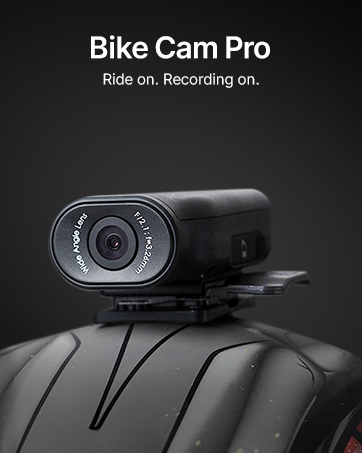
Image 4.2: 360° Rotatable Design. This image shows the dashcam's ability to rotate, allowing for both forward-facing and in-cabin recording.
5. QuboPro App Features
The QuboPro App provides comprehensive control and access to your dashcam's features:
- Živý přenos: View foo v reálném časetage from your dashcam on your smartphone.
- Správa nahrávání: Access, download, and manage recorded videos and images.
- Nastavení: Adjust dashcam settings such as recording resolution, G-Sensor sensitivity, and parking mode.
- Záznamy cest: Review trip details and time-lapse videos.

Image 5.1: QuboPro App Interface. This image displays the user-friendly interface of the QuboPro App on a smartphone, showing live feed and various control options.
6. Údržba
- Vyčistěte objektiv: Pravidelně čistěte objektiv fotoaparátu měkkým hadříkem, který nepouští vlákna, abyste zajistili čistou a kvalitní nahrávku.
- Správa SD karet: Format the SD card periodically (e.g., once a month) through the QuboPro App to maintain optimal performance and prevent data corruption. Use only compatible V30 high-speed SD cards.
- Aktualizace firmwaru: Check for and install firmware updates via the QuboPro App to ensure your dashcam has the latest features and bug fixes.
- Teplota: The dashcam is designed to operate in temperatures from -20°C to 85°C. Avoid exposing it to extreme temperatures outside this range for prolonged periods.

Image 6.1: Compatible SD Cards. This image displays the types of SD cards compatible with the Qubo Dashcam, emphasizing the requirement for V30 high-speed cards and warning against non-compatible types.
7. Řešení problémů
| Problém | Možná příčina | Řešení |
|---|---|---|
| Dashcam not powering on | Loose power connection, faulty adapter, car power outlet issue. | Check power cable connection. Ensure the car's 12V outlet is functional. Try a different adapter if available. |
| Recording quality is poor | Znečištěný objektiv, nesprávné nastavení rozlišení, špatné světelné podmínky. | Clean the camera lens. Check recording resolution in the QuboPro App. Ensure windshield is clean. |
| Problémy s připojením Wi-Fi | Incorrect password, too far from dashcam, app issues. | Verify Wi-Fi password. Ensure your phone is close to the dashcam. Restart the app and dashcam. |
| Chyba SD karty | Incompatible SD card, corrupted card, full card. | Use a compatible V30 high-speed SD card. Format the SD card via the app. Replace the SD card if issues persist. |
8. Specifikace
| Funkce | Detail |
|---|---|
| Model | NG-HCAGR001 |
| Rozměry produktu | 9.5 x 4 x 3.5 cm |
| Hmotnost položky | 80 g |
| Rozlišení záznamu videa | 2K QHD (1296p) |
| Pole View | 120 stupňů |
| Technologie připojení | Wi-Fi |
| Speciální funkce | Time Lapse, G-Sensor, Supercapacitor Powered, 360° Rotatable Design |
| Podpora úložiště | Up to 1 TB SD Card (SD card not included) |
| Provozní teplota | -20 °C až 85 °C |
| Zdroj napájení | Car Charger (USB Input) |
9. Záruka a podpora
Your Qubo Car DashCam Pro 2K QHD comes with a standard brand warranty. For detailed warranty terms and conditions, please refer to the QR card included in your package or visit the official Qubo webmísto.
Zákaznická podpora:
For any technical assistance, installation support, or service-related queries, please contact Qubo customer support. Qubo offers dedicated On-Call & Field support across India, with installation and service support available in over 70 cities.
- Online zdroje: Refer to the digital user manual via the provided QR card.
- Kontaktní údaje: Please refer to the product packaging or the official Qubo website for the latest contact details for customer support.
10. Bezpečnostní informace
- Do not operate the dashcam while driving if it distracts you.
- Ensure the dashcam is securely mounted and does not obstruct your view silnice.
- Use only the provided power adapter and cable to prevent damage to the device.
- Avoid exposing the device to direct sunlight for extended periods when not in use, especially in hot climates.
- Udržujte zařízení mimo dosah vody a vlhkosti.
- Do not attempt to disassemble or repair the dashcam yourself. Contact customer support for assistance.