
1. Úvod
The Moulinex I-Companion XL is a versatile connected cooking robot designed to simplify your culinary experience. It features 14 operating modes, a manual control option, and a generous 4.5-liter capacity, making it suitable for preparing meals for up to 10 people. With Bluetooth connectivity, you can manage cooking parameters and access an extensive recipe library directly from your smartphone or tablet.
This manual provides essential information for the safe and efficient use of your I-Companion XL, covering setup, operation, maintenance, and troubleshooting.
2. Důležité bezpečnostní pokyny
Před použitím spotřebiče si pečlivě přečtěte všechny pokyny. Nedodržení těchto pokynů může vést k úrazu elektrickým proudem, požáru nebo vážnému zranění.
- Vždy se ujistěte, že je spotřebič umístěn na stabilním, rovném a tepelně odolném povrchu.
- Neponořujte motorovou jednotku, kabel ani zástrčku do vody ani jiné kapaliny.
- Během provozu držte ruce a náčiní v dostatečné vzdálenosti od pohyblivých částí, abyste předešli zranění.
- Odpojte spotřebič ze zásuvky, pokud jej nepoužíváte, před montáží nebo demontáží jeho součástí a před čištěním.
- Neprovozujte žádný spotřebič s poškozenou šňůrou nebo zástrčkou nebo poté, co spotřebič nefunguje správně nebo byl jakýmkoliv způsobem poškozen.
- Když je jakýkoli spotřebič používán dětmi nebo v jejich blízkosti, je nutný pečlivý dohled.
- Use only accessories and attachments recommended or sold by the manufacturer.
- Exercise caution when handling sharp blades and hot liquids.
3. Konec produktuview
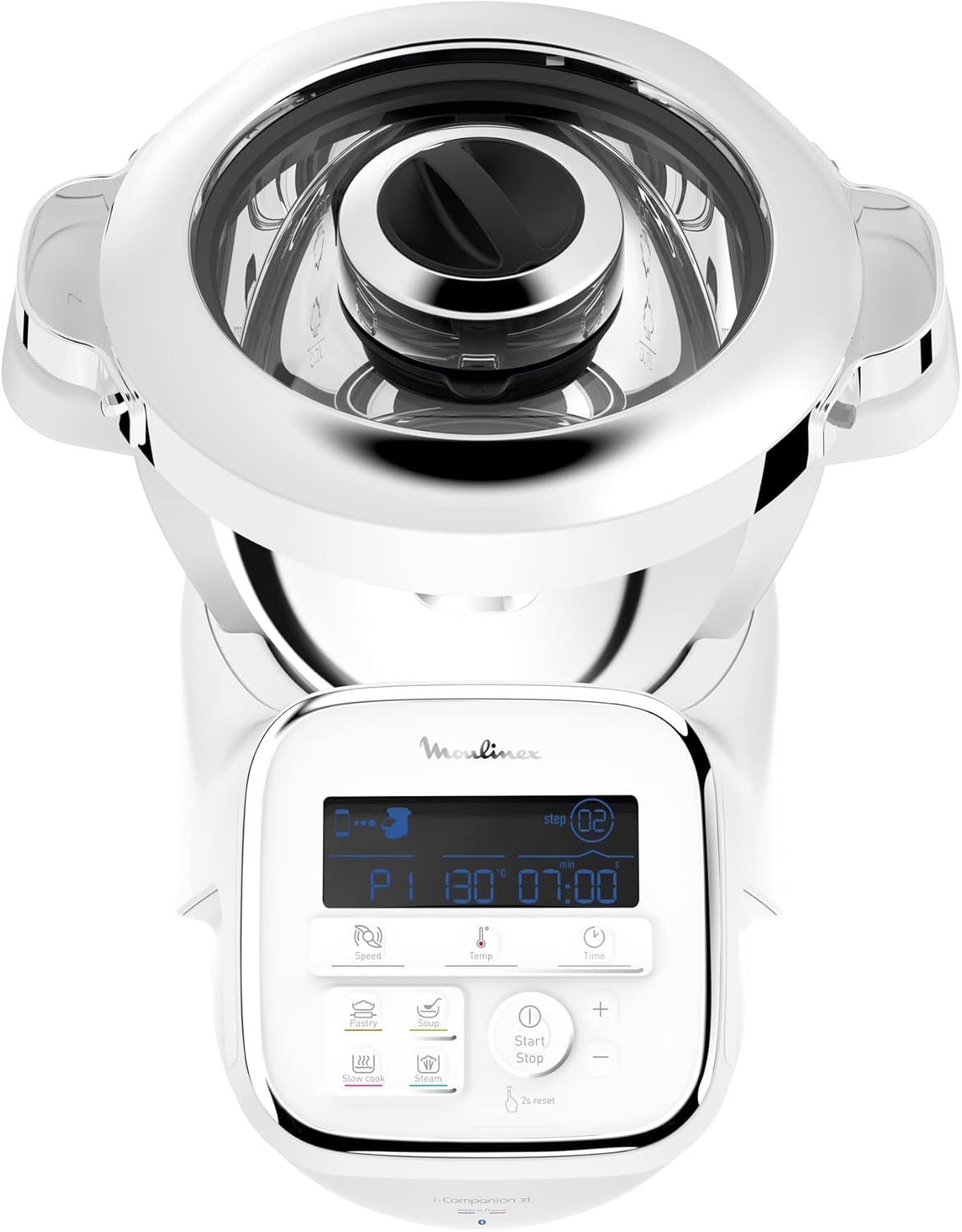
The Moulinex I-Companion XL is designed for intuitive use and efficient cooking. Below are the main components and their functions.

The Moulinex I-Companion XL connected cooking robot, featuring a sleek white design and a prominent control panel, ready for use in a modern kitchen setting.
3.1. Main Unit and Control Panel
The main unit houses the motor and the digital control panel. The control panel allows you to select programs, adjust speed, temperature, and time, and monitor the cooking process.
Detailní view of the I-Companion XL's digital control panel, showing the display with cooking parameters and various function buttons for different cooking modes.
3.2. Included Components and Accessories
Your I-Companion XL comes with a set of essential accessories to perform various cooking tasks:
- Sekací nůž: For mincing, chopping, and mixing.
- Kneading/Crushing Blade: For kneading dough and crushing hard ingredients.
- Metla: For whipping egg whites, cream, and emulsifying sauces.
- Mixér: Pro míchání a jemné míchání.
- Parní košík: Pro dušení zeleniny, ryb a dalších potravin.
- Vegetable Cutter Accessory: For slicing and grating vegetables.

A collection of accessories for the I-Companion XL, such as chopping blades, kneading/crushing knives, whisks, and a steam basket, stored neatly in a container.
4. Nastavení
4.1. Vybalení a počáteční čištění
- Opatrně vyjměte všechny součásti z obalu.
- Wash the bowl, lid, and all accessories (blades, whisk, mixer, steam basket, vegetable cutter) with warm soapy water. Rinse thoroughly and dry.
- Otřete hlavní jednotku reklamouamp tkanina. Neponořujte hlavní jednotku do vody.
4.2. Montáž
- Umístěte hlavní jednotku na čistý, stabilní a suchý povrch.
- Insert the desired accessory (e.g., chopping blade) into the bottom of the cooking bowl.
- Place the cooking bowl onto the main unit, ensuring it is securely locked in place.
- Přidejte přísady do mísy.
- Secure the lid onto the cooking bowl, ensuring it is properly closed and locked.
4.3. Připojení napájení
Zapojte napájecí kabel do uzemněné elektrické zásuvky. Spotřebič je nyní připraven k použití.
4.4. Connecting to the Moulinex App (Bluetooth)
- Download the free Moulinex Companion app from your device's app store.
- Povolte Bluetooth na svém smartphonu nebo tabletu.
- Open the Moulinex Companion app and follow the on-screen instructions to pair your device with the I-Companion XL.
- Once connected, you can access recipes, control cooking parameters, and receive notifications.

The Moulinex I-Companion XL cooking robot positioned on a wooden countertop, surrounded by fresh vegetables, salmon fillets, and small bowls of prepared food, demonstrating its versatility.
5. Návod k obsluze
The I-Companion XL offers 14 operating modes, including 10 automatic programs, a manual mode, lid-off cooking, and a keep-warm function.
5.1. Automatické programy
Select from 10 pre-programmed settings for common preparations such as soups, sauces, stews, pastries, and more. Each program automatically adjusts time, temperature, and speed for optimal results.
5.2. Manuální režim
For complete control, use the manual mode to set your desired cooking parameters:
- Rychlost: Adjust the mixing or blending speed.
- Teplota: Set the cooking temperature between 30°C and 150°C.
- Čas: Define the cooking duration.
5.3. Using the Moulinex Companion App
The app enhances your cooking experience with unlimited recipes and smart features:
- Knihovna receptů: Access an endless array of recipes, with new additions monthly. Save favorites and create shopping lists.
- 'In My Fridge' Function: Find recipe inspiration based on ingredients you already have, helping to reduce food waste.
- Hlasové rozpoznávání: Utilize voice commands for a hands-free cooking experience.
- Connected Scale Compatibility: Pair with a compatible connected scale for precise ingredient measurement directly linked to recipes.

The Moulinex Companion app offers an extensive library of recipes, updated monthly, to guide your cooking.

The voice recognition feature allows for hands-free control of your I-Companion XL.

The I-Companion XL is compatible with connected scales for precise ingredient measurement, enhancing recipe accuracy.
5.4. Video s ukázkou produktu
A product demonstration video showcasing the Moulinex I-Companion XL's features, various cooking processes, and the preparation of diverse dishes would typically be embedded here. This video highlights the robot's versatility, ease of use, and the delicious results achievable, from fresh salads to elaborate desserts, emphasizing shared culinary moments.
6. Údržba a čištění
Proper maintenance ensures the longevity and optimal performance of your Moulinex I-Companion XL.
6.1. Cleaning the Bowl and Accessories
The cooking bowl, lid, and all accessories (chopping blade, kneading/crushing blade, whisk, mixer, steam basket, vegetable cutter) are dishwasher safe. For manual cleaning, wash with warm soapy water, rinse thoroughly, and dry immediately.
6.2. Čištění hlavní jednotky
Otřete vnější část hlavní jednotky měkkým,amp hadříkem. Nepoužívejte abrazivní čisticí prostředky ani drátěnky. Nikdy neponořujte hlavní jednotku do vody ani jiné kapaliny.
6.3. Skladování
Store the appliance and its accessories in a clean, dry place when not in use. Ensure all parts are dry before storage.
7. Řešení problémů
If you encounter issues with your I-Companion XL, refer to the following common problems and solutions:
| Problém | Možná příčina | Řešení |
|---|---|---|
| Zařízení se nezapne. | Není zapojeno do zásuvky; výpadek napájenítage; vadná zásuvka. | Zkontrolujte připojení napájecího kabelu; ověřte zdroj napájení; zkuste jinou zásuvku. |
| Motor neběží. | Miska nebo víko nejsou správně zajištěny. | Ensure the bowl and lid are correctly locked into position. |
| Problémy s připojením Bluetooth. | Bluetooth disabled on device; app not updated; interference. | Enable Bluetooth; update the app; move closer to the appliance; restart both devices. |
| Jídlo se nevaří rovnoměrně. | Incorrect temperature/time; too much food in the bowl. | Adjust settings; reduce food quantity; ensure proper accessory is used. |
| Neobvyklý hluk během provozu. | Accessory not properly installed; foreign object in the bowl. | Check accessory installation; remove any foreign objects. If noise persists, contact support. |
If the problem persists after attempting these solutions, please contact Moulinex Customer Support.
8. Specifikace
| Funkce | Detail |
|---|---|
| Značka | Moulinex |
| Číslo modelu | HF908120 |
| Moc | 1550 wattů |
| Kapacita mísy | 4.5 litrů |
| Počet rychlostí | 12 |
| Provozní režimy | 14 (10 automatic programs, 1 manual mode, 1 lid-off cooking, keep warm, Bluetooth connectivity) |
| Teplotní rozsah | 30 °C až 150 °C |
| Rozměry produktu (D x Š x V) | 35P x 31d x 32V centimetrů |
| Hmotnost položky | 8.6 kg |
| Materiál | Aluminum (Bowl), Stainless Steel (Blade) |
| Barva | Šedá |
| Zdroj napájení | Elektřina |
| Díly vhodné do myčky | Bowl, lid, and accessories |
| Speciální funkce | XL Bowl, Connected Scale Compatible, Connected Cooking, Voice Recognition, Unlimited Recipes via Companion App |
| Zahrnuté komponenty | Chopping blade, kneading/crushing blade, whisk, mixer, steam basket, vegetable cutter accessory |
9. Záruka a podpora
9.1. Repairability Commitment
Moulinex is committed to product longevity and environmental protection. The I-Companion XL is designed to be repairable for 15 years at a fair price. This commitment is supported by a global network of 6200 repairers, aiming to reduce waste and extend the product's lifespan.

The official Moulinex logo indicating a 15-year commitment to repairability at a fair price, emphasizing product longevity and sustainability.
9.2. Zákaznická podpora
For technical assistance, warranty claims, or to locate a repair center, please visit the official Moulinex website or contact their customer service department. Keep your proof of purchase and model number (HF908120) handy when contacting support.
Online podpora: www.moulinex.com
Telefonická podpora: Refer to your regional Moulinex webstránky s místními kontaktními čísly.