
1. Úvod
Thank you for choosing the Xigmatek Lux M Micro-ATX Mini Tower PC Case. This manual provides detailed instructions for the installation, operation, and maintenance of your new PC chassis. Please read this manual carefully before beginning the assembly process to ensure proper installation and to maximize the performance and longevity of your system.
The Lux M case is designed to offer a robust and aesthetically pleasing housing for your computer components, featuring a tempered glass side panel, a metallic front panel with a unique cut-out pattern, and pre-installed fixed RGB fans for optimal cooling and visual appeal. It supports Micro-ATX and Mini-ITX motherboards and is compatible with various cooling solutions, including water cooling.
2. Bezpečnostní informace
Během instalace a provozu dodržujte následující bezpečnostní opatření:
- Před instalací nebo demontáží jakýchkoli součástí vždy odpojte napájecí kabel ze zásuvky, abyste předešli úrazu elektrickým proudem.
- Handle all components with care. Avoid touching circuit boards directly; hold them by their edges.
- Wear an anti-static wrist strap when handling sensitive electronic components to prevent electrostatic discharge (ESD) damage.
- Keep the case and components away from liquids, excessive heat, and direct sunlight.
- Zajistěte dostatečné větrání kolem skříně počítače, abyste zabránili přehřátí.
- Keep small parts and screws out of reach of children.
3. Obsah balení
Ověřte, zda jsou v balení všechny položky. Pokud některé položky chybí nebo jsou poškozené, kontaktujte prosím svého prodejce.
- Xigmatek Lux M Micro-ATX Mini Tower PC Case
- Krabice s příslušenstvím (obsahuje šrouby, distanční sloupky, stahovací pásky atd.)
- Uživatelská příručka (tento dokument)
4. Konec produktuview
Familiarize yourself with the various parts of your Xigmatek Lux M PC case.
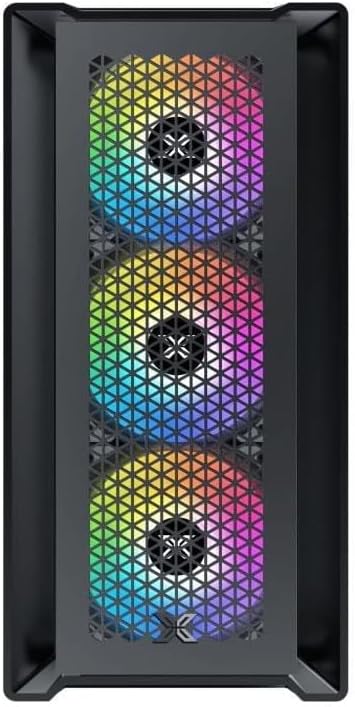
Obrázek 4.1: Přední strana View. This image displays the front of the Xigmatek Lux M case, highlighting the metallic mesh panel with a triangular design and the three pre-installed 120mm fixed RGB fans.

Figure 4.2: Angled Top-Front View. This perspective shows the tempered glass side panel, offering a clear view of the interior, and the top panel with its I/O ports (USB, audio) and power button.
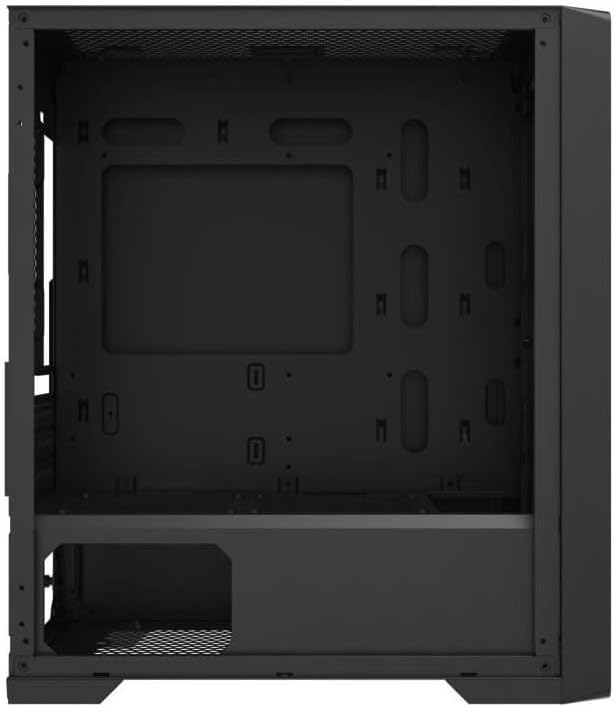
Figure 4.3: Interior Layout. The internal structure of the case, featuring the motherboard mounting tray, cutouts for cable management, and the power supply shroud at the bottom.
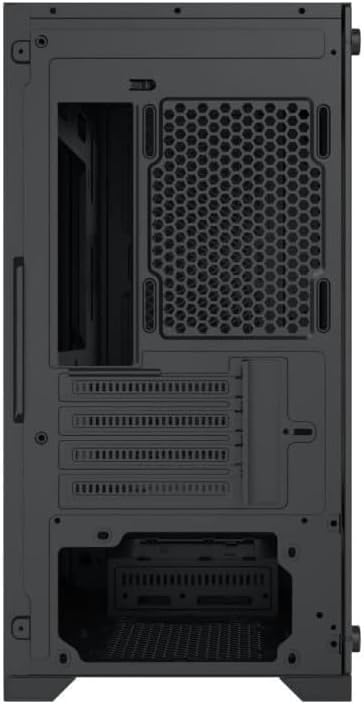
Obrázek 4.4: Zadní View. This image illustrates the rear of the case, including the expansion slots for graphics cards and other add-in cards, the rear fan mounting area, and the power supply mounting bracket.
5. Nastavení a instalace
Follow these steps to install your computer components into the Xigmatek Lux M case.
5.1. Příprava případu
- Umístěte pouzdro na rovný a stabilní povrch.
- Remove the tempered glass side panel by unscrewing the thumb screws and carefully lifting it off. Set it aside on a soft, non-abrasive surface.
- Remove the opposite steel side panel by unscrewing the thumb screws and sliding it backward.
5.2. Instalace základní desky
The Lux M supports Micro-ATX and Mini-ITX motherboards.
- Install the I/O shield (if not pre-installed on your motherboard) into the rear opening of the case.
- Align the motherboard with the pre-installed standoffs. Ensure all screw holes on the motherboard match the standoffs.
- Secure the motherboard using the provided motherboard screws. Do not overtighten.
5.3. Instalace napájecího zdroje (PSU)
Zdroj se montuje na zadní spodní část skříně.
- Slide the PSU into its designated compartment from the rear of the case.
- Align the PSU's screw holes with the holes on the case's rear panel.
- Secure the PSU with the provided screws.
5.4. Storage Drive Installation (2.5"/3.5" Drives)
The case supports 2x 2.5"/3.5" storage drives.
- Locate the drive cage beneath the PSU shroud or dedicated 2.5" mounting points behind the motherboard tray.
- For 3.5" HDDs, slide the drive into a drive tray (if applicable) and secure it with screws.
- For 2.5" SSDs, secure them directly to the mounting points using the provided screws.
5.5. Instalace grafické karty (VGA) a rozšiřující karty
Skříň podporuje grafické karty o délce až 320 mm.
- Odstraňte potřebné kryty rozšiřujících slotů ze zadní strany skříně.
- Insert your graphics card or other expansion card into the appropriate PCIe slot on your motherboard.
- Secure the card to the case using the expansion slot screws.
5.6. Cooling System Installation (Optional)
The Lux M comes with 4x 120mm X24F fixed RGB fans. It supports additional cooling options.
- CPU chladič: Max height of 160mm. Install your CPU cooler according to its manufacturer's instructions.
- Podpora radiátorů: The case supports radiators of 360mm, 240mm, or 120mm. Refer to your radiator's manual for installation. Common mounting locations include the front and top panels.
5.7. Správa kabelů
K uspořádání kabelů využijte výřezy pro vedení kabelů a úchyty za přihrádkou základní desky. Zlepší se tím proudění vzduchu a estetický vzhled.
5.8. Závěrečná montáž
- Once all components are installed and cables are managed, reattach the steel side panel and secure it with thumb screws.
- Carefully reattach the tempered glass side panel and secure it with thumb screws.
6. Návod k obsluze
After completing the installation, connect your peripherals (monitor, keyboard, mouse) and power cable to the PC. Press the power button located on the top panel of the case to start your system.
The pre-installed X24F RGB fans feature fixed RGB lighting, which will illuminate automatically upon system power-on. No additional software or controller is required for their basic operation.
Ensure that the case's ventilation is not obstructed to maintain optimal airflow and cooling performance.
7. Údržba
Regular maintenance helps ensure the longevity and optimal performance of your PC components.
- Čištění prachu: Periodically clean dust filters (if present) and the interior of the case using compressed air or a soft brush. Dust accumulation can hinder airflow and lead to overheating.
- Čištění exteriéru: Vnější povrchy otřete měkkým, damp cloth. Avoid harsh chemicals that may damage the finish or tempered glass.
- Tvrzené sklo: Clean the tempered glass panel with a glass cleaner and a microfiber cloth to avoid scratches and streaks.
8. Řešení problémů
Pokud se během instalace nebo po ní setkáte s problémy, zvažte následující běžné kroky pro řešení potíží:
- Bez napájení:
- Ujistěte se, že je napájecí kabel bezpečně připojen k napájecímu zdroji i k elektrické zásuvce.
- Check that the PSU switch is in the 'ON' position.
- Verify that the front panel power switch cable is correctly connected to the motherboard's front panel header.
- Fans Not Spinning / RGB Not Lighting:
- Ensure all fan power cables are securely connected to the motherboard or a fan controller.
- For RGB, confirm that any necessary RGB headers are connected to the motherboard (though the included fans are fixed RGB and should light up with power).
- Žádný výstup na displej:
- Verify that your monitor cable is connected to the graphics card (if installed) and not the motherboard's integrated graphics port.
- Znovu vložte grafickou kartu do slotu PCIe.
- Přehřívání:
- Ujistěte se, že se všechny ventilátory skříně otáčejí a jsou správně orientovány pro optimální proudění vzduchu (sání/výfuk).
- Vyčistěte všechny prachové filtry a vnitřní součásti.
- Verify that the CPU cooler is properly seated and making good contact with the CPU.
For more complex issues, consult your component manuals or seek assistance from Xigmatek support or a qualified technician.
9. Specifikace
| Funkce | Specifikace |
|---|---|
| Značka | Xigmatek |
| Název modelu | Lux M |
| Číslo modelu | EN48540 |
| Typ pouzdra | Mini věž |
| Kompatibilita základní desky | Micro-ATX, Mini-ITX |
| Materiál | Tempered Glass (side panel), Metal (front panel) |
| Barva | Černý |
| Předinstalované ventilátory | 4 x 120mm X24F Fixed RGB Fans |
| Podpora radiátorů | 360 mm, 240 mm, 120 mm |
| Maximální výška chladiče CPU | 160 mm |
| Maximální délka VGA | 320 mm |
| Maximální délka PSU | 165 mm |
| Skladovací prostory | 2x 2.5"/3.5" |
| Speciální funkce | RGB Lighting, Triangular Mesh Front Design |
10. Záruka a podpora
Xigmatek products are manufactured to the highest quality standards. For warranty information and technical support, please refer to the warranty card included with your product or visit the official Xigmatek webstránky. Uschovejte si prosím doklad o koupi pro případ reklamace.
For further assistance, you may contact Xigmatek customer support through their official channels.