
1. Úvod a konecview
The AeroCool Prism-G-BK-V2 is a mid-tower ATX PC case designed for gaming and high-performance builds. It features a stylish design with a mesh and tempered glass front panel, complemented by a full tempered glass side panel, ensuring both aesthetic appeal and optimal airflow. This case supports various cooling configurations, including comprehensive liquid cooling, and offers convenient features like vertical GPU mounting and efficient cable management. This manual provides essential information for setting up, operating, maintaining, and troubleshooting your PC case.

Obrázek 1.1: Přesview of the AeroCool Prism-G-BK-V2 Mid Tower PC Case. This image displays the case from an angled front-left perspective, highlighting its mesh and tempered glass front panel, the four pre-installed RGB fans, and the full tempered glass side panel.
2. Klíčové vlastnosti
- Stylish Design with Enhanced Airflow: Features a mesh and tempered glass front panel, along with a full tempered glass side panel, providing a sleek look while ensuring optimal airflow to keep your components cool.
- Účinný chladicí systém: Pre-installed with four 12cm fixed RGB fans (three at the front and one at the rear), delivering effective cooling and vibrant lighting to enhance your gaming setup.
- Vertikální montáž GPU: Equipped with two additional vertical expansion slots, allowing for vertical graphics card installation to showcase your GPU and improve airflow.
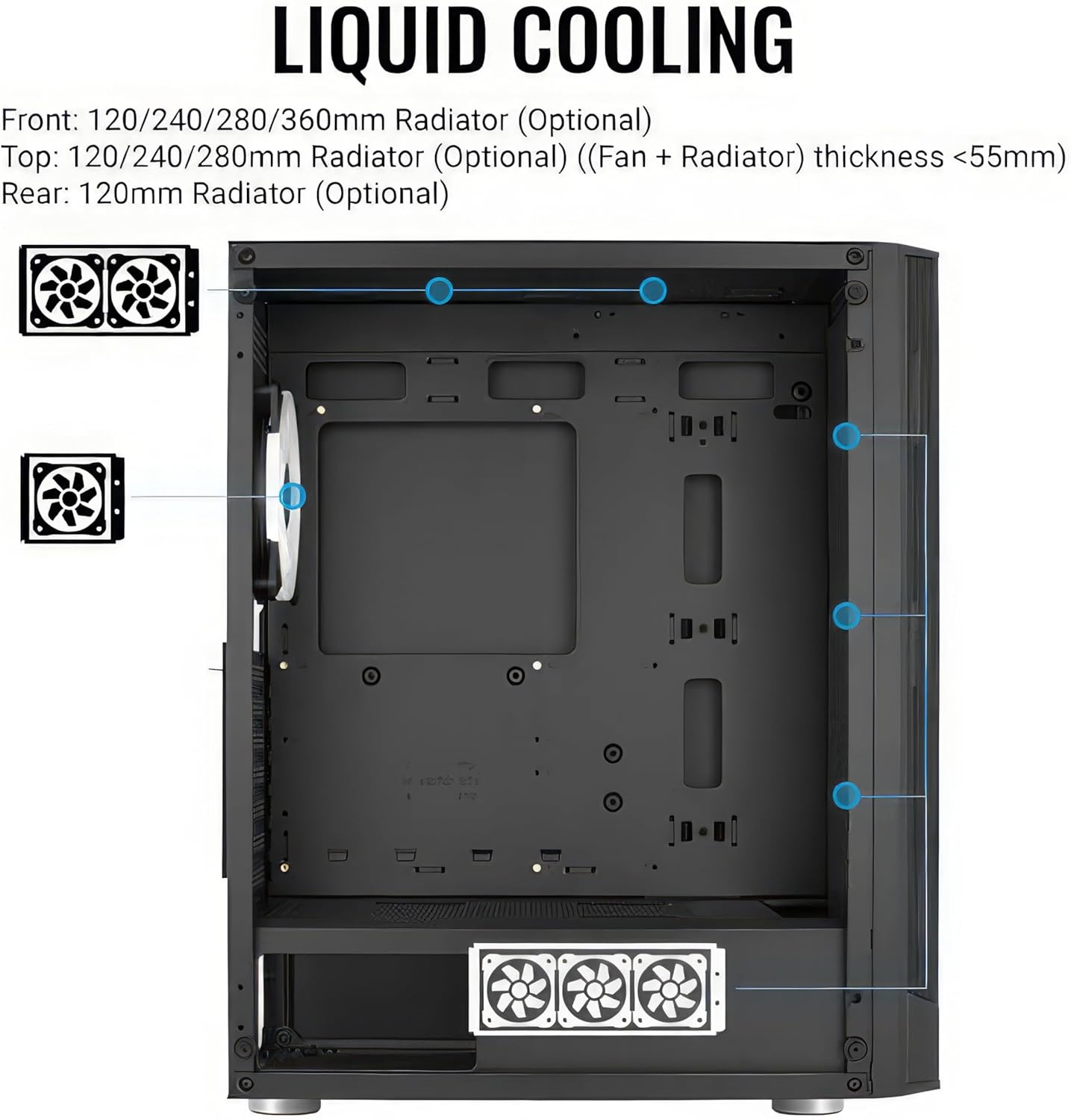
- Comprehensive Liquid Cooling Support: Supports liquid cooling solutions in the front (up to 360mm radiator), top (up to 280mm radiator), and rear (120mm radiator) for maximum cooling efficiency.
- Spacious Interior for High-Performance Builds: Accommodates ATX, Micro-ATX, and Mini-ITX motherboards, CPU coolers up to 164mm in height, and high-end graphics cards up to 346mm in length (without front radiator), providing ample space for your gaming components.
- Efektivní správa kabelů: Designed with features to facilitate neat and efficient cable routing, improving airflow and aesthetics.

Obrázek 2.1: Detail view of the tempered glass front panel design, showcasing the integrated RGB fans and mesh sections for airflow.
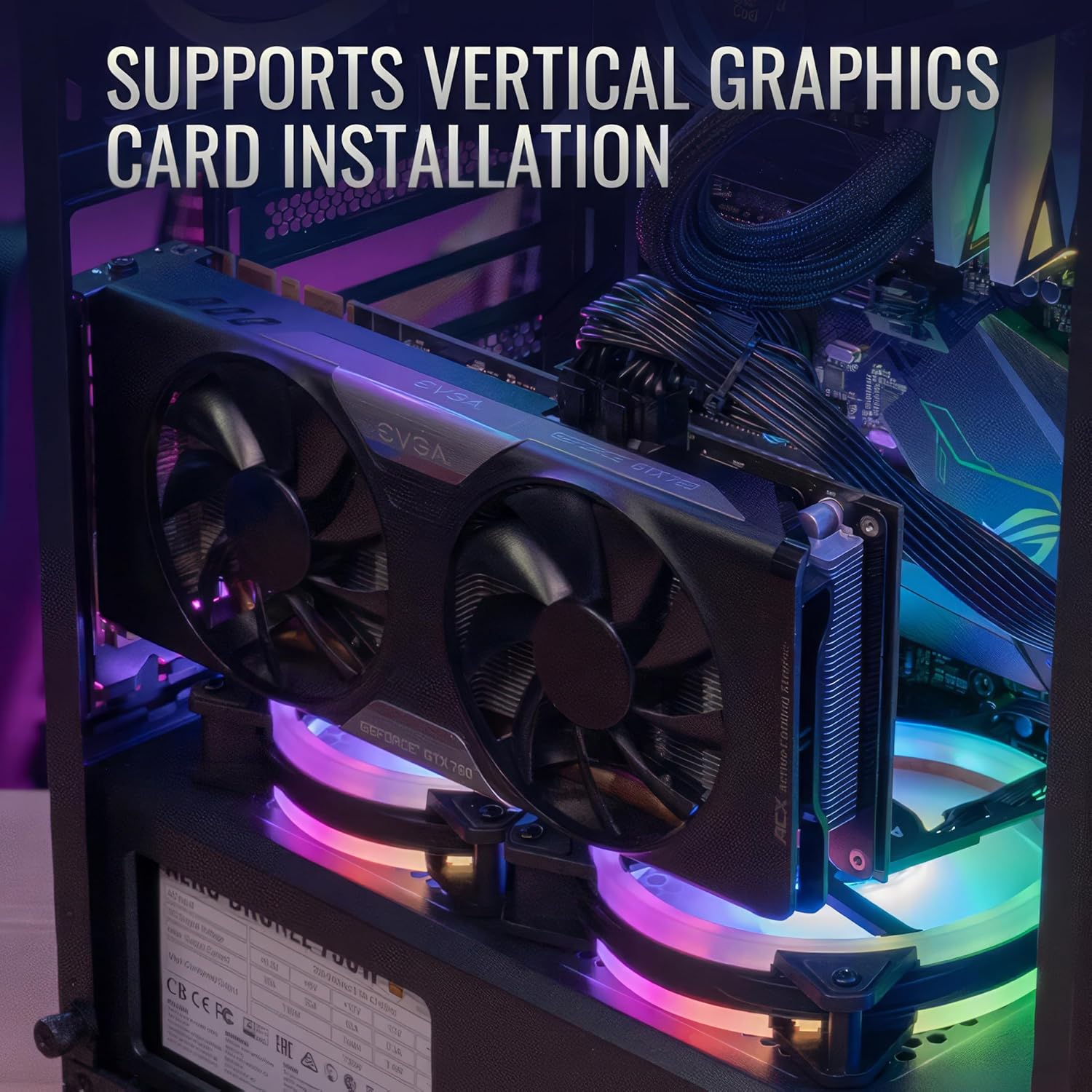
Figure 2.2: Illustration of a graphics card installed vertically within the case, demonstrating the dedicated vertical expansion slots.

Figure 2.3: Diagram indicating the various locations and sizes for liquid cooling radiator installation within the case (front, top, rear).
Obrázek 2.4: Vnitřní view of the case highlighting maximum supported dimensions for CPU coolers (164mm) and graphics cards (346mm).

Obrázek 2.5: Detail view of the cable management system, showing routing channels and tie-down points behind the motherboard tray.
3. Průvodce nastavením
Follow these steps to properly set up your AeroCool Prism-G-BK-V2 PC case and install your components.
- Rozbalení a kontrola: Carefully remove the case from its packaging. Inspect for any shipping damage. Retain all accessories, screws, and manuals.
- Demontáž bočního panelu: Gently unscrew and remove the tempered glass side panel. Place it on a soft, flat surface to prevent scratches.
- Instalace základní desky: Install the necessary standoffs for your motherboard form factor (ATX, Micro-ATX, Mini-ITX). Carefully place your motherboard into the case and secure it with screws.
- Instalace napájecího zdroje: Install your power supply unit (PSU) into the dedicated compartment, typically at the bottom rear of the case. Secure it with screws.
- Instalace úložného disku: Install your SSDs and HDDs into the designated drive bays. Refer to the case's internal layout for specific mounting points.
- Instalace grafické karty (GPU): Insert your graphics card into the appropriate PCIe slot on your motherboard. If opting for vertical GPU mounting, use the provided vertical expansion slots and a compatible riser cable (sold separately).
- Správa kabelů: Route all power and data cables neatly behind the motherboard tray using the integrated cable management features. This improves airflow and aesthetics.
- Instalace ventilátoru a chladiče (volitelné): If installing additional fans or liquid cooling radiators, refer to the "Key Features" section for supported sizes and locations.
- Konečná montáž: Once all components are installed and cables are managed, reattach the side panel.

Figure 3.1: The full tempered glass side panel of the PC case, which can be removed for component installation and access.
4. Návod k obsluze
The AeroCool Prism-G-BK-V2 PC case is a housing for your computer components. Its operation is primarily tied to the functionality of the installed components.
- Zapnutí: Connect your power supply to a wall outlet. Press the power button on the front I/O panel of the case to turn on your computer.
- Provoz ventilátoru: The pre-installed 12cm fixed RGB fans will begin operating upon system power-on. Their speed is typically controlled by the motherboard or a fan controller if one is connected.
- RGB osvětlení: The fixed RGB fans illuminate automatically. Control over RGB effects (if any) depends on how the fans are connected to your motherboard or a dedicated RGB controller. Consult your motherboard manual for RGB header compatibility and software control.
- Přední I/O porty: Utilize the front panel USB 2.0 ports and audio jacks for connecting peripherals.
5. Údržba
Pravidelná údržba pomáhá zajistit optimální výkon a dlouhou životnost komponent vašeho počítače.
- Čištění prachu: Periodically clean dust from the case, especially from fan filters and mesh panels. Use compressed air or a soft brush. Ensure the system is powered off and unplugged before cleaning.
- Údržba ventilátoru: Check fans for dust buildup and ensure they spin freely. Clean fan blades gently if necessary.
- Kontrola kabeláže: Occasionally inspect cable routing to ensure no cables are obstructing airflow or fan operation.
- Péče o tvrzené sklo: Clean tempered glass panels with a microfiber cloth and a non-abrasive glass cleaner. Avoid harsh chemicals.
6. Řešení problémů
Tato část se zabývá běžnými problémy, se kterými se můžete setkat.
- Ventilátory se netočí:
- Check if fan power cables are securely connected to the motherboard or fan controller.
- Ujistěte se, že napájecí zdroj funguje správně.
- Zkontrolujte nastavení ventilátorů v BIOSu/UEFI vaší základní desky.
- Nefunkční RGB osvětlení:
- Confirm RGB cables are correctly connected to the motherboard's RGB header or a dedicated RGB controller.
- Check if RGB software (if applicable) is installed and configured correctly.
- Poor Airflow/High Temperatures:
- Ensure all fans are spinning in the correct direction (intake/exhaust).
- Vyčistěte prachové filtry a vnitřní součásti.
- Verify proper cable management to avoid airflow obstruction.
- Consider adding additional fans or upgrading to a liquid cooling solution if temperatures remain high.
- Přední I/O porty nefungují:
- Check if the front panel connectors (USB, audio, power, reset) are correctly plugged into the motherboard headers. Refer to your motherboard manual for correct pin assignments.
7. Specifikace
| Funkce | Detail |
|---|---|
| Značka | AeroCool |
| Název modelu | Prism G V2 FRGB (Noir) |
| Číslo modelu položky | ACCM-PB2904311 |
| Typ pouzdra | Střední věž |
| Kompatibilita základní desky | ATX, Micro ATX, Mini ITX |
| Materiál | Hliník, legovaná ocel |
| Barva | Černý |
| Hmotnost položky | 13.73 libry |
| Rozměry produktu (DxŠxV) | 6.46 x 13.62 x 6.46 palce |
| Počet portů USB 2.0 | 2 |
| Předinstalované ventilátory | 4x 12cm Fixed RGB Fans (3 front, 1 rear) |
| Maximální délka GPU | 346mm (without front radiator) |
| Maximální výška chladiče CPU | 164 mm |
| Liquid Cooling Support (Front) | Up to 360mm radiator |
| Liquid Cooling Support (Top) | Up to 280mm radiator |
| Liquid Cooling Support (Rear) | Radiátor 120 mm |
| Světlá barva | RGB |
8. Záruka a podpora
For specific warranty information regarding your AeroCool Prism-G-BK-V2 PC case, please refer to the official AeroCool webwebu nebo záruční kartě dodané s vaším produktem. Záruční podmínky se mohou lišit v závislosti na regionu a prodejci.
For technical support, product inquiries, or assistance with troubleshooting beyond this manual, please contact AeroCool customer support through their official channels. You can typically find contact information on the AeroCool webweb (www.aerocool.io).
Note: Protection plans offered by third-party retailers (e.g., Amazon) are separate from the manufacturer's warranty and provide additional coverage. Please review the terms of any such plans directly with the provider.