
Zavedení
Welcome to the user manual for your Brondi Stone+ Flip Phone. This guide provides essential information to help you set up, operate, and maintain your device. The Brondi Stone+ is designed for ease of use, featuring a convenient flip design and essential mobile functionalities.
- Notifikační LED: The LED on the flip cover indicates incoming calls, missed calls, and new messages.
- Raised Rubber Keypad: The raised rubber keys provide comfortable and tactile feedback for dialing and navigating functions.
- Klávesy rychlého přístupu: Dedicated keys on the keypad provide quick access to Camera, Messages, and Flashlight functions.
- Micro-USB Connector: Pro nabíjení a přenos dat.
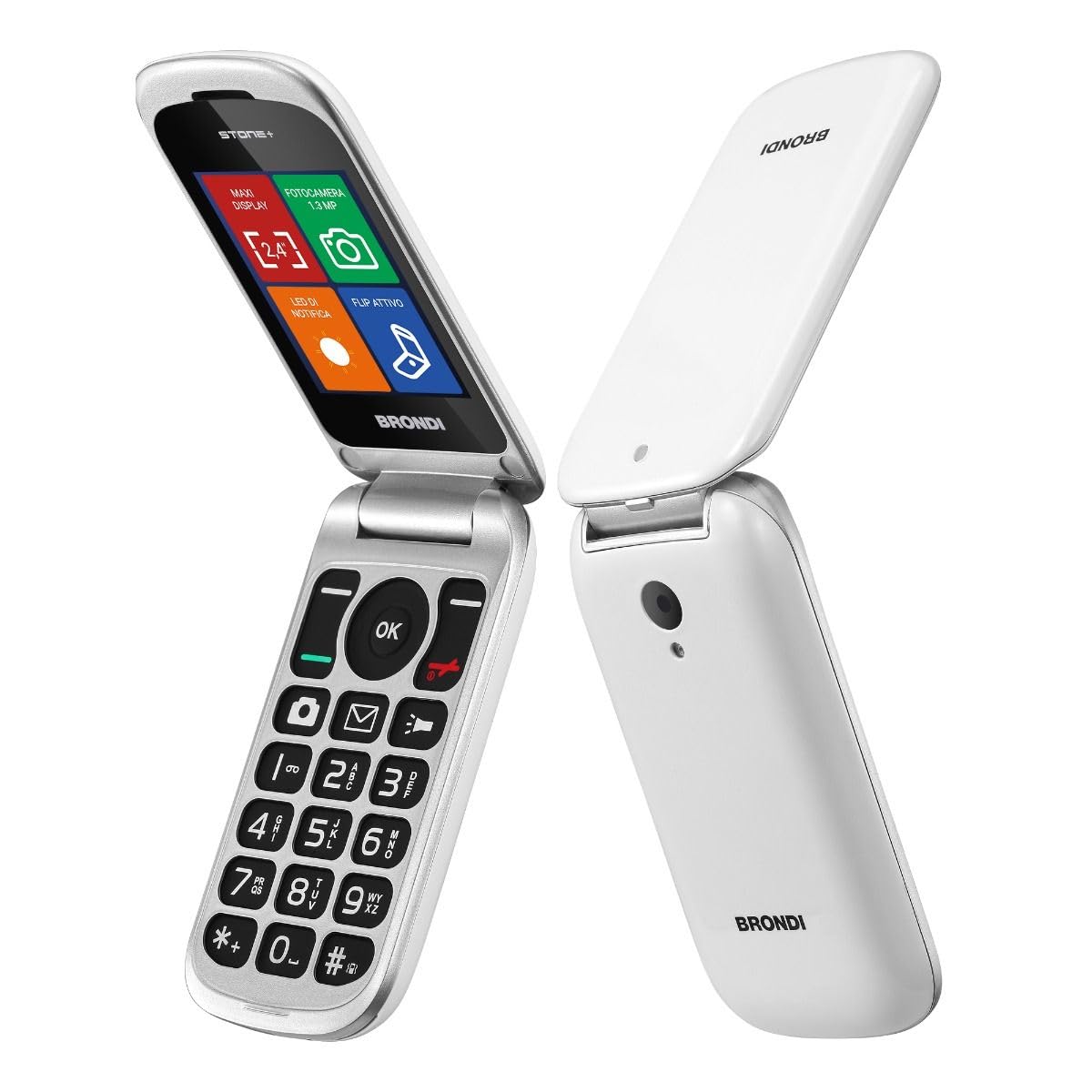
Image: Brondi Stone+ Flip Phone in white, shown in its closed, compact state.
Nastavení
1. Vybalení a komponenty
Your Brondi Stone+ package should contain the following items:
- Telefon
- Baterie
- Nabíječka
- Sluchátka
2. Instalace baterie
- Odstraňte zadní kryt telefonu.
- Zarovnejte kontakty baterie s póly telefonu.
- Gently press the battery into place.
- Nasaďte zadní kryt.
3. SIM Card Installation (Dual SIM)
The Brondi Stone+ supports two SIM cards (Dual SIM functionality).
- With the battery removed, locate the SIM card slots.
- Insert your SIM card(s) into the designated slots, ensuring the gold contacts face downwards and the cut corner aligns correctly.
- Znovu vložte baterii a nasaďte zpět zadní kryt.
4. Nabíjení zařízení
- Připojte nabíjecí kabel micro-USB k nabíjecímu portu na telefonu.
- Zapojte nabíječku do elektrické zásuvky.
- Před prvním použitím nechte telefon plně nabít. Indikátor baterie na obrazovce bude zobrazovat stav nabíjení.
5. Zapnutí/vypnutí
- Pro zapnutí stiskněte a podržte Napájení/Ukončení hovoru dokud se obrazovka nerozsvítí.
- Chcete-li přístroj vypnout, stiskněte a podržte tlačítko Napájení/Ukončení hovoru a poté z možností vyberte „Vypnout“.
Návod k obsluze
1. Uskutečňování a přijímání hovorů
- Uskutečnění hovoru: Vytočte číslo pomocí klávesnice a stiskněte Volání tlačítko.
- Receiving a Call (Active Flip): Simply open the phone's flip cover to answer an incoming call.
- Ukončení hovoru: Close the phone's flip cover or press the Ukončit hovor tlačítko.

Image: Brondi Stone+ Flip Phone in open position, displaying the keypad and main screen interface.
2. Odesílání a přijímání zpráv
- Access the Messages menu from the main screen or use the dedicated Quick Access Key.
- Select "New Message" to compose an SMS.
- Enter the recipient's number and your message using the keypad.
- Stiskněte tlačítko „Odeslat“ pro odeslání zprávy.
3. Použití fotoaparátu
- Press the dedicated Camera Quick Access Key or navigate to the Camera application.
- Komponujte snímek pomocí displeje.
- Press the "OK" button to capture a photo.
- Note: The phone requires a MicroSD card (up to 16GB) to save photos.

Obrázek: Podrobný view of the Brondi Stone+ keypad, highlighting the quick access buttons for camera, messages, and flashlight.
4. Použití svítilny
- Press the dedicated Flashlight Quick Access Key to turn the flashlight on or off.
5. Nastavení hlasitosti
- Use the volume keys on the side of the phone to adjust call volume, ringtone volume, and media volume.
6. Phonebook and Contacts
- Navigate to the "Contacts" menu to add, edit, or delete entries.
- You can store contacts on the phone's internal memory or on your SIM card(s).
Údržba
1. Čištění zařízení
- K čištění vnější strany telefonu použijte měkký, suchý hadřík.
- Avoid using liquid cleaners or abrasive materials, as these can damage the device.
2. Péče o baterie
- Chcete-li prodloužit výdrž baterie, nevystavujte telefon extrémním teplotám.
- Baterii pravidelně nabíjejte, ale vyvarujte se jejího delšího přebíjení.
- Pokud telefon nebudete delší dobu používat, nabijte jej přibližně na 50 % a uložte jej na chladném a suchém místě.
3. Skladování
- Store the phone in a safe place away from direct sunlight, moisture, and dust.
- Udržujte jej mimo dosah dětí a domácích zvířat.
Odstraňování problémů
If you encounter issues with your Brondi Stone+, refer to the following common problems and solutions:
| Problém | Řešení |
|---|---|
| Telefon se nezapne. | Ujistěte se, že je baterie správně vložena a nabitá. Připojte nabíječku a zkuste to znovu. |
| Nelze uskutečňovat ani přijímat hovory. | Check if the SIM card(s) are properly inserted and active. Verify network signal strength. |
| Špatná kvalita hovoru. | Move to an area with better network coverage. Ensure the earpiece/microphone is not obstructed. |
| Baterie se nenabíjí. | Check the charger cable and adapter for damage. Ensure the charging port on the phone is clean and free of debris. Try a different power outlet. |
| Cannot save photos. | Insert a MicroSD card (up to 16GB) into the phone. Ensure the card has sufficient free space. |
Specifikace
| Funkce | Detail |
|---|---|
| Značka | Brondi Chi Parla |
| Název modelu | Stone+ |
| Operační systém | Proprietární |
| Velikost displeje | 2.4 palce |
| Rozlišení displeje | 320 x 240 |
| Buněčná technologie | GSM |
| Technologie připojení | Bluetooth |
| Sloty pro SIM karty | Duální SIM |
| Form Factor | Flip (Clamshell) |
| Rozlišení zadní kamery | 1.3 MP |
| Max. Supported Flash Memory | 16 GB (MicroSD) |
| Kapacita baterie | 800 mAh Lithium-ion |
| Doba hovoru | 190 minut |
| Rozměry | 10.3 x 5 x 1.9 cm |
| Hmotnost | 87 gramů |
| Typ konektoru | Micro-USB |
| Jack pro sluchátka | 3.5 mm |
Záruka a podpora
1. Záruka výrobce
The Brondi Stone+ Flip Phone comes with a 2letá záruka výrobce od data nákupu. Tato záruka se vztahuje na vady materiálu a zpracování při běžném používání. Uschovejte si prosím doklad o koupi pro případ uplatnění záruky.
2. Zákaznická podpora
For technical assistance, troubleshooting beyond this manual, or warranty inquiries, please contact Brondi customer support. Refer to the contact information provided in your product packaging or visit the official Brondi webweb s nejaktuálnějšími informacemi o podpoře.
Webmísto: www.brondi.it (Poznámka: Toto je zástupný symbol URL, please refer to your product documentation for the official support webmísto.)