
1. Úvod
This manual provides detailed instructions for the safe and effective operation of your Andoer 4K 48MP 60FPS WiFi Camcorder. Please read this manual thoroughly before using the device and retain it for future reference. This camcorder is designed for high-quality video recording and photography, featuring 4K Ultra HD resolution, 48-megapixel photos, a 3-inch IPS touchscreen, and infrared night vision capabilities. It is equipped with WiFi connectivity for easy file transfer and remote control, and comes with essential accessories such as an external microphone and a wide-angle macro lens.

Image 1.1: Andoer 4K Camcorder with included accessories.
2. Obsah balení
Ověřte, zda jsou všechny níže uvedené položky součástí balení. Pokud některé položky chybí nebo jsou poškozené, kontaktujte prosím svého prodejce.

Obrázek 2.1: Všechny komponenty jsou součástí balení.
- Videokamera
- Mikrofon
- Čelní sklo pro mikrofon
- 3.5mm audio kabel TRS na TRS
- USB kabel
- Rukojeť
- Camera Lens (Wide-angle macro lens)
- Kroužek adaptéru objektivu
- 2 x Lithium-polymer Batteries (2000mAh)
- Dálkové ovládání
- Camcorder Storage Bag
- Taška pro uložení objektivu
- Camcorder User Manual
- Uživatelská příručka k mikrofonu
3. Konec produktuview
Seznamte se s různými částmi a ovládacími prvky videokamery.
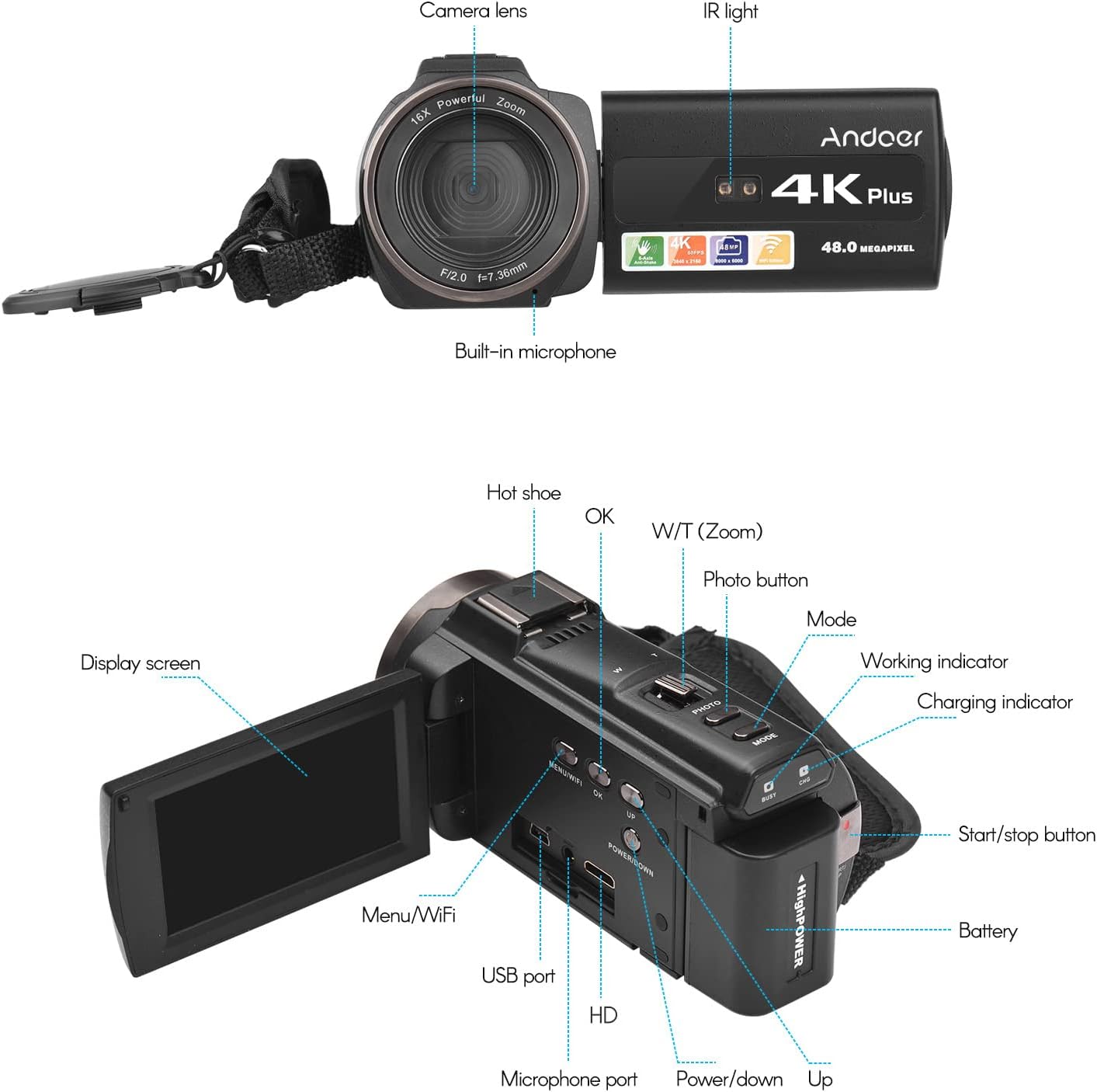
Obrázek 3.1: Přední a zadní část View of the Camcorder with labeled components.
Klíčové komponenty:
- Objektiv fotoaparátu: Hlavní optická součástka pro snímání snímků a videa.
- IR světlo: Emits infrared light for night vision recording.
- Vestavěný mikrofon: Captures audio. An external microphone can be connected for enhanced sound quality.
- Sáňky pro blesk: Mount for external accessories like the included microphone or an LED video light.
- Display Screen (3" IPS Touch Screen): Pro viewing live footage, playback, and navigating menus.
- Ovládací tlačítka: Including Power, Mode, Photo, Zoom (W/T), OK, Menu/WiFi, Up/Down.
- Porty: USB, HD (HDMI), Microphone port.
- Přihrádka na baterie: Obsahuje dobíjecí baterii.
4. Nastavení
4.1 Nabíjení baterie
Before first use, fully charge the included lithium-polymer batteries. Insert one battery into the camcorder's battery compartment. Connect the camcorder to a power source using the provided USB cable. The charging indicator will illuminate during charging and turn off when fully charged. A full charge typically takes several hours.

Image 4.1: Battery installation and charging indication.
4.2 Vložení paměťové karty
The camcorder supports TF (MicroSD) cards up to 128GB. Ensure the card is formatted before first use in the camcorder's settings. Insert the memory card into the designated slot until it clicks into place.
- Use a Class 10 or higher speed rating for optimal performance, especially for 4K video recording.
- The camcorder supports V60 video speed class.
4.3 Attaching the External Microphone
For improved audio quality, attach the external stereo microphone to the hot shoe mount on top of the camcorder. Connect the microphone's 3.5mm audio cable to the microphone input port on the camcorder.
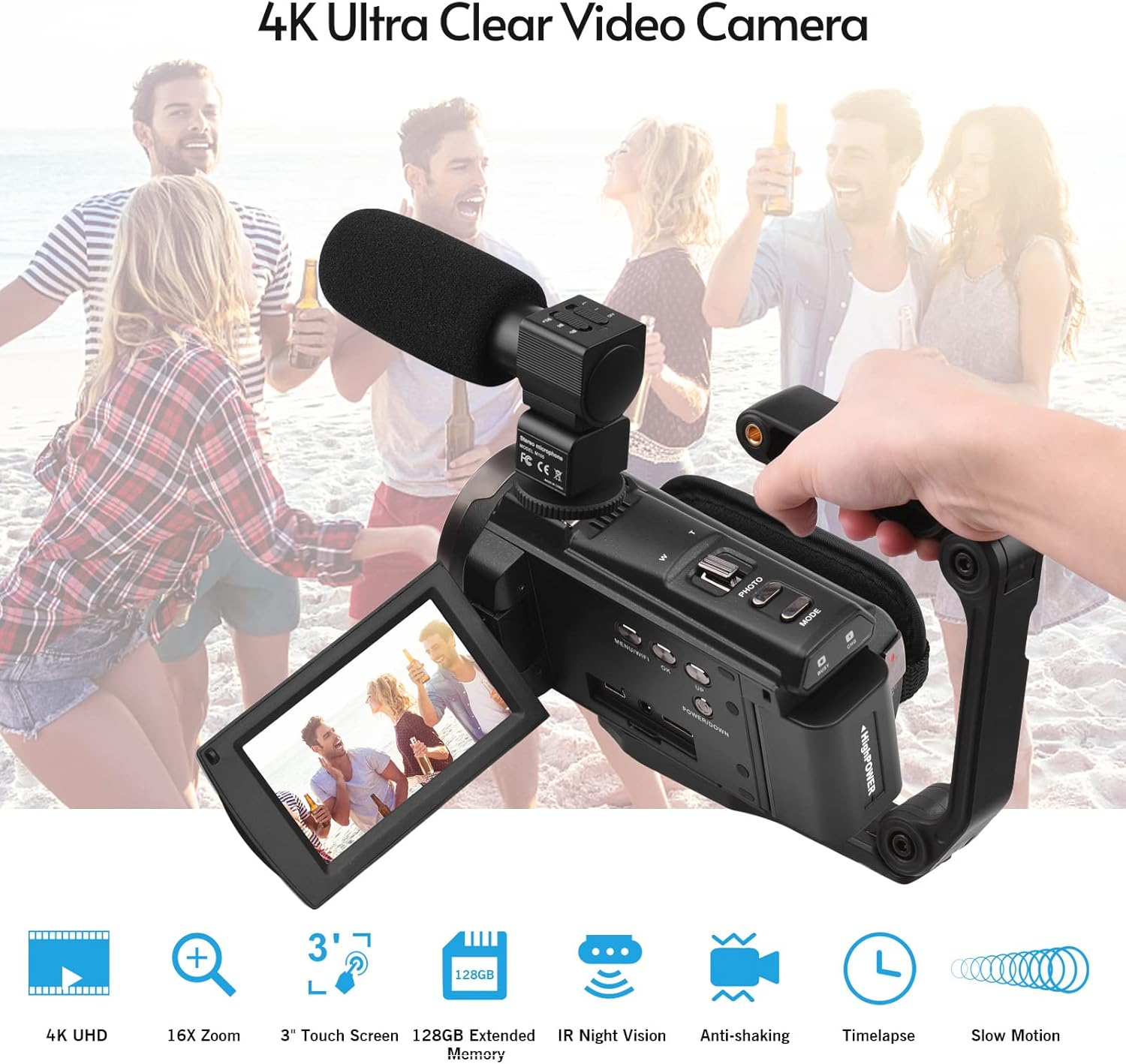
Image 4.2: External microphone attached to the camcorder.
4.4 Attaching the Wide-Angle Macro Lens
To use the wide-angle macro lens, first attach the lens adapter ring to the camcorder's main lens. Then, screw the wide-angle macro lens onto the adapter ring. This lens provides a broader perspective for your shots.

Image 4.3: Wide-angle macro lens for expanded field of view.
4.5 Attaching the Handgrip
The included handgrip can be attached to the bottom of the camcorder via the 1/4" screw hole for more stable handheld recording.
5. Návod k obsluze
5.1 Zapnutí/vypnutí
To power on the camcorder, open the display screen and press the Power button. To power off, press and hold the Power button, or close the display screen.
5.2 Nahrávání videa
- Zapněte videokameru.
- Stiskněte tlačítko Režim tlačítko pro výběr režimu nahrávání videa.
- Stiskněte tlačítko Start/Stop button to begin recording. The recording indicator will flash.
- Stiskněte tlačítko Start/Stop dalším tlačítkem nahrávání zastavíte.
The camcorder supports 4K/60FPS video resolution for clear and smooth footage.
5.3 Fotografování
- Zapněte videokameru.
- Stiskněte tlačítko Režim button to select photo mode.
- Kompozice snímku se provede pomocí displeje.
- Stiskněte tlačítko Fotografie button to capture a 48-megapixel image.
5.4 Používání 3" dotykové IPS obrazovky
The capacitive touchscreen allows for intuitive navigation of menus and settings. Tap to select options, swipe to scroll, and pinch to zoom (if supported in specific modes).
5.5 WiFi Function
The built-in WiFi allows for wireless transmission of files to a compatible smartphone or tablet via a dedicated app. It also enables remote control of the camcorder from your mobile device.
- Activate WiFi on the camcorder via the menu.
- Download and install the specified app on your mobile device.
- Connect your mobile device to the camcorder's WiFi network.
- Use the app to control recording, view živé footage a převod files.
5.6 IR noční vidění
For recording in low-light or dark conditions, activate the IR Night Vision feature. This utilizes infrared light to capture clear black and white footage.

Image 5.1: IR Night Vision in operation.
5.7 Digitální zoom
Use the W/T (Wide/Telephoto) button to adjust the 16x digital zoom. Note that digital zoom can reduce image quality compared to optical zoom.
5.8 Stabilizace obrazu
The camcorder features 6-axis image stabilization to reduce blur and shakiness in your recordings, especially during handheld use.
5.9 Speciální funkce
- Detekce pohybu: The camcorder can be set to automatically start recording when motion is detected.
- Detekce/rozpoznávání obličejů: Optimizes focus and exposure for faces in the frame.
- Dálkové ovládání: Use the included remote control to operate the camcorder from a distance, useful for self-recording or group shots.
- Samospoušť: Set a delay before capturing a photo or starting a video recording.

Image 5.2: Tripod mounting for self-timer and stable shots.
5.10 Připojení k externím zařízením
- USB: Připojte se k počítači pro file převod.
- HD (HDMI): Connect to a TV or monitor to view vaše nahrávky na větší obrazovce.
6. Údržba
- Čištění: K čištění těla videokamery používejte měkký, suchý hadřík. Na objektiv použijte speciální hadřík a roztok na čištění objektivů. Nepoužívejte agresivní chemikálie.
- Skladování: Videokameru skladujte na chladném a suchém místě mimo dosah přímého slunečního záření a extrémních teplot. Pokud ji skladujete delší dobu, vyjměte baterii.
- Péče o baterie: Do not expose batteries to high temperatures. Recharge regularly even if not in use to maintain battery health.
- Aktualizace firmwaru: Zkontrolujte výrobce webPravidelně kontrolujte webové stránky, zda nejsou k dispozici aktualizace firmwaru, aby byl zajištěn optimální výkon a nové funkce.
7. Řešení problémů
| Problém | Možná příčina | Řešení |
|---|---|---|
| Videokamera se nezapne. | Baterie je vybitá nebo není správně vložena. | Ujistěte se, že je baterie plně nabitá a správně vložená. Vyzkoušejte druhou baterii. |
| Nelze nahrávat video/fotit. | Paměťová karta je plná, není vložena nebo je poškozená. Je vybrán nesprávný režim. | Check memory card status, ensure it's inserted and has free space. Format if necessary (backup data first). Select the correct mode. |
| Špatná kvalita obrazu/videa. | Lens is dirty. Low light conditions without IR. Digital zoom used excessively. | Clean the lens. Activate IR Night Vision in dark environments. Avoid excessive digital zoom. Ensure sufficient lighting. |
| Problémy s připojením k Wi-Fi. | Incorrect WiFi settings. App not installed or updated. | Ensure WiFi is enabled on camcorder and mobile device. Re-establish connection. Update or reinstall the mobile app. |
| Microphone not recording audio. | Microphone not connected properly or settings incorrect. | Check microphone cable connection. Verify audio input settings in the camcorder menu. |
8. Specifikace
| Funkce | Detail |
|---|---|
| Číslo modelu | ZOH0150584179474NZ |
| Rozlišení videa | 4K (3840x2160) at 60FPS |
| Rozlišení fotografie | 48 megapixelů (8000x6000) |
| Stabilizace obrazu | 6-osé |
| Obrazovka displeje | 3palcová IPS kapacitní dotyková obrazovka |
| Digitální zoom | 16x |
| Konektivita | USB, Wi-Fi, HDMI |
| Podpora paměťových karet | TF (MicroSD) up to 128GB (Class 10, V60 recommended) |
| Speciální funkce | IR Night Vision, Motion Detection, Face Detection, Remote Control |
| Baterie | 2 x 2000mAh Lithium-polymer |
| Clona objektivu | f/2.0 |
| Minimální ohnisková vzdálenost | 39 mm |
| Kompatibilní zařízení | Tripod, Microphone, TV, Computer, Smartphone |
| Kompatibilita operačního systému | Windows |
| Rozměry (balení) | 18 x 15 x 11 cm |
| Hmotnost (balení) | 1.01 kg |
9. Záruka a podpora
Andoer products are designed for reliability and performance. For any technical assistance, troubleshooting beyond this manual, or warranty inquiries, please contact Andoer customer support through their official webstránky nebo vašeho prodejce.
Uschovejte si prosím doklad o koupi pro uplatnění záruky.