
1. Úvod
This manual provides essential information for the safe and efficient use of your Getac V110 Rugged Convertible Laptop/Tablet PC. Please read this manual thoroughly before operating the device and retain it for future reference. The Getac V110 is designed for durability and performance in challenging environments, offering versatility as both a laptop and a tablet.
2. Bezpečnostní informace
Dodržujte následující bezpečnostní opatření, abyste předešli poškození zařízení nebo zranění:
- Nevystavujte zařízení extrémním teplotám, přímému slunečnímu záření ani nadměrné vlhkosti.
- Use only Getac-approved power adapters and accessories.
- I přes robustní konstrukci se vyvarujte pádu zařízení na zem nebo jeho vystavení silným nárazům.
- Nepokoušejte se zařízení rozebírat ani opravovat sami. Obraťte se na kvalifikovaný servisní personál.
- Udržujte větrací otvory volné, aby nedošlo k přehřátí.
3. Fyzický overview
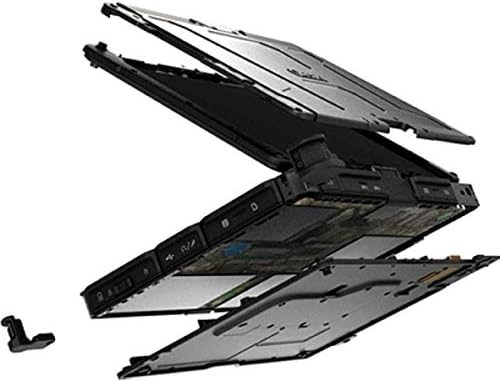
The Getac V110 is a versatile device designed for rugged use. It features a convertible design, allowing it to function as both a traditional laptop and a tablet. Key components include a durable chassis, an 11.6-inch touchscreen display, a full-sized keyboard, and various ports for connectivity.

Obrázek 3.1: Rozložené view illustrating the internal structure and ruggedized layers of the Getac V110.
3.1. Klávesnice a touchpad
The device includes a backlit keyboard for typing in various lighting conditions and a precision touchpad for navigation.
Obrázek 3.2: Shora dolů view of the Getac V110 keyboard and integrated touchpad.
3.2. Convertible Design
The V110 can be easily converted between laptop and tablet modes by rotating the screen. This flexibility allows for optimal use in different scenarios.

Figure 3.3: The Getac V110 configured in laptop mode, displaying the screen and keyboard.

Figure 3.4: The Getac V110 in tablet mode, showcasing the touchscreen interface.
4. Nastavení
4.1. Počáteční zapnutí
- Připojte napájecí adaptér k zařízení a elektrické zásuvce.
- Press the power button located on the side or front of the device.
- Follow the on-screen prompts to complete the initial Windows 8.1 setup, including language, region, and user account creation.
4.2. Připojení k síti
The Getac V110 supports both Wi-Fi and Ethernet for internet access.
- Wi-Fi: Access the network settings in Windows 8.1, select your desired Wi-Fi network, and enter the password if required.
- Ethernet: Connect an Ethernet cable from your network router or switch to the Ethernet port on the device.
4.3. Párování Bluetooth
Chcete-li připojit zařízení Bluetooth:
- Ujistěte se, že je zařízení Bluetooth v režimu párování.
- On the Getac V110, navigate to PC Settings > PC and devices > Bluetooth.
- Turn Bluetooth on and select the device from the list to pair.
5. Obsluha zařízení
5.1. Přepínání mezi režimy notebooku a tabletu
To convert the device:
- Gently rotate the screen 180 degrees clockwise or counter-clockwise.
- Fold the screen back over the keyboard to enter tablet mode.
- Unfold the screen and rotate it back to the original position for laptop mode.
5.2. Použití dotykové obrazovky
The 11.6-inch LED touchscreen supports multi-touch gestures. Use your fingers or a compatible stylus for navigation, selection, and input.
5.3. Řízení spotřeby
To conserve battery life, adjust power settings in Windows 8.1. You can configure sleep mode, display brightness, and other power-saving options.
- Režim spánku: Krátkým stisknutím tlačítka napájení přepnete zařízení do režimu spánku.
- Vypnout: Go to the Charms bar (swipe from right edge or move mouse to top-right corner), select Settings > Power > Shut down.
- Restartovat: Go to the Charms bar, select Settings > Power > Restart.
6. Údržba
6.1. Čištění zařízení
Regular cleaning helps maintain performance and appearance.
- Použijte měkký hadřík, který nepouští vlákna dampened with water or a mild, non-abrasive cleaner for the screen and exterior.
- Zabraňte stříkání tekutin přímo na zařízení.
- Nepoužívejte agresivní chemikálie, rozpouštědla ani abrazivní materiály.
6.2. Péče o baterie
Pro maximalizaci životnosti baterie:
- Vyhněte se častému úplnému vybíjení baterie.
- Pokud zařízení nebudete delší dobu používat, skladujte jej na chladném a suchém místě.
- If the device has removable batteries, ensure they are properly seated.
6.3. Aktualizace softwaru
Regularly check for and install operating system and driver updates to ensure optimal performance and security. Access Windows Update through PC Settings.
7. Řešení problémů
This section addresses common issues you might encounter with your Getac V110.
7.1. Zařízení se nezapne
- Ujistěte se, že je napájecí adaptér bezpečně připojen a zásuvka je funkční.
- Check if the battery is charged. If not, allow it to charge for at least 30 minutes before attempting to power on again.
- If the battery is removable, ensure it is correctly installed.
7.2. Problémy s připojením k Wi-Fi
- Ověřte, zda je v nastavení systému Windows povolena funkce Wi-Fi.
- Restart your router and the Getac V110.
- Ujistěte se, že jste v dosahu sítě Wi-Fi a máte správné heslo.
- Zkontrolujte aktualizované ovladače Wi-Fi.
7.3. Dotyková obrazovka nereaguje
- Restartujte zařízení.
- Ujistěte se, že je obrazovka čistá a bez nečistot.
- Check for any recent software updates or driver issues.
7.4. Pomalý výkon
- Zavřete nepotřebné aplikace běžící na pozadí.
- Zkontrolujte dostupný úložný prostor.
- Spusťte antivirovou kontrolu.
- Ujistěte se, že systém Windows a ovladače jsou aktuální.
8. Specifikace
| Funkce | Detail |
|---|---|
| Značka | Getac |
| Číslo modelu | V110 |
| Procesor | Intel Core i5-6300U (2.6 GHz) |
| Paměť RAM | 8 GB DDR4 SDRAM |
| Kapacita úložiště | 128 GB |
| Velikost obrazovky | 11.6 palce |
| Rozlišení displeje | 1366 x 768 pixelů |
| Typ zobrazení | LED |
| Vstup lidského rozhraní | Dotyková obrazovka |
| Operační systém | Windows 8.1 |
| Grafický koprocesor | Grafická karta Intel HD Graphics 520 |
| Technologie připojení | Bluetooth, Ethernet, HDMI, USB, Wi-Fi |
| Hmotnost položky | 4.4 libry |
| Item Dimensions (L x W x Th) | 11.99 cm x 18.9 cm x 3.9 cm |
| Typ baterie | Lithium Ion (23 Watt Hours) |
9. Informace o záruce
The Getac V110 Rugged Convertible Laptop/Tablet PC comes with a 90denní omezená záruka. This warranty covers manufacturing defects and malfunctions under normal use. It does not cover damage caused by misuse, accidents, unauthorized repairs, or modifications. Please retain your proof of purchase for warranty claims.
For detailed terms and conditions, refer to the warranty documentation provided with your device or contact Getac customer support.
10. Podpora
If you require further assistance or encounter issues not covered in this manual, please contact Getac customer support. You can typically find support contact information on the manufacturer's official website or within the device's pre-installed documentation.
When contacting support, please have your device's model number (V110) and serial number ready.