
Zavedení
This manual provides detailed instructions for the installation, operation, and maintenance of your Everycom EC-901 80mm Thermal POS Receipt Printer. Please read this manual thoroughly before using the printer to ensure proper functionality and to prevent damage.
Bezpečnostní informace
- Ujistěte se, že je tiskárna připojena ke zdroji napájení se správným napětím.tage.
- Nevystavujte tiskárnu vodě ani vysoké vlhkosti.
- Neumísťujte tiskárnu na přímé sluneční světlo ani do blízkosti zdrojů tepla.
- Use only specified thermal paper for optimal performance and to prevent damage to the print head.
- Nepokoušejte se tiskárnu rozebírat ani opravovat sami. Kontaktujte kvalifikovaný servisní personál.
Obsah balení
Ověřte, zda jsou v balení přítomny všechny položky:
- Everycom EC-901 Thermal POS Receipt Printer
- Roll paper × 1 Roll (for initial testing)
- CD-ROM (containing Drivers, Utility Software, Manuals)
- Papírový průvodce
- Paper Bearing
- USB kabel
- Kabel napájecího adaptéru
Konec produktuview
The Everycom EC-901 is a compact 80mm (3-inch) thermal POS receipt printer designed for efficient and reliable printing. It features a USB and LAN interface for versatile connectivity.

Obrázek 1: Přední strana view of the Everycom EC-901 Thermal POS Receipt Printer.
Klíčové vlastnosti:
- Rychlá rychlost tisku: Up to 160mm per second for quick receipt output.
- Snadné vkládání papíru: Drop-in paper loading mechanism for quick and easy media changes.
- Kompaktní design: Low space requirement with an integrated power supply.
- Variable Paper Width: Supports 80mm paper width.
- Konektivita: USB and LAN interface options.
- Vysoké rozlišení: 203 x 203 DPI for clear print quality.
- Nízká hladina hluku: Operates quietly, suitable for various work environments.

Figure 2: Top-open design for easy paper roll installation.
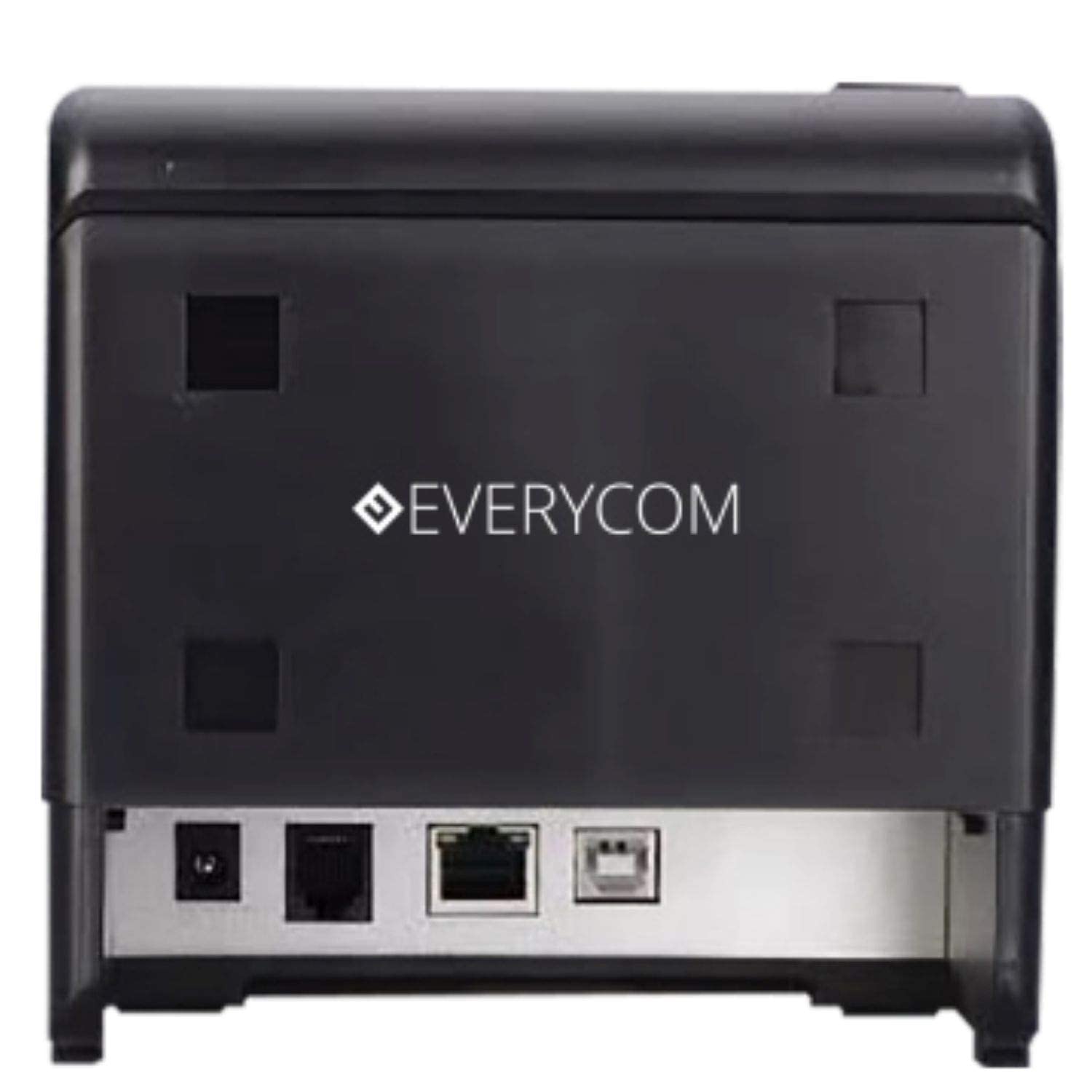
Obrázek 3: Zadní view showing USB and LAN connectivity ports.

Figure 4: The EC-901 printer is designed for low noise operation.

Figure 5: The EC-901 printer features an easy-to-use design for paper installation.
Nastavení
1. Připojení tiskárny
- Connect the power adapter cable to the printer's power port and then plug it into a suitable electrical outlet.
- For USB connection: Connect one end of the USB cable to the printer's USB port and the other end to your computer.
- For LAN connection: Connect an Ethernet cable to the printer's LAN port and the other end to your network router or switch.
- Turn on the printer using the power switch located on the front or side of the device.
2. Instalace papírové role
- Open the printer cover by pressing the release button or lifting the cover.
- Insert the thermal paper roll into the compartment with the paper feeding from the bottom and exiting towards the front.
- Vytáhněte malé množství papíru ven z řezačky.
- Pevně zavřete kryt tiskárny, dokud nezacvakne na místo.
3. Instalace ovladače
Insert the provided CD-ROM into your computer's CD/DVD drive. Follow the on-screen instructions to install the printer drivers and utility software. Drivers are typically compatible with Windows operating systems, including Windows 10.
Návod k obsluze
Kontrolky:
- MOC: Indikuje, že je tiskárna zapnutá.
- CHYBA: Lights up or flashes to indicate an error (e.g., print head overheating, cover open).
- PAPÍR: Indikuje málo papíru nebo žádný papír.
Základní tisk:
Once the printer is connected and drivers are installed, you can print receipts from your POS software or any application that supports printing. Ensure the Everycom EC-901 is selected as the default printer or the desired printer in your application's print settings.
Údržba
Čištění tiskárny:
- Před čištěním tiskárnu vypněte a odpojte napájecí kabel.
- Použijte měkký hadřík, který nepouští vlákna dampened with isopropyl alcohol to gently clean the thermal print head. Allow it to dry completely before use.
- Wipe the exterior of the printer with a soft, dry cloth. Do not use abrasive cleaners.
Replacing Paper:
When the PAPER indicator lights up or printing becomes faint, replace the paper roll following the steps outlined in the "Installing the Paper Roll" section.
Odstraňování problémů
| Problém | Možná příčina | Řešení |
|---|---|---|
| Tiskárna se nezapne. | Odpojený napájecí kabel nebo problém se zásuvkou. | Check power cable connections. Ensure the power outlet is functional. |
| No printing or blank output. | No paper, paper loaded incorrectly, or print head issue. | Check paper roll and ensure it's loaded correctly. Clean the print head if necessary. Verify printer drivers are installed. |
| PAPER indicator is on. | Paper roll is empty or low. | Vyměňte roli papíru. |
| ERROR indicator is on. | Printer cover open, print head overheating, or other internal error. | Ensure the printer cover is closed properly. Turn off the printer, wait a few minutes for it to cool down, then restart. If the issue persists, contact support. |
| Počítač nerozpoznává tiskárnu. | Driver not installed or USB/LAN cable issue. | Reinstall printer drivers. Check USB/LAN cable connections. Try a different port or cable. |
Specifikace
| Funkce | Detail |
|---|---|
| Název modelu | EC-901 |
| Technologie tisku | Tepelný |
| Tisková média | Paper (plain thermal) |
| Maximální velikost média | 3 palců (80 mm) |
| Maximální rychlost tisku | 160 mm/s |
| Rezoluce | 203 x 203 DPI |
| Technologie připojení | USB, LAN Interface |
| Tiskový výstup | Monochromatický |
| Operační systém | Windows 10 (and compatible with other Windows versions) |
| Rozměry produktu (DxŠxV) | 19.8 x 14.8 x 14.8 cm |
| Hmotnost položky | 1.8 kg |
| Speciální funkce | Without Auto cutter |
Záruka a podpora
For technical assistance, warranty claims, or any product-related inquiries, please contact Everycom customer support.
- Bezplatné číslo: 1800 121 4480
- Pracovní doba: Monday - Saturday, 10:00 AM - 6:30 PM (Except on Public Holidays)