
1. Úvod
This manual provides comprehensive instructions for the installation, operation, and maintenance of your OAE 60A MPPT Solar Charge Controller. This device is designed to efficiently manage power flow from your solar panels to various battery types, including Lithium, Sealed, Gel, and Flooded batteries, ensuring optimal charging and system longevity.
2. Bezpečnostní informace
Před instalací a provozem si pečlivě přečtěte všechny bezpečnostní pokyny. Nedodržení těchto pokynů může vést k úrazu elektrickým proudem, požáru nebo vážnému zranění.
- Ensure all power sources are disconnected before installing or servicing the controller.
- Používejte vhodné osobní ochranné prostředky (OOP), jako jsou izolační rukavice a ochrana očí.
- Verify correct polarity for all connections (solar panel, battery, load) to prevent damage.
- Regulátor instalujte v dobře větraném prostoru, mimo dosah hořlavých materiálů a přímého slunečního záření.
- Nerozebírejte ani se nepokoušejte o opravu regulátoru sami. Obraťte se na kvalifikovaný personál.
- Zajistěte správné uzemnění systému.
3. Vlastnosti produktu
The OAE 60A MPPT Solar Charge Controller offers advanced features for efficient solar power management:
- Auto 12/24/36/48V Battery System: Automatically detects and adapts to your battery voltage.
- Všestranná kompatibilita baterií: Supports 4 charging options: Sealed, Gel, Flooded, and User-defined, compatible with lithium batteries.
- Vysoce účinná MPPT technologie: Creative maximum power point tracking technology significantly increases energy utilization rate (up to 97% transfer efficiency). Quickly scans the entire I-V curve to track the maximum power point within seconds.
- Informative LCD Display: Clear display of operating data and working conditions. Features real-time energy statistics, Chinese and English language options, and a multi-function LCD screen with operation menu. Displays daily power generation and current curves, and fault records for timely troubleshooting.
- Komplexní ochranné funkce: Built-in protections ensure system safety and longevity.
- RS485 Komunikace: Capable of Wi-Fi remote monitoring (additional purchase required) for real-time wireless monitoring via APP (Android & iOS compatible). Simple and convenient to set, with one-key factory settings restore.
4. Obsah balení
Po otevření balíku zkontrolujte, zda jsou všechny položky přítomny a nepoškozené:
- OAE 60A MPPT Solar Charge Controller (Blue)
- Montážní konzola
- Uživatelská příručka
- Kabel snímače teploty
- Šrouby pro montáž

Figure 1: OAE 60A MPPT Solar Charge Controller (Blue model).
5. Nastavení a instalace
Follow these steps for proper installation of your MPPT solar charge controller. For a visual guide, please refer to the installation video below.
Video 1: OAE 60A MPPT Solar Charge Controller Installation Guide. This video demonstrates the unboxing, physical setup, and wiring connections for the solar charge controller.
5.1 Fyzická instalace
- Rozbalení a kontrola: Carefully remove the controller from its packaging. Inspect for any visible damage. The package typically includes the controller, mounting bracket, and user manual.

Figure 2: The OAE MPPT Solar Charge Controller as packaged in its box.
- Montáž ovladače: Loosen the four screws on the bottom of the MPPT controller to detach the mounting bracket. Secure the bracket to a stable, vertical surface in a well-ventilated area, then reattach the controller to the bracket using the screws.

Obrázek 3: Strana view of the controller showing dimensions and mounting points.
5.2 Zapojení kabeláže
Before making any connections, ensure all power sources are OFF. Connect the wires in the following order:
- Připojení baterie: Connect the battery wires to the "BATTERY" terminals on the controller. Ensure correct polarity (positive to positive, negative to negative). Loosen the terminal screws, insert the wires, and tighten securely.

Figure 4: Connection diagram illustrating solar panel, battery, and DC load connections.
- Připojení solárního panelu: Connect the solar panel wires to the "SOLAR PANEL" terminals. Observe correct polarity. The controller supports a maximum PV input of 150V.

Figure 5: Close-up of the controller's terminal block, showing connections for solar panel, battery, and DC load.
- Připojení stejnosměrné zátěže (volitelné): If using a DC load directly from the controller, connect the load wires to the "DC LOAD" terminals, ensuring correct polarity.
- Připojení snímače teploty: Connect the temperature sensor cable to the designated "TEMPERATURE INTERFACE" port. This ensures accurate battery temperature compensation for optimal charging.
6. Návod k obsluze
Once all connections are secure, the controller will boot up automatically. The LCD display provides real-time system information and allows for configuration.
6.1 LCD displej Overview
The multi-function LCD screen displays various parameters and allows access to settings. Use the MENU, DOWN, UP, and ENTER buttons to navigate and adjust settings.
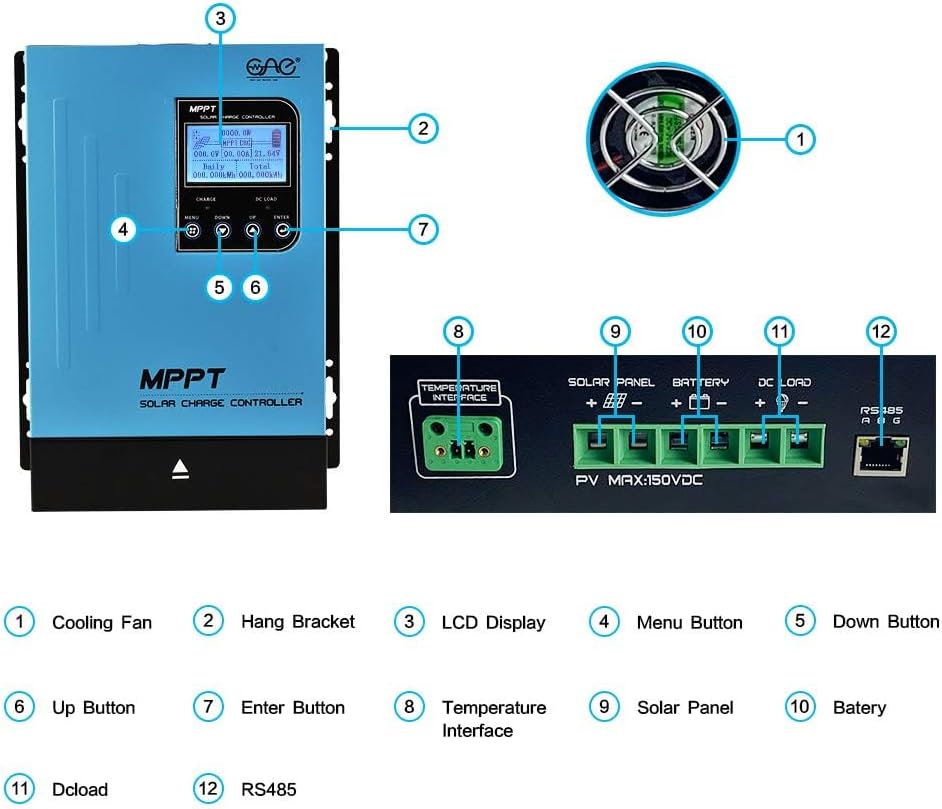
Figure 6: Detailed description of the main interface and display parameters.
6.2 Základní obsluha
- Zapnutí: After connecting the battery, the controller will automatically power on. The display will show "Boot up, please wait..."
- Sledování: The main interface displays PV module voltage, daily power generation, charging power, charging current, battery capacity indication, battery voltage, total power generation, date, time, charging state (MPPT tracking, floating charge, stop charge), external temperature, and internal temperature.
- Navigace v nabídkách: Use the "MENU" button to cycle through different display screens and settings options. Use "UP" and "DOWN" to change values or navigate within a menu. Press "ENTER" to confirm selections.
- DC Load Control: The DC load output can be configured for automatic operation (e.g., time control) or manual ON/OFF. This is accessed via the "DC Output Setting" menu.
7. Údržba
Pravidelná údržba zajišťuje dlouhou životnost a optimální výkon vašeho solárního regulátoru nabíjení:
- Čistota: Udržujte ovladač čistý a bez prachu a nečistot. K čištění používejte suchý hadřík.
- Větrání: Ensure the cooling fan and ventilation holes are not obstructed. Periodically check for dust buildup in the fan.


Figure 7: Cooling fan and ventilation holes for proper airflow.
- Spojení: Pravidelně kontrolujte veškeré kabelové spoje, zda nejsou těsné a zda nezpůsobují korozi. Volné spoje mohou vést k přehřátí a špatnému výkonu.
- Stav baterie: Monitor baterie voltage and health regularly. Ensure the battery type setting on the controller matches your battery.
8. Řešení problémů
Tato část se zabývá běžnými problémy, se kterými se můžete setkat u regulátoru solárního nabíjení.
| Problém | Možná příčina | Řešení |
|---|---|---|
| Ovladač se nezapíná. | Není připojena baterie nebo je baterie příliš vybitátage příliš nízké. | Ensure battery is connected with correct polarity and has sufficient voltage (above minimum operating voltagE). |
| No charging current from solar panels. | Solar panels not connected, insufficient sunlight, or incorrect panel voltage. | Zkontrolujte připojení a polaritu solárního panelu. Zajistěte dostatečné sluneční světlo. Ověřte hlasitost panelu.tage je v rozsahu vstupu regulátoru. |
| DC load not working. | Load output disabled, overloaded, or incorrect wiring. | Check DC output settings on the LCD. Reduce load if overloaded. Verify load wiring and polarity. |
| Unusual noise from controller (e.g., fan). | Normal operation (fan activates under load) or obstructed fan. | Ensure proper ventilation. Clean fan if obstructed. If noise is excessive or unusual, contact support. |
9. Specifikace
Key technical specifications for the OAE 60A MPPT Solar Charge Controller:
- Číslo modelu: MP-60A
- Značka: OAE
- Aktuální hodnocení: 60A
- Battery System Voltage: Auto 12V/24V/36V/48V
- Max PV Input Voltage: 150V
- Typ displeje: LED
- Materiál: Kov
- Rozměry produktu: 7.9 x 3.5 x 12.4 palce
- Hmotnost položky: 7.96 liber (3.62 kilogramů)
- Kompatibilní typy baterií: Sealed, Gel, Flooded, Lithium, and User-defined
10. Záruka a podpora
For warranty information, technical support, or to purchase additional accessories, please visit the official OAE store or contact their customer service.
Pro rozšířené krytí jsou k dispozici plány ochrany:
- Dvouletý ochranný plán
- Dvouletý ochranný plán
- Complete Protect (měsíční tarif pokrývající vybrané nákupy)
Pro více podrobností navštivte OAE Store on Amazon.