
CCA KZ AZ09 Pro
User Manual: KZ AZ09 PRO Bluetooth 5.2 Module IEM Bluetooth Adapter
Model: KZ AZ09 Pro | Brand: CCA
Zavedení
The KZ AZ09 PRO Bluetooth 5.2 Module is designed to transform your wired In-Ear Monitors (IEMs) into wireless headphones. This module provides a stable and high-fidelity audio experience, allowing you to enjoy your favorite music and calls without the constraints of cables. It features the latest Bluetooth 5.2 technology and a Qualcomm QCC3040 chipset for enhanced performance and battery efficiency.

Image: The KZ AZ09 PRO Bluetooth earhooks shown with their charging case, ready for use with compatible IEMs.
Obsah balení
- KZ AZ09 PRO Bluetooth Earhooks (Left and Right)
- Nabíjecí pouzdro
- USB nabíjecí kabel
- Uživatelská příručka (tento dokument)
Průvodce nastavením
1. Počáteční nabíjení
Before first use, fully charge the KZ AZ09 PRO Bluetooth earhooks and their charging case. Connect the charging case to a USB power source using a compatible USB cable. The charging case indicator light will show red during charging and turn green when fully charged. The earhook indicators will flash red when low on battery.

Image: Diagram illustrating the earphone and charging case indicator lights for battery status and charging.
2. Attaching to IEMs
The KZ AZ09 PRO module is designed for In-Ear Monitors (IEMs) with 0.75mm or 0.78mm pins. Carefully align the pins on the Bluetooth earhook with the sockets on your IEMs and push them firmly until they are securely connected. Ensure the left earhook is connected to the left IEM and the right earhook to the right IEM.

Image: The KZ AZ09 PRO earhooks shown detached and attached to compatible In-Ear Monitors, demonstrating the modular design.
3. Párování Bluetooth
- Ensure the earhooks are charged and connected to your IEMs.
- Open the charging case. The earhooks will automatically enter pairing mode.
- Na svém zařízení (chytrý telefon, tablet, počítač) povolte Bluetooth.
- Hledat "AZ09 Pro" in the list of available Bluetooth devices.
- Select "AZ09 Pro" to connect. Once connected, you will hear a confirmation tone, and the indicator light on the earhooks will change.

Image: Various devices (laptop, tablet, smartphone) demonstrating the wide compatibility of the KZ AZ09 PRO Bluetooth module.
Návod k obsluze
Funkce tlačítek
Each earhook features a multi-functional press button for easy control:
| Akce | Funkce |
|---|---|
| Klepněte na tlačítko | Play / Pause music; Answer / Hang up call |
| Dvakrát klikněte na tlačítko levého ucha | Předchozí skladba |
| Dvakrát klikněte na pravé tlačítko ucha | Další píseň |
| Dlouze stiskněte po dobu 2 sekund | Aktivace hlasového asistenta (Siri, Google Assistant atd.) |
| Long press on incoming call | Odmítněte přijmout hovor |
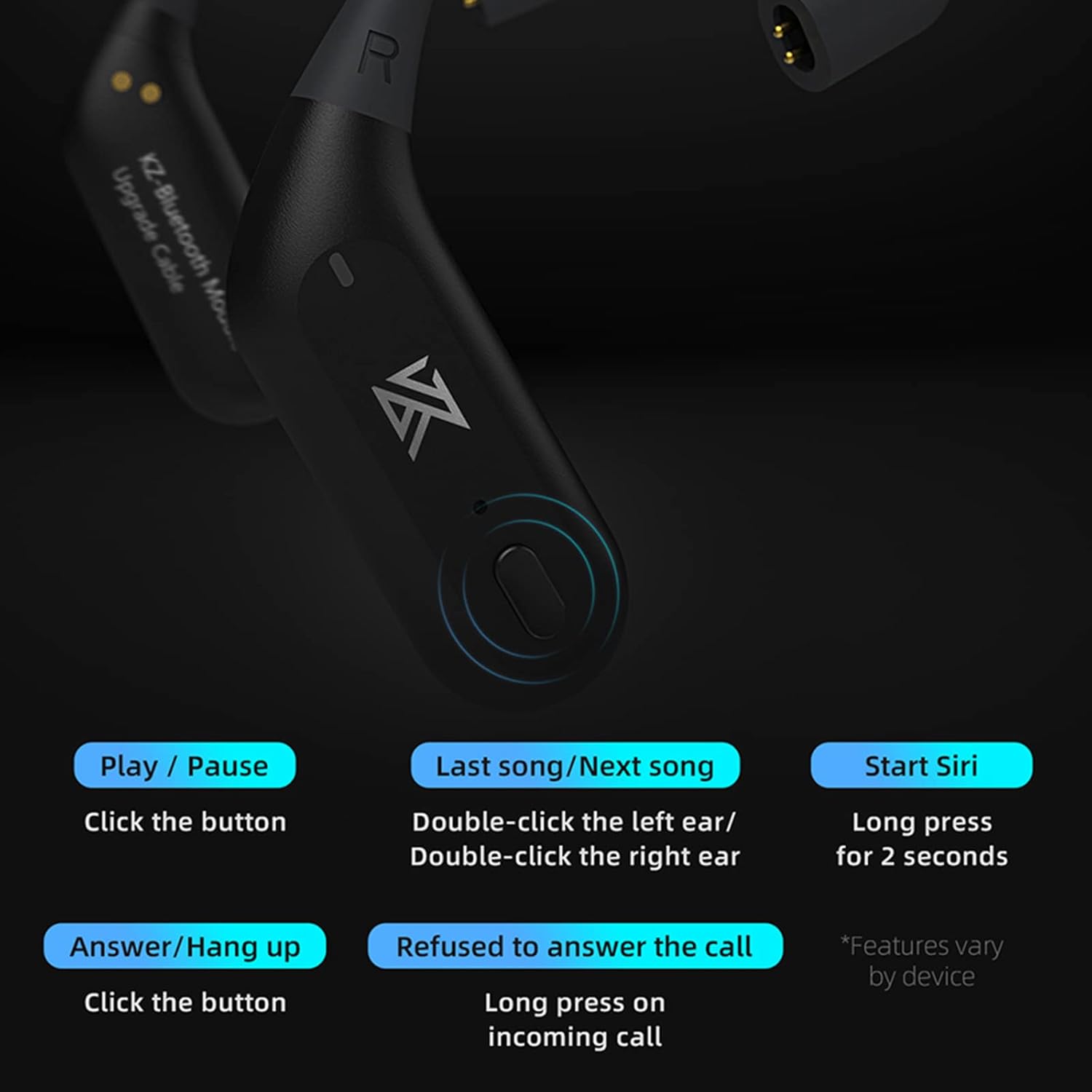
Image: Visual representation of the multi-functional button on the earhook and its various control actions.
Speciální režimy
- Full Power Output Mode: Provides enhanced bass effect with higher output power. To activate/deactivate, triple-click the vlevo earhook button.
- Herní režim: Significantly reduces sound latency for a more immersive gaming experience. To activate/deactivate, triple-click the právo earhook button.
Údržba
- Čištění: Use a soft, dry cloth to clean the earhooks and charging case. Avoid using harsh chemicals or abrasive materials.
- Voděodolnost: The earhooks are waterproof. However, avoid prolonged submersion in water. Ensure the charging contacts are dry before placing them back in the charging case.
- Skladování: When not in use, store the earhooks in their charging case to protect them and maintain battery life. Store in a cool, dry place away from direct sunlight and extreme temperatures.
Odstraňování problémů
Běžné problémy a řešení:
- Žádné problémy se zvukem/připojením:
- Ensure the earhooks are fully charged.
- Verify Bluetooth is enabled on your device and "AZ09 Pro" is selected.
- Try unpairing and re-pairing the earhooks with your device.
- Ensure the earhooks are securely connected to your IEMs.
- Špatná kvalita zvuku:
- Ensure your device supports aptX for the best audio quality. If not, AAC/SBC modes will be used.
- Pro snížení rušení se přibližte k připojenému zařízení.
- Check if the IEMs themselves are functioning correctly when wired.
- Baterie se nenabíjí:
- Ujistěte se, že je nabíjecí kabel bezpečně připojen k pouzdru i ke zdroji napájení.
- Zkontrolujte, zda je samotné nabíjecí pouzdro napájeno.
- Clean the charging contacts on both the earhooks and the case with a dry cotton swab.
- One Earhook Not Working:
- Ensure the earhook is properly seated in the charging case and making contact.
- Try resetting the earhooks (refer to manufacturer's website for specific reset procedures if needed, as not provided here).
- Verify the IEM connected to the non-working earhook is functional.
Specifikace
| Funkce | Detail |
|---|---|
| Název modelu | KZ AZ09 Pro |
| Verze Bluetooth | 5.2 |
| Čipová sada Bluetooth | Qualcomm QCC3040 |
| Podporované kodeky | aptX/AAC/SBC |
| Dosah Bluetooth | Až 15 metrů (49 stop) |
| Earhook Weight (single) | 4.5 gramů |
| Hmotnost nabíjecího pouzdra | 85 gramů |
| Výdrž baterie ušního háčku | Cca. 7 hodiny na jedno nabití |
| Celková výdrž baterie (s pouzdrem) | Až 42 hodin |
| Voděodolnost | Vodotěsný |
| Kontrolní metoda | Fyzické tlačítko |
| Compatible IEM Pins | 0.75 mm / 0.78 mm |
| Compatible IEM Models | KZ ZS10 PRO/ZSN Pro X/ZSN PRO/ZAS/ZSX/ZSN/AS12/AS16/ZAX/DQ6, CCA CA16/C12/CRA/NRA/CA16 PRO |

Image: The KZ AZ09 PRO earhooks highlighting their TWS High Definition Bluetooth capabilities and Qualcomm QCC3040 transmission.
Záruka a podpora
This product comes with a standard manufacturer's warranty. For specific warranty details and duration, please refer to the documentation provided with your purchase or contact the seller directly. Keep your proof of purchase for warranty claims.
For technical support, troubleshooting assistance beyond this manual, or warranty inquiries, please contact the official CCA support channels or the retailer from whom you purchased the product. You can often find support contact information on the brand's official webmísto.
Ask a question about this manual
Ask about setup, troubleshooting, compatibility, parts, safety, or missing instructions. Manuals+ will review the question and use this page’s manual context to help answer it.