
1. Úvod
Thank you for choosing the Devoko Ergonomic Gaming Chair, model OCRC8900. This manual provides detailed instructions for the assembly, operation, and maintenance of your new chair. Please read this manual carefully before assembly and use to ensure proper function and longevity of the product.
The Devoko OCRC8900 is designed to provide comfort and support during extended periods of sitting, whether for gaming, work, or relaxation. Its ergonomic design includes multi-point support, an adjustable headrest, and lumbar cushion to conform to your spine.

Obrázek 1.1: Přední strana view of the Devoko Ergonomic Gaming Chair OCRC8900 in black.
2. Bezpečnostní informace
- Vždy pečlivě dodržujte montážní návod.
- Ensure all screws and bolts are securely tightened before using the chair. Periodically check and re-tighten if necessary.
- Nestůjte na židli ani ji nepoužívejte jako schůdky.
- Nepřekračujte maximální nosnost 130 kg (286 liber).
- Během montáže a seřizování držte děti v dostatečné vzdálenosti od pohyblivých částí.
- Používejte židli na rovném a stabilním povrchu.
3. Obsah balení
Zkontrolujte prosím obsah balení podle níže uvedeného seznamu. Pokud některé součásti chybí nebo jsou poškozené, kontaktujte prosím zákaznickou podporu.
- 1 x Devoko Ergonomic Gaming Chair (disassembled)
- 1 x Assembly Tool Kit (includes Allen wrench and screws)
- 1 x Uživatelská příručka (tento dokument)
4. Montážní návod
Follow these steps to assemble your Devoko Ergonomic Gaming Chair. It is recommended to assemble the chair on a soft, clean surface to prevent damage.
- Připevnění koleček k základně: Vložte pět koleček do otvorů na konci každé nohy základny židle. Pevně zatlačte, dokud nezacvaknou na místo.
- Vložte plynový zvedák: Place the gas lift cylinder into the center hole of the assembled chair base. Ensure it is seated securely.
- Sestavení mechanismu sedadla: Připevněte mechanismus sedadla ke spodní straně sedáku pomocí dodaných šroubů. Ujistěte se, že přední část mechanismu směřuje k přední části sedadla.
- Připevněte područky: Secure the armrests to the sides of the seat cushion using the designated screws. Do not fully tighten yet.
- Připojení opěradla k sedadlu: Align the backrest with the seat cushion's metal brackets. Secure them together using the remaining screws. Once aligned, tighten all screws for the armrests and backrest firmly. Ensure all screws are aligned with their holes before tightening.
- Umístěte sestavu sedadla na plynový zvedák: Carefully place the assembled seat and backrest onto the gas lift cylinder, ensuring the center hole of the seat mechanism aligns with the top of the gas lift.
- Attach Headrest and Lumbar Cushions: Position the headrest cushion and lumbar support cushion as desired. These are typically secured with straps.

Image 4.1: Diagram illustrating key dimensions and components for assembly.

Image 4.2: Detail of the gas lift cylinder, a key component for height adjustment.
5. Návod k obsluze
Your Devoko Ergonomic Gaming Chair offers several adjustable features to customize your seating experience.
5.1. Nastavení výšky sedadla
To adjust the seat height, locate the lever on the right side beneath the seat. While seated, pull the lever up to lower the seat. To raise the seat, stand up slightly and pull the lever up. Release the lever to lock the height in place. The gas lift allows for a height adjustment range of 33-43 cm.
5.2. Nastavení sklonu opěradla
The backrest can be reclined between 90° and 150°. To recline, pull the recline lever (typically located on the right side, near the height adjustment lever) and lean back to your desired angle. Release the lever to lock the backrest in position. To return to an upright position, pull the lever and lean forward.

Image 5.1: Illustration of the chair's recline angles (90°, 120°, 150°) and height adjustment mechanism.
5.3. Nastavení loketní opěrky
The armrests are adjustable. Locate the buttons or levers on the side of the armrests to adjust their height. Adjust them to a comfortable position that supports your arms and shoulders.

Image 5.2: Detail showing the adjustable armrests and the tilt lock mechanism.
5.4. Lumbar and Headrest Cushions
The chair includes a removable headrest pillow and lumbar support cushion. Adjust their position along the backrest to find the most comfortable and supportive placement for your neck and lower back.

Image 5.3: Ergonomic design highlighting multi-point support for the spine.
5.5. Funkce otáčení
The chair features a 360-degree swivel function, allowing for easy rotation and access to your workspace without needing to move the entire chair.
6. Údržba
- Čištění: Povrch židle otřete měkkým hadříkemamp hadříkem. Na odolnější skvrny použijte jemný mýdlový roztok a poté otřete čistým hadříkem.amp hadříkem. Nepoužívejte agresivní chemikálie ani abrazivní čisticí prostředky.
- Kolečka: Periodically check the casters for hair or debris that may hinder smooth movement. Clean as needed.
- Spojovací materiál: Regularly check all screws and bolts to ensure they are tight. Re-tighten any loose fasteners to maintain stability and safety.
7. Řešení problémů
| Problém | Možná příčina | Řešení |
|---|---|---|
| Židle se kymácí nebo je nestabilní. | Uvolněné šrouby nebo nesprávná montáž. | Check all assembly screws and tighten them securely. Ensure the chair is on a flat surface. |
| Nastavení výšky sedadla nefunguje. | Gas lift not properly engaged or damaged. | Ensure the gas lift is correctly inserted into the base and seat mechanism. If still not working, contact support. |
| Kolečka se neotáčejí hladce. | Nečistoty zachycené v kolečkách nebo poškozená kolečka. | Inspect casters for hair, dust, or other obstructions and remove them. If damaged, consider replacement. |
| Backrest recline not locking. | Recline mechanism not engaged or damaged. | Ensure the recline lever is fully released to lock the position. If the issue persists, contact support. |
| Lumbar/Headrest cushions slide out of place. | Cushions not properly secured or straps are loose. | Adjust the straps to secure the cushions more firmly to the backrest. |
8. Specifikace
| Funkce | Detail |
|---|---|
| Číslo modelu | OCRC8900 |
| Značka | Devoko |
| Barva | Černý |
| Materiál | Alloy Steel frame, High-density foam, PU leather upholstery |
| Rozměry sedadla (Š x H) | 37 cm x 52 cm (14.6 palce x 20.5 palce) |
| Rozměry opěradla (Š x V) | 56 cm x 93 cm (22 palce x 36.6 palce) |
| Nastavitelná výška sedadla | 33 cm - 43 cm (13 palce - 17 palců) |
| Maximální nosnost | 130 kg (286 lb) |
| Hmotnost produktu | 20 kg (44 lb) |
| Úhel sklonu | 90° až 150° |
| Speciální funkce | Ergonomic design, Adjustable height, Reclining backrest, Adjustable armrests, Lumbar support, Headrest pillow, 360° swivel, Silent casters |

Image 8.1: Indication of the chair's maximum weight capacity.
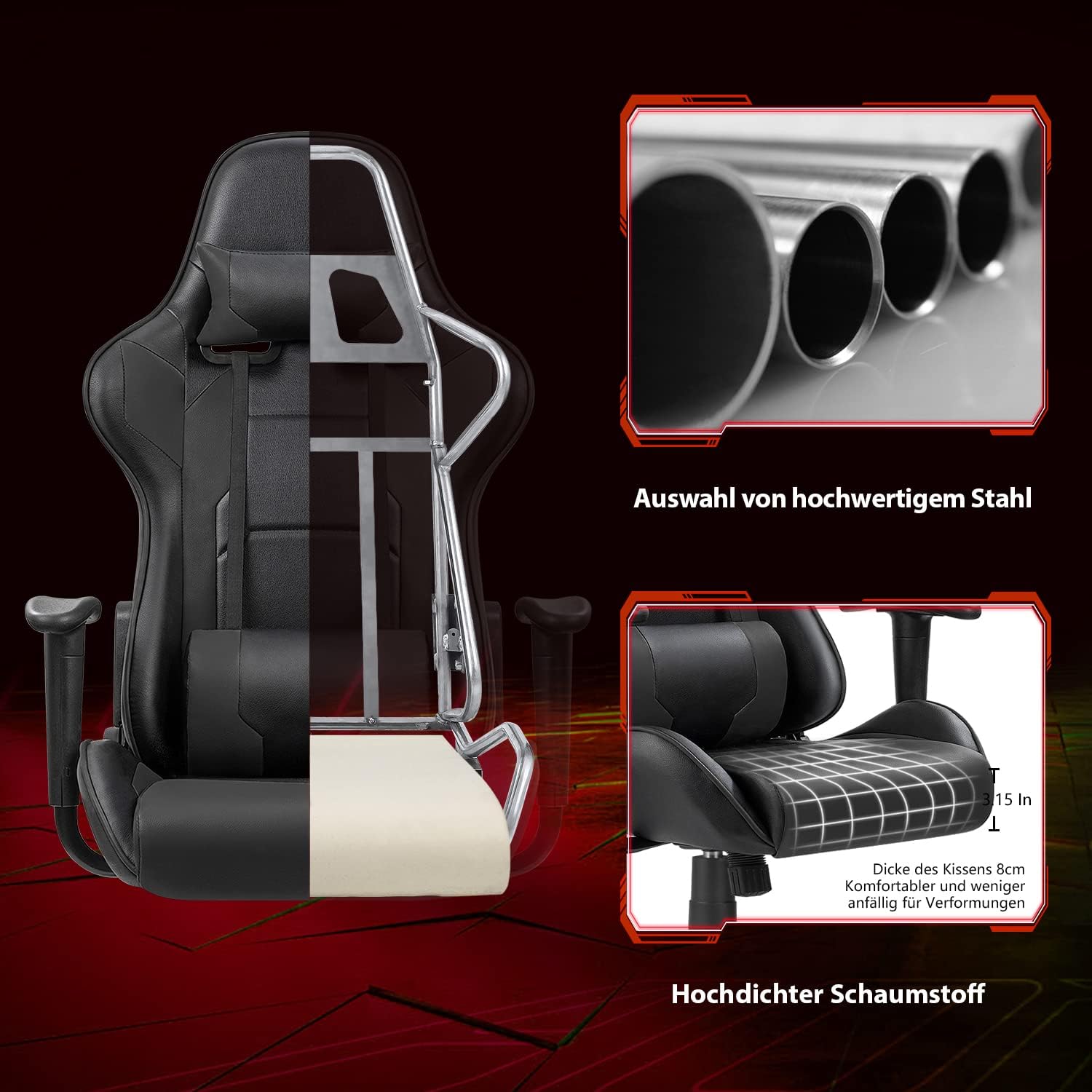
Obrázek 8.2: Výřez view illustrating the robust alloy steel frame and high-density foam construction.
9. Záruka a podpora
Devoko is committed to providing high-quality products and customer satisfaction. While specific warranty details are not provided in this manual, please retain your proof of purchase for any warranty claims.
If you have any questions, require assistance with assembly, or encounter any issues with your Devoko Ergonomic Gaming Chair, please do not hesitate to contact our customer support team. We are here to help.
For support, please refer to the contact information provided with your purchase or visit the official Devoko webmísto.