
TOUCARE T9S
Uživatelská příručka k motocyklovému Bluetooth interkomu TOUCARE T9S
Model: T9S | Brand: TOUCARE
Zavedení
The TOUCARE T9S is a high-performance Bluetooth intercom system designed for motorcycle riders. It enables clear communication between up to four riders, offers music sharing, and integrates with your mobile phone for calls and GPS navigation. With advanced noise cancellation and a robust waterproof design, the T9S ensures a reliable and enjoyable riding experience in various conditions.
Klíčové vlastnosti
- 1200M Maximum Distance: Equipped with Bluetooth 5.0 for high compatibility and stability, allowing group communication within a 1200m intercom range.
- Support 4-Riders Intercom: Full-duplex communication for up to 4 riders simultaneously. Universal pairing function ensures compatibility with most Bluetooth headsets and mobile phones.
- Sdílení hudby: Share music with another rider, enjoy Hi-Fi stereo music, FM radio, or GPS voice guidance.
- Noise Reduction and IP67 Waterproof: DSP and CVC advanced noise reduction technology for clear communication up to 120km/h. IP67 waterproof rating for all-weather use.
- Ultra-Long Standby Battery: 800mAh rechargeable battery provides up to a week of standby time and 15 hours of working time.

Image: The T9S system supports communication for up to four riders over a distance of 1200 meters.

Image: CVC & DSP Noise Cancellation Technology ensures clear and smooth communication even at high speeds.

Image: The IP67 waterproof rating makes the T9S suitable for use in all weather conditions, including water sports.

Image: The T9S offers extended endurance times for talking, music playback, and standby, supporting long-distance travel.
Obsah balení
Each TOUCARE T9S package includes the following components:
- 1 x Bluetooth Intercom Unit
- 1 x Hi-Fi Speaker Set
- 1 x Boom Microphone
- 1 x Button Microphone
- 1 x USB kabel
- 1 x montážní držák
- 1 x Clamp Talíř
- 1x imbusový klíč

Image: All components included in the TOUCARE T9S package, ensuring you have everything needed for installation and use.
Konec produktuview a funkce tlačítek
Familiarize yourself with the buttons and indicators on your T9S intercom unit:
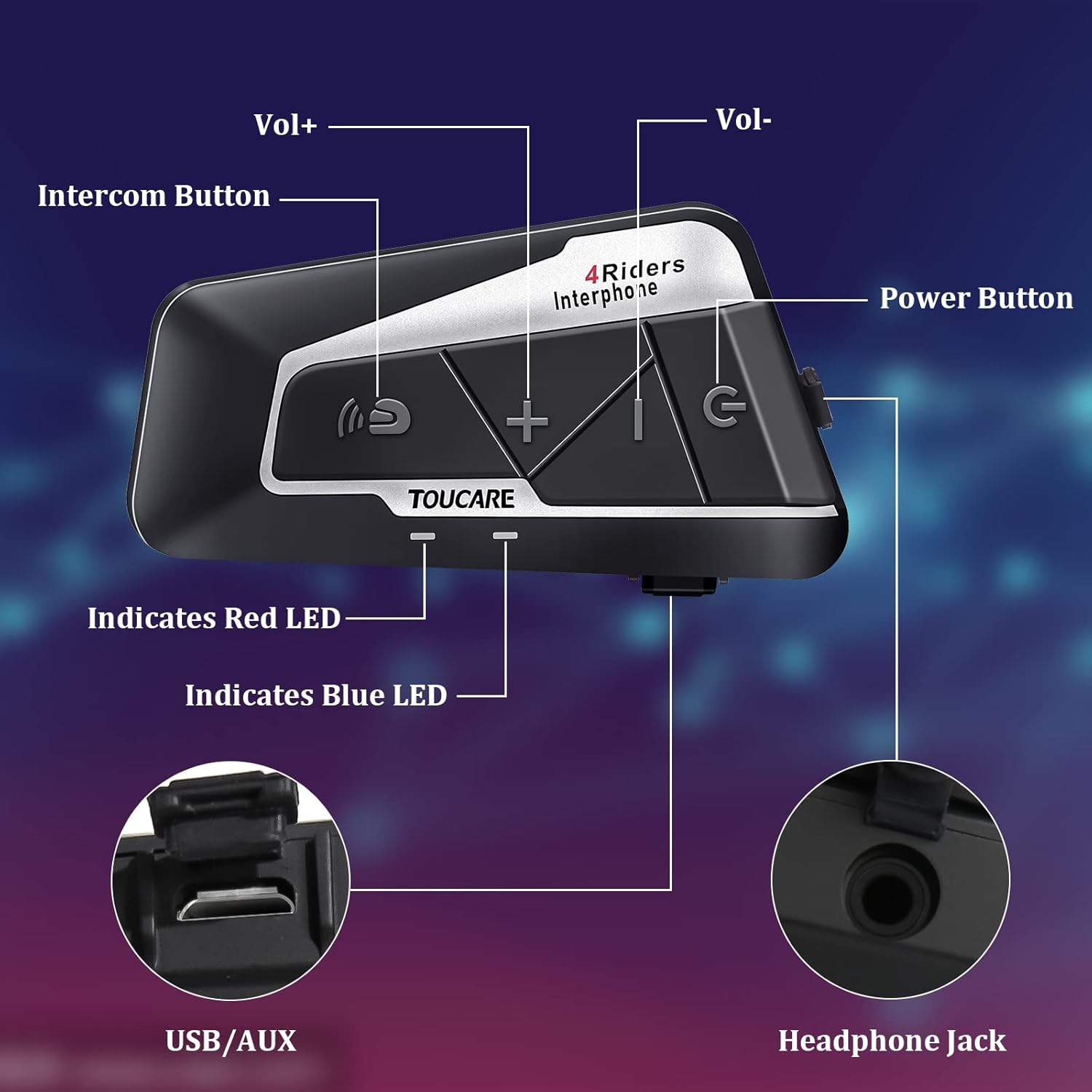
Image: Detailed diagram of the T9S unit, highlighting the location and labels of each button and port.
Power On/Off Button (G)
- Zapnutí/vypnutí: Stisknutím a podržením zařízení zapnete nebo vypnete.
- Paired Mobile Phone: Short press to connect/disconnect with a paired mobile phone.
- Výzva napájení: Short press to hear battery level prompt.
- Hang up Bluetooth Intercom: Short press during an intercom call to end it.
- Přehrávání/pozastavení hudby: Krátkým stisknutím spustíte nebo pozastavíte hudbu.
- Call Answering/Third Party Answer/End/Reject: Spravujte telefonní hovory.
Bluetooth Intercom Button (Intercom Icon)
- Hlasitost +: Krátkým stisknutím zvýšíte hlasitost.
- Poslední píseň: Dlouhým stisknutím přejdete na předchozí skladbu.
- FM Turn Up: Short press during FM mode to tune up.
- FM Turn On/Off: Long press to turn FM radio on or off.
- Opakované vytáčení posledního čísla: Double press to redial the last dialed number.
Volume - Button (-)
- Objem -: Krátkým stisknutím snížíte hlasitost.
- Další skladba: Dlouhým stisknutím přejdete na další skladbu.
- FM Turn Down: Short press during FM mode to tune down.
- FM Turn On/Off: Long press to turn FM radio on or off.
- Hlasové vytáčení: Double press to activate voice dialing (if supported by your phone).

Image: The T9S features ultra-large buttons, designed for easy operation even while wearing gloves.
Průvodce instalací
Pevný způsob instalace
Follow these steps to securely install the T9S intercom unit on your helmet:
- Locate and Clean: Identify a suitable flat area on the left side of your helmet for mounting. Ensure the surface is clean and dry.
- Příprava lepidla: Peel off the protective film from the 3M adhesive on the back of the mounting bracket.
- Aplikujte tlak: Firmly press the mounting bracket onto the chosen location on your helmet. Apply consistent pressure for several seconds to ensure a strong bond.
- Zabezpečená jednotka: Slide the T9S intercom unit onto the mounted bracket until it clicks securely into place.
- Instalace reproduktorů a mikrofonu: Route the speaker and microphone wires inside the helmet lining. Position the speakers inside the ear pockets and the microphone near your mouth for optimal audio.
Návod k obsluze
Spárování s mobilním telefonem
- Ensure the T9S is powered off.
- Press and hold the Power On/Off button until the LED indicator flashes red and blue alternately, indicating pairing mode.
- On your mobile phone, enable Bluetooth and search for new devices. Select "TOUCARE T9S" from the list.
- Once paired, the LED will flash blue slowly.
Initiating Intercom Communication
- Ensure all T9S units are powered on and within range.
- To initiate a group intercom, short press the Bluetooth Intercom Button on your unit. The units will attempt to connect.
- To end an intercom call, short press the Power On/Off button.
Přehrávání hudby
- Přehrát/pozastavit: Krátce stiskněte tlačítko Power On/Off.
- Další skladba: Dlouze stiskněte tlačítko pro zvýšení hlasitosti.
- Předchozí skladba: Long press the Bluetooth Intercom button.
- Nastavení hlasitosti: Krátkým stisknutím tlačítek pro zvýšení nebo snížení hlasitosti.
FM rádio
- Zapnout/Vypnout: Long press either the Bluetooth Intercom button or the Volume - button.
- Ladit: Short press the Bluetooth Intercom button.
- Vyladit: Krátce stiskněte tlačítko Hlasitost -.
Přijímání/ukončování hovorů
- Přijmout hovor: Short press the Power On/Off button when a call comes in.
- Ukončit hovor: Short press the Power On/Off button during a call.
- Odmítnout hovor: Long press the Power On/Off button when a call comes in.
- Hlasové vytáčení: Double press the Volume - button (requires phone support).
- Opakované vytáčení posledního čísla: Double press the Bluetooth Intercom button.
Technické specifikace
| Funkce | Specifikace |
|---|---|
| Verze Bluetooth | 5.0 |
| Bluetooth Profiles Podporováno | HSP, HFP, A2DP, AVRCP, AGHSP |
| Pracovní doba | 15 hodin |
| Pohotovostní doba | 350 hodin |
| Doba nabíjení | 3 hodin |
| Typ baterie | Rechargeable Lithium Battery, 800mAh, 3.7V |
| Rozměry | 89 x 46 x 30 mm |
| Hmotnost | 85 g |
| Kontrola hluku | Active Noise Cancellation (DSP & CVC) |
| Úroveň odolnosti proti vodě | IP67 |
| Technologie připojení | Bezdrátový |
| Materiál | Pryž |
| Typ ovládání | Voice Control (via phone), Button Control |
Údržba
To ensure the longevity and optimal performance of your TOUCARE T9S intercom, follow these maintenance guidelines:
- Čištění: Jednotku otřete měkkým, damp tkanina. Nepoužívejte agresivní chemikálie, čisticí rozpouštědla ani silné čisticí prostředky.
- Skladování: Pokud zařízení nepoužíváte, skladujte ho na chladném a suchém místě mimo dosah přímého slunečního záření a extrémních teplot.
- Péče o baterie: For long-term storage, charge the battery to about 50% every three months to prevent deep discharge and extend battery life.
- Vystavení vodě: Although IP67 rated, avoid prolonged submersion. Ensure charging port is dry before charging.
- Správa kabelů: S kabely a konektory zacházejte opatrně, abyste předešli jejich poškození.
Odstraňování problémů
If you encounter issues with your T9S intercom, try the following solutions:
Žádná síla
- Zkontrolujte baterii: Ujistěte se, že je zařízení plně nabité. Připojte jej ke zdroji napájení a zkontrolujte, zda se rozsvítí indikátor nabíjení.
- Resetovat: If unresponsive, try holding the Power On/Off button for an extended period (e.g., 10-15 seconds) to force a reset.
Cannot Pair with Mobile Phone/Other Intercoms
- Režim párování: Ensure the T9S is in pairing mode (LED flashing red and blue alternately).
- Viditelnost zařízení: Make sure Bluetooth is enabled on your phone/other intercoms and they are discoverable.
- Vymazat historii párování: On your phone, forget the T9S device and try pairing again. For intercoms, consult the manual for clearing pairing history if available.
- Vzdálenost: Ensure devices are within close proximity (e.g., 1 meter) during pairing.
Poor Audio Quality/No Sound
- Objem: Check if the volume is turned up on both the T9S and the connected device (phone/intercom).
- Pozice mikrofonu: Ensure the microphone is correctly positioned near your mouth and not obstructed.
- Připojení reproduktorů: Verify that the speakers are securely plugged into the headphone jack.
- Rušení: Přesuňte se dál od zdrojů silného elektromagnetického rušení.
- Firmware: Zkontrolujte výrobce website for any available firmware updates that might improve audio performance.
Záruka a podpora
For warranty information, technical support, or service inquiries, please refer to the warranty card included with your product or visit the official TOUCARE webUschovejte si účtenku jako doklad o koupi pro případ reklamace.
For further assistance, you may also contact TOUCARE customer service through the contact information provided on their official channels.
Ask a question about this manual
Ask about setup, troubleshooting, compatibility, parts, safety, or missing instructions. Manuals+ will review the question and use this page’s manual context to help answer it.