
1. Úvod
The DORHEA Buck Boost Converter is a versatile adjustable voltage regulator designed to convert an input DC voltage (6V-36V) to a stable output DC voltage (0.6V-36V). It features both step-up and step-down capabilities, constant current functionality, and various protection mechanisms, making it suitable for a wide range of applications including power supply, battery charging, and LED driving.
2. Bezpečnostní informace
- Vždy se ujistěte, že vstupní hlasitosttage is within the specified range (DC 6V-36V). Exceeding this range can damage the device.
- Observe correct polarity when connecting input and output terminals. Reverse polarity protection is included, but incorrect wiring can still lead to issues.
- Do not exceed the maximum output current of 5A or output power of 80W to prevent overheating and damage.
- Ensure proper ventilation, especially when operating at higher power levels, as the device may generate heat.
- Chraňte zařízení před vlhkostí, prachem a extrémními teplotami.
- Před prováděním jakýchkoli změn nebo úprav zapojení odpojte napájení.
3. Vlastnosti produktu
- Wide Input Voltage Rozsah: DC 6V-36V.
- Nastavitelný výstupní objemtage: DC 0.6V-36V, with 0.01V resolution.
- Nastavitelný výstupní proud: 0-5A, with 0.001A resolution.
- Maximální výstupní výkon: 80 W.
- Constant Current (CC) Function: Ideal for charging rechargeable batteries (0.6V-36V).
- Multifunkční displej: Zobrazuje vstupní/výstupní hlasitosttage (V), current (A), temperature (T), power (W), electric capacity (AH), electric quantity (WH), and running time.
- Grafické zobrazení: svtage and current curves interface.
- Přizpůsobitelný displej: Flip/rotate display, change background/parameter colors, switch day/night display mode.
- Funkce paměti: Saves voltage and current settings after power down.
- Komplexní ochrana: Voltage protection (OVP), over-current protection (OCP), over-power protection (OPP), low-voltage protection (LVP), over-temperature protection (OTP), reverse protection, and short circuit protection.
4. Specifikace
| Parametr | Hodnota |
|---|---|
| Vstupní objemtage Dosah | DC 6.0V-36V |
| Výstupní objemtage Dosah | DC 0.6V-36V |
| Výstupní proud | 0-5.0A |
| Výstupní výkon | 80W (max.) |
| Limit vstupního proudu | 6A (max.) |
| svtage Rozlišení | 0.01V |
| Aktuální rozlišení | 0.001A |
| svtage Přesnost | ±0.3% + 1 byte |
| Current Precision | ±0.4 % + 3 bajty |
| Měření kapacity | 0-999999AH |
| Měření energie | 0-999999WH |
| Měření času | 0-1000 hodin |
| Typ montáže | Portable (Panel Mount Design) |
| Rozměry (přibližně) | 79mm x 43mm x 53mm (D x Š x H) |
5. Obsah balení
- 2 x DORHEA DC 6.0V-36V to DC 0.6-36V 5A Buck Boost Converter Modules
6. Nastavení
6.1 Fyzický overview

Obrázek 1: Přední view of the DORHEA Buck Boost Converter. This image shows the main display screen, the rotary encoder knob for adjustments, and the ON/OFF button. The display is active, showing output voltage (05.00V), current (0.121A), and power (00.60W).

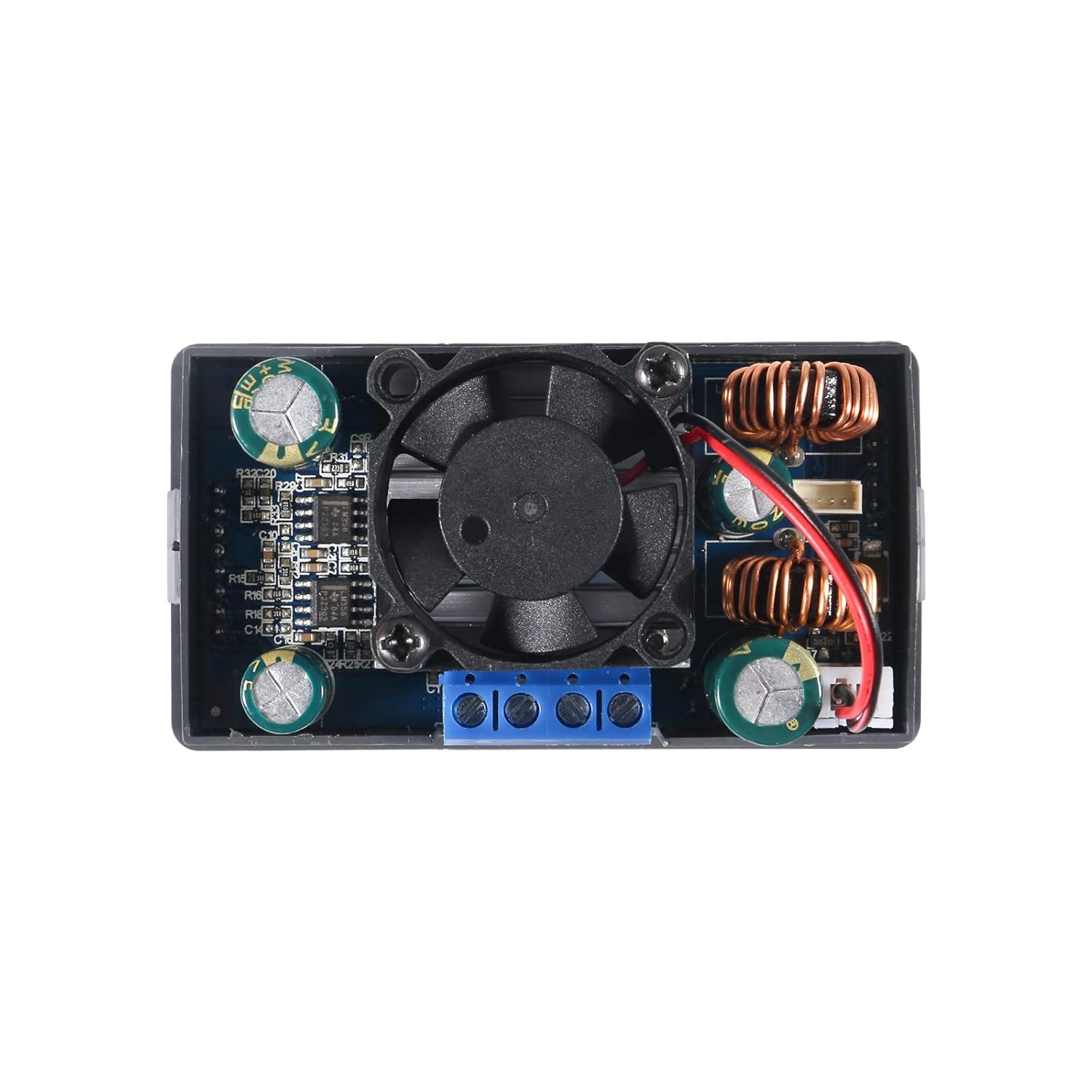
Obrázek 2: Shora dolů view of the converter's internal components. This image highlights the cooling fan, inductors, capacitors, and the screw terminals for input and output connections. The fan is centrally located for heat dissipation.
6.2 Rozměry a montáž
Obrázek 3: Dimensional drawing of the converter. This image provides key measurements for the device, including a length of 79mm (3.11in), width of 43mm (1.69in), and height of 53mm (2.09in). These dimensions are crucial for enclosure design and mounting.
The converter is designed for panel mounting. The cutout dimensions required for installation are approximately Rozměr 72 mm x 40 mm, s a 12mm x 2.5mm notch centered on each narrow side for securing the unit.
6.3 Zapojení kabeláže
Identify the input and output terminals on the back of the module. These are typically labeled:
- VIN+: Positive input voltage
- VIN-: Negative input voltage (zem)
- OUT+: Positive output voltage
- VEN-: Negative output voltage (zem)
Use appropriate gauge wires for your input power source and load. Ensure all connections are secure within the screw terminals. For stranded wires, it is recommended to twist and tin the ends with solder for a more reliable connection.

Obrázek 4: Zadní view of the converter, highlighting the screw terminals. The labels VIN+, VIN-, OUT+, and OUT- are visible, indicating where to connect the input power source and the load.
7. Návod k obsluze
7.1 Zapnutí/vypnutí
Once wired, apply input power. The unit will typically power on automatically. Use the dedicated ON/OFF button on the front panel to toggle the output power.
7.2 Nastavení hlasitostitage a proud
The rotary encoder knob is used to adjust parameters. Press the knob to select a parameter (e.g., voltage or current). Rotate the knob to change the value. You may need to cycle through digit positions to set precise values. Press the knob again to confirm or move to the next digit/parameter.
7.3 Display Pages and Settings
The converter features multiple display pages that can be cycled through to view various operational parameters:
- Input/Output Voltage (V)
- proud (A)
- Teplota (T)
- Výkon (W)
- Electric Capacity (AH)
- Electric Quantity (WH)
- Doba běhu
- svtage and Current Graphs
- Nastavení systémových parametrů
Refer to the on-screen menu for navigation and customization options, which may include flipping or rotating the display, changing background and parameter colors, and switching between day and night display modes.
7.4 Constant Current (CC) Function
The constant current function allows the module to maintain a set output current regardless of load changes (within its operational limits). This is particularly useful for charging batteries or driving LEDs that require a stable current. To use this function, set the desired current limit. The module will then regulate the output current to this value.
7.5 Ochranné funkce
The module includes several built-in protection features:
- Over-Voltage Ochrana (OVP): Shuts down output if voltage překračuje stanovený limit.
- Ochrana proti nadproudu (OCP): Limits or shuts down output if current exceeds a set limit.
- Ochrana proti přetížení (OPP): Limits or shuts down output if power exceeds a set limit.
- Nízký objemtagOchrana e (LVP): Shuts down output if input voltage klesne pod stanovenou prahovou hodnotu.
- Ochrana proti přehřátí (OTP): Shuts down output if the module's temperature becomes too high.
- Reverzní ochrana: Protects against damage from incorrect input polarity.
- Ochrana proti zkratu: Protects against damage from output short circuits.
These protections are designed to safeguard both the converter and the connected load. If a protection is triggered, the display will typically indicate the fault.
8. Údržba
- Čištění: Keep the module clean and free from dust. Use a soft, dry cloth for cleaning. Avoid using liquids or solvents.
- Heat Sink/Fan: Periodically check the cooling fan for obstructions and ensure it operates freely. Ensure the heat sink is securely attached to the components for effective heat dissipation. If the heat sink or fan circuit board appears loose, it can be secured with a small amount of non-conductive adhesive.
- Připojení terminálu: Regularly inspect screw terminal connections to ensure they remain tight and secure. Loose connections can lead to intermittent operation or overheating.
9. Řešení problémů
- No Output Voltage:
- Check input power supply and connections.
- Ensure the ON/OFF button has been pressed to enable output.
- Verify that no protection functions (e.g., OVP, OCP, LVP) have been triggered.
- Inaccurate Output Voltage/Aktuální:
- Use a calibrated external multimeter to verify the output.
- Ensure the load is not drawing more current than the set limit or the module's maximum capacity.
- If significant discrepancies persist, the unit may require calibration or be faulty.
- Přehřátí modulu:
- Reduce the load or ensure it is within the 80W power limit.
- Check for proper ventilation around the module.
- Ujistěte se, že chladicí ventilátor funguje správně a není zablokovaný.
- Intermittent Operation or Display Issues:
- Check all wiring connections for looseness.
- Inspect the internal circuit board, especially the heat sink/fan board, for any loose connections or components. Gently re-seat or secure if necessary (e.g., with a small dab of hot glue on non-critical areas).
10. Záruka a podpora
For warranty information or technical support, please refer to the product listing on the retailer's website or contact DORHEA directly through their official channels. You can often find support contact information on the brand's store page, such as the DORHEA Store on Amazon.


