
AOLION WGXB004005
AOLION Stereo Headset Adapter User Manual
Model: WGXB004005
Zavedení
The AOLION Stereo Headset Adapter is designed to enhance your gaming experience on Xbox One controllers. This adapter allows you to connect most wired stereo gaming headsets with a 3.5mm audio jack (CTIA plug standard) directly to your Xbox controller, providing convenient control over game sound and voice chat.
Obsah balení
- 1 × AOLION Stereo Headset Adapter
- 1 × Uživatelská příručka
Konec produktuview
The adapter features intuitive controls for managing your audio experience during gameplay.

Obrázek 1: Přední strana view of the headset adapter showing control buttons.
- Game Balance Button: Adjusts the balance towards game audio.
- Chat Balance Button: Adjusts the balance towards voice chat audio.
- Tlačítko ztlumení mikrofonu: Zapíná/vypíná mikrofon.
- Tlačítko zvýšení hlasitosti: Increases overall volume.
- Tlačítko snížení hlasitosti: Decreases overall volume.
- 3.5mm audio jack: For connecting your stereo gaming headset.
- USB konektor: For connecting to the Xbox controller.
Kompatibilita
This headset adapter is compatible with a wide range of Xbox One controllers and stereo gaming headsets:
- Xbox Controllers: Xbox One, Xbox One S, Xbox One X, Xbox Elite Wireless Controller Series 1, Xbox Elite Wireless Controller Series 2, Xbox Series S, and Xbox Series X Controllers.
- Náhlavní soupravy: Most wired stereo gaming headsets featuring a 3.5mm audio jack (using the CTIA plug standard).

Figure 2: The adapter is compatible with multiple Xbox controller models.

Figure 3: The adapter supports standard 3.5mm CTIA headsets.
Nastavení
Setting up your AOLION Stereo Headset Adapter is a simple plug-and-play process.
- Connect the Adapter to the Controller: Align the USB connector of the headset adapter with the expansion port at the bottom of your Xbox controller. Gently push until it clicks securely into place.
- Připojte headset: Plug your wired stereo gaming headset's 3.5mm audio jack into the corresponding port on the bottom of the headset adapter.
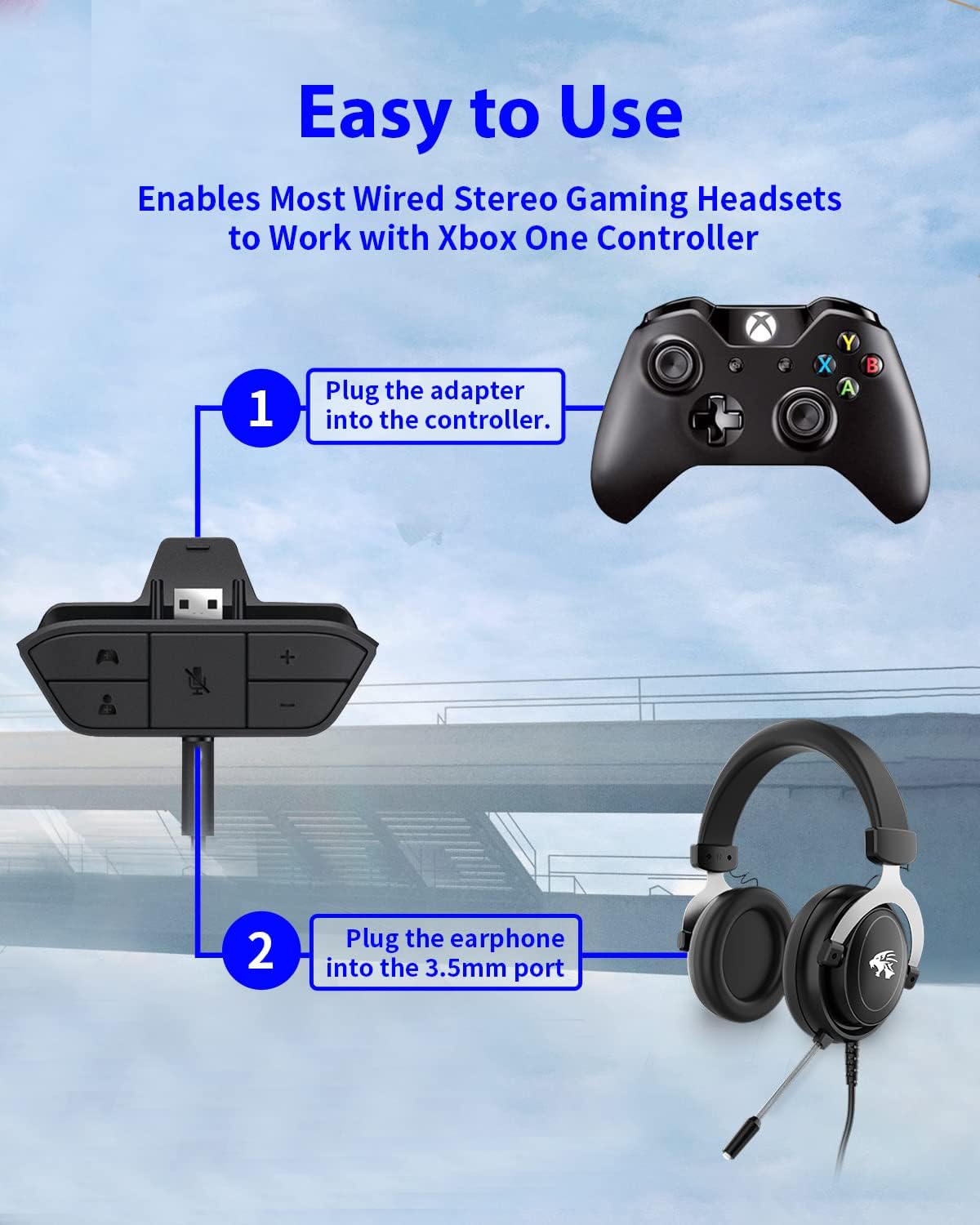
Figure 4: Step-by-step connection guide for the headset adapter.
Video 1: Demonstration of connecting the headset adapter to an Xbox controller.
Důležitá poznámka: For optimal performance and to resolve potential audio issues, it is recommended to update your Xbox controller's firmware after connecting the adapter. This can typically be done through your Xbox console's settings (Settings > Devices & connections > Accessories > Select your controller > ... > Controller settings > Update firmware).
Návod k obsluze
Once connected, use the buttons on the adapter to control your audio:
- Zvýšení/snížení hlasitosti (+/-): Press the '+' button to increase the overall volume of both game and chat audio. Press the '-' button to decrease it.
- Microphone Mute (Microphone Icon): Press this button to mute or unmute your microphone. An indicator light (if present) or on-screen notification may confirm the mute status.
- Game/Chat Balance (Controller Icon / Person Icon):
- Stiskněte tlačítko Ikona ovladače button to increase game audio volume and decrease chat audio volume.
- Stiskněte tlačítko Ikona osoby button to increase chat audio volume and decrease game audio volume.
Obrázek 5: Detailní view of the adapter's control buttons.
Údržba
To ensure the longevity and optimal performance of your headset adapter, follow these simple maintenance guidelines:
- Udržujte adaptér čistý a bez prachu a nečistot. K čištění používejte měkký, suchý hadřík.
- Nevystavujte adaptér extrémním teplotám, vlhkosti nebo přímému slunečnímu záření.
- Nepokoušejte se adaptér rozebírat ani opravovat sami, jinak ztratíte záruku.
- Pokud adaptér nepoužíváte, uložte jej na bezpečném místě, abyste zabránili jeho fyzickému poškození.
Odstraňování problémů
If you encounter issues with your AOLION Stereo Headset Adapter, please refer to the following common solutions:
| Problém | Možná příčina / řešení |
|---|---|
| No audio or poor audio quality (buzzing, peaking) |
|
| Mikrofon nefunguje |
|
| Game/Chat balance not working |
|
Pokud problém přetrvává i po vyzkoušení těchto kroků, kontaktujte prosím zákaznickou podporu.
Specifikace
| Funkce | Detail |
|---|---|
| Číslo modelu | WGXB004005 |
| Značka | AOLION |
| Rozměry produktu (D x Š x V) | 3.15 x 1.57 x 0.79 palce (8 x 4 x 2 cm) |
| Barva | Černý |
| Typ konektoru | Auxiliary (3.5mm CTIA standard) |
| Kompatibilní zařízení | Xbox One, One S, One X, Elite 1, Elite 2, Series S, Series X Controllers; 3.5mm CTIA Stereo Headsets |
Záruka a podpora
AOLION stands behind the quality of its products. This Stereo Headset Adapter comes with:
- 60denní záruka vrácení peněz: If you are not entirely satisfied with your purchase within 60 days, you may be eligible for a full refund.
- Záruka 24-měsíc: We provide a 24-month warranty against manufacturing defects from the date of purchase.
For any questions, concerns, or warranty claims, please contact us through Amazon. We are committed to responding to your inquiries within 12 hours to ensure your complete satisfaction.
Ask a question about this manual
Ask about setup, troubleshooting, compatibility, parts, safety, or missing instructions. Manuals+ will review the question and use this page’s manual context to help answer it.