
X7 Pro
X7 Pro Smart Watch User Manual
Model: X7 Pro | Brand: Generic
Zavedení
Thank you for choosing the X7 Pro Smart Watch. This manual provides essential information for setting up, operating, and maintaining your device. The X7 Pro Smart Watch is designed to enhance your daily life with features such as Bluetooth calling, health monitoring, fitness tracking, and smart notifications. It supports both Android and iPhone devices and features a 1.78-inch IPS full touch screen.
Obsah balení
Zaškrtněte prosím políčko u následujících položek:
- X7 Pro Smart Watch (Black)
- Silicone Band (44mm)
- Bezdrátový nabíjecí kabel
- Uživatelská příručka

Image: The X7 Pro Smart Watch in black, featuring a sleek design and a clear digital display showing the date and time.
Konec produktuview
Familiarize yourself with the main components of your X7 Pro Smart Watch:
- 1.78-inch IPS Full Touch Screen: For interactive navigation and display.
- Otočná korunka: Used for navigating menus, zooming, and scrolling.
- Boční tlačítko: Typically for power on/off or returning to the home screen.
- Monitor srdečního tepu: Nachází se na zadní straně pro sledování zdravotního stavu.
- Bezdrátová nabíjecí podložka: On the back for convenient charging.
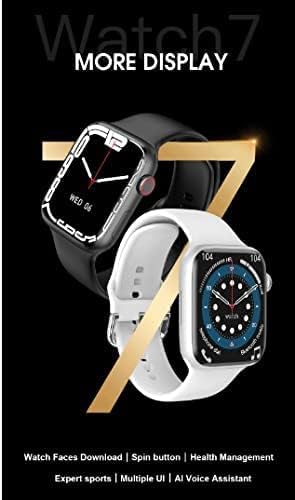
Image: A close-up of the X7 Pro Smart Watch, highlighting the rotating crown on the side, which is used for navigation.
Nastavení
1. Nabíjení zařízení
Before first use, fully charge your X7 Pro Smart Watch. Place the watch on the wireless charging pad. A built-in magnetic module ensures correct alignment. A full charge takes approximately 2 hours.
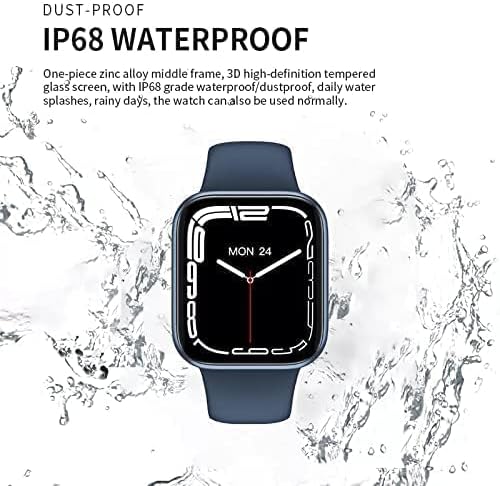
Image: The X7 Pro Smart Watch positioned on its wireless charging base, illustrating the charging process. The image also notes the 200mAh battery and 2-hour charging time.
2. Zapnutí/vypnutí
- Zapnutí: Stiskněte a podržte boční tlačítko, dokud se obrazovka nerozsvítí.
- Vypnout: Stiskněte a podržte boční tlačítko a poté na obrazovce vyberte „Vypnout“.
3. Párování s chytrým telefonem
- Stáhněte si Wearfit Pro application from your smartphone's app store (compatible with Android and iPhone).
- Ujistěte se, že je na vašem smartphonu povoleno Bluetooth.
- Open the Wearfit Pro app and follow the on-screen instructions to search for and connect to your X7 Pro Smart Watch. The watch uses Bluetooth 5.2 for stable connectivity.
- Potvrďte požadavek na párování na hodinkách i smartphonu.
Návod k obsluze
Základní navigace
- Dotyková obrazovka: Přejetím prstem nahoru, dolů, doleva nebo doprava můžete procházet nabídky a oznámení. Klepnutím vyberete položky.
- Otočná korunka: Rotate to scroll through lists, zoom in/out, or change watch faces. Press to return to the home screen or confirm selections.
Funkce volání Bluetooth
Once paired with your smartphone, you can make and answer calls directly from your X7 Pro Smart Watch. Ensure the Bluetooth call feature is enabled in the Wearfit Pro app.
Oznámení
Receive notifications for SMS, Facebook, Twitter, Line, WhatsApp, and other applications directly on your watch. Configure notification settings within the Wearfit Pro app.
Health Monitoring & Fitness Tracking
- Monitor srdečního tepu: Hodinky nepřetržitě sledují váš tep. View your data in real-time on the watch or in the Wearfit Pro app.
- Fitness Tracker: Track your steps, distance, calories burned, and various sports activities.
Přizpůsobení ciferníků
The X7 Pro Smart Watch offers a variety of built-in watch faces and allows for custom watch faces. Access the "Dial Market" within the Wearfit Pro app to download more options and personalize your watch's appearance.

Image: A display showcasing various dynamic watch faces available for the X7 Pro Smart Watch, emphasizing personalization options.
PIN Lock Feature
For enhanced security, you can set a PIN lock on your watch. This feature helps keep your data safe and provides peace of mind.
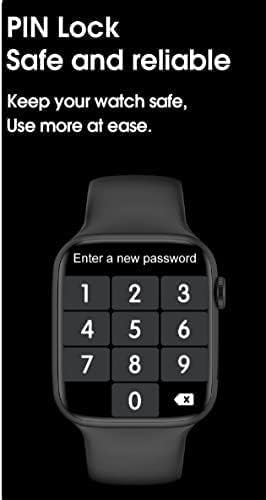
Image: The X7 Pro Smart Watch screen showing the PIN lock interface, prompting the user to enter a new password for security.
Další funkce
- Sdílet umístění: Utilize location sharing features through the connected app.
- QR Code Support: For quick access to certain functions or information.
- PayPal & Alipay: Support for mobile payment functionalities.
- Wake Up Gesture: Raise your wrist to wake the screen.
- Poplach: Nastavujte si budíky přímo z hodinek.
- Stopky: Vestavěné stopky pro měření času při aktivitách.
Údržba
Čištění hodinek
Hodinky a řemínek pravidelně otírejte měkkým hadříkemamp tkanina. Vyhněte se používání agresivních chemikálií nebo abrazivních materiálů.
Vodotěsnost (IP68)
The X7 Pro Smart Watch is IP68 waterproof and dustproof. This means it can withstand daily water splashes, rain, and can be used normally in such conditions. Avoid prolonged submersion or hot water exposure.

Image: The X7 Pro Smart Watch shown with water droplets, illustrating its IP68 dustproof and waterproof capabilities, suitable for daily use and splashes.
Péče o baterie
To prolong battery life, avoid extreme temperatures and fully discharging the battery frequently. The 200mAh lithium polymer battery provides more than 4 days of typical use.
Odstraňování problémů
If you encounter issues with your X7 Pro Smart Watch, try the following common solutions:
- Hodinky se nezapínají: Ujistěte se, že jsou hodinky plně nabité.
- Nelze spárovat s telefonem: Make sure Bluetooth is enabled on both devices and the Wearfit Pro app is open. Try restarting both the watch and phone.
- Nezobrazují se oznámení: Check notification permissions in the Wearfit Pro app and your phone's settings.
- Nepřesné zdravotní údaje: Ensure the watch is worn snugly on your wrist and the sensors are clean.
For persistent issues, refer to the Wearfit Pro app's help section or contact customer support.
Specifikace
| Funkce | Specifikace |
|---|---|
| Číslo modelu | X7 Pro |
| Velikost obrazovky | 1.78 inches IPS Full Touch Screen |
| Verze Bluetooth | 5.2 |
| Kapacita baterie | Lithium-polymer 200 mAh |
| Způsob nabíjení | Bezdrátové nabíjení |
| Materiál popruhu | Silicone (44MM) |
| Voděodolnost | IP68 prachotěsný a vodotěsný |
| Kompatibilita operačního systému | Android, iOS |
| Kapacita paměti | 128 MB |
| Rozměry produktu | 0.43 x 0.38 x 0.13 cm; 190 g |
| Výrobce | HW |
| První dostupný termín | 1. ledna 2022 |
Záruka a podpora
For warranty information and customer support, please refer to the documentation included with your purchase or contact the retailer. Keep your purchase receipt as proof of purchase.
Ask a question about this manual
Ask about setup, troubleshooting, compatibility, parts, safety, or missing instructions. Manuals+ will review the question and use this page’s manual context to help answer it.