
JZAQ BT40
JZAQ Motorcycle Helmet Bluetooth Headset User Manual
Model: BT40
Bluetooth 5.0 Waterproof Sports Headset Music Control, 80 Hours Playtime, Ultra Thin Earphones for Cycling/Skiing/Riding
1. Úvod
Thank you for choosing the JZAQ BT40 Motorcycle Helmet Bluetooth Headset. This manual provides detailed instructions for the proper installation, operation, and maintenance of your device. Please read this manual thoroughly before use to ensure optimal performance and safety. Keep this manual for future reference.
2. Konec produktuview
2.1 Klíčové vlastnosti
- Ultratenký design: Only 0.35 inches thick, designed to fit comfortably in all helmet types without squeezing the ears.
- Připojení Bluetooth 5.0: Ensures a strong, stable signal connection and automatic pairing. Can connect wirelessly to two mobile devices simultaneously.
- Prodloužená hrací doba: Built-in 600mAh rechargeable Li-ion battery provides up to 80 hours of continuous talking/playing time and 500 hours of standby time. Full charge in approximately 2 hours.
- Voděodolnost a prachotěsnost IPX7: Nano coating technology protects the headset from rain, snow, and dust, making it suitable for various outdoor conditions.
- Čistá kvalita zvuku: Features DSP noise-canceling technology and windproof foam pads for crystal-clear stereo music and calls.
- Jednoduchá obsluha: Easy-to-use controls for music, calls, and voice assistant. Automatic answering for safer riding.
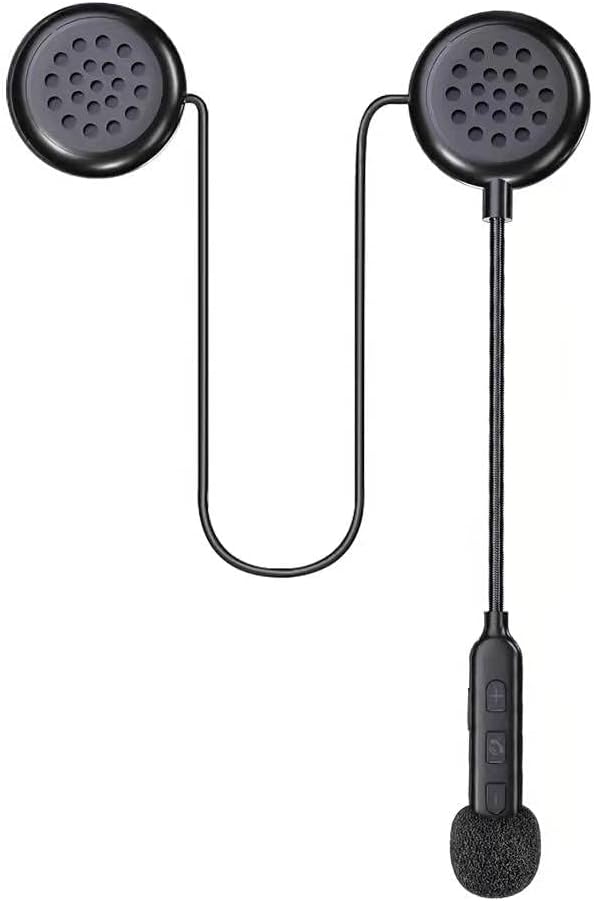
Figure 1: The JZAQ BT40 Motorcycle Helmet Bluetooth Headset, showcasing its compact design with two earpieces, a flexible microphone boom, and integrated control buttons.

Figure 2: Image highlighting the ultra-thin profile of the headset speakers, measuring 0.35 inches (8.7mm), ensuring they do not press against the ears inside a helmet.
2.2 Co je zahrnuto
- Helma Headset
- USB kabel
- Uživatelská příručka (tento dokument)
- Reflexní nálepka
3. Nastavení
3.1 Instalace do helmy
- Identify suitable locations within your helmet for the speakers. Most helmets have designated pockets or areas near the ears.
- Attach the speakers to the helmet's interior using the provided detachable Velcro pads. Ensure the speakers are positioned directly over your ears for optimal sound and comfort.
- Route the microphone boom and control unit to a convenient location near your mouth, ensuring it does not obstruct your vision or helmet closure. Secure any loose wires.

Figure 3: An illustration demonstrating the simple installation process of the headset into a helmet, emphasizing the ease of attaching the components.
3.2 Nabíjení headsetu
Before first use, fully charge the headset. Connect the provided USB cable to the charging interface on the control unit and plug the other end into a USB power source (e.g., computer, wall adapter). The charging time is approximately 2 hours. The headset supports displaying battery status on your connected phone.

Figure 4: A smartphone screen displaying the battery level indicator for the connected JZAQ BT40 headset, allowing users to monitor charge status.
3.3 Párování Bluetooth
- Ujistěte se, že jsou sluchátka nabitá a vypnutá.
- Press and hold the Power ON/Play/Pause button on the control unit until the indicator light flashes, indicating pairing mode.
- On your mobile device, enable Bluetooth and search for available devices. Select "JZAQ BT40" (or similar name) from the list.
- Once connected, the indicator light will change, and you will hear an audible confirmation. The headset can connect to two mobile phones simultaneously.

Figure 5: The JZAQ BT40 headset shown connected simultaneously to two different mobile phones, illustrating its smart connection capability.
4. Návod k obsluze

Figure 6: A detailed diagram illustrating the components of the JZAQ BT40 headset, including earpiece dimensions, speaker, microphone hole, charging interface, and the functions of each control button (Power ON/Play/Pause, Volume +/Previous Song, Volume -/Next Song).
4.1 Zapnutí/vypnutí
- Zapnutí: Press and hold the central button (Power ON/Play/Pause) until the indicator light illuminates and you hear a power-on prompt.
- Vypnout: Press and hold the central button (Power ON/Play/Pause) until the indicator light turns off and you hear a power-off prompt.
4.2 Ovládání hudby
- Přehrát/pozastavit: Short press the central button (Power ON/Play/Pause).
- Zvýšit hlasitost: Krátce stiskněte tlačítko „+“.
- Snížit hlasitost: Krátce stiskněte tlačítko „-“.
- Další skladba: Dlouze stiskněte tlačítko „-“.
- Předchozí skladba: Dlouze stiskněte tlačítko „+“.
4.3 Správa hovorů
- Přijmout hovor: Short press the central button (Power ON/Play/Pause) when an incoming call is received. The headset supports automatic answering.
- Ukončit hovor: Short press the central button (Power ON/Play/Pause) during a call.
- Odmítnout hovor: Long press the central button (Power ON/Play/Pause) when an incoming call is received.
4.4 Hlasový asistent
- Aktivovat Voice Assistant: Double-click the central button (Power ON/Play/Pause) to activate your phone's voice assistant (e.g., Siri, Google Assistant).
5. Údržba
5.1 Čištění
Wipe the headset and control unit with a soft, damp hadříkem. Nepoužívejte agresivní chemikálie ani abrazivní čisticí prostředky. Před nabíjením se ujistěte, že je nabíjecí port suchý.
5.2 Hydroizolace
The JZAQ BT40 headset features IPX7 waterproofing, protecting it from immersion in water up to 1 meter for 30 minutes. While it is designed to withstand rain and snow, avoid prolonged submersion. Always ensure the charging port cover is securely closed when not charging to maintain water resistance.

Figure 7: The JZAQ BT40 headset shown with water droplets, emphasizing its IPX7 waterproof capability, suitable for use in wet conditions.
5.3 Skladování
Store the headset in a cool, dry place away from direct sunlight and extreme temperatures. When storing for extended periods, ensure the battery is partially charged (around 50%) to prolong its lifespan.
6. Řešení problémů
- Bez napájení: Ujistěte se, že jsou sluchátka plně nabitá. Připojte je ke zdroji napájení a zkontrolujte indikátor nabíjení.
- Nelze spárovat: Make sure the headset is in pairing mode (indicator light flashing). Turn off and on your phone's Bluetooth. If issues persist, try resetting the headset (refer to manufacturer's webkonkrétní pokyny k resetování, pokud nejsou v manuálu).
- Nízká hlasitost/špatná kvalita zvuku: Adjust the volume on both the headset and your connected device. Ensure speakers are correctly positioned over your ears inside the helmet. Check for obstructions or damage to the speakers.
- Přerušované připojení: Ensure your device is within the Bluetooth range (up to 20 meters). Avoid environments with strong electromagnetic interference.
- Mikrofon nefunguje: Ensure the microphone is positioned correctly and not obstructed. Check your phone's privacy settings for microphone access.
7. Technické specifikace
| Funkce | Specifikace |
|---|---|
| Název modelu | BT40 |
| Verze Bluetooth | 5.0 |
| Dosah Bluetooth | 20 metrů |
| Kapacita baterie | 600mAh Li-ion |
| Výdrž baterie (doba přehrávání) | Až 80 hodin |
| Pohotovostní doba | 500 hodiny |
| Doba nabíjení | 2 hodiny |
| Úroveň odolnosti proti vodě | IPX7 |
| Kontrola hluku | Aktivní potlačení hluku (DSP) |
| Earphone Thickness | 0.35 palců (9 mm) |
| Technologie připojení | Bezdrátový |
| Kompatibilní zařízení | Mobilní telefony |
| Materiál | Plast, termoplastický elastomer (TPE) |
| Hmotnost položky | 3.84 unce |
8. Záruka a podpora
This JZAQ product is covered by a standard manufacturer's warranty. For specific warranty details, duration, and terms, please refer to the product packaging or contact JZAQ customer support directly. If you encounter any issues or require assistance, please reach out to the retailer where you purchased the product or visit the official JZAQ webweb s podpůrnými zdroji a kontaktními informacemi.
Související dokumenty - BT40
 |
MOMAN H4 Wireless Helmet Headset: User Manual, Installation & Operation Guide Comprehensive user manual for the MOMAN H4 Wireless Earphone and Motorcycle Helmet Headset. Includes detailed instructions on installation, operation, pairing, charging, product care, and technical specifications for riders. |
 |
Q082X Motorcycle Helmet Bluetooth Headset Quick Manual Quick manual for the Q082X motorcycle helmet Bluetooth headset intercom, detailing features like phone calls, music playback, intercom pairing, charging, and important instructions. Includes FCC compliance information. |
 |
Stručný návod k použití Bluetooth sluchátek s mikrofonem pro motocyklovou helmu XINOWY Y70 Stručný návod k použití Bluetooth sluchátek s mikrofonem pro motocyklovou helmu XINOWY Y70, který zahrnuje párování, přehrávání hudby, správu telefonních hovorů, nabíjení a bezpečnostní pokyny. |
 |
Uživatelská příručka k interkomu s Bluetooth sluchátkem pro motocyklovou helmu Maxto M6s Uživatelská příručka k interkomu s Bluetooth sluchátkem do motocyklové helmy Maxto M6s. Tato příručka popisuje instalaci a zdůrazňuje funkce, jako je vodotěsnost IP67, komunikační dosah 1000 metrů, sdílení hudby a připojení Bluetooth 5.0. |
 |
Stručný návod k obsluze Bluetooth sluchátek s mikrofonem pro motocyklovou helmu Y80 Stručný návod k obsluze Bluetooth headsetu pro motocyklovou helmu Y80, který zahrnuje funkce jako připojení telefonu, přehrávání hudby, režimy ekvalizéru, hlasového asistenta a nabíjení. |
 |
Uživatelská příručka k interkomu pro motocyklovou helmu Kebidumei Y10-2X Komplexní uživatelská příručka pro interkomovou sluchátka s mikrofonem do motocyklové helmy Kebidumei Y10-2X, která zahrnuje produkt přes...view, funkce, provoz, instalace a bezpečnostní opatření. |
Ask a question about this manual
Ask about setup, troubleshooting, compatibility, parts, safety, or missing instructions. Manuals+ will review the question and use this page’s manual context to help answer it.