
Tukzer TZ-ML-02
Tukzer 19-Inch Monitor Screen Light Bar User Manual
Model: TZ-ML-02
1. Úvod
This manual provides detailed instructions for the installation, operation, and maintenance of your Tukzer 19-Inch Monitor Screen Light Bar. Please read this manual thoroughly before use to ensure proper functionality and to extend the product's lifespan. Keep it for future reference.

Obrázek 1.1: Přední a zadní část view of the Tukzer Monitor Screen Light Bar.
2. Vlastnosti produktu
- No Screen Glare: Asymmetrical optical design illuminates the desktop and keyboard without reflecting glare on the screen, reducing eye strain.
- Smart Touch Sensor Controls: Intuitive touch controls for power and settings adjustments.
- Paměť pro vypnutí: Automatically resumes the last used brightness and color temperature settings upon restart.
- Plynulé stmívání: Adjustable brightness from -5 to +45 levels for personalized illumination.
- Tři režimy teploty barev:
- Warm Light (3000K): Ideal for reading and relaxation.
- Warm-White Light (4500K): Balanced light for comfortable viewIng.
- White Light (6500K): Bright, clear light for efficient work.
- Napájení přes USB: Convenient 5W LED operation via any standard USB port (1A~5V Min).
- Prostorově úsporný design: C-třamp mounting system saves desk space.
- High Color Rendering Index (Ra >80): Ensures accurate color representation.

Image 2.1: Key features of the Tukzer Monitor Screen Light Bar.
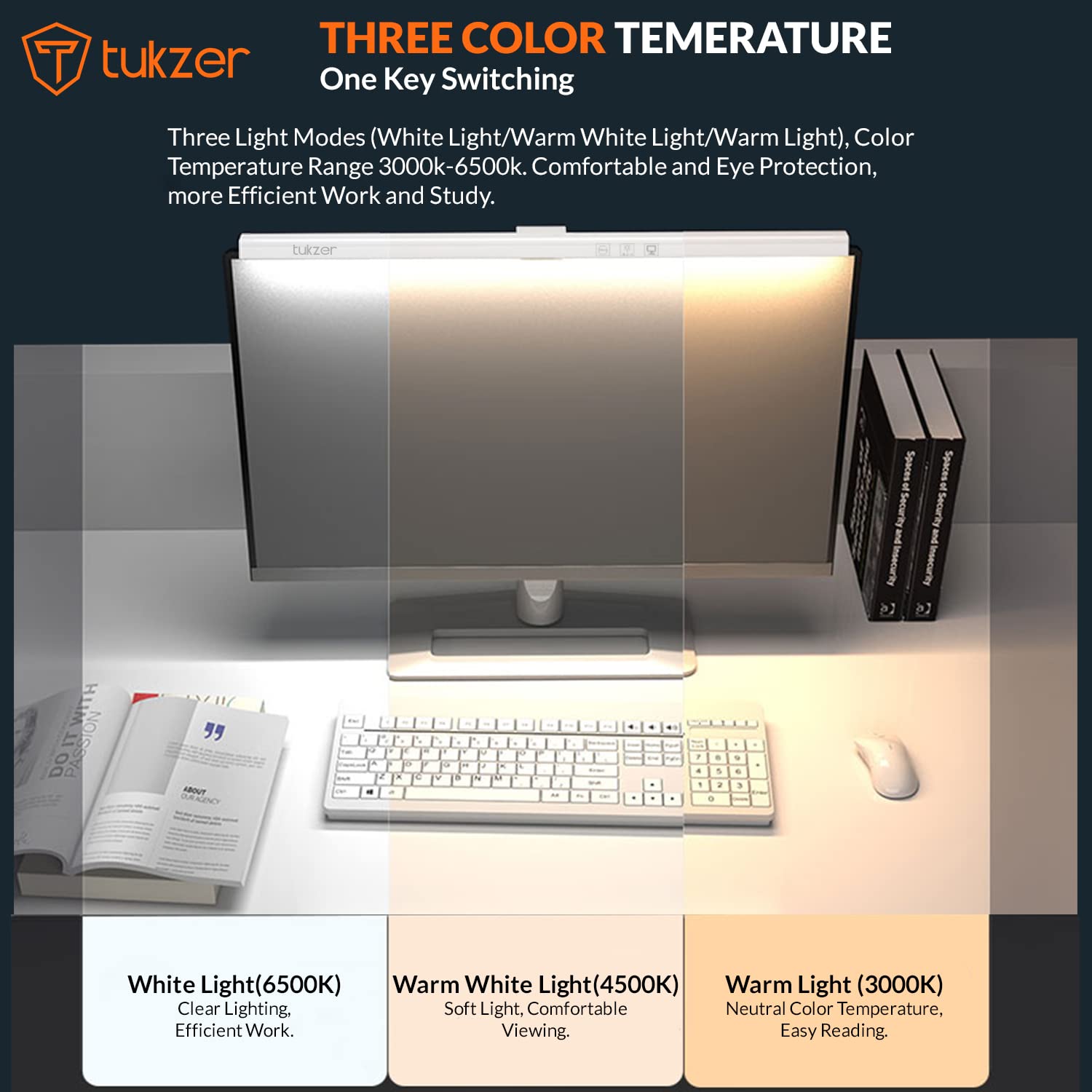
Image 2.2: Visual representation of the three adjustable color temperature modes.

Image 2.3: Asymmetric light source design for glare-free illumination.
3. Nastavení a instalace
Follow these steps to properly install your monitor screen light bar:
- Příprava monitoru: Ensure the top surface of your monitor is clean and dry.
- Připevněte silikonovou podložku: If your monitor's back is not flat, or for added stability, peel off the protection paper from the provided silicone pad and stick it onto the monitor's top edge where the light bar will rest.
- Umístěte světelnou lištu: Place the light bar's C-clamp mechanism over the top edge of your monitor.
- Zajistěte přísavku: Press the suction cup firmly onto the monitor's back to secure the light bar in place.
- Připojte napájení USB: Connect the USB power cable from the light bar to any available USB port (e.g., computer, monitor, phone charger, power bank) with a minimum output of 1A at 5V.
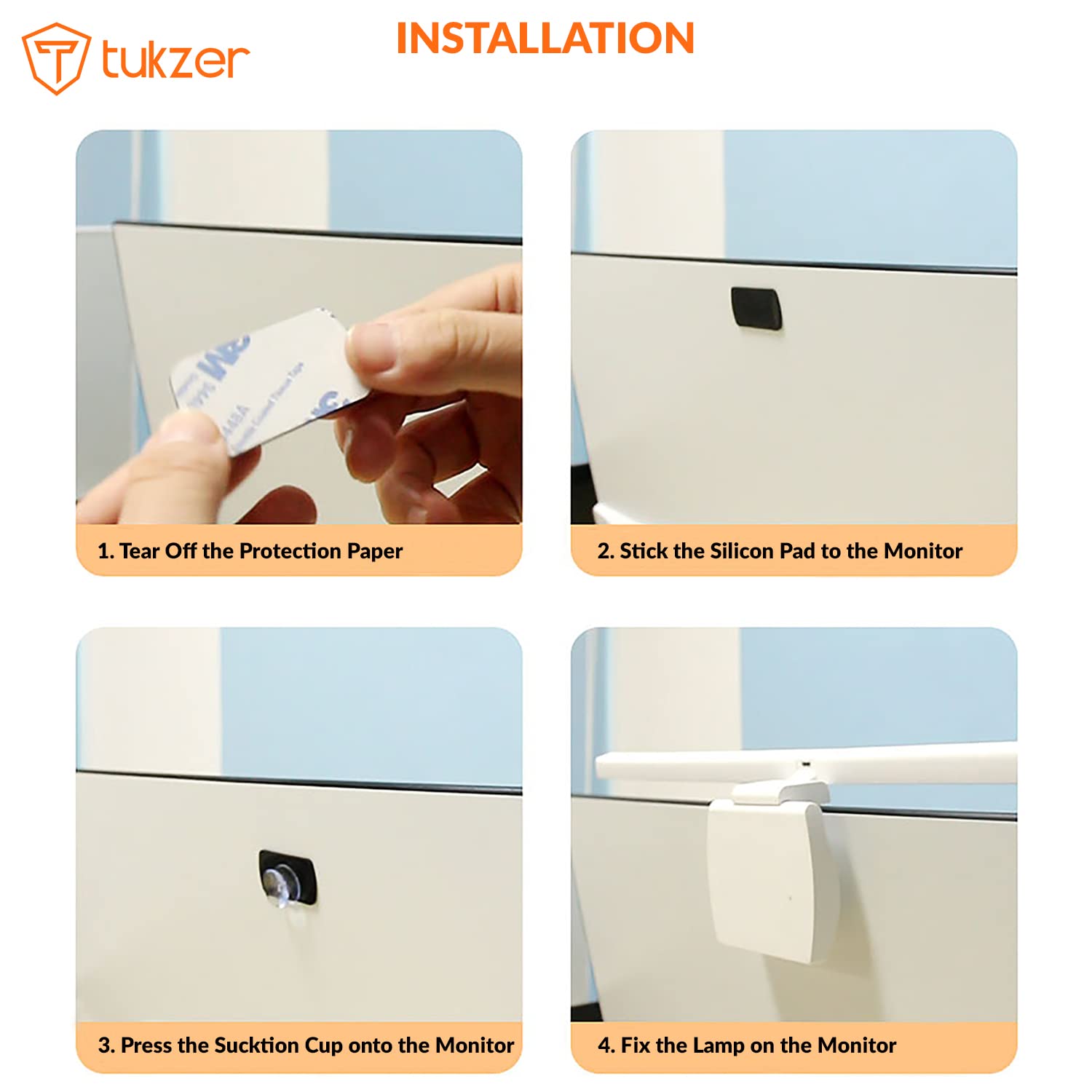
Image 3.1: Step-by-step installation process.

Image 3.2: Product parts and hanging angle adjustment range.
4. Návod k obsluze
The Tukzer Monitor Screen Light Bar features smart touch sensor controls for easy operation.
- Zapnutí/vypnutí: Lightly touch the power icon once to turn the light bar on or off.
- Nastavení jasu (plynulé stmívání): Press and hold the brightness adjustment icon to smoothly increase or decrease the light intensity. Release when the desired brightness is reached.
- Změna teploty barev: Tap the color temperature icon to cycle through the three modes: Warm Light (3000K), Warm-White Light (4500K), and White Light (6500K).
- 60minutový časovač: Tap the timer icon once to activate the 60-minute timer. The light will automatically turn off after 60 minutes.
- Paměť pro vypnutí: The light bar will remember your last brightness and color temperature settings when turned off and on again.

Image 4.1: Smart touch sensor controls for operation.
5. Údržba a péče
To ensure the longevity and optimal performance of your light bar, follow these maintenance guidelines:
- Čištění: Use a soft, dry cloth to gently wipe the surface of the light bar. Avoid using abrasive cleaners, solvents, or sprays that could damage the finish or electronic components.
- Skladování: Pokud světelnou lištu delší dobu nepoužíváte, skladujte ji na chladném a suchém místě, mimo dosah přímého slunečního záření a extrémních teplot.
- Zacházení: Handle the light bar with care. Avoid dropping it or subjecting it to strong impacts.
- Demontáž: Nepokoušejte se produkt rozebírat ani upravovat. Zrušíte tím záruku a může to způsobit poškození nebo zranění.
6. Řešení problémů
If you encounter any issues with your Tukzer Monitor Screen Light Bar, please refer to the following common problems and solutions:
| Problém | Možná příčina | Řešení |
|---|---|---|
| Světelná lišta se nezapne. |
|
|
| Světlo bliká nebo je nestabilní. |
|
|
| Dotykové ovládání nereaguje. |
|
|
| Light bar is not stable on the monitor. |
|
|
Pokud problém přetrvává i po vyzkoušení těchto řešení, kontaktujte zákaznickou podporu.
7. Specifikace
| Funkce | Detail |
|---|---|
| Číslo modelu | TZ-ML-02 |
| Materiál produktu | Akrylonitrilbutadienstyren (ABS) |
| Jmenovitý objemtage | 5V |
| Výkon produktu | 5W MAX (78x0.2W/LED Module) |
| Jmenovitý proud | 1A |
| Světelný zdroj | LED |
| Index podání barev (CRI) | > 80 Ra |
| Provozní teplota | -5°C až +45°C |
| Režimy teploty barev | Warm Light (3000K), Warm-White Light (4500K), White Light (6500K) |
| Světelný tok | >90 LM |
| Hmotnost produktu | 170 gramů |
| Rozměry produktu | 50 cm (Length) x 10.4 cm (Width) x 6.5 cm (Depth) |
| USB Power Cable Length | 1.2 metrů |
| Kontrolní metoda | Touch Sensor |
| Typ montáže | Screen Mount (C-clamp with suction cup) |
| Zahrnuté komponenty | Monitor Screen Light Bar |

Obrázek 7.1: Rozměry produktu a podrobné specifikace.
8. Záruka a podpora
8.1. Informace o záruce
The Tukzer Monitor Screen Light Bar comes with a Záruka 06 měsíců od data nákupu. Tato záruka se vztahuje na výrobní vady a poruchy při běžném používání. Nevztahuje se na škody způsobené nesprávným použitím, nehodami, neoprávněnými úpravami nebo nesprávnou instalací.
Uschovejte si prosím účtenku jako doklad o koupi pro případ reklamace.
8.2. Zákaznická podpora
For technical assistance, warranty claims, or any other inquiries, please contact Tukzer customer support. Refer to the official Tukzer webkontaktní údaje naleznete na webových stránkách nebo v dokumentaci k nákupu.
When contacting support, please provide your product model number (TZ-ML-02) and a detailed description of the issue.
9. Důležité poznámky
- Tento výrobek je určen pouze pro vnitřní použití.
- Do not expose the product to water or high humidity. It is not water resistant.
- Uchovávejte mimo dosah dětí.
- The light source of this product is not replaceable. When the light source reaches the end of its life, the entire lamp by měl být vyměněn.
- Use only with a 5V/1A USB power supply.
Ask a question about this manual
Ask about setup, troubleshooting, compatibility, parts, safety, or missing instructions. Manuals+ will review the question and use this page’s manual context to help answer it.