
1. Úvod
Thank you for choosing the FEELWORLD T7PLUS 7-inch On-Camera Field Monitor. This manual provides detailed instructions for the proper setup, operation, and maintenance of your device. Please read this manual thoroughly before using the monitor to ensure optimal performance and to prevent damage.
The FEELWORLD T7PLUS is an advanced 7-inch field monitor designed for professional videographers and photographers. It features a 1920x1200 resolution IPS display, 4K HDMI input/output, and a robust metal casing. Key functionalities include custom 3D LUT support, waveform, vector scope, and various professional video assist features to enhance your shooting workflow.

Image: The FEELWORLD T7PLUS monitor displaying a high-resolution image, highlighting its compact design and clear display.
2. Klíčové vlastnosti
- 7palcový Full HD IPS displej: Features a 1920x1200 resolution, 450 cd/m² brightness, and 1200:1 contrast ratio for clear and accurate image monitoring.
- Professional Video Assist Functions: Includes 3D LUT, Waveform, Vector Scope, Histogram, Peaking Focus Assist, False Color, Zebra Exposure, Nine Grid, Zoom-in, Embedded Audio, Anamorphic Mode, Image Flip, and Check Field.
- Podpora vlastních 3D LUT: Allows users to load up to 32 custom 3D LUTs via USB for real-time color calibration and workflow optimization.
- 4K HDMI Input and Output: Supports 4K@30Hz HDMI signals, enabling synchronous monitoring and output to other devices.
- Odolný kov Casing: Ultra-thin 18mm design with a robust metal shell for enhanced protection and portability (320g weight).
- Flexibilní napájecí systém: Compatible with F970 battery plates (standard) and optional D28S/D54, LP-E6, U60 battery plates. Can also be powered by an optional DC 12V adapter.
- Přizpůsobitelná tlačítka zkratek: Four user-definable F1-F4 shortcut buttons for quick access to frequently used functions.
- Podpora více jazyků: The T7PLUS supports 11 languages, including English, French, German, Spanish, Japanese, Chinese, Traditional Chinese, Portuguese, Korean, Russian, and Dutch.
3. Obsah balení
Po vybalení zkontrolujte obsah balení, abyste se ujistili, že jsou přítomny všechny položky:
- 1 × FEELWORLD T7PLUS Monitor
- 1 × Mini HDMI kabel
- 1 × Sluneční clona
- 1 × Držák pro blesk
- 1 × F970 Battery Plate (pre-installed)
- 1 × Uživatelská příručka
- 1 × USB Adapter Cable (for LUT loading)
- 1 × Storage Bag (optional, not always included)

Image: An illustration of the FEELWORLD T7PLUS package contents, including the monitor, mini HDMI cable, sunshade, hot shoe mount, F970 battery plate, and user manual.
4. Nastavení
4.1 Montáž monitoru
- Attach the hot shoe mount to the bottom of the monitor using the screw thread.
- Upevněte držák sáněk blesku k sáňkám blesku fotoaparátu nebo kompatibilnímu zařízení.
- Upravte úhel monitoru pro optimální viewing. The hot shoe mount typically allows for 360-degree rotation and 180-degree tilt.

Image: The FEELWORLD T7PLUS monitor mounted on a camera, illustrating its use in a typical shooting setup.
4.2 Napájení monitoru
The T7PLUS offers flexible power options:
- Baterie NP-F: The monitor comes with a standard F970 battery plate. Insert a compatible NP-F series battery (F970, F960, F950, F930, F770, F750, F730, F570, F550, F530 series) into the battery slot. Ensure the battery is fully charged.
- Adaptér stejnosměrného proudu 12 V: Connect an optional DC 12V/1.5A power adapter to the DC IN port on the side of the monitor.
Poznámka: Batteries and DC power adapters are typically sold separately and are not included in the standard package.

Image: A diagram illustrating the flexible power options for the FEELWORLD T7PLUS, including the NP-F battery plate and the DC 12V input port.
4.3 Connecting to a Camera (HDMI)
The T7PLUS supports 4K HDMI input and output.
- Connect one end of the provided Mini HDMI cable to the HDMI OUT port of your camera.
- Connect the other end of the Mini HDMI cable to the HDMI IN port on the side of the T7PLUS monitor.
- If you need to output the signal to another monitor, connect an HDMI cable from the HDMI OUT port of the T7PLUS to the input of the secondary monitor.
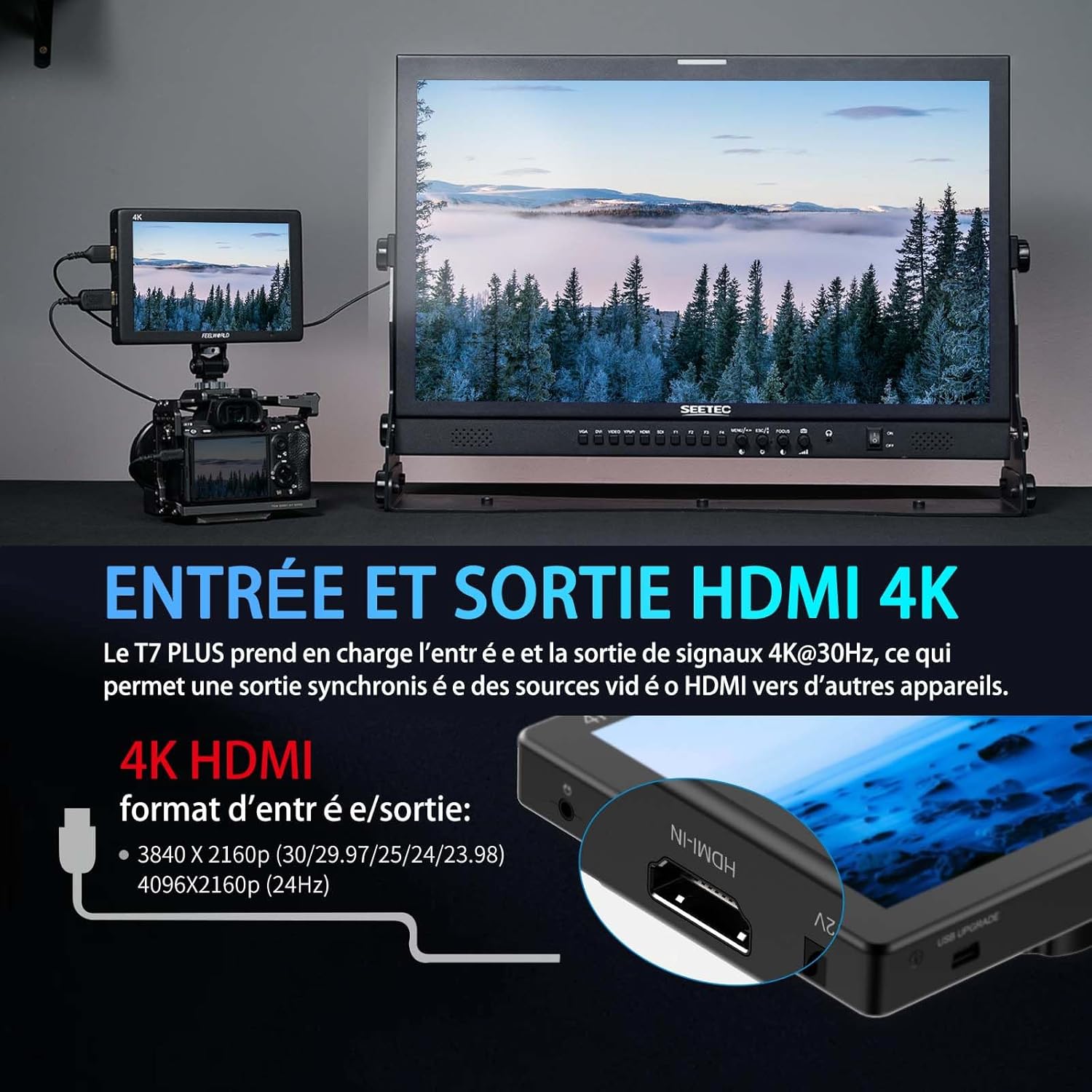
Image: A visual representation of the 4K HDMI input and output ports on the FEELWORLD T7PLUS, demonstrating connectivity to a camera and a larger display.
5. Obsluha monitoru
5.1 Zapnutí/vypnutí
Press and hold the power button located on the top or side of the monitor to turn it on or off.
5.2 Menu Navigation and Shortcut Buttons
The T7PLUS features an intuitive menu system accessible via buttons on the top of the monitor. It also includes four customizable shortcut buttons (F1-F4) for quick access to frequently used functions.
- Use the menu buttons to navigate through settings such as image adjustments, assist functions, and system settings.
- To customize F1-F4 buttons: Enter the main menu, navigate to "User Option" or "Function Settings," and assign desired functions (e.g., Peaking, False Color, LUTs) to each button.

Image: The user interface menu of the FEELWORLD T7PLUS, demonstrating the navigation options and the location of the F1-F4 shortcut buttons.
5.3 Using Professional Video Assist Functions
The T7PLUS integrates a suite of tools to aid in precise exposure, focus, and color management. These can be accessed via the main menu or assigned to shortcut buttons.
- 3D LUT: Load custom LUTs to preview tvůj footage with desired color grades. Connect a USB drive with .cube LUT files to the monitor's USB port, then navigate to the LUT menu to import and apply them. Up to 32 user LUTs can be stored.
- Křivka: Monitor luminance and chrominance levels across the image. This helps in achieving correct exposure and color balance.
- Vektorový rozsah: Analyze the color saturation and hue of your video signal.
- Asistent zaostření Peaking: Highlights sharp edges in red, green, or blue to help achieve precise focus.
- Falešná barva: Displays different exposure levels as distinct color overlays, assisting in setting optimal exposure.
- Expozice zebry: Indicates overexposed areas with zebra stripes.
- histogram: Provides a graphical representation of the tonal distribution of your image.
- Devítidílná mřížka: Překrývá mřížku 3x3 pro usnadnění kompozice.
- Přiblížit: Magnifies a portion of the image for critical focus checking.
- Anamorfní režim: Uvolňuje anamorfní footage za správné viewIng.
- Převrácení obrázku: Flips the image horizontally or vertically, useful for various mounting configurations.
- Kontrolní pole: Pro kalibraci barev zobrazuje pouze červené, zelené, modré nebo mono kanály.
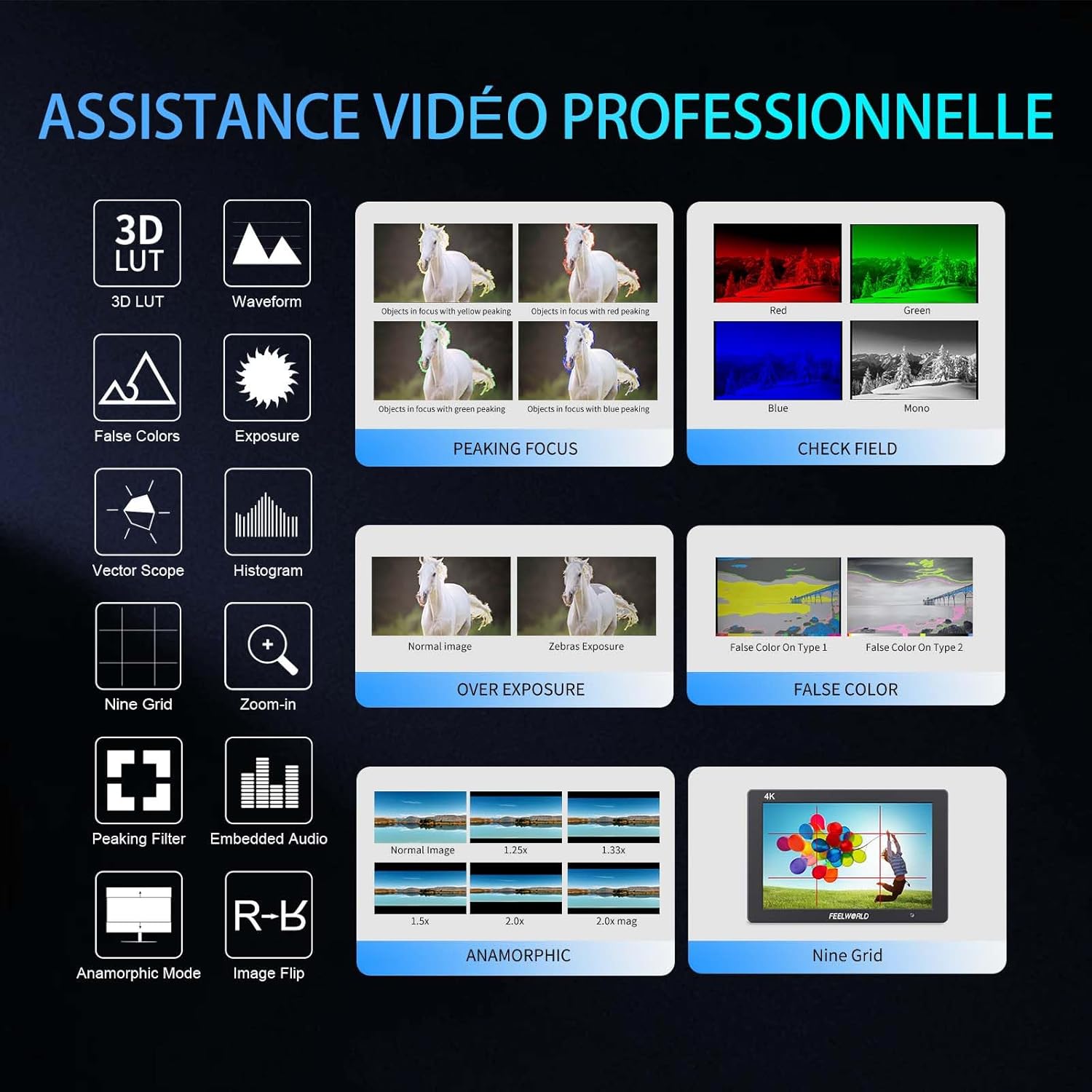
Obrázek: Vizuální obrázekview of the professional video assistance features available on the FEELWORLD T7PLUS monitor, including 3D LUT, Waveform, Peaking Focus, and False Color.
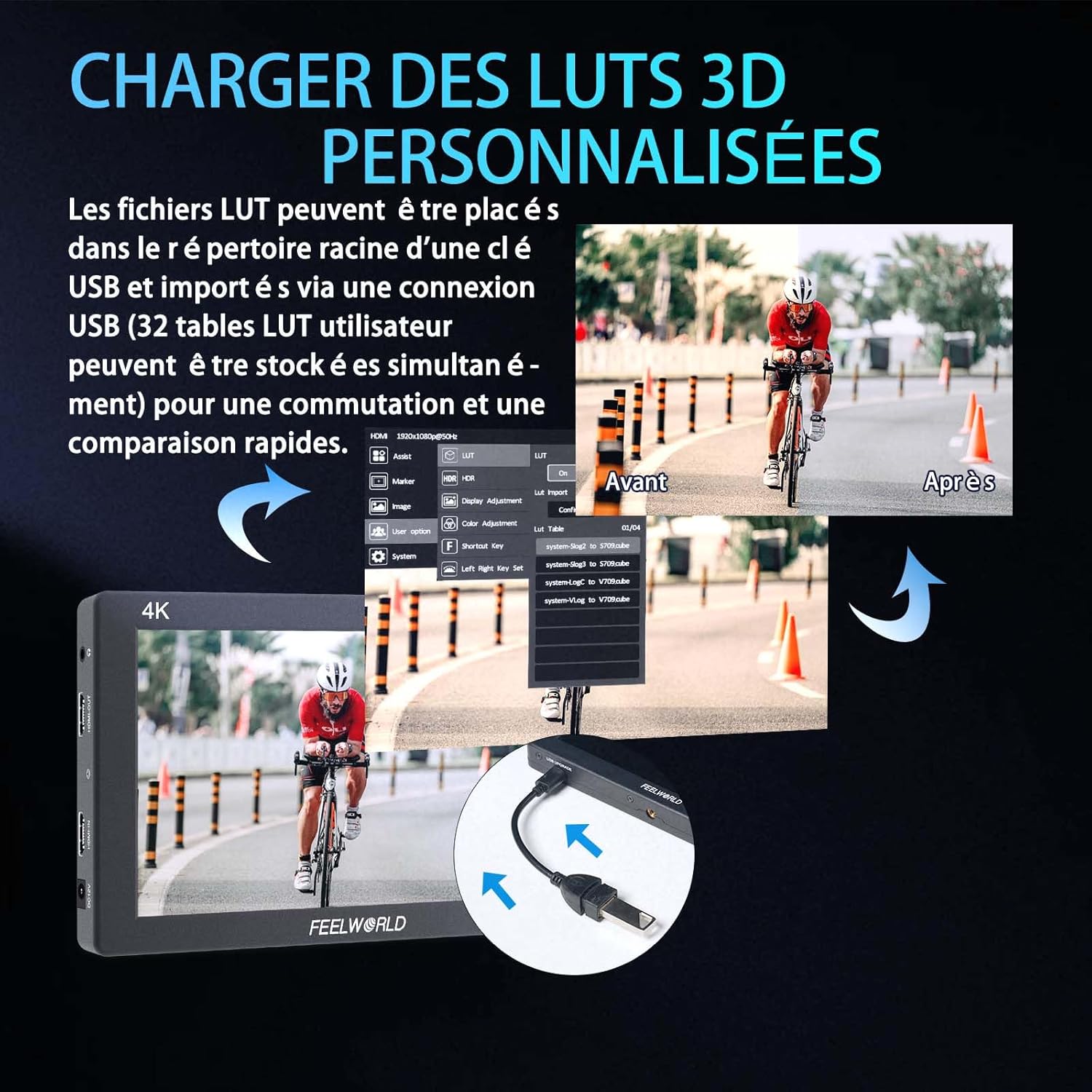
Image: The FEELWORLD T7PLUS demonstrating the process of loading custom 3D LUTs via USB, with a split screen showing the "Before" and "After" application of a LUT.

Image: The FEELWORLD T7PLUS displaying broadcast-level waveform monitoring functions, including Vectorscope, Brightness Histogram, YUV Parade, and Y Parade.
5.4 Nastavení jazyka
To change the display language, navigate to the "System" menu and select "Language." Choose your preferred language from the available options.
6. Údržba
- Čištění: K čištění obrazovky a těla monitoru použijte měkký, suchý hadřík. V případě odolných šmouh použijte lehceamp cloth with a mild cleaning solution designed for electronics can be used, but avoid direct spraying.
- Skladování: When not in use, store the monitor in a cool, dry place, away from direct sunlight and extreme temperatures. Use the provided storage bag for protection.
- Péče o baterie: If using batteries, ensure they are charged regularly and stored properly. Remove batteries if the monitor will not be used for an extended period.
- Aktualizace firmwaru: Check the FEELWORLD official website periodically for any available firmware updates to ensure your monitor has the latest features and bug fixes.
7. Řešení problémů
| Problém | Možná příčina | Řešení |
|---|---|---|
| Monitor se nezapne. | Low or dead battery; power adapter not connected or faulty. | Ensure battery is charged or replace it. Check power adapter connection and functionality. |
| No signal on screen. | HDMI cable loose or faulty; incorrect input selected; camera not outputting signal. | Check HDMI cable connections. Ensure the correct input source is selected on the monitor. Verify camera's HDMI output settings. |
| Image is distorted or colors are off. | Incorrect color settings; faulty HDMI cable; monitor settings misconfigured. | Reset monitor to factory settings. Check HDMI cable. Adjust color settings in the menu. |
| Tlačítka nereagují. | Dočasná softwarová závada; fyzické poškození. | Power cycle the monitor. If the problem persists, contact customer support. |
8. Specifikace
| Funkce | Detail |
|---|---|
| Značka | FEELWORLD |
| Model | T7PLUS-OF-EU |
| Velikost obrazovky | 7 palců |
| Rezoluce | 1920x1200 |
| Jas | 450 cd/m² |
| Kontrastní poměr | 1200:1 |
| Hustota pixelů | 323 PPI |
| Viewúhel | 160° (IPS) |
| HDMI vstup/výstup | 4K@30Hz (3840x2160p, 4096x2160p) |
| Vstup napájení | DC 12V/1.5A or NP-F Battery Plate |
| Rozměry (D x Š x V) | 22.5 x 16.2 x 8.1 cm (přibližně 8.86 x 6.38 x 3.19 palce) |
| Hmotnost | 930 gramů (přibližně 2.05 libry) |
| CasinMateriál | Kov |
9. Záruka a podpora
The FEELWORLD T7PLUS monitor comes with a 1letá záruka výrobceTato záruka se vztahuje na vady materiálu a zpracování při běžném používání. Uschovejte si prosím doklad o koupi pro případ uplatnění záruky.
For technical support, troubleshooting assistance, or warranty service, please contact FEELWORLD customer support through their official webwebu nebo prodejce, kde jste produkt zakoupili.
Poznámka: Availability of spare parts and software updates may vary. Please refer to the manufacturer's official channels for the most current information.