
Zavedení
Thank you for choosing the Krisons Sound Blaster Tower Speaker. This manual provides essential information for the safe and efficient operation of your speaker system. Please read it thoroughly before use and retain it for future reference.
Konec produktuview
The Krisons Sound Blaster Tower Speaker is designed to deliver clear and balanced audio with an 8-inch woofer. It features multiple connectivity options including Bluetooth, USB, AUX, and FM radio, along with an LCD display for mode information. The speaker includes controls for volume, bass, and mode selection.

Obrázek 1: Přední a boční view of the Krisons Sound Blaster Tower Speaker, highlighting the display, USB port, mode button, play/pause, previous/next controls, bass, treble, volume knobs, 4-inch speakers, and 8-inch woofer.
Nastavení
1. Vybalování
Opatrně vyjměte všechny součásti z obalu. Ujistěte se, že jsou přítomny následující položky:
- 1 x Krisons Sound Blaster Tower Speaker
- 1 x Dálkové ovládání
- 1 x Uživatelská příručka (tento dokument)
- 1 x Záruční list
2. Umístění
Position the tower speaker on a flat, stable surface. For optimal sound performance, place the speaker in a location that allows for clear sound dispersion. The compact design allows for flexible placement in various room sizes.
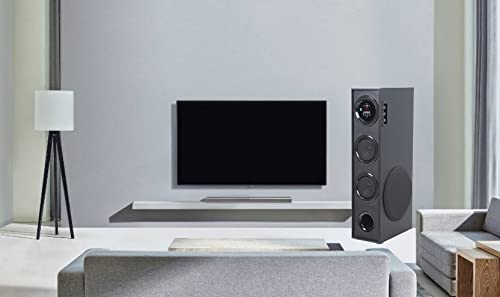
Obrázek 2: Přampumístění reproduktorů v domácím prostředí.

Figure 3: Speaker dimensions for placement planning.
3. Připojení napájení
Connect the speaker's power cable to a standard AC power outlet. Ensure the power switch on the speaker is in the OFF position before connecting to power.
4. Audio připojení
Reproduktor podporuje několik metod zvukového vstupu:
- Bluetooth: Pro bezdrátové připojení k chytrým telefonům, tabletům a dalším zařízením s podporou Bluetooth.
- USB: Pro přehrávání zvuku filepřímo z USB disku.
- Vstup AUX: Pro kabelové připojení k zařízením pomocí 3.5mm audio kabelu.
- FM rádio: Built-in FM tuner for radio broadcasts.

Figure 4: Available connectivity options.

Figure 5: Connecting to an external device via AUX cable.
Návod k obsluze
1. Zapnutí/vypnutí
Locate the power switch on the rear panel of the speaker. Flip the switch to the "ON" position to power on the speaker. The LCD display will illuminate. Flip to "OFF" to power down.
2. Kontrolní metody
The speaker can be controlled using the physical buttons and knobs on the side panel or via the included remote control.
- Ovládací prvky na bočním panelu: Includes buttons for mode change, play/pause, previous/next track, and knobs for volume and bass adjustment.
- Dálkové ovládání: Provides full functionality for convenient operation from a distance.
3. Výběr režimu
Press the "MODE" button on the speaker's control panel or the remote control to cycle through available input modes: Bluetooth, USB, AUX, and FM Radio. The selected mode will be indicated on the LCD display.
4. Provoz Bluetooth
- Switch the speaker to Bluetooth mode. The LCD display will show "BT" or a similar indicator, and the speaker will enter pairing mode.
- Na svém zařízení (chytrém telefonu, tabletu) povolte Bluetooth a vyhledejte dostupná zařízení.
- Select "Krisons Sound Blaster" (or similar name) from the list of devices.
- Once paired, the speaker will confirm the connection, and you can play audio from your device.
5. Přehrávání z USB
- Vložte USB disk s audio soubory ve formátu MP3 filedo USB portu na reproduktoru.
- Přepněte reproduktor do režimu USB. Reproduktor automaticky detekuje a začne přehrávat zvuk. files z USB disku.
- Use the previous/next buttons to navigate tracks and the play/pause button to control playback.
6. Připojení AUX-in
- Connect one end of a 3.5mm audio cable to the AUX-in port on the speaker.
- Connect the other end of the 3.5mm audio cable to the audio output jack of your external device (e.g., TV, computer, MP3 player).
- Switch the speaker to AUX mode. Audio from your connected device will now play through the speaker.
7. FM rádio
- Přepněte reproduktor do režimu FM rádia.
- The speaker will automatically scan and store available FM stations.
- Use the previous/next buttons to cycle through the stored stations.
8. Nastavení hlasitosti a tónu
Use the "Volume" knob to adjust the overall sound level. Use the "Bass" knob to increase or decrease the low-frequency output. The speaker is designed to provide a balanced sound across treble, midrange, and bass frequencies.
Údržba
To ensure the longevity and optimal performance of your Krisons Sound Blaster Tower Speaker, follow these maintenance guidelines:
- Čištění: Use a soft, dry cloth to wipe the exterior surfaces of the speaker. Do not use abrasive cleaners, waxes, or solvents, as these can damage the finish.
- Prach: Regularly dust the speaker grilles and vents to prevent accumulation, which can affect sound quality and internal components.
- Expozice tekutin: Keep the speaker away from water and other liquids. Do not place liquid-filled containers on or near the speaker.
- Skladování: If storing the speaker for an extended period, disconnect it from power and store it in a cool, dry place, away from direct sunlight and extreme temperatures.
Odstraňování problémů
Pokud narazíte na problémy s reproduktorem, podívejte se na následující běžné problémy a jejich řešení:
| Problém | Možné řešení |
|---|---|
| Žádná síla |
|
| Žádný zvuk |
|
| Bluetooth se nepřipojuje |
|
| Dálkové ovládání nefunguje |
|
| Sound during power on/off | A brief sound or pop during power on/off is normal for this type of audio equipment and does not indicate a malfunction. |
Specifikace
| Funkce | Detail |
|---|---|
| Značka | Krisons |
| Název modelu | Sound Blaster |
| Maximální výstupní výkon reproduktoru | 80 wattů |
| Technologie připojení | Auxiliary, Bluetooth, USB, Wireless |
| Režim zvukového výstupu | Surround |
| Typ montáže | Stojící na podlaze |
| Materiál pouzdra | Krystal |
| Typ reproduktoru | Subwoofer/Bookshelf/Woofer/Tower |
| Barva | Černý |
| Kontrolní metoda | Dotykové ovládání, dálkové ovládání |
| Woofer Driver Diameter | 8 palce |
| Tweeter Driver Diameter | 1 palce |
| Total USB 2.0 Ports | 1 |
| Počet zvukových kanálů | 2.1 |
| Rozměry položky (D x Š x V) | 39H x 24Š x 57V centimetrů |
| Hmotnost položky | 8900 gramů |
| Kompatibilní zařízení | Smartphone, tablet |
| Zdroj napájení | AC |
Informace o záruce
This Krisons Sound Blaster Tower Speaker comes with a Záruka 6 měsíců on manufacturing defects. Please refer to the included Warranty Card for detailed terms and conditions. Retain your purchase receipt as proof of purchase for warranty claims.
Zákaznická podpora
For any questions, assistance, or support regarding your Krisons Sound Blaster Tower Speaker, please contact Krisons Customer Care:

Figure 6: Krisons Customer Support contact details.
- E-mail: service@krisons.com
- Telefon: +91-8287124581 / +91-9910016757
- Provozní doba: od 10:6 do XNUMX:XNUMX
- Výrobce: Krisons Electronic Systems Limited, ZYTEL ENTERPRISES PVT


