
Zavedení
This manual provides detailed instructions for the setup, operation, and maintenance of your TopMate SM1B Monitor Stand. Designed for ergonomic comfort and desktop organization, this stand features integrated USB 3.0 ports, RGB lighting, a storage drawer, and a mobile phone stand. Please read this manual thoroughly before use to ensure proper functionality and safety.
Vlastnosti produktu
- Ergonomický design: Raises monitor height by 3.15 inches to reduce neck and back fatigue.
- Skládací design: Support legs fold 90° to adjust length and save space.
- Robustní konstrukce: Made of thermosetting material, supporting up to 44 lbs (19.96 kg) for monitors, laptops, and printers.
- USB 3.0 Hub: Includes 4 USB 3.0 ports for data transfer and charging (1 device charging, 3 input devices simultaneously).
- RGB světelný efekt: Decorative lights on both sides with 7 dazzling lighting effects, controllable via a button. Long press to turn off/on.
- Úložná zásuvka: Hidden drawer for small items like pens, paper clips, and USB drives.
- Stojan na mobilní telefon: Integrated stand for convenient phone placement.
Pokyny pro nastavení
The TopMate SM1B Monitor Stand requires minimal assembly. Follow these steps for initial setup:
- Vybalte stojan: Carefully remove the monitor stand and all accessories from the packaging. Ensure all components are present: the monitor stand unit and a USB 3.0 braided cable.
- Umístěte stojan: Place the monitor stand on a stable, flat surface on your desk.
- Adjust Foldable Legs (Optional): The support legs on both sides can be folded inwards by 90 degrees to shorten the stand's length, adapting to your desk space or monitor size. Adjust as needed for optimal viewing and space utilization.

Image: The monitor stand demonstrating its foldable legs for adjustable width.
- Connect USB Hub: Use the included USB 3.0 braided cable to connect the monitor stand to a USB 3.0 port on your computer or laptop. This activates the integrated USB hub and RGB lighting.
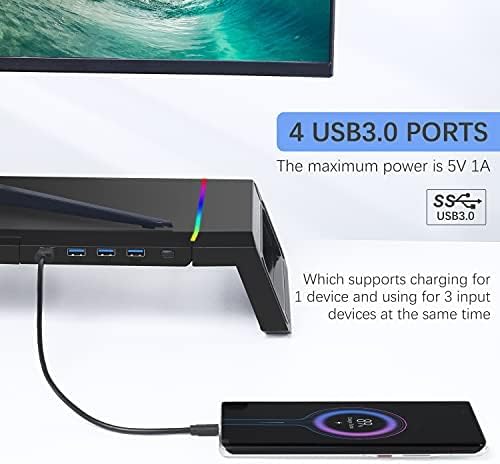
Image: Connecting the USB 3.0 cable to the monitor stand to enable the hub and lighting features.
- Place Your Monitor/Device: Carefully place your computer monitor, laptop, or other compatible device on top of the stand. Ensure it is centered and stable.
Návod k obsluze
Ovládání osvětlení RGB
The monitor stand features dynamic RGB lighting on both sides. To control the lighting:
- Efekty změny: Press the light control button located on the front right side of the stand to cycle through 7 different dazzling lighting effects.
- Zapnout/Vypnout: Long press the light button for 2-3 seconds to turn the RGB lighting off or on.

Image: The RGB lighting control button and examples of the 7 available lighting effects.
Používání rozbočovače USB 3.0
The integrated USB 3.0 hub provides convenient connectivity for your peripherals:
- Připojit zařízení: Plug your USB devices (e.g., mouse, keyboard, USB drives, charging cables) into the 4 USB 3.0 ports on the front of the stand.
- Výkon: The hub supports charging for one device and simultaneous use of up to three input devices. The maximum power output is 5V 1A.

Image: A smartphone charging via one of the USB 3.0 ports on the monitor stand.
Storage Drawer and Mobile Phone Stand
To utilize the integrated storage and phone stand:
- Access Storage Drawer: Pull out the hidden drawer located on the left side of the stand to store small office supplies such as pens, paper clips, or sticky notes.
- Use Phone Stand: Pull out the mobile phone stand located on the right side of the drawer to securely hold your smartphone for easy viewIng.

Obrázek: Výstava stojanu na monitorasing its integrated phone stand and storage drawer.
Údržba
To ensure the longevity and proper functioning of your TopMate SM1B Monitor Stand, follow these simple maintenance guidelines:
- Čištění: Wipe the surface of the stand with a soft, dry, or slightly damp cloth. Avoid using abrasive cleaners or solvents, as these may damage the finish or electronic components.
- Odstranění prachu: Regularly dust the USB ports and RGB light strips to prevent accumulation that could affect performance or appearance.
- Správa kabelů: Ensure all connected cables are neatly organized and not under excessive tension to prevent damage to the ports or cables themselves.
- Hmotnostní limit: Do not exceed the maximum load-bearing capacity of 44 lbs (19.96 kg) to prevent structural damage.
Odstraňování problémů
If you encounter any issues with your TopMate SM1B Monitor Stand, please refer to the following common troubleshooting steps:
- RGB světla nefungují:
- Ensure the USB cable is securely connected to both the monitor stand and your computer.
- Long press the light control button for 2-3 seconds to ensure the lights are not simply turned off.
- Zkuste připojit kabel USB k jinému portu USB na počítači.
- Nefunkční USB porty:
- Verify the USB 3.0 braided cable is firmly connected to both the stand and your computer.
- Test with different USB devices to confirm if the issue is with the port or the device.
- Ujistěte se, že ovladače USB vašeho počítače jsou aktuální.
- Remember the hub supports charging for one device and using three input devices simultaneously. Overloading may cause issues.
- Nestabilita stojanu:
- Ensure the stand is placed on a flat, even surface.
- Check that the foldable legs are fully extended and locked into position if using the wider configuration.
- Verify that the weight of your device does not exceed the maximum load-bearing capacity of 44 lbs (19.96 kg).
Pokud tyto kroky problém nevyřeší, kontaktujte prosím zákaznickou podporu.
Specifikace
| Značka | TopMate |
| Číslo modelu | SM1B-CA-1 |
| Tvar | Obdélníkový |
| Základní typ | Noha |
| Montáž Vyžadována | Žádný |
| Speciální funkce | Integrated USB3.0 hub, RGB lighting, storage drawer, and mobile phone stand |
| UPC | 743579376601 |
| Rozměry balení | 17.52 x 8.46 x 3.62 palce |
| Hmotnost položky | 3.98 liber (1.81 kilogramů) |
| Barva | Černý |
| Materiál | Akrylonitrilbutadienstyren (ABS) |
| Typ dokončení | Lakované |
| Jsou vyžadovány baterie | Žádný |
Záruka a podpora
The TopMate SM1B Monitor Stand comes with a 1-letý záruční servis od data nákupu.
If you experience any quality problems or require assistance with your product, please contact our online customer service. We are committed to providing satisfactory after-sales support.
For further support, please visit the official TopMate store or contact your retailer.
Oficiální videa produktů
Topmate SM1B Monitor Stand Overview
Video: Úředník u konceview of the TopMate SM1B Monitor Stand, demonstrating its features and functionality.
TopMate SM1B Foldable RGB Monitor Stand Demonstration
Video: A demonstration of the TopMate SM1B's foldable design and RGB lighting effects.