
1. Úvod
The C2G USB-C 9-in-1 Dual Display Docking Station expands the connectivity of your USB-C or Thunderbolt 3 enabled laptop. This docking station provides multiple ports for displays, peripherals, network access, and power delivery, enhancing productivity for various computing environments.
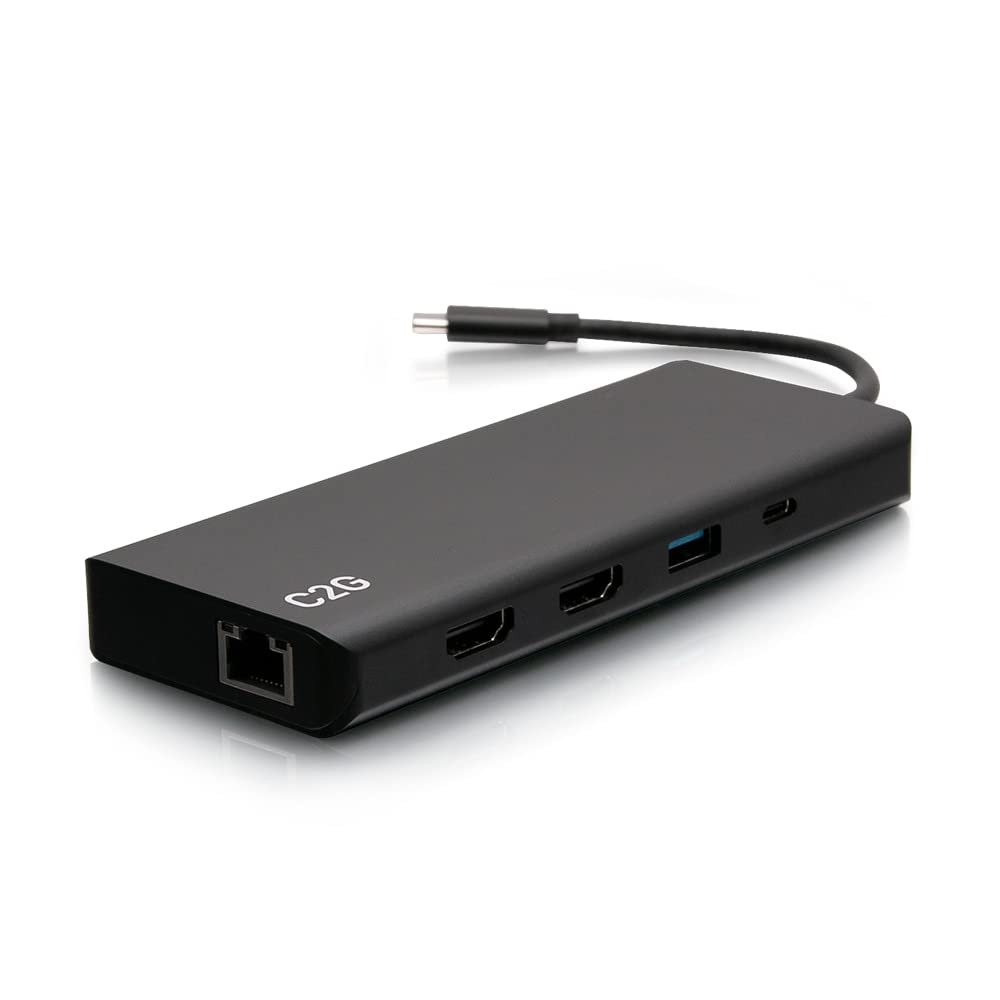
Figure 1: C2G USB-C 9-in-1 Dual Display Docking Station
Obsah balení
- C2G USB-C 9-in-1 Dual Display Docking Station
- Napájecí zdroj 60W
2. Vlastnosti
- Supports single HDMI display resolutions up to 4K (3840 x 2160) at 30Hz.
- Supports dual HDMI display resolutions up to 1080p at 60Hz.
- Integrated Gigabit Ethernet port for wired network connectivity.
- Provides up to 60W of power delivery to charge connected laptops via USB-C.
- Includes multiple USB-A ports for data transfer (5Gbps and 480Mbps).
- Features a 3.5mm audio jack for headphone/microphone connection.
3. Pokyny k nastavení
3.1 Connecting to Your Host Device
- Connect the integrated USB-C cable from the docking station to an available USB-C or Thunderbolt 3 port on your laptop.

Figure 2: USB-C host cable and Ethernet port
3.2 Powering the Docking Station and Laptop
- Connect the included 60W power supply to the dedicated USB-C Power Delivery (PD) port on the docking station. This will power the docking station and provide up to 60W of power to your connected laptop.

Figure 3: HDMI, USB-A, and USB-C Power Delivery ports
3.3 Připojení displeje
- Connect your display(s) to the HDMI ports on the docking station using HDMI cables.
- For a single display, resolutions up to 4K (3840 x 2160) at 30Hz are supported.
- For dual displays, resolutions up to 1080p at 60Hz are supported simultaneously.
3.4 Připojení periferních zařízení
- Connect USB devices such as keyboards, mice, and external storage drives to the available USB-A ports. Three ports support SuperSpeed USB 5Gbps, and two ports support 480Mbps data transfers.
- For audio output, connect headphones or a microphone to the 3.5mm audio jack.
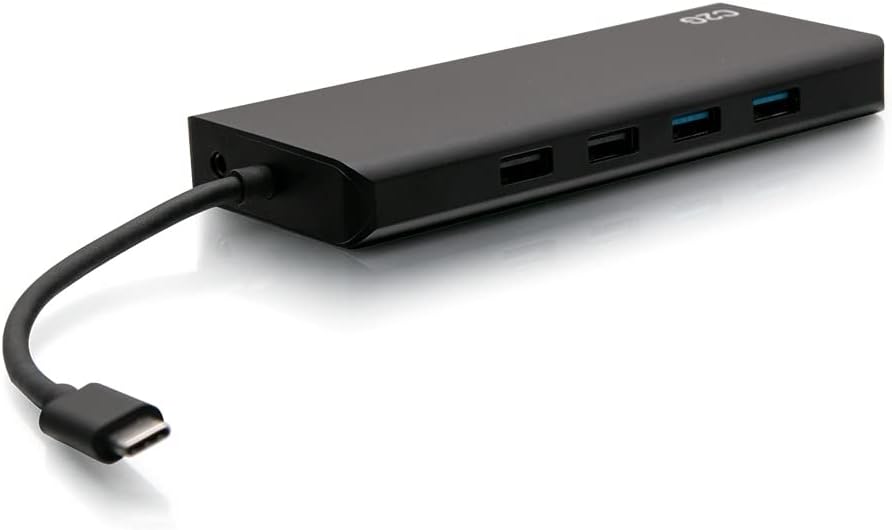
Figure 4: USB-A ports and 3.5mm audio jack
3.5 Síťové připojení
- Connect an Ethernet cable from your network router or switch to the Gigabit Ethernet port on the docking station for wired internet access.
4. Návod k obsluze
Once all connections are made, your laptop should automatically detect the docking station and connected devices. Drivers are typically installed automatically by the operating system (Windows 10, Mac OS 12 Monterey or newer).
4.1 Konfigurace displeje
- Windows: Right-click on the desktop and select "Display settings" to configure your external monitors (extend, duplicate, or second screen only).
- MacOS: Go to "System Preferences" > "Displays" to arrange or mirror your displays.
4.2 Použití USB portu
The USB-A ports are for connecting various peripherals. For optimal performance with high-speed devices like external SSDs, use the USB-A ports supporting 5Gbps data transfer. The USB-C Power Delivery port is exclusively for connecting the power adapter to charge your laptop and power the docking station.
5. Specifikace
| Funkce | Specifikace |
|---|---|
| Číslo modelu | C2G54488 |
| Značka | C2G |
| Hardwarové rozhraní | Ethernet, HDMI, USB 2.0, USB 3.0, USB-C |
| Celkový počet portů USB | 6 (5x USB-A, 1x USB-C PD) |
| Počet portů | 9 (2x HDMI, 1x USB-C PD, 5x USB-A, 1x Ethernet, 1x 3.5mm Audio) |
| Rychlost přenosu dat | 5 Gigabits Per Second (USB-A) |
| Single Display Resolution | Až 4K (3840 x 2160) při 30 Hz |
| Dual Display Resolution | Up to 1080p at 60Hz |
| Dodávka energie | Až 60W |
| Kompatibilní zařízení | Notebooks, Tablets, Monitors |
| Operační systém | Windows 10, Mac OS 12 Monterey (or newer) |
| Rozměry (D x Š x V) | 11.42 cm x 2.28 cm x 0.67 cm |
| Hmotnost položky | 0.6 libry |
| Barva | Černý |
| Materiál | Plast |
6. Řešení problémů
- Žádný výstup na displej:
- Ensure all HDMI cables are securely connected to both the docking station and the monitor.
- Verify that the docking station's USB-C host cable is firmly connected to your laptop.
- Check your laptop's display settings to ensure the external monitor is detected and configured correctly (e.g., extended or duplicated).
- Confirm the monitor is powered on and set to the correct input source (HDMI 1, HDMI 2, etc.).
- Peripherals (Keyboard/Mouse) Lagging or Freezing:
- Try connecting the affected peripheral directly to your laptop to rule out the docking station as the cause.
- Ensure the docking station is receiving adequate power from its power supply.
- Disconnect and reconnect the peripheral from the docking station.
- Update your laptop's USB drivers and operating system.
- Žádné napájení notebooku:
- Ensure the 60W power supply is correctly connected to the docking station's USB-C PD port and a working power outlet.
- Verify that your laptop supports USB-C Power Delivery through its USB-C port.
- Ethernet Connection Not Working:
- Check that the Ethernet cable is securely connected to both the docking station and your network device (router/switch).
- Confirm that your laptop's network settings recognize the wired connection.
- Update network drivers on your laptop if necessary.
7. Údržba
Abyste zajistili dlouhou životnost a optimální výkon vaší dokovací stanice, dodržujte tyto pokyny pro údržbu:
- Keep the device in a clean, dry environment, away from extreme temperatures and direct sunlight.
- Avoid exposing the docking station to water or other liquids.
- Vnější povrch čistěte měkkým, suchým hadříkem. Nepoužívejte agresivní chemikálie ani abrazivní čisticí prostředky.
- Zajistěte dostatečné větrání kolem zařízení, aby nedošlo k přehřátí.
8. Záruka a podpora
This C2G USB-C 9-in-1 Dual Display Docking Station (Model C2G54488) comes with a 1-letá záruka od data nákupu, která kryje výrobní vady.
For technical support, warranty claims, or additional product information, please visit the official C2G webnebo kontaktujte jejich oddělení zákaznických služeb. Další informace a zdroje podpory naleznete na C2G Store on Amazon.