
Gvirtue VZ-7LC
Gvirtue Universal Vizio Control VZ-7LC Remote Instruction Manual
Model: VZ-7LC
Brand: Gvirtue
1. Úvod
This instruction manual provides comprehensive guidance for the Gvirtue Universal Vizio Control VZ-7LC remote. This remote is designed to replace your original Vizio Smart TV remote, offering broad compatibility and ease of use without requiring complex programming.
2. Klíčové vlastnosti
- Univerzální kompatibilita: Designed for a wide range of Vizio Smart TVs, including LED, QLED, LCD, 4K UHD, HDR, and SmartCast D, E, M, P, V Series.
- Není vyžadováno žádné programování: Ready to use directly out of the box with compatible Vizio TVs.
- Dedicated Quick Access Hotkeys: Features direct access buttons for popular streaming services like Vudu, Netflix, Prime Video, Xumo, Hulu, iHeartRadio, Crackle, Sleep, Redbox, and Watch Free.
- Infračervená technologie: Ensures reliable signal transmission to your television.
- Odolná konstrukce: Made from ABS material with soft plastic buttons for comfortable use.

Image: Gvirtue VZ-7LC remote highlighting key features such as stable performance and no programming requirement.
3. Kompatibilita
The Gvirtue VZ-7LC remote is compatible with various Vizio Smart TV models and series, including but not limited to:
- Vizio SmartCast D, E, M, P, V Series
- Vizio 4K LED, LCD, HDR, UHD Smart TVs
- Vizio LED, QLED, LCD TVs of various sizes (e.g., 24, 32, 40, 43, 48, 50, 55, 60, 65, 70, 75 inches)

Image: The Gvirtue VZ-7LC remote demonstrating compatibility with different Vizio Smart TV types.
4. Začínáme: Instalace baterie
To begin using your Gvirtue VZ-7LC remote, you will need to install two AAA batteries (not included). Follow these steps:
- Najděte kryt prostoru pro baterie na zadní straně dálkového ovladače.
- Posuňte kryt dolů nebo stiskněte západku (pokud je k dispozici) a otevřete přihrádku.
- Insert two new AAA batteries, ensuring the positive (+) and negative (-) ends align correctly with the markings inside the compartment.
- Zasuňte kryt přihrádky na baterie zpět na místo, dokud bezpečně nezacvakne.

Obrázek: Podrobný view of the remote's battery compartment and proper battery insertion.
5. Nastavení a první použití
The Gvirtue VZ-7LC remote is designed for immediate use with most Vizio Smart TVs without any complex setup or programming. Simply insert the batteries, point the remote at your Vizio TV, and it should function directly.

Image: The remote ready for use with a Vizio TV, emphasizing no setup is needed.
Video: Demonstration of the Gvirtue universal remote control for Vizio Smart TVs, showing its functionality and ease of use.
6. Návod k obsluze: Funkce tlačítek
The Gvirtue VZ-7LC remote features a standard layout for intuitive control of your Vizio Smart TV. Below is a general overview of the main buttons and their functions:
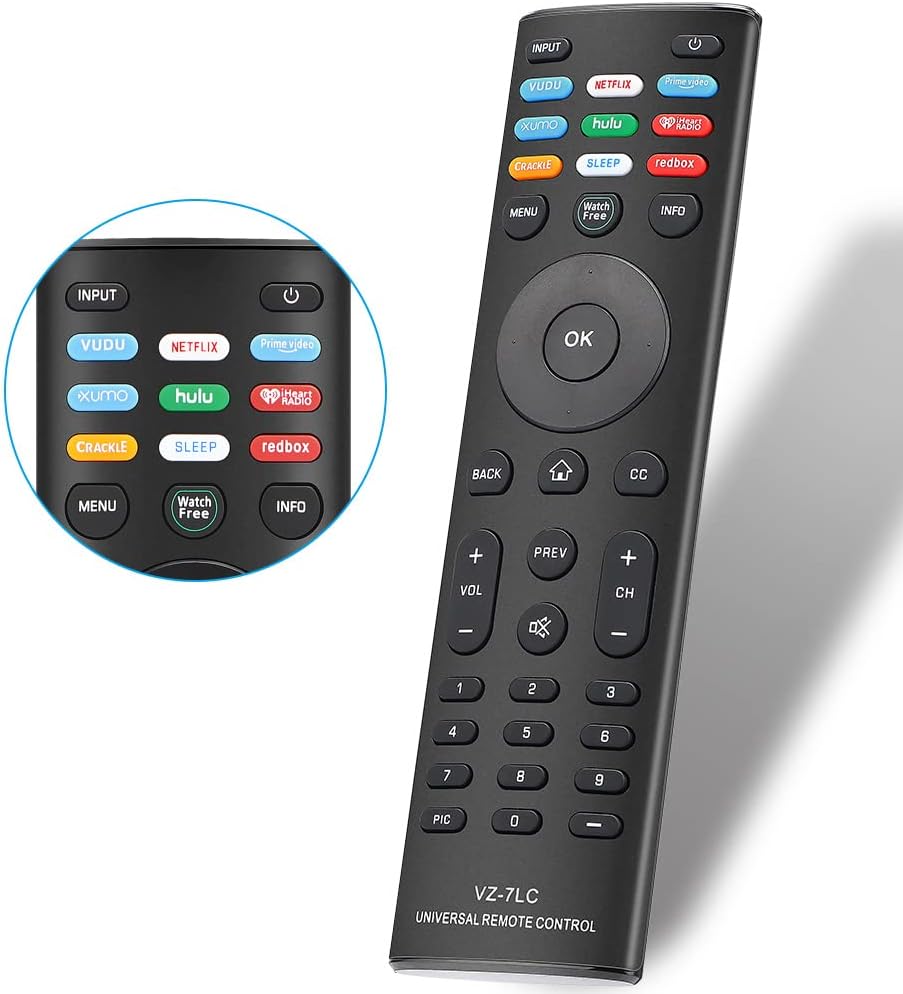
Obrázek: Přední strana view of the Gvirtue VZ-7LC remote, displaying all control buttons.
- Tlačítko napájení (⏻): Zapíná nebo vypíná televizor.
- Vstup: Cyklicky přepíná dostupné vstupní zdroje (HDMI 1, HDMI 2 atd.).
- Navigační tlačítko (nahoru, dolů, vlevo, vpravo, OK): Používá se k navigaci v nabídkách a výběru možností.
- Zadní: Vrátí se na předchozí obrazovku nebo nabídku.
- Domů (⌂): Accesses the SmartCast home screen or main menu.
- Skryté titulky (CC): Zapíná nebo vypíná skryté titulky.
- Hlasitost (+/-): Nastavuje hlasitost TV.
- Ztlumit (🔇): Ztlumí nebo zruší ztlumení zvuku televizoru.
- Kanál (+/-): Změní televizní kanál.
- Numerická klávesnice (0-9): Přímé zadávání čísel kanálů.
- Quick Access Hotkeys: Dedicated buttons for Vudu, Netflix, Prime Video, Xumo, Hulu, iHeartRadio, Crackle, Sleep, Redbox, and Watch Free for instant access to these applications.
- Menu: Opens the TV's main settings menu.
- Info: Zobrazuje informace o aktuálním programu nebo vstupu.

Image: The remote's quick access hotkeys for popular streaming platforms.
7. Řešení problémů
If you encounter issues with your Gvirtue VZ-7LC remote, please refer to the following common troubleshooting steps:
- Dálkové ovládání nereaguje:
- Ujistěte se, že jsou baterie vloženy správně se správnou polaritou (+/-).
- Vyměňte staré baterie za nové baterie typu AAA.
- Zkontrolujte, zda se mezi dálkovým ovladačem a infračerveným senzorem televizoru nenacházejí nějaké překážky.
- Ujistěte se, že se nacházíte v efektivním provozním dosahu televizoru.
- Konkrétní tlačítka nefungují:
- Zkontrolujte, zda je dálkový ovladač namířen přímo na televizor.
- Clean the remote's infrared emitter (the small LED at the front) and the TV's IR receiver with a soft, dry cloth.
- TV Not Turning On/Off:
- Confirm the TV is plugged into a working power outlet.
- Try using the power button directly on the TV to rule out a TV issue.
Video: Stručný přehledview of a replacement remote for Vizio Smart TVs, demonstrating basic functionality which can be helpful for troubleshooting.
8. Specifikace
| Číslo modelu | VZ-7LC |
| Značka | Gvirtue |
| Kompatibilní zařízení | Vizio Smart TVs (LED, QLED, LCD, 4K UHD, HDR, SmartCast D/E/M/P/V Series) |
| Technologie připojení | Infračervený |
| Zdroj napájení | 2 x AAA baterie (nejsou součástí balení) |
| Materiál | ABS |
| Rozměry | 17.1 x 4.7 x 2.1 cm (přibližně 6.73 x 1.85 x 0.83 palce) |
| Hmotnost | 80 g (přibližně 2.82 oz) |

Image: Physical dimensions of the Gvirtue VZ-7LC remote.
9. Údržba
Abyste zajistili dlouhou životnost a optimální výkon vašeho dálkového ovladače, dodržujte tyto pokyny pro údržbu:
- Čištění: Use a soft, dry cloth to clean the remote. Avoid using liquid cleaners or abrasive materials.
- Péče o baterie: Remove batteries if the remote will not be used for an extended period to prevent leakage. Replace batteries promptly when they are depleted.
- Skladování: Dálkový ovladač skladujte na chladném a suchém místě mimo dosah přímého slunečního záření a extrémních teplot.
- Zacházení: Nevystavujte dálkový ovladač pádu ani nadměrnému tlaku, mohlo by dojít k poškození vnitřních součástí.
10. Záruka a podpora
For any warranty claims, technical support, or further inquiries regarding your Gvirtue VZ-7LC remote control, please refer to the contact information provided with your product packaging or visit the official Gvirtue webstránky s podrobnostmi o zákaznickém servisu.
Ask a question about this manual
Ask about setup, troubleshooting, compatibility, parts, safety, or missing instructions. Manuals+ will review the question and use this page’s manual context to help answer it.