
1. Úvod
Děkuji za nákupasing the TURBOX Giantpeak Mechanical Feel RGB Gaming Keyboard. This manual provides essential information for setting up, operating, and maintaining your new keyboard. Please read this manual carefully before use to ensure optimal performance and longevity of your device.
2. Bezpečnostní informace
- Keep the keyboard away from excessive heat, direct sunlight, and moisture.
- Although the keyboard is spill-resistant, avoid intentionally exposing it to large amounts of liquid. In case of spills, disconnect the keyboard immediately and allow it to dry completely before reconnecting.
- Nepokoušejte se klávesnici rozebírat ani upravovat. Zrušíte tak platnost záruky a může dojít k jejímu poškození.
- Používejte pouze s kompatibilními zařízeními a zdroji napájení dle specifikace.
- Uchovávejte mimo dosah dětí.
3. Obsah balení
Zkontrolujte prosím balení, zda neobsahuje následující položky:
- TURBOX Giantpeak Mechanical Feel RGB Gaming Keyboard
- Uživatelská příručka (tento dokument)
4. Konec produktuview
The TURBOX Giantpeak keyboard is designed for gaming, featuring a mechanical feel, customizable RGB lighting, and macro capabilities. It also includes a convenient mobile device holder.
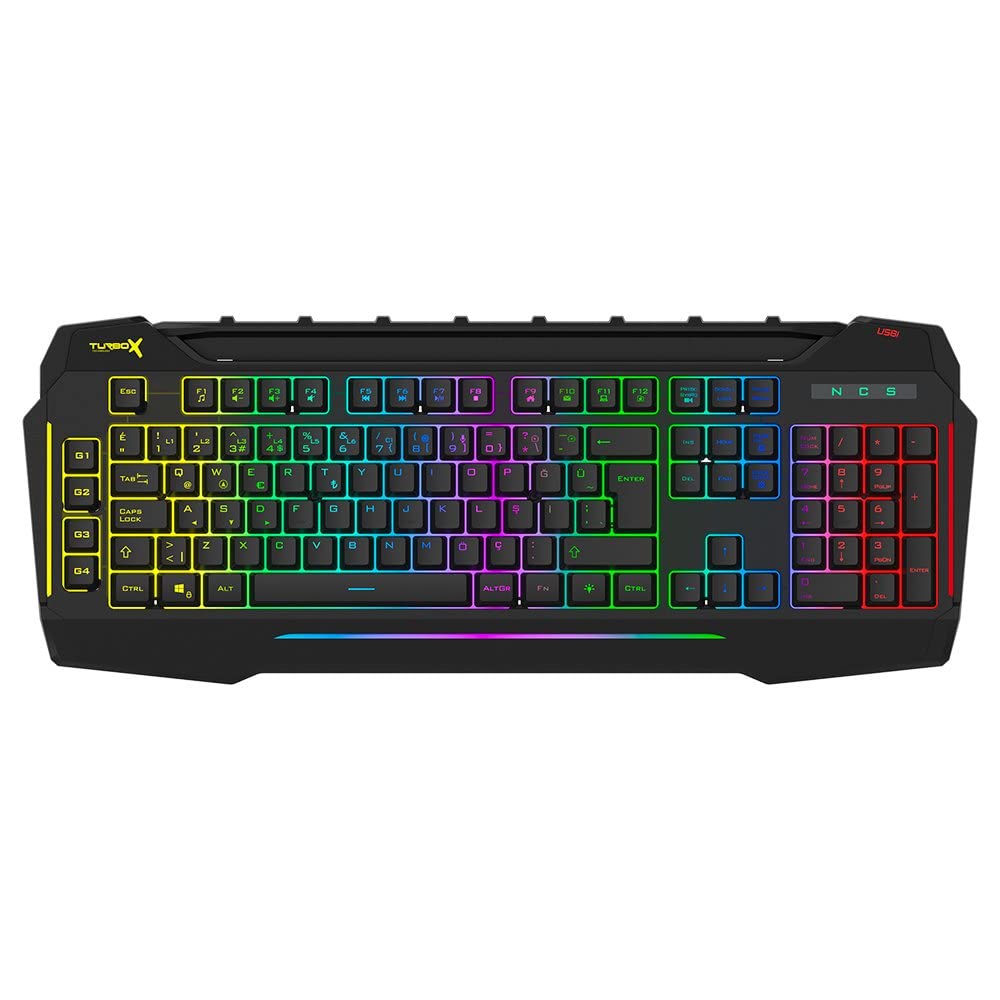
Figure 4.1: TURBOX Giantpeak keyboard with integrated mobile device stand.
This full-size keyboard offers a standard Q layout, providing a comfortable and responsive typing experience for both gaming and general use.

Obrázek 4.2: Nahoře view of the TURBOX Giantpeak keyboard.
The keyboard features vibrant RGB backlighting that can be customized to various effects, including sound-sensitive modes. Its spill-resistant design provides added durability.

Obrázek 4.3: Úhlové view showing RGB lighting.
Dedicated macro keys (G1-G4) are located on the left side, allowing for quick execution of complex commands or sequences.

Figure 4.4: Close-up of programmable G-keys.
The keyboard also includes a full numeric keypad for data entry and additional functions.

Figure 4.5: Numeric keypad detail.
Connectivity is provided via a durable USB cable, ensuring a stable and responsive connection to your computer.

Obrázek 4.6: Strana view s USB kabelem.
5. Nastavení
Follow these steps to set up your TURBOX Giantpeak keyboard:
- Rozbalte klávesnici: Carefully remove the keyboard and any packaging materials from the box.
- Připojení k počítači: Plug the USB connector of the keyboard into an available USB port on your desktop or laptop computer.
- Instalace ovladače: Your operating system (Windows, macOS, etc.) should automatically detect and install the necessary drivers. This process may take a few moments.
- Ověřte funkčnost: Once drivers are installed, test the keyboard by typing in a text editor or browser to ensure all keys are functioning correctly. The RGB lighting should also illuminate.
6. Návod k obsluze
6.1 Základní funkce klávesnice
The TURBOX Giantpeak keyboard operates like a standard Q-layout keyboard. All standard keys (alphanumeric, function keys, numeric keypad, navigation keys) function as expected.
6.2 Ovládání RGB osvětlení
The keyboard features customizable RGB backlighting with 7 different color options and sound-sensitive modes. Specific key combinations are used to cycle through lighting effects and adjust brightness:
- Změnit režim osvětlení: Použijte Fn + Scroll Lock keys to cycle through various lighting effects.
- Upravit jas: Použijte Fn + Page Up (zvýšení) nebo Fn + Page Down (decrease) keys to adjust the brightness level of the backlighting.
- Sound-Sensitive Mode: The keyboard supports sound-sensitive lighting. Refer to specific software or key combinations (if available) for activation. (Note: Specific key combinations for sound-sensitive mode may vary or require software.)
6.3 Macro Programming (G1-G4 Keys)
The TURBOX Giantpeak keyboard includes 4 programmable macro keys (G1, G2, G3, G4) for executing custom commands or sequences. Follow these general steps for macro recording:
- Vstupte do režimu makro nahrávání: Stiskněte tlačítko MR key (Macro Record, usually near the G-keys). The keyboard's indicator light may flash to indicate recording mode.
- Vyberte makro klávesu: Press one of the G-keys (G1, G2, G3, or G4) where you want to save the macro.
- Pořadí záznamu: Type the sequence of keys you wish to record. This can include multiple keystrokes, delays, and modifier keys.
- Exit Macro Recording Mode: Stiskněte tlačítko MR key again to save the macro and exit recording mode. The indicator light should stop flashing.
- Execute Macro: To use the recorded macro, simply press the assigned G-key.
Note: For advanced macro settings or specific software-based macro management, please check the manufacturer's website for any available utility software.
6.4 Mobile Device Holder
The integrated slot at the top of the keyboard is designed to hold smartphones or small tablets, providing a convenient viewing angle while gaming or working.
7. Údržba
To ensure the longevity and performance of your keyboard, follow these maintenance guidelines:
- Čištění: K otření povrchu klávesnice použijte měkký, suchý hadřík. V případě odolné nečistoty lehceampOtřete hadřík vodou nebo jemným čisticím roztokem. Vyhněte se agresivním chemikáliím nebo abrazivním materiálům.
- Odstranění prachu: K odstranění prachu a nečistot z prostoru mezi klávesami použijte stlačený vzduch.
- Zvládání úniků: In case of liquid spills, immediately disconnect the keyboard from your computer. Turn it upside down to drain any liquid and allow it to air dry completely for at least 24-48 hours before reconnecting.
- Skladování: Pokud klávesnici delší dobu nepoužíváte, skladujte ji v čistém a suchém prostředí.
8. Řešení problémů
If you encounter issues with your TURBOX Giantpeak keyboard, refer to the following common problems and solutions:
| Problém | Možné řešení |
|---|---|
| Klávesnice nereaguje. |
|
| RGB lighting is not working or is stuck. |
|
| Macro keys (G1-G4) are not working. |
|
| Klávesy se zasekávají nebo nereagují. |
|
9. Specifikace
| Funkce | Detail |
|---|---|
| Název modelu | Giantpeak |
| Číslo dílu | ID9923266 |
| Značka | TURBOX |
| Technologie připojení | Kabel USB |
| Kompatibilní zařízení | Notebook, PC |
| Typ klíče | Mechanical Feel (Membrane) |
| Speciální funkce | RGB Lighting, Macro Keys (4), Sound-Sensitive Lighting, Spill-Resistant, Mobile Device Holder |
| Počet klíčů | 87 (Note: Visuals suggest a full-size layout, this number may refer to a specific key group or variant.) |
| Hardwarové rozhraní | USB |
| Rozměry balení | 51.2 x 22.2 x 5.2 cm |
| Hmotnost položky | 1 kilogram |
10. Záruka a podpora
For warranty information and technical support, please refer to the warranty card included with your product or visit the official TURBOX webUschovejte si doklad o koupi pro případné reklamace.
If you require further assistance, please contact TURBOX customer support through their official channels.