
1. Důležité bezpečnostní informace
Read all instructions carefully before using this treadmill. Keep this manual for future reference.
- Běžecký pás vždy umístěte na rovný a stabilní povrch.
- Ensure adequate clear space (at least 2 meters behind and 0.6 meters on each side) around the treadmill during operation.
- Během provozu udržujte děti a domácí zvířata mimo běžecký pás.
- Nepoužívejte běžecký pás, pokud má poškozený kabel nebo zástrčku, nebo pokud nefunguje správně.
- Noste vhodnou sportovní obuv a oblečení.
- Vždy používejte bezpečnostní klíč. Před zahájením cvičení si připevněte klipsnu k oblečení.
- Před zahájením jakéhokoli cvičebního programu se poraďte s lékařem.
- Maximální nosnost uživatele je 130 kg (286 liber).
2. Konec produktuview
The JOROTO F20PRO Folding Treadmill is designed for home and office use, offering a compact and efficient cardio workout solution. It features a powerful motor, adjustable incline, and smart app connectivity.
Zahrnuté komponenty:
- JOROTO F20PRO Treadmill Unit
- Napájecí kabel
- Bezpečnostní klíč
- Uživatelská příručka (tento dokument)

Obrázek 2.1: Celkově view of the JOROTO F20PRO Folding Treadmill. This image displays the treadmill in its unfolded, ready-to-use state, highlighting its compact design and main components like the console, handrails, and running deck.
3. Nastavení a první použití
The JOROTO F20PRO treadmill comes largely pre-assembled. Follow these steps for initial setup:
- Rozbalení: Opatrně vyjměte běžecký pás z obalu. Uschovejte si obalový materiál pro případnou budoucí přepravu nebo skladování.
- Umístění: Position the treadmill on a firm, level surface, ensuring sufficient clearance around the unit as described in the safety section.
- Unfolding (if folded): If the treadmill is in its folded position, gently lower the running deck until it locks into place. Ensure all locking mechanisms are secure.
- Připojení napájení: Zapojte napájecí kabel do napájecího vstupu běžeckého pásu a poté do uzemněné elektrické zásuvky.
- Připojení bezpečnostního klíče: Vložte bezpečnostní klíč do určeného slotu na konzoli. Běžecký pás nebude fungovat bez bezpečnostního klíče.

Figure 3.1: Product dimensions of the JOROTO F20PRO Treadmill. This image illustrates the treadmill's measurements (length, width, height) in both unfolded and folded states, aiding in proper placement and storage planning.
4. Návod k obsluze
4.1 Zapnutí/vypnutí
- To power on, ensure the safety key is in place and press the 'Start' button on the console.
- To power off, press the 'Stop' button or remove the safety key.
4.2 Funkce konzole
The LED display shows time, distance, calories, and speed. Use the console buttons to adjust settings.
4.3 Nastavení rychlosti
The treadmill offers speeds up to 12 km/h. Use the '+' and '-' buttons on the console or handrails to increase or decrease speed. Quick speed buttons may also be available for preset speeds.

Figure 4.1: Treadmill speed ranges for various activities. This image illustrates different speed settings (1-3 km/h for leisure walking, 4-6 km/h for fat burning, 7-9 km/h for cardio training, and 10-12 km/h for intensive training) to guide users in selecting appropriate workout intensities.
4.4 Ruční nastavení sklonu
The treadmill features a manual incline adjustment. To change the incline, stop the treadmill, lift the running deck, and adjust the support feet to the desired incline level (e.g., 0% or 10%). Ensure both sides are adjusted equally and securely before resuming your workout.
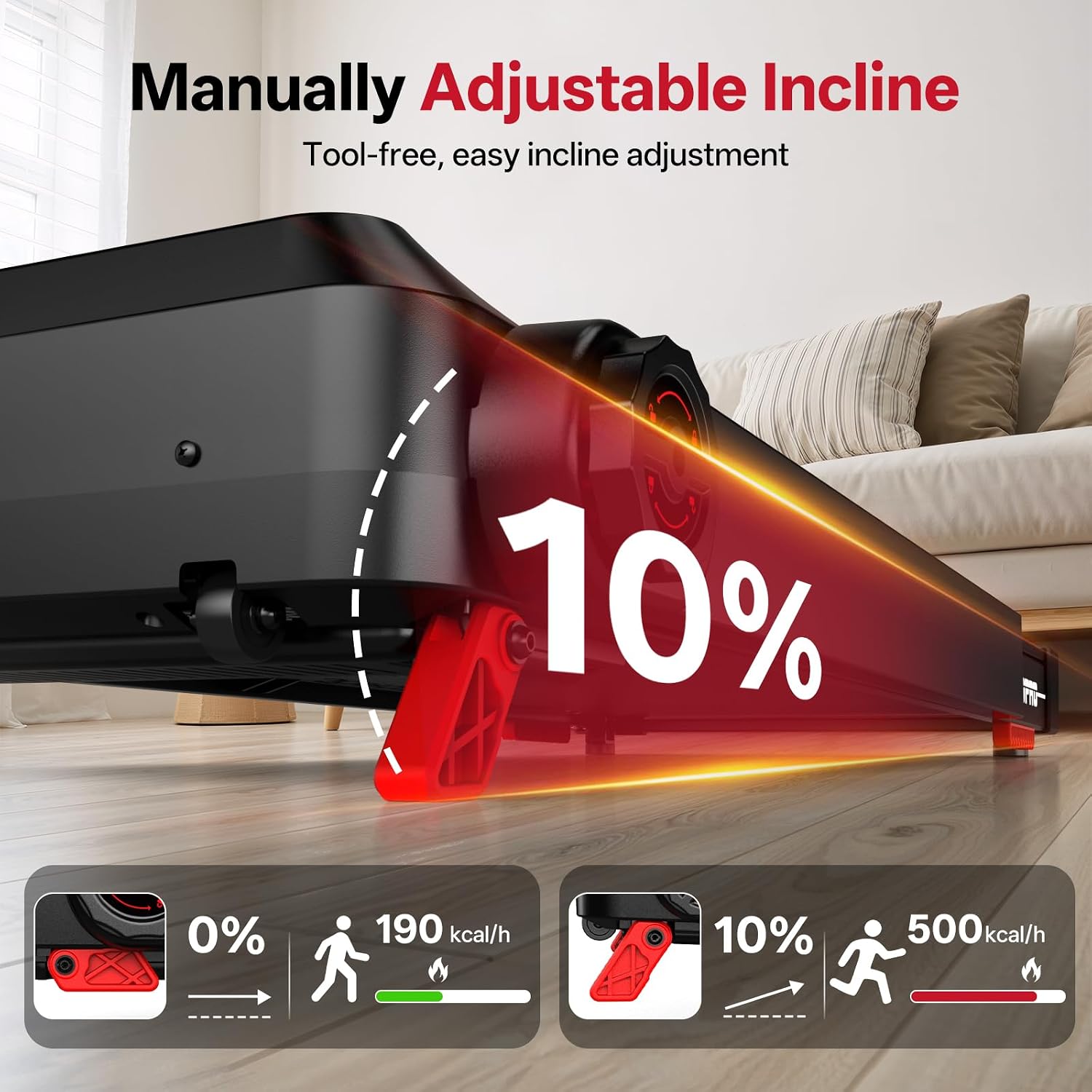
Figure 4.2: Manual incline adjustment mechanism. This image demonstrates how to manually adjust the treadmill's incline, showing the difference between a flat (0%) and an inclined (10%) running surface and the corresponding calorie burn.
4.5 Přednastavené programy
The treadmill includes 15 pre-set workout programs. Select a program from the console to automatically adjust speed and incline (if applicable) throughout your workout.
4.6 Připojení chytrých aplikací
Connect your treadmill to a compatible fitness app via Bluetooth for enhanced tracking and control. Refer to the app's instructions for pairing and usage.

Figure 4.3: Smart app connectivity feature. This image shows a user exercising on the treadmill while connected to a fitness app, demonstrating how the app displays workout data and enhances the training experience.
4.7 Nouzové zastavení
In case of an emergency, pull the safety key from its slot. The treadmill will immediately stop. The safety key also acts as an automatic shut-off if you accidentally step off the running belt.
5. Skládání a skladování
The JOROTO F20PRO treadmill features a foldable design for convenient storage.
- Zastavte běžecký pás: Ensure the treadmill is completely stopped and powered off.
- Fold Handrails: Turn the knob on the handrail support to release and fold the handrails downwards.
- Lift Running Deck: Carefully lift the running deck upwards until it locks into its vertical storage position.
- Přesun do úložného prostoru: Use the integrated transport wheels to move the folded treadmill to a suitable storage location.

Figure 5.1: Foldable handrail design and storage. This image demonstrates the process of folding the treadmill's handrails and then the entire unit for compact storage, highlighting its space-saving feature.
6. Údržba
Pravidelná údržba zajistí dlouhou životnost a bezpečný provoz vašeho běžeckého pásu.
6.1 Čištění
- Otřete konzoli a vnější povrchy čisticím prostředkem.amp Po každém použití očistěte hadříkem. Nepoužívejte abrazivní čisticí prostředky.
- Periodically vacuum underneath the treadmill to prevent dust buildup.
6.2 Mazání běžícího pásu
The running belt requires periodic lubrication to reduce friction and extend its lifespan. Refer to the specific lubrication instructions provided with your treadmill or contact customer support for guidance on the correct lubricant and application frequency.
6.3 Nastavení běžeckého pásu
If the running belt starts to slip or drift to one side, it may need adjustment. Consult the detailed instructions in the full manual or contact customer support for proper belt tensioning and centering procedures.
7. Řešení problémů
Pokud narazíte na problémy s běžeckým pásem, podívejte se na následující běžné problémy a jejich řešení:
| Problém | Možná příčina | Řešení |
|---|---|---|
| Běžecký pás se nezapne | Power cord not connected; Safety key not in place; Power switch off | Ensure power cord is securely plugged in; Insert safety key; Turn on power switch |
| Běžecký pás klouže | Řemen je příliš volný; Řemen potřebuje mazání | Adjust belt tension (refer to maintenance); Lubricate running belt |
| Neobvyklý hluk během provozu | Uvolněné součásti; Tření řemene; Problém s motorem | Check for loose screws; Lubricate belt; Contact customer support if noise persists |
| Displej konzole nefunguje | Loose cable connection; Console malfunction | Check console cable connections; Contact customer support |
For issues not listed here or if solutions do not resolve the problem, please contact JOROTO customer support.
8. Specifikace
| Funkce | Detail |
|---|---|
| Značka | JOROTO |
| Číslo modelu | F20PRO |
| Výkon motoru | 2.5 HP |
| Maximální rychlost | 12 kilometrů za hodinu |
| Maximální nosnost | 130 kg |
| Rozměry produktu (D x Š x V) | 120 cm x 61 cm x 104 cm (hloubka x šířka x výška) |
| Složená velikost | 114cm x 61cm x 130cm (approx. 44.9" x 24" x 51.2") |
| Hmotnost položky | 25 kg |
| Materiál | Uhlíková ocel |
| Počet programů | 15 |
| Montáž Vyžadována | Ne (minimální nastavení) |
9. Záruka a podpora
Your JOROTO F20PRO Treadmill is covered by a manufacturer's warranty. Please refer to the warranty card included with your product for specific terms and conditions. For technical support, parts, or warranty claims, please contact JOROTO customer service through the retailer where the product was purchased or visit the official JOROTO webmísto.
Zákaznická podpora: Pro pomoc prosím navštivte Obchod JOROTO na Amazonu or consult your purchase documentation.