
1. Konec produktuview
The TrolMaster NFS-1 Aqua-X Controller is an advanced irrigation system controller designed for managing multiple rooms and zones. It offers precise control over up to 30 outputs (24V or 110V) and includes pH, EC, and temperature monitoring capabilities. Users can access a free smartphone app for alerts, historical charts, and data logging.

Obrázek 1: Přední strana view of the Aqua-X Controller, showing the LCD display with sensor readings and control buttons.

Figure 2: The retail packaging for the Aqua-X Controller, highlighting the product's branding and model number.
2. Obsah balení
Ověřte, zda jsou v balení přítomny všechny komponenty:
- TrolMaster NFS-1 Aqua-X Controller Unit
- Water Detector Set
- Napájecí adaptér
- Uživatelská příručka (tento dokument)
- Montážní materiál (pokud je k dispozici)
3. Nastavení a instalace
3.1 Fyzická instalace
The Aqua-X Controller is designed for indoor use. Choose a dry, secure location away from direct sunlight and excessive heat or moisture.
- Montáž ovladače: Use the provided mounting hardware to secure the controller to a wall or suitable surface. Ensure it is easily accessible for operation and cable management.
- Připojení napájení: Connect the power adapter to the DC 12V input port on the controller and then plug it into a standard electrical outlet.
- Connecting Water Detector: Plug the water detector cable into the designated "WATER DETECTOR" port on the back of the controller. Position the water detector in an area where water leaks are most likely to occur.
- Internetové připojení: Connect an Ethernet cable from your router to the "INTERNET" port on the controller for smartphone app connectivity and data logging.
- Connecting Control Modules: Connect 24V or 110V control modules (sold separately) to the respective "24V CONTROL" or "110V CONTROL" ports as needed for your irrigation setup.
- Připojení senzorů: Connect pH, EC, and temperature sensors (sold separately) to the "SENSOR/COMBO" port.

Obrázek 3: Zadní view of the Aqua-X Controller, displaying the various input and output ports for power, internet, control modules, sensors, and water detector.
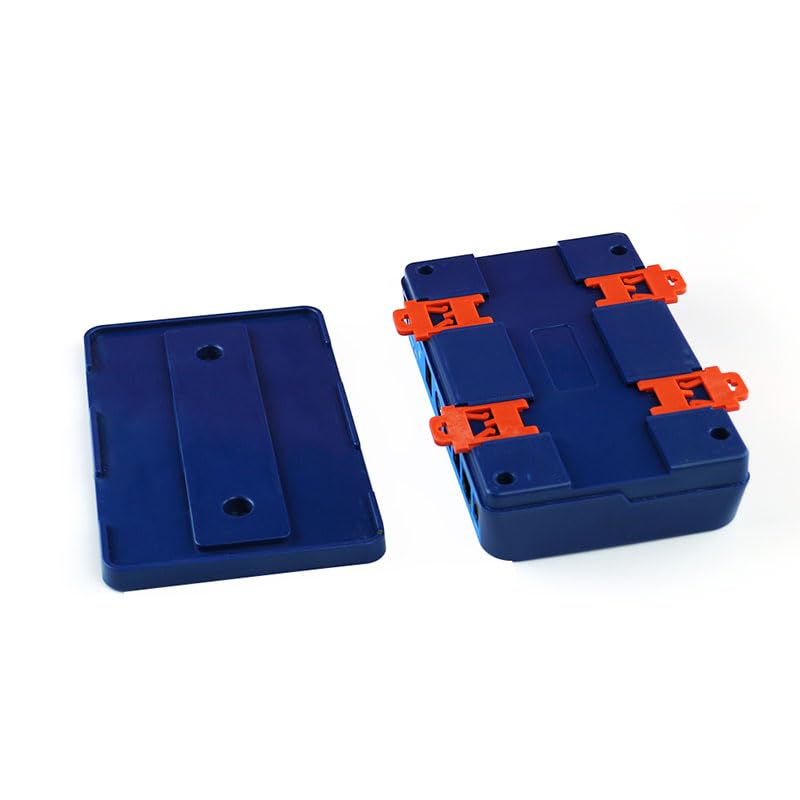
Figure 4: Detached mounting brackets for the Aqua-X Controller, illustrating how the unit can be secured to a surface.
4. Návod k obsluze
4.1 Initial Power-On and Display
Once powered on, the LCD display will illuminate, showing current readings for EC, temperature, and pH (if sensors are connected). The date and time will also be displayed.
4.2 Navigace a nastavení
Použijte navigační tlačítka (UP, DOLŮ, VLEVO, PRÁVO, ENTER, ZADNÍ) on the front panel to navigate through menus and adjust settings.
- NAHORU / DOLŮ: Procházení možností nabídky nebo úprava hodnot.
- LEVÁ, PRAVÁ: Move cursor or change selection within a setting.
- ZADEJTE: Potvrzení výběru nebo vstup do podnabídky.
- ZADNÍ: Return to the previous menu or cancel an action.
4.3 Integrace aplikací pro chytré telefony
Download the official TrolMaster app from your device's app store. Follow the in-app instructions to connect your Aqua-X Controller. The app allows for remote monitoring, setting adjustments, viewing historical data, and receiving alerts.
Note: Ensure your controller is connected to the internet for app functionality.
5. Údržba
Regular maintenance ensures optimal performance and longevity of your Aqua-X Controller.
- Čištění: Periodically wipe the controller's exterior with a soft, dry cloth. Do not use abrasive cleaners or solvents.
- Kalibrace senzoru: Calibrate pH and EC sensors regularly according to their specific instructions to maintain accuracy.
- Aktualizace firmwaru: Check the TrolMaster website or smartphone app for available firmware updates. Keep your controller's firmware up-to-date for new features and bug fixes.
- Water Detector Check: Periodically test the water detector by placing it in a small amount of water to ensure it triggers an alert.
6. Řešení problémů
| Problém | Možná příčina | Řešení |
|---|---|---|
| Ovladač se nezapíná. | Chybí napájení; vadný adaptér. | Check power connection; test outlet; replace adapter if necessary. |
| Žádné připojení k internetu. | Ethernet cable disconnected; router issue; network settings. | Ensure Ethernet cable is securely connected; restart router; check network settings on controller. |
| Nepřesné údaje senzorů. | Sensors need calibration; dirty sensors; faulty sensors. | Calibrate sensors according to manufacturer instructions; clean sensors; replace if damaged. |
| Water detector not alarming. | Detector not connected; faulty detector. | Ensure detector is securely plugged in; test detector manually; replace if faulty. |
7. Specifikace
| Funkce | Detail |
|---|---|
| Číslo modelu | NFS-1 |
| Rozměry produktu | 10.83 x 6.46 x 2.44 palce |
| Hmotnost | 1.94 libry |
| Ovládací výstupy | Up to 30 (24V or 110V) |
| Sledování | pH, EC, teplota |
| Konektivita | Ethernet for App/Data Logging |
| Speciální funkce | Plug and Play |
| Vnitřní/venkovní použití | Krytý |
| UPC | 606795352036 |
8. Záruka a podpora
8.1 Informace o záruce
TrolMaster products typically come with a limited manufacturer's warranty covering defects in materials and workmanship. Please refer to the warranty card included with your product or visit the official TrolMaster webkonkrétní záruční podmínky, včetně doby trvání a podrobností o krytí, naleznete na webových stránkách.
8.2 Zákaznická podpora
For technical assistance, troubleshooting, or warranty claims, please contact TrolMaster customer support through their official website or the contact information provided in your product packaging. Have your model number (NFS-1) and purchase details ready when contacting support.
Online zdroje: Visit the TrolMaster Store on Amazon pro další informace o produktu a zdroje.