
Zavedení
Thank you for choosing the SOMIC GS510 Cat Ear Wireless Gaming Headset. This manual provides detailed instructions on how to set up, operate, and maintain your new headset. Please read this manual thoroughly before use to ensure optimal performance and longevity of your device.
Co je v krabici
Carefully unpack your SOMIC GS510 headset and ensure all items are present:
- Bezdrátová sluchátka x 1
- Reproduktor Tags x 4 (2 pre-installed, 2 extra)
- USB Transmitter x 1
- 1x audio kabel 3.5 mm
- Nabíjecí kabel typu C x 1

Image: The SOMIC GS510 headset in black with its detachable cat ears and the included USB wireless transmitter.
Konec produktuview
Familiarize yourself with the key components and controls of your SOMIC GS510 headset:
- Nastavitelná čelenka: Pro pohodlné nošení na různých velikostech hlavy.
- Soft PU Earpads: Navrženo pro delší pohodlí při nošení.
- Flexible Earcaps: Allow for slight rotation to conform to your ears.
- Výsuvný mikrofon: An omnidirectional microphone that can be extended or retracted as needed.
- Ovládání na uchu: Located on the earcups for easy access to power, volume, mode switching, and microphone mute.
- Magnetický reproduktor Tags: Customizable outer earcup covers that can be easily swapped.

Obrázek: Podrobný view of the headset's comfort features, including the adjustable headband, soft PU earpads, flexible earcaps, and the retractable microphone.
Nastavení
1. Nabíjení náhlavní soupravy
Před prvním použitím sluchátka plně nabijte. Úplné nabití trvá přibližně 2 hodiny.
- Connect the supplied Type-C charging cable to the charging port on the headset.
- Druhý konec kabelu připojte k USB zdroji napájení (např. k USB portu počítače, USB adaptéru do zásuvky).
- LED indikátor na sluchátkách bude zobrazovat stav nabíjení a po plném nabití zhasne nebo změní barvu.
2. Wireless Connection (2.4GHz USB Transmitter)
For wireless use with PS4, PS5, PC, or Laptop:
- Insert the USB transmitter into an available USB port on your console or computer.
- Power on the SOMIC GS510 headset by pressing and holding the power button.
- The headset will automatically pair with the USB transmitter. A stable indicator light on both devices confirms a successful connection.
- Ujistěte se, že jsou v nastavení zvuku systému jako výstupní a vstupní zvukové zařízení vybrána sluchátka.

Image: The SOMIC GS510 headset demonstrating its 2.4GHz wireless connection to a laptop using the USB transmitter, indicating up to 8 hours working time and 33 feet transmission distance.
3. Drátové připojení (3.5mm audio kabel)
For wired use with PS5 Controller, PS4 Controller, Xbox Series X/One Controller, and other mobile devices:
- Připojte jeden konec 3.5mm audio kabelu k 3.5mm jacku na sluchátkách.
- Druhý konec připojte k 3.5mm audio portu na vašem zařízení.
- For older Xbox One controllers, a Microsoft adapter (not included) may be required.
Návod k obsluze
Zapnutí/vypnutí
- Pro zapnutí stiskněte a podržte tlačítko napájení, dokud se nerozsvítí kontrolka.
- Chcete-li zařízení vypnout, stiskněte a podržte tlačítko napájení, dokud kontrolka nezhasne.
Zvukové režimy
The headset features three professional sound modes for different scenarios:
- Herní režim: Optimized for immersive gaming audio, enhancing footsteps, gunfire, and explosions.
- Režim zvuku: Vyvážený zvukový profesionálfile for music and general listening.
- Živý režim: Clearer voice reproduction, ideal for live streaming or voice chat.
Press the 'Mode Switch' button on the earcup to cycle through these modes.

Image: The headset's earcup controls with labels for ON/OFF, Mode Switch, Mic Mute Button, and Volume Wheel, illustrating the three distinct audio modes: Gaming, Audio, and Live.
Virtuální 7.1 prostorový zvuk
Experience enhanced spatial awareness with virtual 7.1 surround sound, allowing you to pinpoint audio cues like footsteps and gunfire in games.

Image: The headset positioned above a graphic representing virtual 7.1 surround sound, highlighting its ability to render distinct audio details such as footsteps, gunfire, explosions, and general surround sound.
Použití mikrofonu
- Extend the retractable microphone for use.
- Press the 'Mic Mute Button' on the earcup to toggle microphone mute on or off. The microphone may have an indicator light to show its status.
- The omnidirectional microphone is designed to capture clear voice communication while reducing background noise.
RGB světelné efekty
The headset features 8 RGB lighting effects and a multi-color cycling mode.
- Press the light touch key on the earcup to switch between different RGB colors and modes.
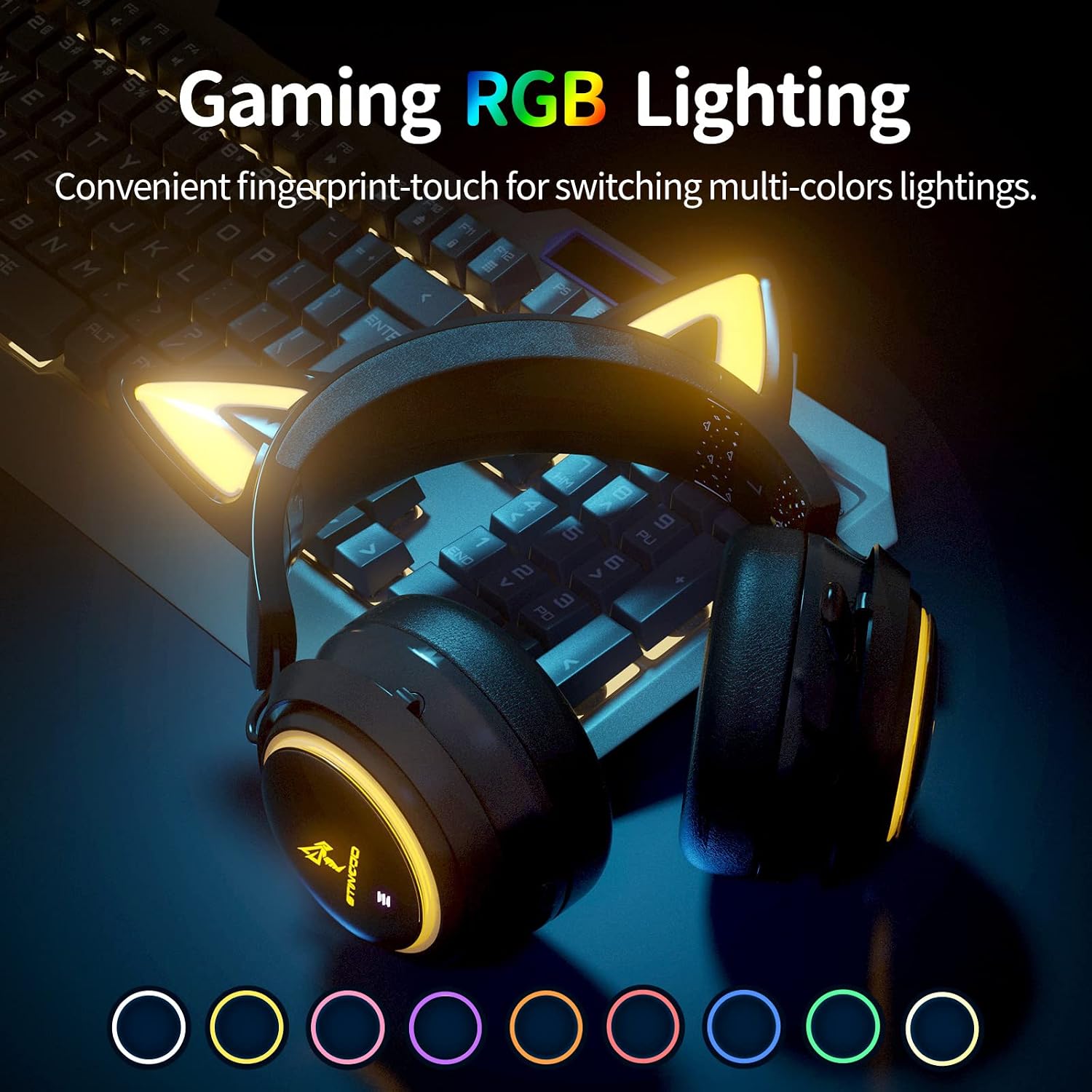
Image: The SOMIC GS510 headset showcasing its vibrant RGB lighting on the earcups and cat ears, with a row of colored circles indicating the available lighting options.
Ovládání hlasitosti
- Adjust the volume using the 'Volume Wheel' located on the earcup.
Kompatibilita
The SOMIC GS510 headset offers wide compatibility:
- Wireless (2.4GHz USB Transmitter): PC, Laptop, PS4, PS5.
- Kabelové (3.5mm audio kabel): PS5 Controller, PS4 Controller, Xbox Series X Controller, Xbox One Controller, Nintendo Switch, MAC, and other mobile devices with a 3.5mm jack.
Note: This headset does not have Bluetooth functionality. Xbox consoles only support wired mode.

Image: The SOMIC GS510 headset displayed alongside icons representing its wide compatibility with devices such as Nintendo Switch, PS4/PS5, Laptops, PCs, Mobile devices, and Xbox One/S/X.
Údržba
Abyste zajistili dlouhou životnost a optimální výkon vaší náhlavní soupravy, dodržujte tyto pokyny pro údržbu:
- Čištění: Use a soft, dry cloth to wipe down the headset. For earpads, a slightly damp Lze použít hadřík, ale vyhněte se nadměrné vlhkosti. Nepoužívejte agresivní chemikálie ani abrazivní čisticí prostředky.
- Skladování: Sluchátka skladujte na chladném a suchém místě mimo dosah přímého slunečního záření a extrémních teplot.
- Péče o kabely: Avoid sharp bends or kinks in the charging and audio cables. Disconnect cables by pulling the plug, not the cord.
- Vyhněte se kapkám: While durable, repeated drops can damage internal components.
Odstraňování problémů
If you encounter issues with your SOMIC GS510 headset, refer to the following common problems and solutions:
| Problém | Možná příčina | Řešení |
|---|---|---|
| Žádný zvuk nebo nízká hlasitost | Headset not powered on; Volume too low; Incorrect audio output selected; Loose connection. | Ensure headset is powered on and charged. Increase volume on headset and device. Check system audio settings to ensure SOMIC GS510 is selected. Reconnect USB transmitter or 3.5mm cable. |
| Mikrofon nefunguje | Microphone muted; Incorrect audio input selected; Microphone not fully extended. | Press the mic mute button to unmute. Check system audio settings to ensure SOMIC GS510 is selected as input. Ensure microphone is fully extended. |
| Wireless connection unstable or disconnected | Mimo dosah; Rušení; Slabá baterie. | Move closer to the USB transmitter. Avoid strong electromagnetic interference. Recharge the headset. Re-pair the headset with the USB transmitter if necessary. |
| RGB osvětlení nefunguje nebo se zaseklo | Software glitch; Low battery; Wired mode (RGB may not work in wired mode). | Ensure headset is sufficiently charged. Try cycling through lighting modes. If in wired mode, RGB functionality may be limited or unavailable. |
| Krátká výdrž baterie | RGB lighting enabled; High volume usage; Battery degradation over time. | Disable or reduce RGB lighting effects. Lower volume if possible. Ensure full charge before use. |
Specifikace
Key technical specifications for the SOMIC GS510 Cat Ear Wireless Gaming Headset:
| Funkce | Detail |
|---|---|
| Název modelu | GS510-2.4G-BlACK |
| Technologie připojení | Wireless (2.4GHz USB Transmitter), Wired (3.5mm Jack) |
| Velikost zvukového ovladače | 50 milimetrů |
| Frekvenční odezva | 20 Hz - 20,000 XNUMX Hz |
| Citlivost mikrofonu | 36 dB |
| Životnost baterie | Až 10 hodin (bezdrátově) |
| Doba nabíjení | 2 hodiny |
| Materiál | Kůže, Plast |
| Hmotnost položky | 630 gramů (1.39 libry) |
| Rozměry produktu | 8.66 x 4.33 x 10.24 palce |
| Typ ovládání | On-ear audio controls (Touch) |
| Umístění uší | Přes ucho |
Záruka a podpora
SOMIC provides a warranty for its products. For specific warranty terms, duration, and to register your product, please refer to the warranty card included in your product packaging or visit the official SOMIC website. If you require technical support or have questions not covered in this manual, please contact SOMIC customer service through their official channels.
Další zdroje naleznete na SOMIC Store on Amazon.