
Sovol SV04
Sovol SV04 3D Printer Instruction Manual
Model: SV04
1. Úvod
The Sovol SV04 is an advanced 3D printer featuring an Independent Dual Extruder (IDEX) system, designed for versatility and high-quality printing. It offers a large build volume of 300x300x400mm, enabling the creation of substantial models. Key features include automatic bed leveling for consistent first layers, a 32-bit TMC2209 silent mainboard for quiet operation, and a flexible magnetic print bed for easy print removal. This manual provides essential information for assembly, operation, and maintenance to ensure optimal performance of your SV04 3D printer.

Obrázek 1: Přesview of Sovol SV04 3D Printer key features.
2. Bezpečnostní informace
Please read all safety instructions carefully before operating the Sovol SV04 3D Printer. Failure to follow these instructions may result in injury or damage to the printer.
- Elektrická bezpečnost: Ujistěte se, že je tiskárna připojena k uzemněné zásuvce. Neobsluhujte ji mokrýma rukama ani vamp conditions. Disconnect power before performing any maintenance or assembly.
- Horké povrchy: The print nozzle and heated bed reach high temperatures during operation. Avoid touching these components to prevent burns. Allow components to cool before handling.
- Pohyblivé části: Během provozu držte ruce, vlasy a volné oblečení v dostatečné vzdálenosti od pohyblivých částí, abyste zabránili jejich zamotání.
- Větrání: Tiskárnu používejte v dobře větraném prostoru, zejména při tisku s materiály, které mohou uvolňovat výpary.
- Manipulace s filamentem: Use appropriate filament for your printer. Store filament in a dry environment to prevent moisture absorption.
- Děti a domácí mazlíčci: Uchovávejte tiskárnu mimo dosah dětí a domácích zvířat. Pokud jsou v přítomnosti dětí, je nutný dohled dospělé osoby.
3. Obsah balení
Před zahájením montáže ověřte, zda jsou v balení přítomny všechny součásti.
- Sovol SV04 3D Printer (partially assembled)
- Independent Dual Extruders (pre-installed)
- Flexible Magnetic Print Bed
- 4.3palcový dotykový LCD displej
- Filament Spool Holders
- Napájecí kabel
- USB kabel
- SD Card (includes test models and software)
- Tool Kit (wrenches, screwdrivers, pliers, nozzle cleaning needle, etc.)
- Sample vlákno
- Uživatelská příručka (tento dokument)
4. Montáž
The Sovol SV04 features a modular design for quick and straightforward assembly. Most major components are pre-assembled.
- Rozbalení: Opatrně vyjměte všechny součásti z obalu. Zkontrolujte, zda během přepravy nedošlo k poškození.
- Sestava základny a portálu: Attach the gantry frame to the printer base using the provided screws. Ensure all connections are secure.
- Extruder Installation: The independent dual extruders are typically pre-installed. Verify they are securely mounted on the X-axis.
- Držáky cívek filamentu: Mount the filament spool holders onto the top bar of the gantry.
- Připojení kabeláže: Connect all cables according to the included wiring diagram. Pay close attention to the extruder, limit switch, and motor connections.
- Flexible Print Bed: Place the flexible magnetic print bed onto the heated bed platform.
5. Počáteční nastavení
Before your first print, perform the following initial setup steps.
5.1. Aktualizace firmwaru
It is highly recommended to download and install the latest firmware for the SV04 from the official Sovol website. This ensures you have the most up-to-date features and bug fixes.
5.2. Automatic Bed Leveling
The SV04 is equipped with an automatic bed leveling sensor to ensure optimal nozzle-to-bed distance across the entire print surface.
- Navigate to the 'Leveling' menu on the LCD touchscreen.
- Select 'Auto Level' to initiate the automatic bed leveling process. The sensor will probe multiple points on the print bed.
- After auto-leveling, perform a Z-offset calibration if necessary to fine-tune the first layer adhesion.

Figure 2: Automatic bed leveling in progress.
5.3. Extruder Calibration
For optimal dual-color or dual-material printing, ensure both extruders are properly calibrated for alignment and extrusion.
- Refer to the included SD card for calibration models and detailed instructions on adjusting X and Y offsets for the second extruder.
- Adjust E-steps for each extruder to ensure accurate filament extrusion.
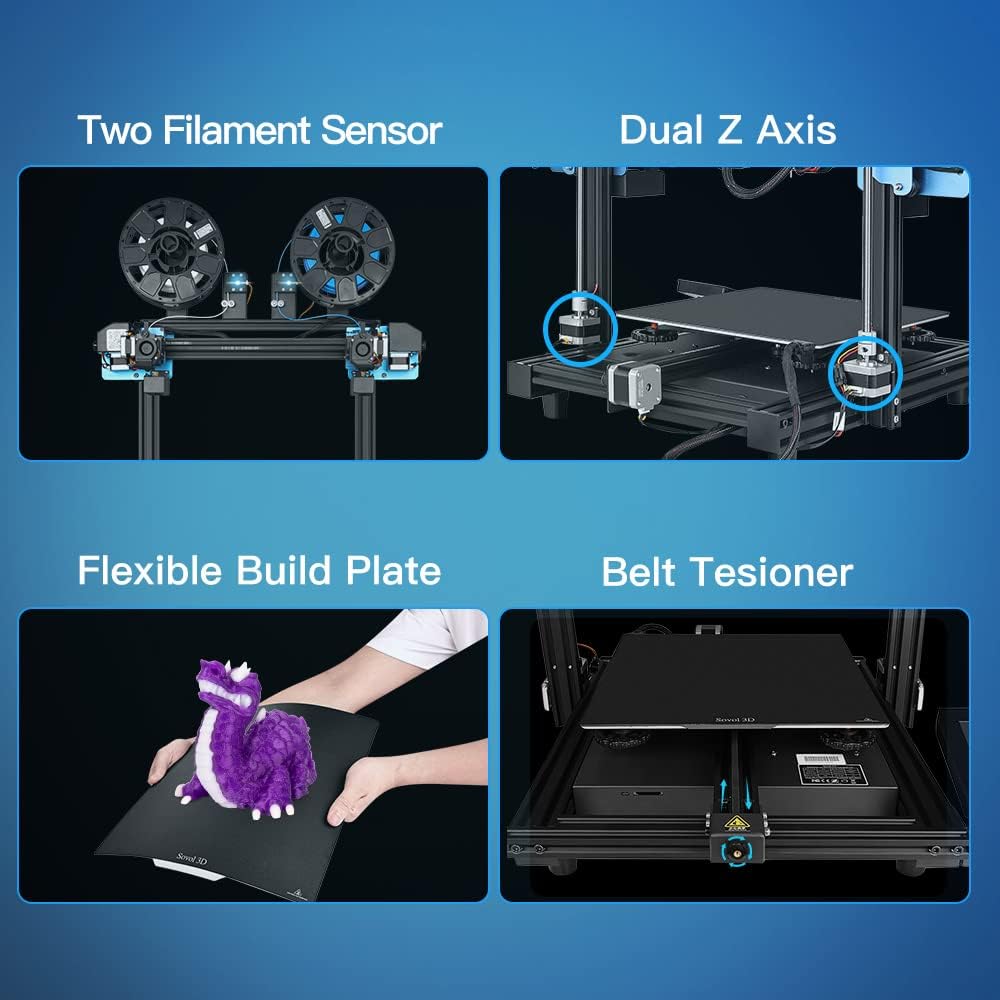
Figure 3: Key components including filament sensors and dual Z-axis.
6. Návod k obsluze
This section covers basic operation, including filament loading and utilizing the various printing modes.
6.1. Zatížení filamentu
The SV04 supports a wide range of filaments, including PLA, ABS, PETG, TPU, PC, PA, Wood, ASA, and PVA.
- Umístěte cívku s filamentem na držák cívky.
- Feed the filament through the filament sensor and into the extruder's input hole.
- Zahřejte trysku na teplotu vhodnou pro váš typ filamentu.
- Manually push the filament until it extrudes smoothly from the nozzle.

Figure 4: Filament loading for dual extruders.
6.2. Printing Modes
The independent dual extruders allow for four distinct printing modes:
- Jediný režim: Uses one extruder to print a single model.
- Duální režim: Prints a single model using two different colors or materials.
- Zrcadlový režim: Prints two mirrored copies of a model simultaneously.
- Duplicitní režim: Prints two identical copies of a model simultaneously.

Figure 5: The four different printing modes.
6.3. Using the LCD Touchscreen
The 4.3-inch LCD touchscreen provides an intuitive interface for controlling the printer.
- Navigate through menus using touch gestures.
- Access print files z SD karty.
- Monitor print progress, temperature, and other parameters.
- Adjust settings such as print speed, fan speed, and filament change options.

Figure 6: The 4.3-inch LCD touchscreen interface.
6.4. Funkce obnovení tisku
The SV04 features a resume printing function, allowing you to continue a print from the last layer after a power outage nebo přerušení.

Figure 7: Resume printing capability.
7. Údržba
Pravidelná údržba zajišťuje dlouhou životnost a konzistentní výkon vaší 3D tiskárny.
- Čištění tiskové podložky: Clean the flexible magnetic print bed with isopropyl alcohol after each print to ensure good adhesion for subsequent prints.
- Údržba trysek: Periodically check nozzles for clogs. Use the provided cleaning needle to clear any blockages. Replace worn-out nozzles as needed.
- Napnutí řemene: Inspect the X, Y, and Z axis belts for proper tension. Adjust the belt tensioners if belts appear loose to prevent print quality issues.
- Mazání: Apply a small amount of lubricant to the Z-axis lead screws periodically.
- Aktualizace firmwaru: Regularly check the Sovol website for new firmware versions and update as recommended.
8. Řešení problémů
Tato část se zabývá běžnými problémy, se kterými se můžete setkat během provozu.
| Problém | Možná příčina | Řešení |
|---|---|---|
| Špatná přilnavost první vrstvy | Bed not level, incorrect Z-offset, dirty print surface, incorrect bed temperature. | Perform auto-leveling and Z-offset calibration. Clean the print bed. Adjust bed temperature in slicer settings. |
| Vlákno se nevytlačuje | Clogged nozzle, tangled filament, incorrect temperature, extruder gear slip. | Clear nozzle with cleaning needle. Untangle filament. Check nozzle temperature. Adjust extruder tension. |
| Posun vrstev | Loose belts, print head hitting print, excessive print speed. | Check and tighten belts. Ensure print is securely adhered to the bed. Reduce print speed. |
| Hlučný provoz | Loose components, fan noise. | Check all screws and connections. While the mainboard is silent, some fans may produce noise; ensure they are clear of obstructions. |
| Filament Sensor Errors | Filament not inserted correctly, sensor malfunction, incorrect wiring. | Ensure filament is properly seated. Check sensor connections. If issues persist, the sensor may need replacement. |
9. Specifikace
Technical specifications for the Sovol SV04 3D Printer.
| Funkce | Detail |
|---|---|
| Výrobce | Sovol |
| Číslo modelu | SV04 |
| Rozměry produktu | 73 x 70 x 30 cm |
| Hmotnost položky | 15 kg |
| Typ extrudéru | Independent Dual Direct Drive Extruder (IDEX) |
| Build Volume | 300 x 300 x 400 mm |
| Základní deska | 32-bit TMC2209 Silent Mainboard |
| Vyrovnání postele | Automatic Bed Leveling Sensor |
| Tisková plocha | Flexible Magnetic Print Bed |
| Konektivita | SD karta |
| Podporované filamenty | PLA, ABS, PETG, TPU, PC, PA, Wood, ASA, PVA |

Figure 8: Large build volume of the SV04.
10. Záruka a podpora
Sovol provides customer support and warranty services for the SV04 3D Printer.
- Informace o záruce: Please refer to the warranty card included with your product or visit the official Sovol webpodrobné záruční podmínky naleznete na webu.
- Technická podpora: For technical assistance, troubleshooting beyond this manual, or spare parts, please contact Sovol customer support through their official webwebu nebo kontaktních informací uvedených na obalu produktu.
Ask a question about this manual
Ask about setup, troubleshooting, compatibility, parts, safety, or missing instructions. Manuals+ will review the question and use this page’s manual context to help answer it.