
Azumi LS5018FP
Uživatelská příručka smartphonu Azumi Senwa LS5018FP
Your comprehensive guide to the Senwa LS5018FP 4G LTE Smartphone
Zavedení
Thank you for choosing the Azumi Senwa LS5018FP 4G LTE Smartphone. This device is designed to provide a reliable and user-friendly mobile experience. This manual will guide you through the setup, operation, and maintenance of your new smartphone, ensuring you get the most out of its features.
The Senwa LS5018FP features a 5-inch HD display, a fingerprint sensor for enhanced security, and runs on Android 11 (Go edition). It is compatible with AT&T and T-Mobile networks, offering broad connectivity options.
Bezpečnostní informace
Před použitím zařízení si pečlivě přečtěte tuto část, abyste zajistili jeho bezpečný a správný provoz.
- Bezpečnost baterie: Use only manufacturer-approved batteries, chargers, and accessories. Do not disassemble, puncture, or short-circuit the battery. Dispose of batteries properly.
- Bezpečnost jízdy: Always prioritize driving safety. Do not use your phone while driving if it distracts you. Use hands-free accessories when necessary.
- Lékařské přístroje: Maintain a safe distance between your phone and medical devices like pacemakers to avoid interference. Consult your physician and medical device manufacturer for specific guidelines.
- Výbušná prostředí: V oblastech s potenciálně výbušným prostředím, jako jsou čerpací stanice nebo chemické továrny, vypínejte telefon.
- Voděodolnost: Toto zařízení není voděodolné. Zabraňte kontaktu s tekutinami.
- Likvidace: Do not dispose of the device in household waste. Follow local regulations for electronic waste disposal.
Obsah balení
Ujistěte se, že v balení produktu jsou přítomny všechny položky:
- Azumi Senwa LS5018FP Smartphone
- Nabíječka
- USB kabel
- 16GB SD karta (předinstalovaná nebo dodávaná samostatně)
- Quick Start Guide (may be in Spanish)

Image: The Azumi Senwa LS5018FP smartphone displayed on its orange retail box, showcasing the device's screen with pre-installed applications and the included accessories.
Konec produktuview
Familiarize yourself with the physical components of your Senwa LS5018FP smartphone.
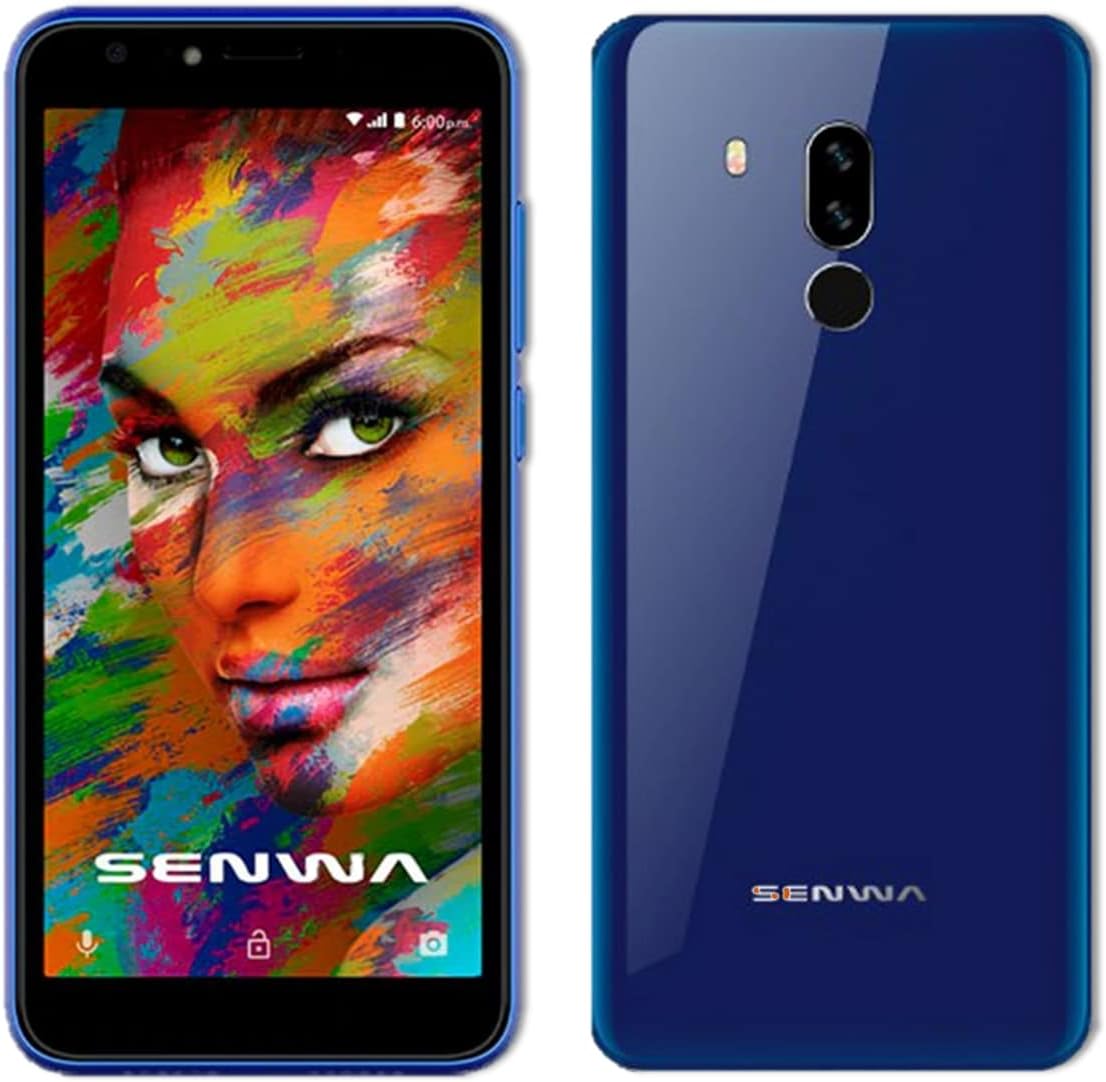
Obrázek: Přední a zadní strana views of the Azumi Senwa LS5018FP smartphone. The front shows the display, earpiece, and front camera. The back highlights the dual rear cameras, LED flash, and fingerprint sensor.
Klíčové komponenty:
- Přední kamera: For selfies and video calls, equipped with a flash.
- Zobrazit: 5-inch HD screen with an 18:9 aspect ratio.
- Tlačítka hlasitosti: Upravte úrovně zvuku.
- Vypínač: Zapnutí/vypnutí zařízení, zamknutí/odemknutí obrazovky.
- Zadní kamery: Main camera with flash for capturing photos and videos.
- Snímač otisku prstu: Located on the back for secure unlocking.
- Reproduktor: Pro audio výstup.
- USB port: Pro nabíjení a přenos dat.
- 3.5mm audio jack: Pro sluchátka.
Nastavení
1. Vložení SIM karty a SD karty
Your phone uses a standard SIM card. An additional 16GB SD card is included for expanded storage.
- Vyhledejte slot pro SIM/SD kartu na boku telefonu.
- K otevření zásuvky použijte dodaný nástroj pro vysunutí SIM karty (pokud je součástí balení) nebo malou kancelářskou sponku.
- Carefully place your activated SIM card into the designated slot. Ensure the gold contacts face down.
- Insert the included 16GB SD card into its slot. The phone supports up to 64GB SD cards.
- Jemně zatlačte zásobník zpět do telefonu, dokud nebude v jedné rovině s bokem.
2. Nabíjení baterie
Před prvním použitím plně nabijte baterii telefonu.
- Připojte kabel USB k nabíječce.
- Zapojte nabíječku do elektrické zásuvky.
- Connect the other end of the USB cable to the phone's USB port.
- Na obrazovce se zobrazí indikátor nabíjení.
3. Zapnutí a počáteční nastavení
- Press and hold the Power button until the Azumi logo appears.
- Follow the on-screen prompts to complete the initial setup. This includes selecting your language, connecting to Wi-Fi, setting up your Google account, and configuring security options like the fingerprint sensor.
Ovládání smartphonu
Základní navigace
- Gesta na dotykové obrazovce: Klepnutí, přejetí prstem a přiblížení prsty jsou standardní gesta systému Android.
- Domovská obrazovka: Přístup k aplikacím, widgetům a oznámením.
- Navigační lišta: Použijte tlačítka Zpět, Domů a Nedávné aplikace ve spodní části obrazovky.
Hovory a zprávy
- Uskutečňování hovorů: Otevřete aplikaci Telefon, vytočte číslo a klepněte na ikonu volání.
- Odesílání zpráv: Open the Messages app, tap "Start chat," enter recipient and message.
Konektivita
- Wi-Fi: Pro připojení k dostupným sítím přejděte do Nastavení > Síť a internet > Wi-Fi.
- Bluetooth: Pro spárování s dalšími zařízeními přejděte do Nastavení > Připojená zařízení > Bluetooth.
- Mobilní data: Ujistěte se, že máte v Nastavení > Síť a internet > Mobilní síť povolena mobilní data pro přístup k internetu přes vašeho operátora.
Použití fotoaparátu
The Senwa LS5018FP features both front and rear cameras, each with a flash.
- Otevřete aplikaci Fotoaparát.
- Klepnutím na tlačítko spouště pořídíte fotografii.
- Klepnutím na ikonu videa nahrajete video.
- Use the flash icon to toggle the flash on/off/auto.
- Přepínejte mezi předním a zadním fotoaparátem pomocí ikony přepínače fotoaparátu.
Zabezpečení otisků prstů
Set up your fingerprint for quick and secure unlocking.
- Přejděte do Nastavení > Zabezpečení > Otisk prstu.
- Follow the on-screen instructions to register your fingerprint. You will need to set up a backup screen lock method (PIN, pattern, or password) first.
- Once registered, simply place your finger on the rear fingerprint sensor to unlock your phone.
Správa úložiště
Your phone comes with 8GB of internal storage and an included 16GB SD card. You can expand storage up to 64GB with a compatible SD card.
- Chcete-li zkontrolovat využití úložiště, přejděte do Nastavení > Úložiště.
- Pravidelně mazejte mezipaměť a nepotřebné files pro uvolnění místa.
- Move photos and videos to the SD card to optimize internal storage.
Údržba
Čištění zařízení
- K čištění obrazovky a těla telefonu používejte měkký hadřík, který nepouští vlákna.
- Vyhněte se používání agresivních chemikálií nebo abrazivních materiálů.
Péče o baterie
- Vyhněte se extrémním teplotám, protože mohou ovlivnit životnost baterie.
- Nenechávejte telefon nabíjet delší dobu po úplném nabití.
- Pro optimální životnost baterie se snažte udržovat nabití mezi 20 % a 80 %.
Aktualizace softwaru
Periodically check for software updates to ensure your phone has the latest features and security patches.
- Přejděte do Nastavení > Systém > Aktualizace systému.
- Connect to Wi-Fi before downloading updates to avoid mobile data charges.
Odstraňování problémů
| Problém | Možné řešení |
|---|---|
| Telefon se nezapne. | Ujistěte se, že je baterie nabitá. Připojte nabíječku a před zapnutím počkejte několik minut. |
| Nelze uskutečňovat ani přijímat hovory. | Check if the SIM card is properly inserted. Verify that your mobile network signal is strong. Ensure your account is active with your carrier. |
| Problémy s připojením k Wi-Fi. | Restart your phone and Wi-Fi router. Forget the network in Wi-Fi settings and reconnect. |
| Aplikace padají nebo zamrzají. | Clear the app's cache (Settings > Apps & notifications > [App Name] > Storage & cache > Clear cache). Restart the phone. |
| Low storage space. | Smazat nepotřebné files, photos, and videos. Move media to the SD card. Uninstall unused apps. |
| Snímač otisků prstů nefunguje. | Ensure your finger and the sensor are clean and dry. Re-register your fingerprint in Settings > Security. |
Specifikace
| Funkce | Detail |
|---|---|
| Název modelu | SENWA (LS5018FP) |
| Operační systém | Android 11 (edice Go) |
| Zobrazit | 5 Inches, 1280 x 720 Resolution (HD) |
| Procesor | Quad-core, 1.84 GHz CPU Speed |
| BERAN | 1 GB |
| Interní úložiště | 8 GB |
| Rozšiřitelné úložiště | Up to 64 GB via SD Card (16GB included) |
| Zadní kamera | Ano, s bleskem |
| Přední kamera | Ano, s bleskem |
| Kapacita baterie | Lithium-iontová kapacita 2000 mAh |
| Konektivita | 4G LTE, Wi-Fi, Bluetooth |
| Audio Jack | 3.5 mm |
| Speciální funkce | Finger Print Security |
| Rozměry | 5 x 4 x 4 palce |
| Hmotnost položky | 1 liber |
| Barva | Modrý |
Záruka a podpora
For warranty information and technical support, please refer to the documentation provided with your purchase or contact Azumi customer service through their official webUschovejte si doklad o koupi pro případ reklamace.
Online zdroje:
- For general information and support, visit the Azumi Mobile official webmísto.
- For software updates and FAQs, check the support section of the manufacturer's webmísto.
Ask a question about this manual
Ask about setup, troubleshooting, compatibility, parts, safety, or missing instructions. Manuals+ will review the question and use this page’s manual context to help answer it.