
1. Úvod
Thank you for choosing the OSALO OS-5M 12-Digit Desktop Calculator. This manual provides essential information for the proper setup, operation, and maintenance of your calculator. Please read it thoroughly before use to ensure optimal performance and longevity of the device.
The OSALO OS-5M calculator is designed for ease of use with its large buttons and extra-large 12-digit display. It is suitable for various environments, including offices, schools, and retail settings. The calculator operates on both solar power and a backup battery, ensuring reliable performance.
2. Bezpečnostní informace
- Upozornění na baterii: The included battery is for single use only. Do not attempt to recharge it.
- Zdroj napájení: The solar panel provides limited power and is intended to supplement the battery, not to charge it.
- Skladování: Store the calculator in a dry place, away from extreme temperatures and direct sunlight for prolonged periods.
- Čištění: Use a soft, dry cloth to clean the calculator. Do not use liquid cleaners or abrasive materials.
- Demontáž: Do not attempt to disassemble or repair the calculator yourself. Contact qualified personnel for service.
3. Obsah balení
- 1 x OSALO OS-5M Desktop Calculator
- 1 x AAA baterie (předinstalovaná nebo přiložená samostatně)
- 1 x Návod k obsluze v angličtině
4. Konec produktuview
The OSALO OS-5M calculator features a clear layout and ergonomic design for comfortable and efficient use.

Obrázek 4.1: Přední strana view of the OSALO OS-5M Desktop Calculator.

Obrázek 4.2: Detail view highlighting the large buttons and clear 12-digit display.
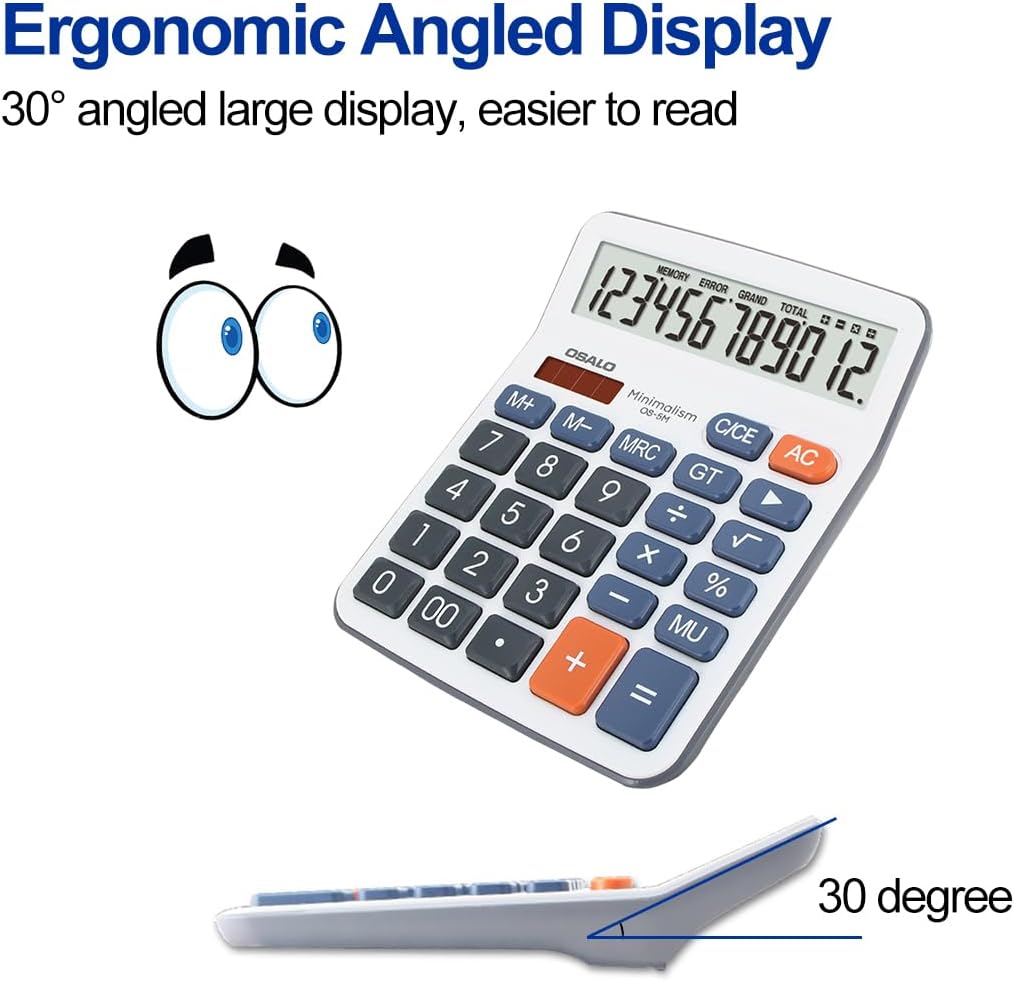
Obrázek 4.3: Strana view demonstrating the ergonomic 30-degree tilted LCD screen for improved readability.

Obrázek 4.4: Detailní view of the clear LCD screen, soft and silent keys, and the specially embossed '5' marking key for tactile recognition.

Obrázek 4.5: Přední a zadní strana views of the calculator, showing the overall design and battery compartment on the rear.
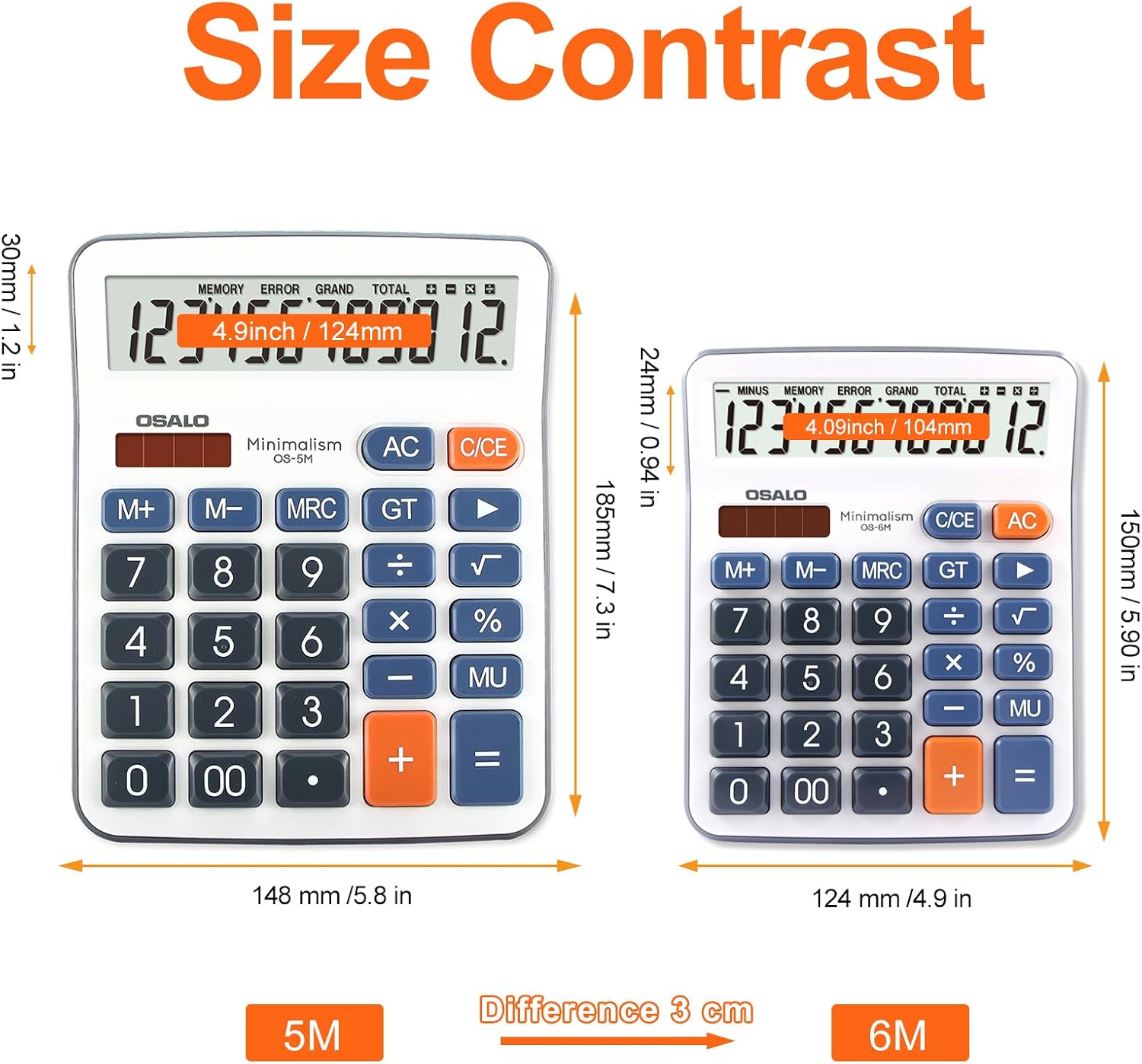
Figure 4.6: Size comparison of the OSALO OS-5M (left) with a smaller calculator, illustrating its larger dimensions for desktop use.

Obrázek 4.7: Přamples of the OSALO OS-5M calculator being used in different environments, such as a supermarket, office, business, and school.
Video 4.1: 360stupňový pohled view of the OSALO OS-5M calculator, showcasinprohlédněte si jeho design ze všech úhlů.
5. Nastavení
5.1 Instalace baterie
The OSALO OS-5M calculator requires one AAA battery for operation. The battery may be pre-installed or included separately in the package. If not pre-installed, please follow these steps:
- Vyhledejte přihrádku na baterie na zadní straně kalkulačky.
- Jemně posuňte kryt přihrádky na baterie.
- Vložte jednu baterii typu AAA a ujistěte se, že kladný (+) a záporný (-) pól správně odpovídají označením uvnitř přihrádky.
- Bezpečně zavřete kryt bateriového prostoru.
Poznámka: The calculator also features a solar panel for power. The solar panel helps extend battery life by providing power in well-lit conditions but does not recharge the installed battery.
6. Provoz
6.1 Základní výpočty
Chcete-li provést základní aritmetické operace:
- Stiskněte tlačítko ON/C/CE button to turn on the calculator or clear the current entry.
- Enter the first number using the number keys (0-9, 00).
- Stiskněte požadované ovládací tlačítko (+, -, ×, ÷). The operation symbol will appear on the display.
- Zadejte druhé číslo.
- Stiskněte tlačítko = klávesu pro zobrazení výsledku.
6.2 Speciální funkce
- AC (vše jasné): Clears all entries and calculations, resetting the calculator to zero.
- C/CE (Clear Entry): Clears the last entered number or the current calculation without affecting previous operations in a sequence. Pressing it twice usually acts as an AC.
- M+ (Memory Plus): Přičte zobrazenou hodnotu do paměti.
- M- (minus paměti): Odečte zobrazenou hodnotu z paměti.
- MRC (vyvolání/vymazání paměti): Jedním stisknutím vyvoláte hodnotu uloženou v paměti. Dvojím stisknutím paměť vymažete.
- GT (celkový součet): Displays the grand total of all calculations performed since the last GT clear.
- % (procentotagE): Používá se pro procentatage výpočty. Napřample, to calculate 10% of 200, enter 200 × 10 %.
- MU (Mark Up): Used for profit margin calculations.
- +/- (Změna znaménka): Mění znaménko zobrazeného čísla (z kladného na záporné nebo ze záporného na kladné).
- √ (druhá odmocnina): Vypočítá druhou odmocninu zobrazeného čísla.
6.3 Automatické vypnutí
The calculator is equipped with an automatic shutdown feature. If left idle for approximately 8 minutes, it will automatically power off to conserve battery life. To turn it back on, press the ON/C/CE tlačítko.
7. Údržba
7.1 Čištění
Pro zachování vzhledu a funkčnosti kalkulačky:
- Wipe the exterior of the calculator with a soft, dry cloth.
- Nepoužívejte abrazivní čisticí prostředky, rozpouštědla ani nestříkejte přímo na kalkulačku.
- Avoid getting moisture into the display or button areas.
7.2 Výměna baterie
When the display becomes dim or the calculator functions erratically, it may be time to replace the AAA battery. Follow the battery installation steps in Section 5.1 to replace the battery. Dispose of used batteries according to local regulations.
8. Řešení problémů
| Problém | Možná příčina | Řešení |
|---|---|---|
| Kalkulačka se nezapne. | Low or dead battery; insufficient light for solar power. | Replace the AAA battery. Ensure adequate lighting for solar operation. |
| Displej je tlumený nebo bliká. | Slabá baterie. | Vyměňte baterii AAA. |
| Nesprávné výsledky výpočtu. | Incorrect key input; complex calculation error. | Clear the calculator with AC and re-enter the calculation carefully. Refer to Section 6 for operation details. |
| Klávesy nereagují. | Prach nebo nečistoty pod klávesami; vnitřní závada. | Gently clean around the keys. If the problem persists, contact customer support. |
9. Specifikace
| Funkce | Detail |
|---|---|
| Značka | OSALO |
| Číslo modelu | OS-5M |
| Typ zobrazení | LCD obrazovka |
| Velikost obrazovky | 4.5 palců |
| Počet číslic | 12 |
| Rozměry produktu | 19 x 14.8 x 0.1 cm |
| Hmotnost položky | 170 g |
| Zdroj napájení | Solar Powered, 1 AAA Battery (required) |
| Materiál | Plast |
| Barva | Šedá |
| Typ kalkulačky | podnikání |
| Datum první dostupnosti | 12. května 2022 |
10. Záruka a podpora
For warranty information or technical support, please refer to the contact details provided with your purchase or visit the official OSALO webUschovejte si účtenku jako doklad o koupi pro případné reklamace.