
1. Úvod
The AOPUTTRIVER AP-5800M is a high-precision air quality monitor designed to detect fine particulate matter, specifically PM2.5, PM1.0, and PM10. Utilizing a laser PM2.5 sensor and single-chip microcomputer technology, this device provides accurate readings displayed on a 2.8-inch TFT color LCD. It is suitable for monitoring air quality in various environments, including indoor spaces, outdoor areas, bedrooms, factories, construction sites, and during travel.
This manual provides essential information for the safe and effective use of your AP-5800M air quality monitor. Please read it thoroughly before operation.
2. Bezpečnostní informace
- Nepokoušejte se zařízení rozebírat ani upravovat. Neoprávněné úpravy mohou vést k poruše nebo zranění.
- Keep the device away from water and high humidity to prevent electrical shock or damage.
- Nevystavujte zařízení extrémním teplotám, přímému slunečnímu záření nebo korozivním látkám.
- K nabíjení používejte pouze dodaný kabel USB. Ujistěte se, že je hlasitost nabíjenítage je kompatibilní se zařízením.
- Uchovávejte mimo dosah dětí.
- Zařízení a jeho baterii zlikvidujte v souladu s místními předpisy o ochraně životního prostředí.
3. Obsah balení
Po otevření balíku se prosím ujistěte, že jsou všechny níže uvedené položky přítomny a v dobrém stavu:
- 1 x AOPUTTRIVER AP-5800M Air Quality Monitor
- 1 x USB nabíjecí kabel
- 1 x Přepravní pouzdro
- 1 x Uživatelská příručka

This image displays the items included in the product package: the AP-5800M air quality monitor, a USB cable, a carrying case, and the user manual.
4. Konec produktuview
4.1 Rozložení zařízení a tlačítka
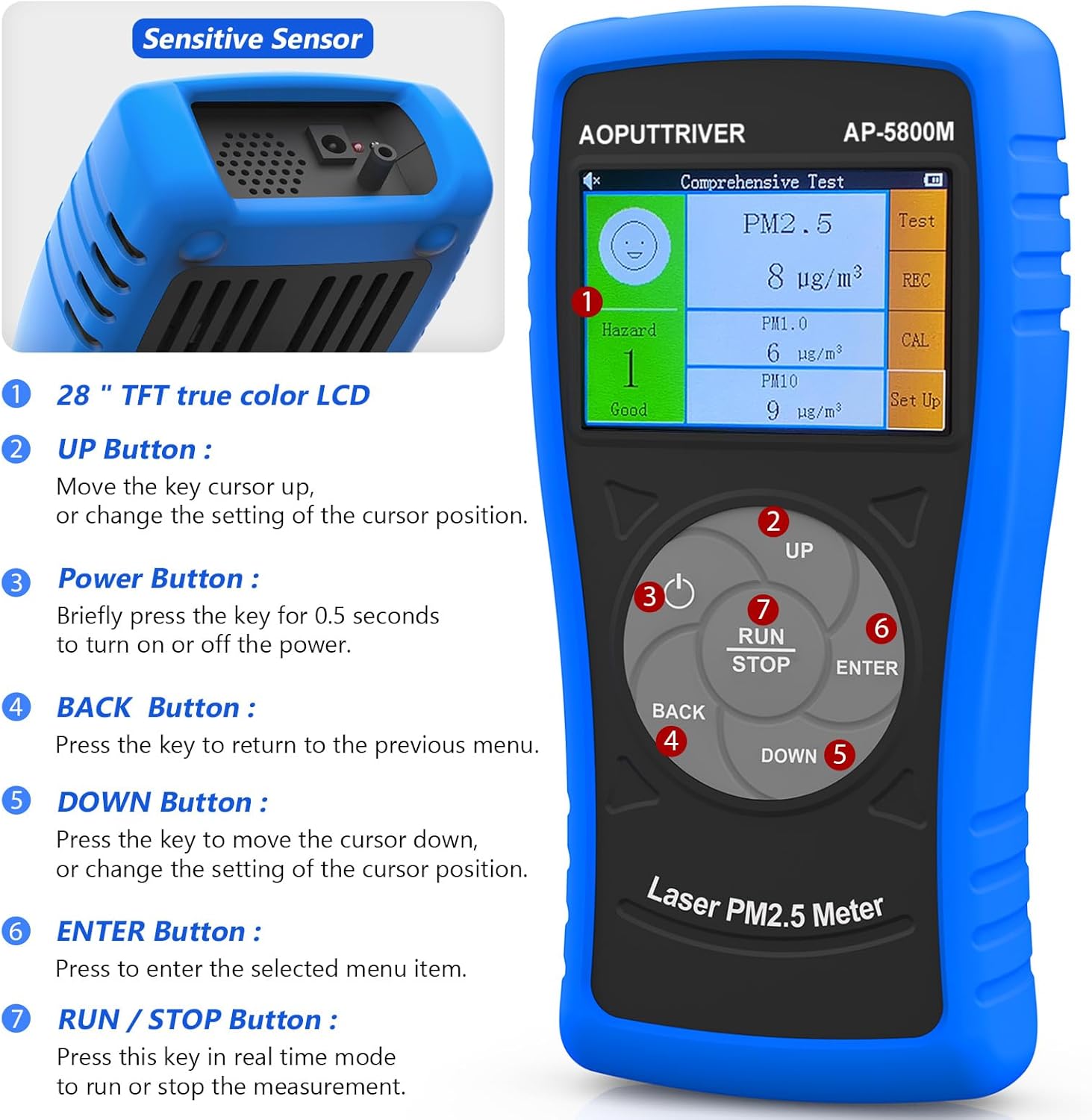
Tento obrázek ukazuje přední stranu view of the AOPUTTRIVER AP-5800M Air Quality Monitor, highlighting the 2.8-inch TFT true color LCD, the sensitive sensor area, and the functions of the UP, Power, BACK, DOWN, ENTER, and RUN/STOP buttons.
- Citlivý senzor: Located at the top, responsible for detecting particulate matter.
- Tlačítko NAHORU: Moves the cursor up or changes the setting of the cursor position.
- Vypínač: Briefly press for 0.5 seconds to turn the device on or off.
- Tlačítko Zpět: Stisknutím se vrátíte do předchozí nabídky.
- Tlačítko DOLŮ: Moves the cursor down or changes the setting of the cursor position.
- Tlačítko ENTER: Press to select the highlighted menu item.
- Tlačítko SPUSTIT/STOP: Press this key in real-time mode to start or stop the measurement.
4.2 Displej a indikátory
The device features a 2.8-inch TFT true color LCD, providing clear visibility even in low-light conditions. The display shows real-time readings for PM2.5, PM1.0, and PM10, along with a hazard index and battery indicator.

Tento obrázek nabízí detailní záběr view of the AP-5800M's colorful LCD display, showing the comprehensive test results for PM2.5, PM1.0, and PM10, along with the hazard index.
4.3 Vnitřní komponenty

This diagram shows the internal components of the AP-5800M, emphasizing the high-precision laser PM2.5 sensor and the 3rd generation particle sensor responsible for detecting PM2.5 and PM10 in air samples.

Tento obrázek nabízí detailní záběr view of the air outlet and inlet on the device, illustrating how air samples are drawn in and expelled for particle detection.
5. Nastavení
5.1 Nabíjení zařízení
The AP-5800M is equipped with a rechargeable battery. Before first use, or when the battery indicator shows low power, charge the device using the provided USB cable.
- Connect the USB cable to the device's charging port and to a standard USB power source (e.g., computer, USB wall adapter).
- Během nabíjení se rozsvítí červená kontrolka.
- The indicator light will turn green once the battery is fully charged.

This image depicts the charging process of the AP-5800M's 2000mAh rechargeable battery via a USB cable, with an indicator showing the battery level.
5.2 Počáteční zapnutí
After charging, press the Power Button briefly (for approximately 0.5 seconds) to turn on the device. The display will light up, and the device will begin its startup sequence.
6. Návod k obsluze
6.1 Zapnutí/vypnutí
- Zapnutí: Stiskněte tlačítko Tlačítko napájení (labeled '3' in the diagram) for approximately 0.5 seconds.
- Vypnutí: Stiskněte tlačítko Tlačítko napájení for approximately 0.5 seconds. The device also features an automatic power-off mode to conserve battery.
6.2 Navigace v nabídkách
Use the following buttons for menu navigation:
- Tlačítko NAHORU: Move cursor up or increase values.
- Tlačítko DOLŮ: Move cursor down or decrease values.
- Tlačítko ENTER: Potvrzení výběru nebo vstup do podmenu.
- Tlačítko Zpět: Return to the previous menu or cancel an action.
6.3 Starting and Stopping Measurements
In real-time measurement mode, press the Tlačítko RUN/STOP to initiate or pause the air quality measurement process.
6.4 Porozumění zobrazení
The 2.8-inch TFT color LCD displays various parameters:
- PM2.5, PM1.0, PM10 Values: Real-time concentration in µg/m³.
- Hazard Index: A calculated risk value based on PM2.5, PM1.0, and PM10 levels. The formula used is: Hazard Value = PM2.5/6 + PM1.0/20 + PM10/20.
- Indikátor baterie: Zobrazuje aktuální stav baterie.

This image illustrates the AP-5800M monitor on its stand, alongside a color-coded chart explaining PM2.5 and PM10 health concern levels, ranging from Good to Hazardous.

Tento obrázek ukazuje zvětšený view of the hazard index chart displayed on the AP-5800M, detailing the color-coded levels of air quality from Good to Hazardous for PM2.5 and PM10.
6.5 Setting Parameters and Alarms
The AP-5800M allows for various settings adjustments, including:
- Nastavení času: Upravte vnitřní hodiny zařízení.
- Záznam dat: Enable or disable the recording of measurement data.
- Pozastavení dat: Freeze the current display readings.
- Hazard Index Alarm: Set thresholds for an audible alarm to activate when air quality levels exceed predefined limits. The device features an audible alarm.

This image highlights the audible alarm function of the AP-5800M, showing an alarm icon on the display and indicating that the device can emit sound alerts for high particle levels.
6.6 Usage Environments
The AP-5800M is versatile and can be used in a variety of settings to monitor air quality:
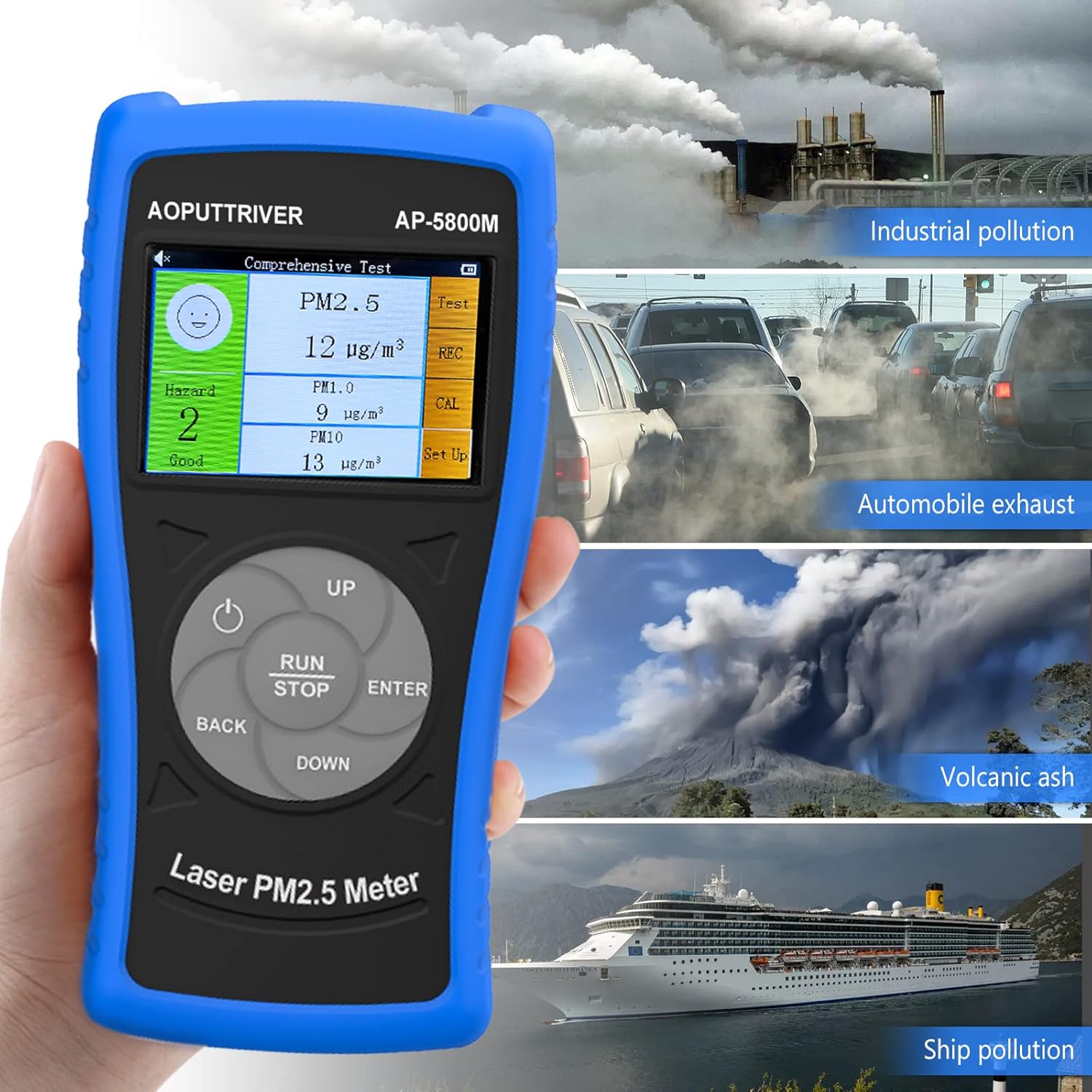
This image demonstrates the versatility of the AP-5800M, showing it in different scenarios such as industrial pollution, automobile exhaust, volcanic ash, and ship pollution, indicating its suitability for diverse testing environments.

This image combines a PM2.5/PM10 air quality level guide with illustrations of various suitable usage environments, including home, school, car, and office, demonstrating the monitor's versatility.
7. Údržba
7.1 Čištění zařízení
- Vnější povrch zařízení otřete měkkým, suchým hadříkem.
- Nepoužívejte abrazivní čisticí prostředky, rozpouštědla ani agresivní chemikálie, protože by mohly poškodit casing nebo displej.
- Ensure the air inlet and outlet are free from dust and obstructions for accurate readings.
7.2 Péče o baterii
- Chcete-li prodloužit životnost baterie, vyvarujte se častého úplného vybíjení.
- If storing the device for an extended period, charge it to approximately 50% and recharge every few months.
7.3 Skladování
Přístroj skladujte v přepravním pouzdře na chladném a suchém místě, mimo dosah přímého slunečního záření a extrémních teplot.
8. Řešení problémů
If you encounter issues with your AP-5800M, refer to the following common problems and solutions:
| Problém | Možná příčina | Řešení |
|---|---|---|
| Zařízení se nezapne. | Slabá baterie nebo problém s napájením. | Charge the device using the provided USB cable. Ensure the charging indicator lights up. If the issue persists, contact customer support. |
| Nepřesné nebo nekonzistentní hodnoty. | Blocked air inlet/outlet, sensor contamination, or environmental interference. | Ensure the air inlet/outlet is clear. Clean the device exterior. Move the device away from strong air currents, dust sources, or chemical fumes. |
| Displej je prázdný nebo zamrzlý. | Závada softwaru nebo vybitá baterie. | Try restarting the device by holding the Power Button. If unresponsive, charge the device. |
| Budík se ozve nečekaně. | High particulate levels detected or alarm threshold set too low. | Check the displayed PM values. If levels are high, ventilate the area. Adjust the alarm threshold in the settings if necessary. |
9. Specifikace
| Parametr | Hodnota |
|---|---|
| Číslo modelu | UK-AP-5800M |
| Detekční rozsah PM2.5 | 0 ~ 999.9 µg/m³ |
| Rozlišení PM2.5 | 0.1 µg/m³ |
| Detekční rozsah PM10 | 0 ~ 999.9 µg/m³ |
| Rozlišení PM10 | 0.1 µg/m³ |
| Zobrazit | 2.8palcový TFT barevný LCD |
| Zdroj napájení | Rechargeable Battery (2000mAh), USB Powered |
| Poplach | Slyšitelný |
| Rozměry produktu | 196 mm (7.71 palců) x 95 mm (3.74 palce) x 46 mm (1.81 palce) |
| Hmotnost položky | 500 gramů |

Tento obrázek poskytuje detailní view of the AP-5800M, showing its dimensions (196mm height, 95mm width, 46mm depth), the 90-degree support stand, the double protective shell, and the tripod hole for mounting.
10. Záruka a podpora
AOPUTTRIVER offers a 2-year warranty for the AP-5800M Air Quality Monitor and provides lifetime customer service. If you encounter any issues with this product or require assistance, please do not hesitate to contact our customer support team. We are committed to ensuring your satisfaction.


