
PPLEE CR1018I
PPLEE Extra Loud Vibrating Alarm Clock with Bed Shaker
Model: CR1018I
1. Konec produktuview
The PPLEE Extra Loud Vibrating Alarm Clock is designed to provide effective wake-up solutions for deep sleepers, individuals with hearing impairment, and the deaf. It features multiple wake-up modes, a large digital display, dual alarm settings, and convenient charging capabilities.

Image 1.1: The PPLEE Extra Loud Vibrating Alarm Clock with its bed shaker accessory.
Klíčové vlastnosti:
- Strong Bed Shaker & Loud Alarm Buzzer: Offers three wake-up modes: loud buzzer, strong bed shaker, or a combination of both.
- 8.7" Large Mirror LED Display: Provides clear time visibility and can also function as a makeup mirror.
- Dual Alarms with Snooze Function: Allows setting two independent alarms with a 9-minute snooze option.
- Nastavitelný jas a hlasitost: Features 8 levels of display brightness and 7 levels of alarm volume.
- USB nabíjecí port: Pohodlně nabíjejte svá mobilní zařízení přímo z hodin.
- Bateriová záloha: Zachovává nastavení času a budíku i při výpadku napájenítag(baterie CR2032 je součástí balení).
- 12/24H Mode & DST Function: Supports both 12-hour and 24-hour time formats, along with Daylight Saving Time adjustment.
2. Obsah balení
Zaškrtněte prosím políčko u následujících položek:
- 1 x PPLEE Mirror Alarm Clock
- 1 x Bed Shaker
- 1 x Power Plug with USB Cable
- 1 x Návod k použití
- 1 x CR2032 Cell Coin Battery (pre-installed or separate)

Obrázek 2.1: Všechny komponenty obsažené v balení produktu.
3. Průvodce nastavením
3.1 Připojení napájení
- Connect the USB cable to the alarm clock's power input port.
- Zapojte napájecí adaptér do standardní elektrické zásuvky. Rozsvítí se displej s hodinami.
- Ensure the CR2032 backup battery is installed in its compartment. This battery preserves time and alarm settings during power interruptions.

Obrázek 3.1: Zadní strana view of the alarm clock showing the AC power input and backup battery compartment.
3.2 Umístění třepačky postele
The bed shaker provides a strong vibration to assist in waking. For optimal effectiveness, place the bed shaker in one of the following locations:
- Pod tvým polštářem.
- Pod tvým prostěradlem.
- Mezi matrací a pružinovým roštem.

Image 3.2: Recommended placements for the bed shaker to maximize vibration effectiveness.
4. Návod k obsluze
4.1 Nastavení času
- Stiskněte a podržte NASTAVENÍ ČASU tlačítko, dokud nezačnou blikat číslice hodin.
- Použijte HODINA a MINUTA tlačítka pro nastavení času.
- Stiskněte NASTAVENÍ ČASU znovu pro potvrzení a ukončení režimu nastavení času.
4.2 Nastavení alarmů (Alarm 1 a Alarm 2)
Hodiny podporují dva nezávislé budíky.
- Stiskněte a podržte POPLACH 1 or POPLACH 2 dokud nezačnou blikat číslice času budíku.
- Použijte HODINA a MINUTA tlačítky nastavte požadovaný čas budíku.
- Stiskněte POPLACH 1 or POPLACH 2 znovu pro potvrzení času budíku.
- To activate or deactivate an alarm, short press the corresponding POPLACH 1 or POPLACH 2 tlačítko. Na displeji se zobrazí/zmizí ikona alarmu.

Image 4.1: The dual alarm feature allows setting two separate wake-up times.
4.3 Funkce odložení
Když zazní alarm, stiskněte tlačítko PODŘIMOVAT button to temporarily silence the alarm for 9 minutes. The alarm will sound again after the snooze period.
4.4 Turning Off Alarms
- Temporary Turn Off: Stiskněte tlačítko ALARM VYPNUT button once when the alarm is sounding to stop it for the current day. It will reactivate the next day.
- Permanent Turn Off: Stiskněte a podržte ALARM VYPNUT button to deactivate the alarm permanently. The alarm icon will disappear from the display.
4.5 Nastavení jasu displeje
The display has 8 levels of brightness. Short press the DIMMER button repeatedly to cycle through the brightness levels (OFF, Level 1-7). When in 'OFF' mode, the red indicator on top will remain on.
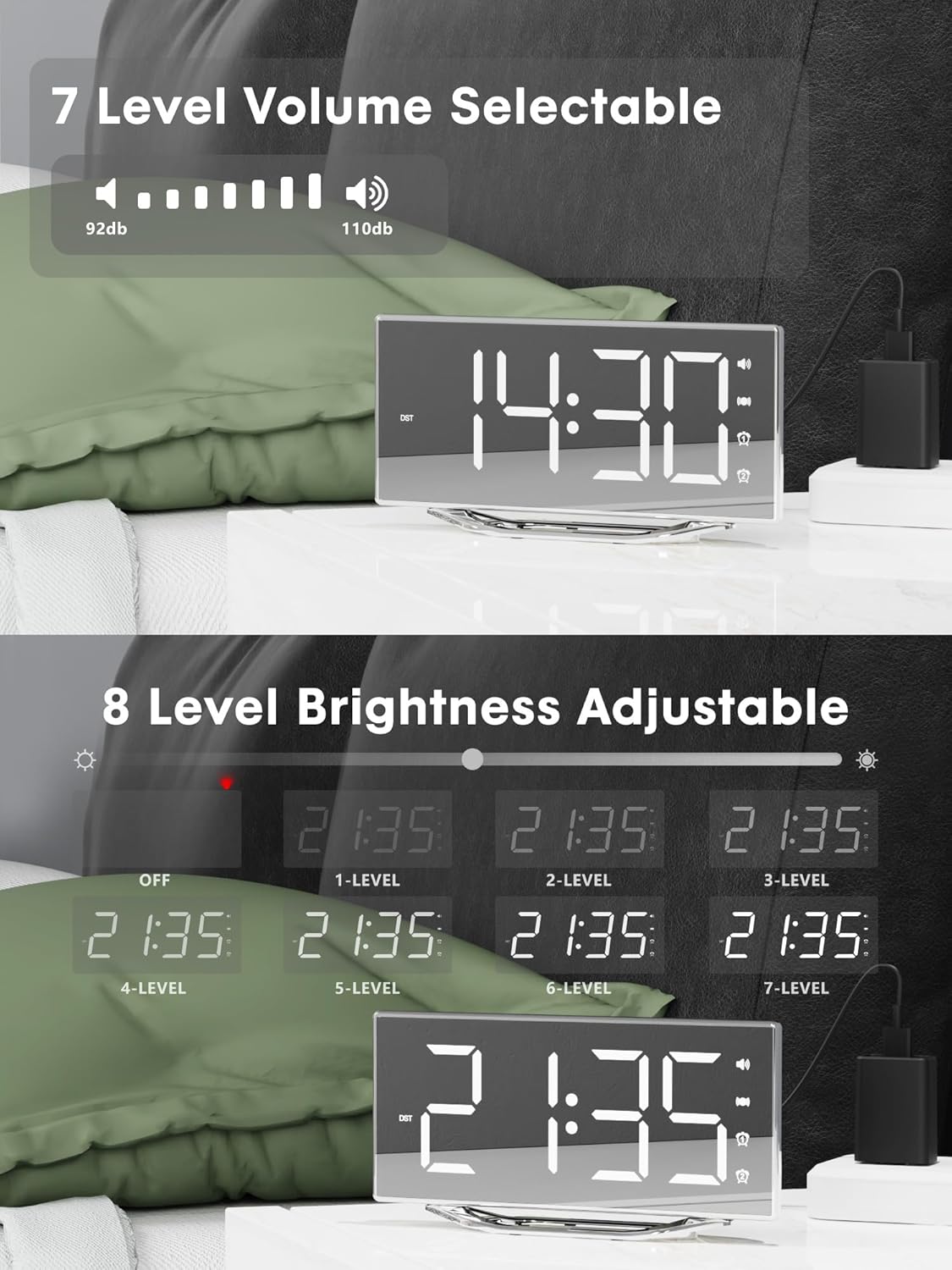
Image 4.2: Visual representation of the 8-level brightness adjustment for the LED display.
4.6 Nastavení hlasitosti alarmu
The alarm buzzer has 7 adjustable volume levels. Short press the OBJEM button repeatedly to cycle through the volume levels.

Image 4.3: The alarm volume can be adjusted across 7 levels, from 92dB to 110dB.
4.7 Selecting Wake-Up Mode
Stiskněte tlačítko BUZZ/VIB button to select your preferred wake-up method:
- Loud Buzzer only
- Strong Bed Shaker only
- Both Buzzer and Shaker

Image 4.4: The alarm clock offers three distinct wake-up modes for personalized use.
4.8 12/24 Hour Format & DST
- 12/24hodinový formát: Krátce stiskněte 12/24 hod button to switch between 12-hour and 24-hour time display.
- Funkce DST: Krátce stiskněte DST button to activate or deactivate Daylight Saving Time.

Image 4.5: The clock supports both 12-hour and 24-hour time formats, and features a USB charging port.
4.9 USB nabíjecí port
The integrated USB charging port allows you to charge your smartphone or other USB-powered devices directly from the alarm clock. Simply connect your device's USB charging cable to the port on the clock.
5. Údržba
- Povrch hodin čistěte měkkým, suchým hadříkem. Nepoužívejte abrazivní čisticí prostředky ani rozpouštědla.
- Chraňte hodiny před vodou a vysokou vlhkostí.
- Nevystavujte hodiny přímému slunečnímu záření ani extrémním teplotám.
- If the clock will not be used for an extended period, consider removing the backup battery to prevent leakage.
6. Řešení problémů
| Problém | Možná příčina | Řešení |
|---|---|---|
| Zobrazení hodin je vypnuté. | No power supply; power cable loose. | Ensure the power adapter is securely plugged into the clock and a working outlet. Check if the dimmer is set to 'OFF'. |
| Budík nezvoní/nevibruje. | Alarm not activated; volume too low; bed shaker not connected or placed incorrectly. | Verify alarm is activated (icon visible). Increase alarm volume. Ensure bed shaker is securely plugged in and properly placed. |
| Čas/nastavení se resetují po výpadku napájenítage. | Záložní baterie je vybitá nebo není nainstalována. | Vyměňte záložní baterii CR2032. Ujistěte se, že je správně nainstalována. |
| Nabíjení přes USB nefunguje. | Device not compatible; cable faulty; clock not powered. | Ensure the clock is powered. Try a different USB cable. Verify your device is compatible with standard USB charging. |
7. Specifikace
| Funkce | Detail |
|---|---|
| Značka | PPLEE |
| Číslo modelu | CR1018I |
| Barva | Silver Surface (with Bed Shaker) |
| Typ zobrazení | Digitální LED |
| Rozměry produktu | 8.7"W x 8.7"H (Display size) |
| Zdroj napájení | Elektrický kabel |
| Záložní baterie | 1 x CR2032 (součástí balení) |
| Materiál | Plast |
| Hmotnost položky | 7 unce (0.2 kilogramů) |
| Režimy alarmu | Buzzer, Vibration, Buzzer + Vibration |
| Jas displeje | 8 Levels (including OFF) |
| Hlasitost alarmu | 7 úrovní |
| Formát času | Volitelné 12H/24H |
| Speciální funkce | Dual Alarms, Snooze, USB Charging Port, DST Function, Mirror Surface |
8. Záruka a podpora
PPLEE is committed to providing high-quality products and customer satisfaction.
- 1-letá záruka: The product is covered by a 1-year warranty from the date of purchase against manufacturing defects.
- 90denní záruka vrácení peněz: If you are unsatisfied with the product, you may be eligible for a full refund within 90 days of purchase.
- Lifetime Free Support: PPLEE offers free lifetime user support for any questions or concerns regarding the product.
- 24-Hour Response Service: For any inquiries, please contact us via Amazon. We aim to respond within 24 hours.

Image 8.1: Summary of warranty and support offerings.
Ask a question about this manual
Ask about setup, troubleshooting, compatibility, parts, safety, or missing instructions. Manuals+ will review the question and use this page’s manual context to help answer it.